



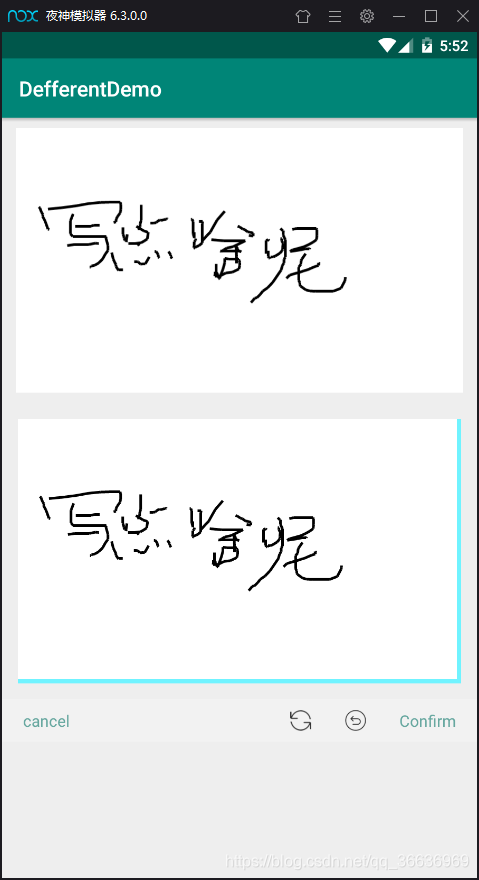
 本文介绍如何使用Kotlin自定义一个SignView用于签名,详细讲解了xml布局配置和在Activity中的应用,提供了操作效果展示。
可直接复制使用
1.自定义SignView
package com.myapplication.signaturecustomization

import android.annotation.SuppressLint
import android.content.Context
import android.graphics.Canvas
import android.graphics.Color
import android.graphics.Paint
import android.graphics.Path
import android.util.AttributeSet
import android.view.MotionEvent
import android.view.View

import java.util.ArrayList


class SignView : View {
    private var mPaint: Paint? = null
    private var mPath: Path? = null
    private var startX: Float = 0.toFloat()
    private var startY: Float = 0.toFloat()
    private var endX: Float = 0.toFloat()
    private var endY: Float = 0.toFloat()
    private var list: MutableList<SignModel>? = null
//    private var mBoundAry: Rect? = null
    private var bound: Int = 0
    private val down = "down"
    private val move = "move"
    private val end = "end"

    constructor(context: Context) : super(context) {
        init()
    }

    constructor(context: Context, attrs: AttributeSet?) : super(context, attrs) {
        init()
    }

    constructor(context: Context, attrs: AttributeSet?, defStyleAttr: Int) : super(context, attrs, defStyleAttr) {
        init()
    }

    override fun onMeasure(widthMeasureSpec: Int, heightMeasureSpec: Int) {
        super.onMeasure(widthMeasureSpec, heightMeasureSpec)
    }

    /**
     * 动态添加边框 暂时未用
     */
    @SuppressLint("DrawAllocation")
    override fun onLayout(changed: Boolean, left: Int, top: Int, right: Int, bottom: Int) {
        super.onLayout(changed, left, top, right, bottom)
        val width = width
        val height = height
//        mBoundAry = Rect(bound, bound, width - bound, height - bound)
    }

    override fun onDraw(canvas: Canvas) {
        super.onDraw(canvas)
        drawLine(canvas)
    }


    @SuppressLint("ClickableViewAccessibility")
    override fun onTouchEvent(event: MotionEvent): Boolean {
        when (event.action) {
            MotionEvent.ACTION_DOWN -> {
                startX = event.x
                startY = event.y
                setData(list!!, event.x, event.y, down)
                endX = event.x
                endY = event.y
                setData(list!!, event.x, event.y, move)
                postInvalidate()
            }
            MotionEvent.ACTION_MOVE -> {
                endX = event.x
                endY = event.y
                setData(list!!, event.x, event.y, move)
                postInvalidate()
            }
            MotionEvent.ACTION_UP -> setData(list!!, event.x, event.y, end)
            MotionEvent.ACTION_CANCEL -> setData(list!!, event.x, event.y, end)
        }
        return true
    }


    private fun init() {
        initPaint()
        initPath()
        initData()
    }

    private fun initPaint() {
        mPaint = Paint()
        mPaint!!.color = Color.BLACK
        mPaint!!.isAntiAlias = true
        mPaint!!.isDither = true
        mPaint!!.strokeWidth = 5f
        mPaint!!.style = Paint.Style.STROKE

    }


    private fun initPath() {
        mPath = Path()
        bound = 10
    }

    private fun initData() {
        list = ArrayList()
    }

    private fun setData(list: MutableList<SignModel>, x: Float, y: Float, type: String) {
        val signatuerModel = SignModel(x, y, type)
        list.add(signatuerModel)
    }

    private fun drawLine(canvas: Canvas) {
        mPath!!.moveTo(startX, startY)
        mPath!!.lineTo(endX, endY)
        startX = endX
        startY = endY
        canvas.drawPath(mPath!!, mPaint!!)
        //        canvas.drawRect(mBoundAry, mPaint);

    }

    fun clear() {
        list!!.clear()
        mPath!!.reset()
        postInvalidate()
    }

    fun back() {
        if (list != null && list!!.size > 0) {
            mPath!!.reset()
            val size = list!!.size - 1
            for (i in size downTo 0) {
                if (down == list!![i].type) {
                    list!!.removeAt(i)
                    break
                }
                list!!.removeAt(i)
            }

            val size3 = list!!.size - 1
            if (size3 > 0) {
                val path = Path()
                for (i in 0 until size3) {
                    val m = i + 1
                    startX = list!![i].x
                    startY = list!![i].y

                    endX = list!![m].x
                    endY = list!![m].y

                    if (end != list!![i].type) {
                        path.moveTo(startX, startY)
                        path.lineTo(endX, endY)
                    }
                    mPath!!.set(path)
                }
            }
            postInvalidate()

        }

    }

    fun size(): Int {
        return if (list != null) {
            list!!.size
        } else {
            0
        }

    }

    private inner class SignModel internal constructor(internal var x: Float, internal var y: Float, var type: String)
}
2.xml布局(signView 的路径是自己定义的路径)
<?xml version="1.0" encoding="utf-8"?>
<LinearLayout xmlns:android="http://schemas.android.com/apk/res/android"
    xmlns:app="http://schemas.android.com/apk/res-auto"
    xmlns:tools="http://schemas.android.com/tools"
    android:layout_width="match_parent"
    android:layout_height="match_parent"
    android:orientation="vertical">

    <ImageView
        android:id="@+id/imageView"
        android:layout_width="match_parent"
        android:layout_height="250dp"
        android:layout_margin="@dimen/dp10"/>

    <FrameLayout
        android:layout_width="match_parent"
        android:layout_height="250dp"
        android:layout_margin="@dimen/dp15"
        android:background="@color/colorAzure">

        <com.myapplication.signaturecustomization.SignView
            android:id="@+id/signature_sv"
            android:layout_width="match_parent"
            android:layout_height="match_parent"
            android:layout_margin="@dimen/dp2"
            android:background="@color/colorWhite" />
    </FrameLayout>

    <LinearLayout
        android:id="@+id/linearLayout"
        android:layout_width="match_parent"
        android:layout_height="@dimen/dp40"
        android:layout_marginBottom="@dimen/dp5"
        android:background="@color/colorBackground"
        android:gravity="center_vertical"
        android:orientation="horizontal"
        android:padding="@dimen/dp10"
        app:layout_constraintBottom_toBottomOf="parent"
        app:layout_constraintEnd_toEndOf="parent"
        app:layout_constraintHorizontal_bias="0.0"
        app:layout_constraintStart_toStartOf="parent">


        <TextView
            android:id="@+id/signature_tv_cancel"
            android:layout_width="wrap_content"
            android:layout_height="wrap_content"
            android:layout_marginStart="@dimen/dp10"
            android:layout_marginLeft="@dimen/dp10"
            android:text="@string/cancel"
            android:textColor="@color/colorSignView"
            android:textSize="@dimen/sp15" />

        <LinearLayout
            android:layout_width="0dp"
            android:layout_height="wrap_content"
            android:layout_weight="1" />

        <!--<ImageView-->
            <!--android:id="@+id/signature_iv_clear"-->
            <!--android:layout_width="wrap_content"-->
            <!--android:layout_height="wrap_content"-->
            <!--android:src="@mipmap/shuaxin" />-->

        <!--<ImageView-->
            <!--android:id="@+id/signature_iv_back"-->
            <!--android:layout_width="wrap_content"-->
            <!--android:layout_height="wrap_content"-->
            <!--android:layout_marginStart="@dimen/dp30"-->
            <!--android:layout_marginLeft="@dimen/dp30"-->
            <!--android:src="@mipmap/chexiao" />-->

        <TextView
            android:id="@+id/signature_tv_ok"
            android:layout_width="wrap_content"
            android:layout_height="wrap_content"
            android:layout_marginStart="@dimen/dp30"
            android:layout_marginLeft="@dimen/dp30"
            android:layout_marginEnd="@dimen/dp10"
            android:layout_marginRight="@dimen/dp10"
            android:text="@string/confirm"
            android:textColor="@color/colorSignView"
            android:textSize="@dimen/sp15"
            tools:ignore="RtlHardcoded" />
    </LinearLayout>

</LinearLayout>
3.使用activity
package com.myapplication.signaturecustomization

import android.graphics.Bitmap
import android.graphics.Canvas
import android.graphics.Color
import android.os.Bundle
import android.view.View
import androidx.appcompat.app.AppCompatActivity
import com.myapplication.R
import kotlinx.android.synthetic.main.activity_sign_view.*

/**
 * @author  zdq
 * 创建时间: 2019/9/12 15:32
 */
class SignViewActivity : AppCompatActivity(), View.OnClickListener {

    override fun onCreate(savedInstanceState: Bundle?) {
        super.onCreate(savedInstanceState)
        setContentView(R.layout.activity_sign_view)
        initView()
    }

    private fun initView() {
        signature_tv_cancel.setOnClickListener(this)
        signature_tv_ok.setOnClickListener(this)

    }

    override fun onClick(v: View) {
        when (v.id) {
            R.id.signature_tv_cancel -> {
                signature_sv.clear()
            }
            R.id.signature_tv_ok -> {
                saveSignInfo(loadBitmapFromView(signature_sv))
            }
        }

    }
    private fun loadBitmapFromView(v: View): Bitmap {
        val w = v.width
        val h = v.height
        val bmp = Bitmap.createBitmap(w, h, Bitmap.Config.ARGB_8888)
        val c = Canvas(bmp)
        c.drawColor(Color.WHITE)
        v.layout(0, 0, w, h)
        v.draw(c)
        return bmp
    }

    private fun saveSignInfo(bitmap: Bitmap) {
        imageView.setImageBitmap(bitmap)
    }
}
ok,附上效果:





 扫一扫
扫一扫


 733
733

 被折叠的 条评论
为什么被折叠?
被折叠的 条评论
为什么被折叠?
 到【灌水乐园】发言





