


Go By Example
- Hello World
- Values
- Variables
- Constants
- For
- If/Else
- Switch
- Arrays
- Slices
- Maps
- Functions
- Multiple Return Values
- Variadic Functions
- Closures
- Recursion
- Range over Built-in Types
- Pointers
- Strings and Runes
- Structs
- Methods
- Interfaces
- Enums
- Struct Embedding
- Generics
- Range over Iterators ( from go 1.23 )
- Errors
- Custom Errors
- Goroutines
- Channels
- Channel Buffering
- Channel Synchronization
- Channel Directions
- Select
- Timeouts
- Non-Blocking Channel Operations
- Closing Channels
- Range over Channels
- Timers
- Tickers
- Worker Pools
- WaitGroups
- Rate Limiting
- 欢迎使用Markdown编辑器
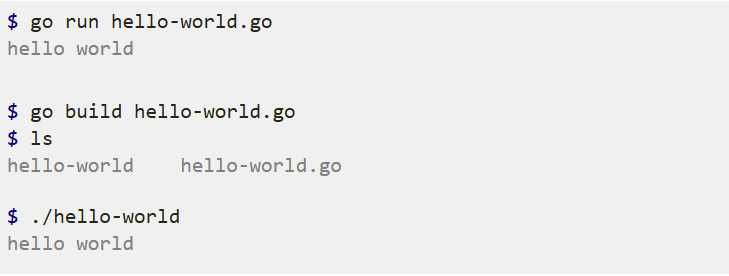
Hello World
package main

import "fmt"

func main() {
    fmt.Println("hello world")
}
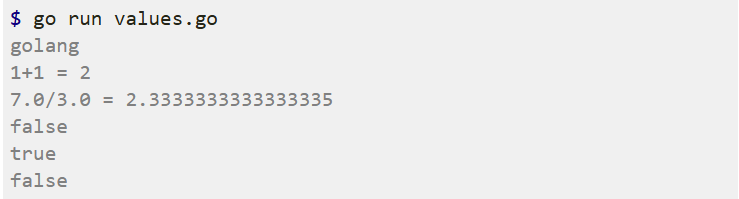
Values
package main

import "fmt"

func main() {

    fmt.Println("go" + "lang")

    fmt.Println("1+1 =", 1+1)
    fmt.Println("7.0/3.0 =", 7.0/3.0)

    fmt.Println(true && false)
    fmt.Println(true || false)
    fmt.Println(!true)
}
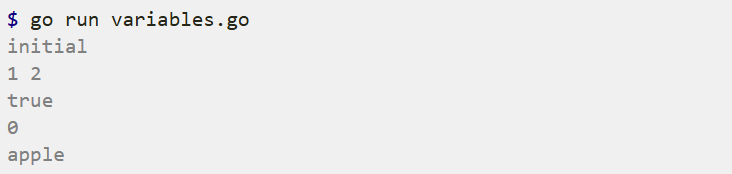
Variables
package main

import "fmt"

func main() {

    var a = "initial"
    fmt.Println(a)

    var b, c int = 1, 2
    fmt.Println(b, c)

    var d = true
    fmt.Println(d)

    var e int
    fmt.Println(e)

    f := "apple"
    fmt.Println(f)
}
Constants
Go supports constants of character, string, boolean, and numeric values.
A const statement can appear anywhere a var statement can.
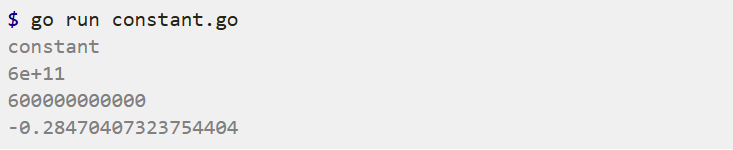
Constant expressions perform arithmetic with arbitrary precision.
A numeric constant has no type until it’s given one, such as by an explicit conversion.
A number can be given a type by using it in a context that requires one, such as a variable assignment or function call. For example, here math.Sin expects a float64.
package main

import (
    "fmt"
    "math"
)

const s string = "constant"

func main() {
    fmt.Println(s)

    const n = 500000000

    const d = 3e20 / n
    fmt.Println(d)

    fmt.Println(int64(d))

    fmt.Println(math.Sin(n))
}
For
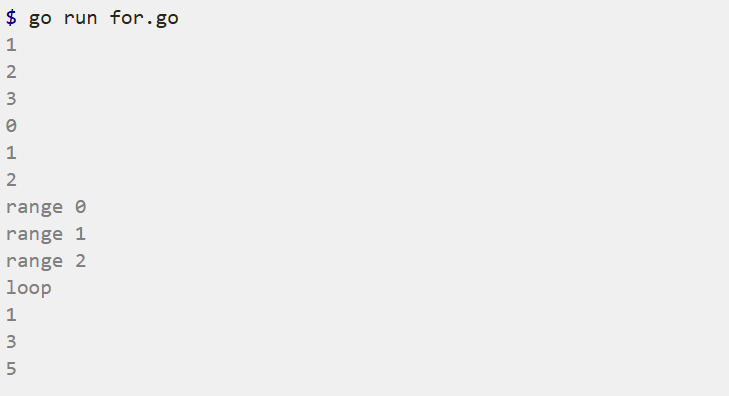
package main

import "fmt"

func main() {

    i := 1
    for i <= 3 {
        fmt.Println(i)
        i = i + 1
    }

    for j := 0; j < 3; j++ {
        fmt.Println(j)
    }

    for i := range 3 {
        fmt.Println("range", i)
    }

    for {
        fmt.Println("loop")
        break
    }

    for n := range 6 {
        if n%2 == 0 {
            continue
        }
        fmt.Println(n)
    }
}
If/Else
package main

import "fmt"

func main() {

    if 7%2 == 0 {
        fmt.Println("7 is even")
    } else {
        fmt.Println("7 is odd")
    }

    if 8%4 == 0 {
        fmt.Println("8 is divisible by 4")
    }

    if 8%2 == 0 || 7%2 == 0 {
        fmt.Println("either 8 or 7 are even")
    }

    if num := 9; num < 0 {
        fmt.Println(num, "is negative")
    } else if num < 10 {
        fmt.Println(num, "has 1 digit")
    } else {
        fmt.Println(num, "has multiple digits")
    }
}

Switch
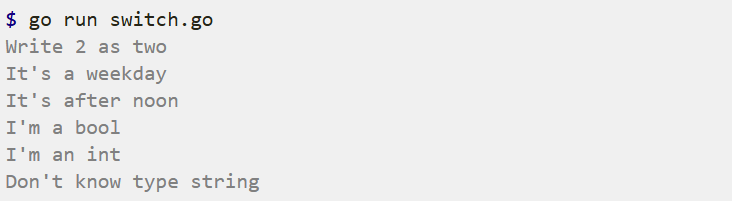
package main

import (
    "fmt"
    "time"
)

func main() {

    i := 2
    fmt.Print("Write ", i, " as ")
    switch i {
    case 1:
        fmt.Println("one")
    case 2:
        fmt.Println("two")
    case 3:
        fmt.Println("three")
    }

    switch time.Now().Weekday() {
    case time.Saturday, time.Sunday:
        fmt.Println("It's the weekend")
    default:
        fmt.Println("It's a weekday")
    }

    t := time.Now()
    switch {
    case t.Hour() < 12:
        fmt.Println("It's before noon")
    default:
        fmt.Println("It's after noon")
    }

    whatAmI := func(i interface{}) {
        switch t := i.(type) {
        case bool:
            fmt.Println("I'm a bool")
        case int:
            fmt.Println("I'm an int")
        default:
            fmt.Printf("Don't know type %T\n", t)
        }
    }
    whatAmI(true)
    whatAmI(1)
    whatAmI("hey")
}
Arrays
package main

import "fmt"

func main() {

    var a [5]int
    fmt.Println("emp:", a)

    a[4] = 100
    fmt.Println("set:", a)
    fmt.Println("get:", a[4])

    fmt.Println("len:", len(a))

    b := [5]int{1, 2, 3, 4, 5}
    fmt.Println("dcl:", b)

    b = [...]int{1, 2, 3, 4, 5}
    fmt.Println("dcl:", b)

    b = [...]int{100, 3: 400, 500}
    fmt.Println("idx:", b)

    var twoD [2][3]int
    for i := range 2 {
        for j := range 3 {
            twoD[i][j] = i + j
        }
    }
    fmt.Println("2d: ", twoD)

    twoD = [2][3]int{
        {1, 2, 3},
        {1, 2, 3},
    }
    fmt.Println("2d: ", twoD)
}
If you specify the index with :, the elements in between will be zeroed.
Slices
package main

import (
    "fmt"
    "slices"
)

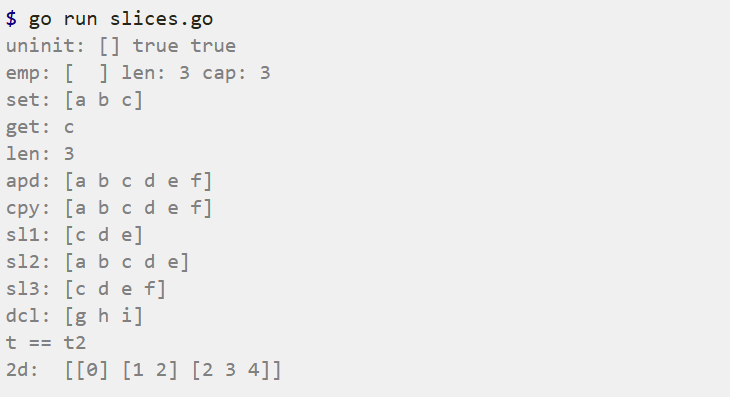
func main() {

    var s []string
    fmt.Println("uninit:", s, s == nil, len(s) == 0)

    s = make([]string, 3)
    fmt.Println("emp:", s, "len:", len(s), "cap:", cap(s))

    s[0] = "a"
    s[1] = "b"
    s[2] = "c"
    fmt.Println("set:", s)
    fmt.Println("get:", s[2])

    fmt.Println("len:", len(s))

    s = append(s, "d")
    s = append(s, "e", "f")
    fmt.Println("apd:", s)

    c := make([]string, len(s))
    copy(c, s)
    fmt.Println("cpy:", c)

    l := s[2:5]
    fmt.Println("sl1:", l)

    l = s[:5]
    fmt.Println("sl2:", l)

    l = s[2:]
    fmt.Println("sl3:", l)

    t := []string{"g", "h", "i"}
    fmt.Println("dcl:", t)

    t2 := []string{"g", "h", "i"}
    if slices.Equal(t, t2) {
        fmt.Println("t == t2")
    }

    twoD := make([][]int, 3)
    for i := range 3 {
        innerLen := i + 1
        twoD[i] = make([]int, innerLen)
        for j := range innerLen {
            twoD[i][j] = i + j
        }
    }
    fmt.Println("2d: ", twoD)
}
Maps
package main

import (
    "fmt"
    "maps"
)

func main() {

    m := make(map[string]int)

    m["k1"] = 7
    m["k2"] = 13

    fmt.Println("map:", m)

    v1 := m["k1"]
    fmt.Println("v1:", v1)

    v3 := m["k3"]
    fmt.Println("v3:", v3)

    fmt.Println("len:", len(m))

    delete(m, "k2")
    fmt.Println("map:", m)

    clear(m)
    fmt.Println("map:", m)

    _, prs := m["k2"]
    fmt.Println("prs:", prs)

    n := map[string]int{"foo": 1, "bar": 2}
    fmt.Println("map:", n)

    n2 := map[string]int{"foo": 1, "bar": 2}
    if maps.Equal(n, n2) {
        fmt.Println("n == n2")
    }
}
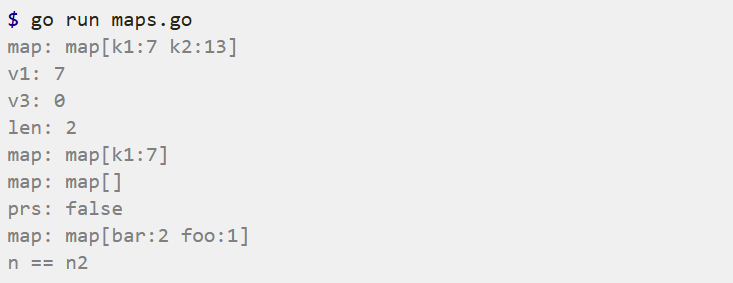
The optional second return value when getting a value from a map indicates if the key was present in the map. This can be used to disambiguate between missing keys and keys with zero values like 0 or “”. Here we didn’t need the value itself, so we ignored it with the blank identifier _.
Functions
package main

import "fmt"

func plus(a int, b int) int {

    return a + b
}

func plusPlus(a, b, c int) int {
    return a + b + c
}

func main() {

    res := plus(1, 2)
    fmt.Println("1+2 =", res)

    res = plusPlus(1, 2, 3)
    fmt.Println("1+2+3 =", res)
}

Multiple Return Values
package main

import "fmt"

func vals() (int, int) {
    return 3, 7
}

func main() {

    a, b := vals()
    fmt.Println(a)
    fmt.Println(b)

    _, c := vals()
    fmt.Println(c)
}

Variadic Functions
package main

import "fmt"

func sum(nums ...int) {
    fmt.Print(nums, " ")
    total := 0

    for _, num := range nums {
        total += num
    }
    fmt.Println(total)
}

func main() {

    sum(1, 2)
    sum(1, 2, 3)

    nums := []int{1, 2, 3, 4}
    sum(nums...)
}

Closures
package main

import "fmt"

func intSeq() func() int {
    i := 0
    return func() int {
        i++
        return i
    }
}

func main() {

    nextInt := intSeq()

    fmt.Println(nextInt())
    fmt.Println(nextInt())
    fmt.Println(nextInt())

    newInts := intSeq()
    fmt.Println(newInts())
}
i := 0 是 intSeq() 函数的初始化逻辑,仅在 intSeq() 被调用时执行一次。
i := 0 is the initialization logic of intSeq() function, which only be executed once when intSeq() is called.
Recursion
package main

import "fmt"

func fact(n int) int {
    if n == 0 {
        return 1
    }
    return n * fact(n-1)
}

func main() {
    fmt.Println(fact(7))

    var fib func(n int) int

    fib = func(n int) int {
        if n < 2 {
            return n
        }

        return fib(n-1) + fib(n-2)
    }

    fmt.Println(fib(7))
}

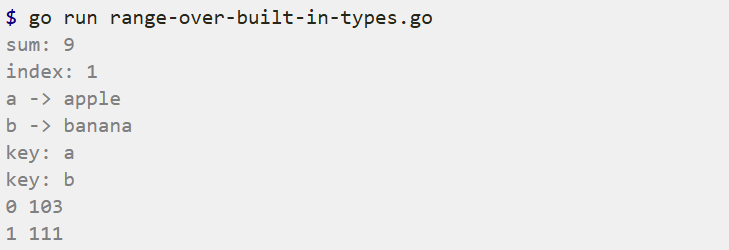
Range over Built-in Types
package main

import "fmt"

func main() {

    nums := []int{2, 3, 4}
    sum := 0
    for _, num := range nums {
        sum += num
    }
    fmt.Println("sum:", sum)

    for i, num := range nums {
        if num == 3 {
            fmt.Println("index:", i)
        }
    }

    kvs := map[string]string{"a": "apple", "b": "banana"}
    for k, v := range kvs {
        fmt.Printf("%s -> %s\n", k, v)
    }

    for k := range kvs {
        fmt.Println("key:", k)
    }

    for i, c := range "go" {
        fmt.Println(i, c)
    }
}
Pointers
package main

import "fmt"

func zeroval(ival int) {
    ival = 0
}

func zeroptr(iptr *int) {
    *iptr = 0
}

func main() {
    i := 1
    fmt.Println("initial:", i)

    zeroval(i)
    fmt.Println("zeroval:", i)

    zeroptr(&i)
    fmt.Println("zeroptr:", i)

    fmt.Println("pointer:", &i)
}

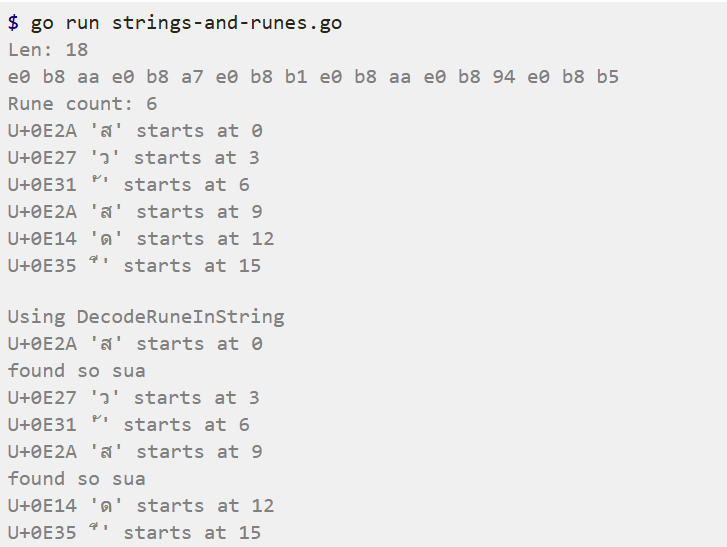
Strings and Runes
package main

import (
    "fmt"
    "unicode/utf8"
)

func main() {

    const s = "สวัสดี"

    fmt.Println("Len:", len(s))

    for i := 0; i < len(s); i++ {
        fmt.Printf("%x ", s[i])
    }
    fmt.Println()

    fmt.Println("Rune count:", utf8.RuneCountInString(s))

    for idx, runeValue := range s {
        fmt.Printf("%#U starts at %d\n", runeValue, idx)
    }

    fmt.Println("\nUsing DecodeRuneInString")
    for i, w := 0, 0; i < len(s); i += w {
        runeValue, width := utf8.DecodeRuneInString(s[i:])
        fmt.Printf("%#U starts at %d\n", runeValue, i)
        w = width

        examineRune(runeValue)
    }
}

func examineRune(r rune) {

    if r == 't' {
        fmt.Println("found tee")
    } else if r == 'ส' {
        fmt.Println("found so sua")
    }
}
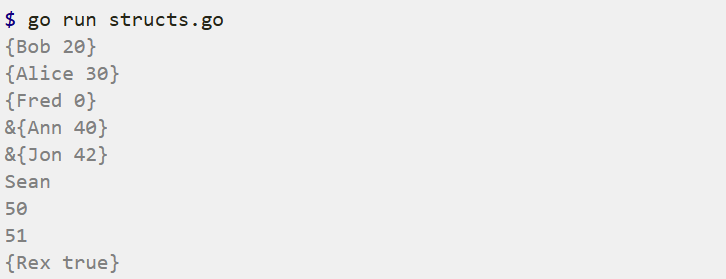
Structs
package main

import "fmt"

type person struct {
    name string
    age  int
}

func newPerson(name string) *person {

    p := person{name: name}
    p.age = 42
    return &p
}

func main() {

    fmt.Println(person{"Bob", 20})

    fmt.Println(person{name: "Alice", age: 30})

    fmt.Println(person{name: "Fred"})

    fmt.Println(&person{name: "Ann", age: 40})

    fmt.Println(newPerson("Jon"))

    s := person{name: "Sean", age: 50}
    fmt.Println(s.name)

    sp := &s
    fmt.Println(sp.age)

    sp.age = 51
    fmt.Println(sp.age)

    dog := struct {
        name   string
        isGood bool
    }{
        "Rex",
        true,
    }
    fmt.Println(dog)
}
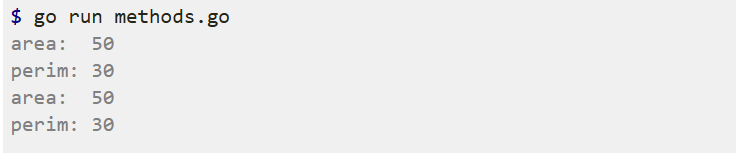
Methods
package main

import "fmt"

type rect struct {
    width, height int
}

func (r *rect) area() int {
    return r.width * r.height
}

func (r rect) perim() int {
    return 2*r.width + 2*r.height
}

func main() {
    r := rect{width: 10, height: 5}

    fmt.Println("area: ", r.area())
    fmt.Println("perim:", r.perim())

    rp := &r
    fmt.Println("area: ", rp.area())
    fmt.Println("perim:", rp.perim())
}
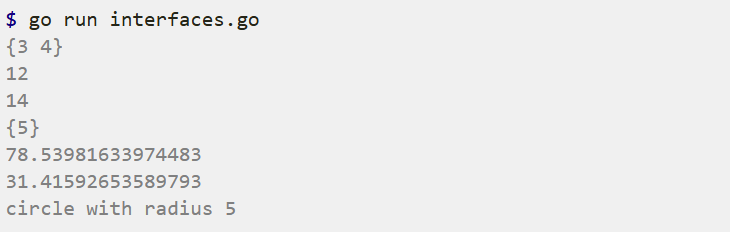
Interfaces
package main

import (
    "fmt"
    "math"
)

type geometry interface {
    area() float64
    perim() float64
}

type rect struct {
    width, height float64
}
type circle struct {
    radius float64
}

func (r rect) area() float64 {
    return r.width * r.height
}
func (r rect) perim() float64 {
    return 2*r.width + 2*r.height
}

func (c circle) area() float64 {
    return math.Pi * c.radius * c.radius
}
func (c circle) perim() float64 {
    return 2 * math.Pi * c.radius
}

func measure(g geometry) {
    fmt.Println(g)
    fmt.Println(g.area())
    fmt.Println(g.perim())
}

func detectCircle(g geometry) {
    if c, ok := g.(circle); ok {
        fmt.Println("circle with radius", c.radius)
    }
}

func main() {
    r := rect{width: 3, height: 4}
    c := circle{radius: 5}

    measure(r)
    measure(c)

    detectCircle(r)
    detectCircle(c)
}
Enums
package main

import "fmt"

type ServerState int

const (
    StateIdle ServerState = iota
    StateConnected
    StateError
    StateRetrying
)

var stateName = map[ServerState]string{
    StateIdle:      "idle",
    StateConnected: "connected",
    StateError:     "error",
    StateRetrying:  "retrying",
}

func (ss ServerState) String() string {
    return stateName[ss]
}

func main() {
    ns := transition(StateIdle)
    fmt.Println(ns)

    ns2 := transition(ns)
    fmt.Println(ns2)
}

func transition(s ServerState) ServerState {
    switch s {
    case StateIdle:
        return StateConnected
    case StateConnected, StateRetrying:

        return StateIdle
    case StateError:
        return StateError
    default:
        panic(fmt.Errorf("unknown state: %s", s))
    }
}

Struct Embedding
package main

import "fmt"

type base struct {
    num int
}

func (b base) describe() string {
    return fmt.Sprintf("base with num=%v", b.num)
}

type container struct {
    base
    str string
}

func main() {

    co := container{
        base: base{
            num: 1,
        },
        str: "some name",
    }

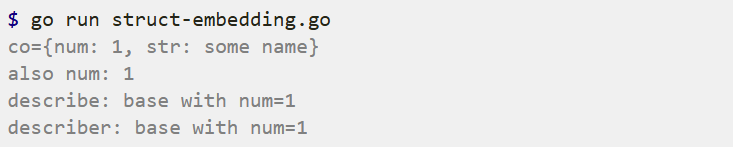
    fmt.Printf("co={num: %v, str: %v}\n", co.num, co.str)

    fmt.Println("also num:", co.base.num)

    fmt.Println("describe:", co.describe())

    type describer interface {
        describe() string
    }

    var d describer = co
    fmt.Println("describer:", d.describe())
}
Generics
package main

import "fmt"

func SlicesIndex[S ~[]E, E comparable](s S, v E) int {
    for i := range s {
        if v == s[i] {
            return i
        }
    }
    return -1
}

type List[T any] struct {
    head, tail *element[T]
}

type element[T any] struct {
    next *element[T]
    val  T
}

func (lst *List[T]) Push(v T) {
    if lst.tail == nil {
        lst.head = &element[T]{val: v}
        lst.tail = lst.head
    } else {
        lst.tail.next = &element[T]{val: v}
        lst.tail = lst.tail.next
    }
}

func (lst *List[T]) AllElements() []T {
    var elems []T
    for e := lst.head; e != nil; e = e.next {
        elems = append(elems, e.val)
    }
    return elems
}

func main() {
    var s = []string{"foo", "bar", "zoo"}

    fmt.Println("index of zoo:", SlicesIndex(s, "zoo"))

    _ = SlicesIndex[[]string, string](s, "zoo")

    lst := List[int]{}
    lst.Push(10)
    lst.Push(13)
    lst.Push(23)
    fmt.Println("list:", lst.AllElements())
}

Range over Iterators ( from go 1.23 )
package main

import (
    "fmt"
    "iter"
    "slices"
)

type List[T any] struct {
    head, tail *element[T]
}

type element[T any] struct {
    next *element[T]
    val  T
}

func (lst *List[T]) Push(v T) {
    if lst.tail == nil {
        lst.head = &element[T]{val: v}
        lst.tail = lst.head
    } else {
        lst.tail.next = &element[T]{val: v}
        lst.tail = lst.tail.next
    }
}

func (lst *List[T]) All() iter.Seq[T] {
    return func(yield func(T) bool) {

        for e := lst.head; e != nil; e = e.next {
            if !yield(e.val) {
                return
            }
        }
    }
}

func genFib() iter.Seq[int] {
    return func(yield func(int) bool) {
        a, b := 1, 1

        for {
            if !yield(a) {
                return
            }
            a, b = b, a+b
        }
    }
}

func main() {
    lst := List[int]{}
    lst.Push(10)
    lst.Push(13)
    lst.Push(23)

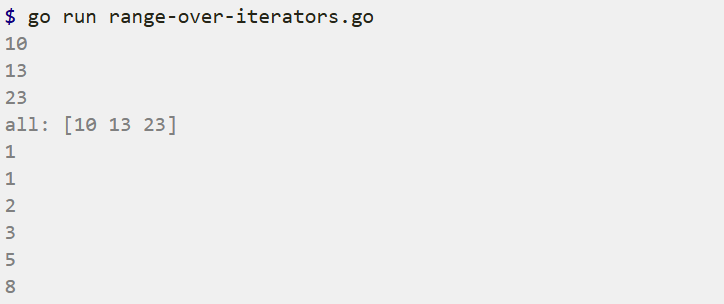
    for e := range lst.All() {
        fmt.Println(e)
    }

    all := slices.Collect(lst.All())
    fmt.Println("all:", all)

    for n := range genFib() {

        if n >= 10 {
            break
        }
        fmt.Println(n)
    }
}
Errors
package main

import (
    "errors"
    "fmt"
)

func f(arg int) (int, error) {
    if arg == 42 {

        return -1, errors.New("can't work with 42")
    }

    return arg + 3, nil
}

var ErrOutOfTea = fmt.Errorf("no more tea available")
var ErrPower = fmt.Errorf("can't boil water")

func makeTea(arg int) error {
    if arg == 2 {
        return ErrOutOfTea
    } else if arg == 4 {

        return fmt.Errorf("making tea: %w", ErrPower)
    }
    return nil
}

func main() {
    for _, i := range []int{7, 42} {

        if r, e := f(i); e != nil {
            fmt.Println("f failed:", e)
        } else {
            fmt.Println("f worked:", r)
        }
    }

    for i := range 5 {
        if err := makeTea(i); err != nil {

            if errors.Is(err, ErrOutOfTea) {
                fmt.Println("We should buy new tea!")
            } else if errors.Is(err, ErrPower) {
                fmt.Println("Now it is dark.")
            } else {
                fmt.Printf("unknown error: %s\n", err)
            }
            continue
        }

        fmt.Println("Tea is ready!")
    }
}
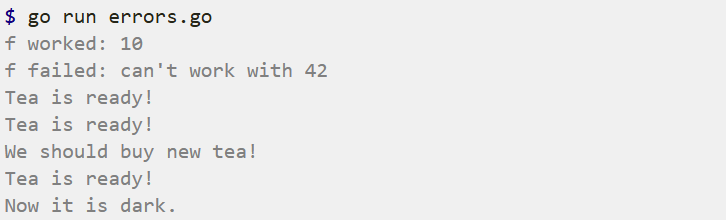
errors.Is checks that a given error (or any error in its chain) matches a specific error value. This is especially useful with wrapped or nested errors, allowing you to identify specific error types or sentinel errors in a chain of errors.
Custom Errors
package main

import (
    "errors"
    "fmt"
)

type argError struct {
    arg     int
    message string
}

func (e *argError) Error() string {
    return fmt.Sprintf("%d - %s", e.arg, e.message)
}

func f(arg int) (int, error) {
    if arg == 42 {

        return -1, &argError{arg, "can't work with it"}
    }
    return arg + 3, nil
}

func main() {

    _, err := f(42)
    var ae *argError
    if errors.As(err, &ae) {
        fmt.Println(ae.arg)
        fmt.Println(ae.message)
    } else {
        fmt.Println("err doesn't match argError")
    }
}

Goroutines
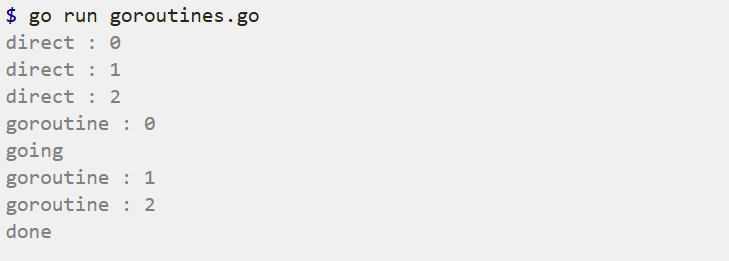
package main

import (
    "fmt"
    "time"
)

func f(from string) {
    for i := range 3 {
        fmt.Println(from, ":", i)
    }
}

func main() {

    f("direct")

    go f("goroutine")

    go func(msg string) {
        fmt.Println(msg)
    }("going")

    time.Sleep(time.Second)
    fmt.Println("done")
}
Channels
package main

import "fmt"

func main() {

    messages := make(chan string)

    go func() { messages <- "ping" }()

    msg := <-messages
    fmt.Println(msg)
}

By default sends and receives block until both the sender and receiver are ready. This property allowed us to wait at the end of our program for the “ping” message without having to use any other synchronization.
Channel Buffering
package main

import "fmt"

func main() {

    messages := make(chan string, 2)

    messages <- "buffered"
    messages <- "channel"

    fmt.Println(<-messages)
    fmt.Println(<-messages)
}

By default channels are unbuffered, meaning that they will only accept sends (chan <-) if there is a corresponding receive (<- chan) ready to receive the sent value. Buffered channels accept a limited number of values without a corresponding receiver for those values.
Channel Synchronization
package main

import (
    "fmt"
    "time"
)

func worker(done chan bool) {
    fmt.Print("working...")
    time.Sleep(time.Second)
    fmt.Println("done")

    done <- true
}

func main() {

    done := make(chan bool, 1)
    go worker(done)

    <-done
}

Send a value to notify that we’re done.
Start a worker goroutine, giving it the channel to notify on.
Block until we receive a notification from the worker on the channel.
If you removed the <- done line from this program, the program would exit before the worker even started.
Channel Directions
package main

import "fmt"

func ping(pings chan<- string, msg string) {
    pings <- msg
}

func pong(pings <-chan string, pongs chan<- string) {
    msg := <-pings
    pongs <- msg
}

func main() {
    pings := make(chan string, 1)
    pongs := make(chan string, 1)
    ping(pings, "passed message")
    pong(pings, pongs)
    fmt.Println(<-pongs)
}

When using channels as function parameters, you can specify if a channel is meant to only send or receive values.
This ping function only accepts a channel for sending values. It would be a compile-time error to try to receive on this channel.
The pong function accepts one channel for receives (pings) and a second for sends (pongs).
Select
package main

import (
    "fmt"
    "time"
)

func main() {

    c1 := make(chan string)
    c2 := make(chan string)

    go func() {
        time.Sleep(1 * time.Second)
        c1 <- "one"
    }()
    go func() {
        time.Sleep(2 * time.Second)
        c2 <- "two"
    }()

    for range 2 {
        select {
        case msg1 := <-c1:
            fmt.Println("received", msg1)
        case msg2 := <-c2:
            fmt.Println("received", msg2)
        }
    }
}
Go’s select lets you wait on multiple channel operations. Combining goroutines and channels with select is a powerful feature of Go.
We’ll use select to await both of these values simultaneously, printing each one as it arrives.
Note that the total execution time is only ~2 seconds since both the 1 and 2 second Sleeps execute concurrently.
Timeouts
package main

import (
    "fmt"
    "time"
)

func main() {

    c1 := make(chan string, 1)
    go func() {
        time.Sleep(2 * time.Second)
        c1 <- "result 1"
    }()

    select {
    case res := <-c1:
        fmt.Println(res)
    case <-time.After(1 * time.Second):
        fmt.Println("timeout 1")
    }

    c2 := make(chan string, 1)
    go func() {
        time.Sleep(2 * time.Second)
        c2 <- "result 2"
    }()
    select {
    case res := <-c2:
        fmt.Println(res)
    case <-time.After(3 * time.Second):
        fmt.Println("timeout 2")
    }
}

Non-Blocking Channel Operations
package main

import "fmt"

func main() {
    messages := make(chan string)
    signals := make(chan bool)

    select {
    case msg := <-messages:
        fmt.Println("received message", msg)
    default:
        fmt.Println("no message received")
    }

    msg := "hi"
    select {
    case messages <- msg:
        fmt.Println("sent message", msg)
    default:
        fmt.Println("no message sent")
    }

    select {
    case msg := <-messages:
        fmt.Println("received message", msg)
    case sig := <-signals:
        fmt.Println("received signal", sig)
    default:
        fmt.Println("no activity")
    }
}
Closing Channels
package main

import "fmt"

func main() {
    jobs := make(chan int, 5)
    done := make(chan bool)

    go func() {
        for {
            j, more := <-jobs
            if more {
                fmt.Println("received job", j)
            } else {
                fmt.Println("received all jobs")
                done <- true
                return
            }
        }
    }()

    for j := 1; j <= 3; j++ {
        jobs <- j
        fmt.Println("sent job", j)
    }
    close(jobs)
    fmt.Println("sent all jobs")

    <-done

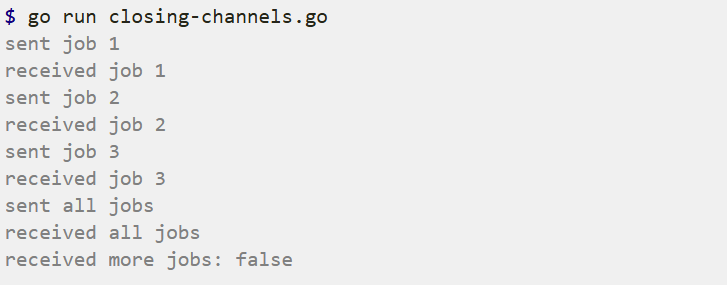
    _, ok := <-jobs
    fmt.Println("received more jobs:", ok)
}
Range over Channels
package main

import "fmt"

func main() {

    queue := make(chan string, 2)
    queue <- "one"
    queue <- "two"
    close(queue)

    for elem := range queue {
        fmt.Println(elem)
    }
}

Timers
package main

import (
    "fmt"
    "time"
)

func main() {

    timer1 := time.NewTimer(2 * time.Second)

    <-timer1.C
    fmt.Println("Timer 1 fired")

    timer2 := time.NewTimer(time.Second)
    go func() {
        <-timer2.C
        fmt.Println("Timer 2 fired")
    }()
    stop2 := timer2.Stop()
    if stop2 {
        fmt.Println("Timer 2 stopped")
    }

    time.Sleep(2 * time.Second)
}

The first timer will fire ~2s after we start the program, but the second should be stopped before it has a chance to fire.
Tickers
package main

import (
    "fmt"
    "time"
)

func main() {

    ticker := time.NewTicker(500 * time.Millisecond)
    done := make(chan bool)

    go func() {
        for {
            select {
            case <-done:
                return
            case t := <-ticker.C:
                fmt.Println("Tick at", t)
            }
        }
    }()

    time.Sleep(1600 * time.Millisecond)
    ticker.Stop()
    done <- true
    fmt.Println("Ticker stopped")
}

Worker Pools
package main

import (
    "fmt"
    "time"
)

func worker(id int, jobs <-chan int, results chan<- int) {
    for j := range jobs {
        fmt.Println("worker", id, "started  job", j)
        time.Sleep(time.Second)
        fmt.Println("worker", id, "finished job", j)
        results <- j * 2
    }
}

func main() {

    const numJobs = 5
    jobs := make(chan int, numJobs)
    results := make(chan int, numJobs)

    for w := 1; w <= 3; w++ {
        go worker(w, jobs, results)
    }

    for j := 1; j <= numJobs; j++ {
        jobs <- j
    }
    close(jobs)

    for a := 1; a <= numJobs; a++ {
        <-results
    }
}
Finally we collect all the results of the work. This also ensures that the worker goroutines have finished. An alternative way to wait for multiple goroutines is to use a WaitGroup.
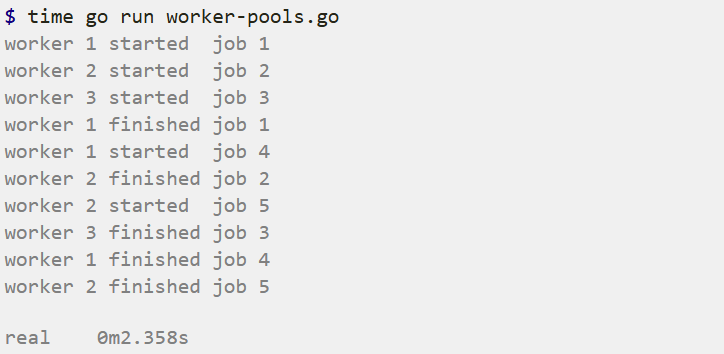
Our running program shows the 5 jobs being executed by various workers. The program only takes about 2 seconds despite doing about 5 seconds of total work because there are 3 workers operating concurrently.
WaitGroups
package main

import (
    "fmt"
    "sync"
    "time"
)

func worker(id int) {
    fmt.Printf("Worker %d starting\n", id)

    time.Sleep(time.Second)
    fmt.Printf("Worker %d done\n", id)
}

func main() {

    var wg sync.WaitGroup

    for i := 1; i <= 5; i++ {
        wg.Add(1)

        go func() {
            defer wg.Done()
            worker(i)
        }()
    }

    wg.Wait()

}
Rate Limiting
package main

import (
    "fmt"
    "time"
)

func main() {

    requests := make(chan int, 5)
    for i := 1; i <= 5; i++ {
        requests <- i
    }
    close(requests)

    limiter := time.Tick(200 * time.Millisecond)

    for req := range requests {
        <-limiter
        fmt.Println("request", req, time.Now())
    }

    burstyLimiter := make(chan time.Time, 3)

    for range 3 {
        burstyLimiter <- time.Now()
    }

    go func() {
        for t := range time.Tick(200 * time.Millisecond) {
            burstyLimiter <- t
        }
    }()

    burstyRequests := make(chan int, 5)
    for i := 1; i <= 5; i++ {
        burstyRequests <- i
    }
    close(burstyRequests)
    for req := range burstyRequests {
        <-burstyLimiter
        fmt.Println("request", req, time.Now())
    }
}
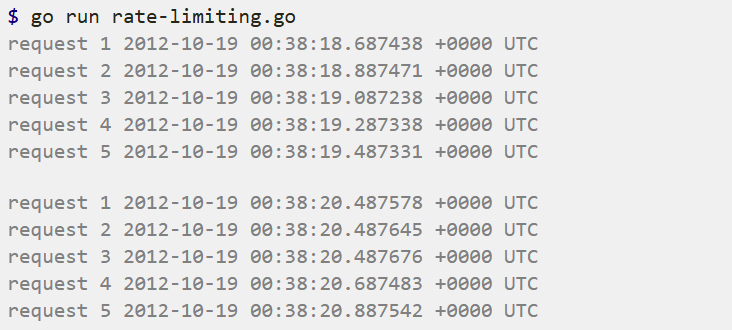
欢迎使用Markdown编辑器
你好! 这是你第一次使用 Markdown编辑器 所展示的欢迎页。如果你想学习如何使用Markdown编辑器, 可以仔细阅读这篇文章,了解一下Markdown的基本语法知识。
新的改变
我们对Markdown编辑器进行了一些功能拓展与语法支持,除了标准的Markdown编辑器功能,我们增加了如下几点新功能,帮助你用它写博客:
- 全新的界面设计 ,将会带来全新的写作体验;
- 在创作中心设置你喜爱的代码高亮样式,Markdown 将代码片显示选择的高亮样式 进行展示;
- 增加了 图片拖拽 功能,你可以将本地的图片直接拖拽到编辑区域直接展示;
- 全新的 KaTeX数学公式 语法;
- 增加了支持甘特图的mermaid语法1 功能;
- 增加了 多屏幕编辑 Markdown文章功能;
- 增加了 焦点写作模式、预览模式、简洁写作模式、左右区域同步滚轮设置 等功能,功能按钮位于编辑区域与预览区域中间;
- 增加了 检查列表 功能。
功能快捷键
撤销:Ctrl/Command + Z
重做:Ctrl/Command + Y
加粗:Ctrl/Command + B
斜体:Ctrl/Command + I
标题:Ctrl/Command + Shift + H
无序列表:Ctrl/Command + Shift + U
有序列表:Ctrl/Command + Shift + O
检查列表:Ctrl/Command + Shift + C
插入代码:Ctrl/Command + Shift + K
插入链接:Ctrl/Command + Shift + L
插入图片:Ctrl/Command + Shift + G
查找:Ctrl/Command + F
替换:Ctrl/Command + G
合理的创建标题,有助于目录的生成
直接输入1次#,并按下space后,将生成1级标题。
输入2次#,并按下space后,将生成2级标题。
以此类推,我们支持6级标题。有助于使用TOC语法后生成一个完美的目录。
如何改变文本的样式
强调文本 强调文本
加粗文本 加粗文本
标记文本
删除文本
引用文本
H2O is是液体。
210 运算结果是 1024.
插入链接与图片
链接: link.
图片:
带尺寸的图片:
居中的图片:
居中并且带尺寸的图片:
当然,我们为了让用户更加便捷,我们增加了图片拖拽功能。
如何插入一段漂亮的代码片
去博客设置页面,选择一款你喜欢的代码片高亮样式,下面展示同样高亮的 代码片.
// An highlighted block
var foo = 'bar';
生成一个适合你的列表
- 项目
- 项目
- 项目
- 项目
- 项目1
- 项目2
- 项目3
- 计划任务
- 完成任务
创建一个表格
一个简单的表格是这么创建的:
| 项目 | Value |
|---|---|
| 电脑 | $1600 |
| 手机 | $12 |
| 导管 | $1 |
设定内容居中、居左、居右
使用:---------:居中
使用:----------居左
使用----------:居右
| 第一列 | 第二列 | 第三列 |
|---|---|---|
| 第一列文本居中 | 第二列文本居右 | 第三列文本居左 |
SmartyPants
SmartyPants将ASCII标点字符转换为“智能”印刷标点HTML实体。例如:
| TYPE | ASCII | HTML |
|---|---|---|
| Single backticks | 'Isn't this fun?' | ‘Isn’t this fun?’ |
| Quotes | "Isn't this fun?" | “Isn’t this fun?” |
| Dashes | -- is en-dash, --- is em-dash | – is en-dash, — is em-dash |
创建一个自定义列表
-
Markdown
- Text-to- HTML conversion tool Authors
- John
- Luke
如何创建一个注脚
一个具有注脚的文本。2
注释也是必不可少的
Markdown将文本转换为 HTML。
KaTeX数学公式
您可以使用渲染LaTeX数学表达式 KaTeX:
Gamma公式展示 Γ ( n ) = ( n − 1 ) ! ∀ n ∈ N \Gamma(n) = (n-1)!\quad\forall n\in\mathbb N Γ(n)=(n−1)!∀n∈N 是通过欧拉积分
Γ ( z ) = ∫ 0 ∞ t z − 1 e − t d t . \Gamma(z) = \int_0^\infty t^{z-1}e^{-t}dt\,. Γ(z)=∫0∞tz−1e−tdt.
你可以找到更多关于的信息 LaTeX 数学表达式here.
新的甘特图功能,丰富你的文章
- 关于 甘特图 语法,参考 这儿,
UML 图表
可以使用UML图表进行渲染。 Mermaid. 例如下面产生的一个序列图:
这将产生一个流程图。:
- 关于 Mermaid 语法,参考 这儿,
FLowchart流程图
我们依旧会支持flowchart的流程图:
- 关于 Flowchart流程图 语法,参考 这儿.
导出与导入
导出
如果你想尝试使用此编辑器, 你可以在此篇文章任意编辑。当你完成了一篇文章的写作, 在上方工具栏找到 文章导出 ,生成一个.md文件或者.html文件进行本地保存。
导入
如果你想加载一篇你写过的.md文件,在上方工具栏可以选择导入功能进行对应扩展名的文件导入,
继续你的创作。
注脚的解释 ↩︎





 扫一扫
扫一扫


 318
318

 被折叠的 条评论
为什么被折叠?
被折叠的 条评论
为什么被折叠?
 到【灌水乐园】发言





