



 本文详细介绍如何在ASP.NET MVC项目中使用PageList进行书籍数据的分页展示,包括数据库设计、模型创建、控制器实现及视图展示,涵盖排序、搜索和分类功能。
MVC使用Page LIst分页操作
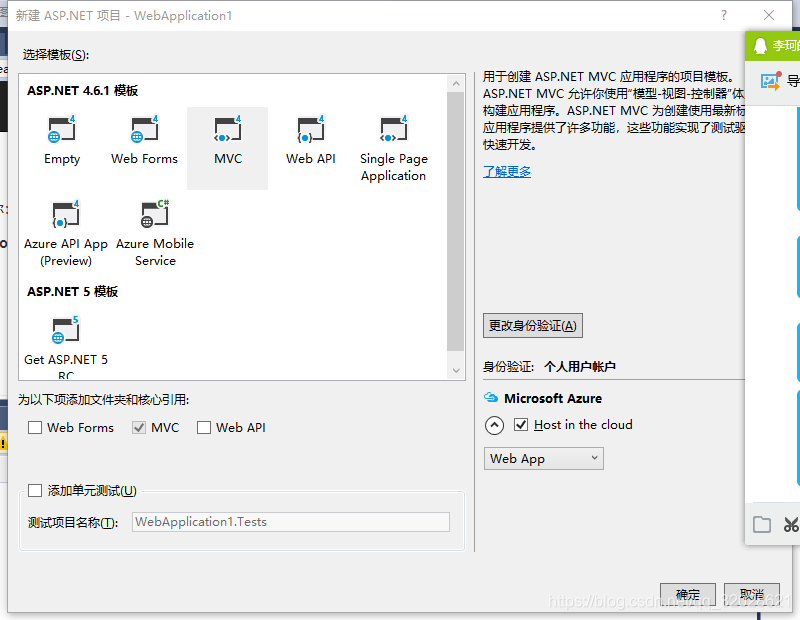
首先打开VS,然后项目–新建–Asp.net Web 应用程序(这个在.Net Framework类库4.5以上的版本才有)
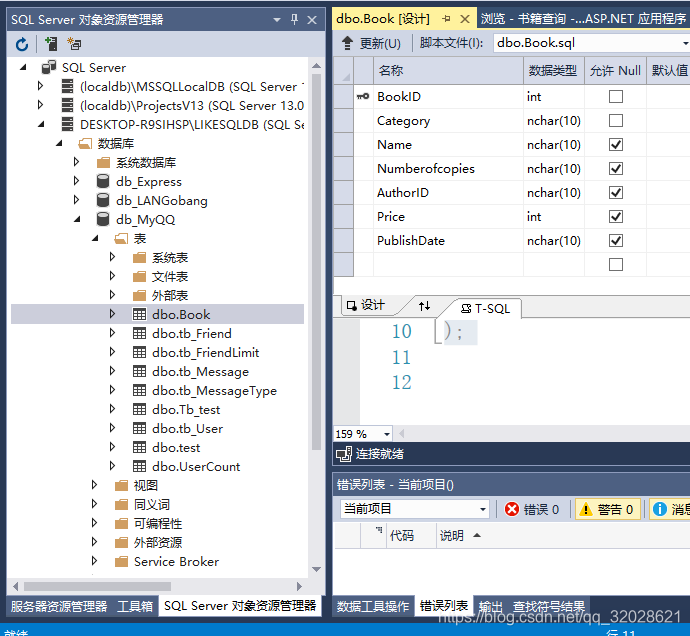
在数据库中添加新的数据库Book
CREATE TABLE [dbo].[Book] (
    [BookID]         INT        NOT NULL,
    [Category]       NCHAR (10) NOT NULL,
    [Name]           NCHAR (10) NULL,
    [Numberofcopies] NCHAR (10) NULL,
    [AuthorID]       NCHAR (10) NULL,
    [Price]          INT        NULL,
    [PublishDate]    NCHAR (10) NULL,
    PRIMARY KEY CLUSTERED ([BookID] ASC)
);
添加类
用来控制分页内容
using PagedList;
namespace MVCWebSite.Models
{
    public class ViewBook
    {

        public IPagedList<Book> Books { get; set; }//存储Book表的数组
        public string Search { get; set; }//用来查找的属性

        public string Category { get; set; }//分类的属性
        public string SortBy { get; set; }//排序的属性
    }//具体的操作在控制器里面实现
}
添加模型
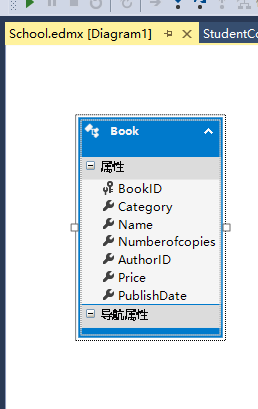
新增一个Ado.net实体数据模型
这么模型连接到数据库的Book表(新增连接–数据库–选表)
新增控制器
         public ActionResult SearchIndex(string Category, string searchString, string sortBy, int? page)
    {
        SchoolEntities1 db = new SchoolEntities1();
        var cateLst = new List<string>();
          var cateQry = from d in db.Book
                      orderby d.Category
                      select d.Category;
        cateLst.AddRange(cateQry.Distinct());
        ViewBag.category = new SelectList(cateLst);

        //排序选项
        var orderbyLst = new Dictionary<string, string>
 {
     { "价格从低到高", "price_lowest" },
     { "价格从高到低", "price_highest" }
 };

        ViewBag.sortBy = new SelectList(orderbyLst, "Value", "Key");
        //  [2017-2-14 end]
        var books = from m in db.Book
                    select m;

        if (!String.IsNullOrEmpty(searchString))
        {
            books = books.Where(s => s.Name.Contains(searchString));
        }

        // sort the results
        switch (sortBy)
        {

            case "price_lowest":
                books = books.OrderBy(p => p.Price);
                break;
            case "price_highest":
                books = books.OrderByDescending(p => p.Price);
                break;
            default:
                books = books.OrderBy(p => p.Name);
                break;
        }

        //分页
        const int pageItems = 5;
        int currentPage = (page ?? 1);
        IPagedList<Book> pageBooks = books.ToPagedList(currentPage, pageItems);
        //  [2017-2-14]
        ViewBook vbook = new ViewBook();
        vbook.Books = pageBooks;
        vbook.Category = Category;
        vbook.SortBy = sortBy;
        vbook.Search = searchString;
        if (string.IsNullOrEmpty(Category))
            vbook.Books = pageBooks;
**else { vbook.Books = pageBooks.Where(x => x.Category.Trim() == Category.Trim()).ToPagedList(currentPage, pageItems); }**这一句是关键,用来比较book.Category里面的内容,Trim() 用来消除空格,否则控件就失效了
       // db.Dispose();
        return View(vbook);
    }
视图
@model MVCWebSite.Models.ViewBook

@using PagedList.Mvc

@{

    ViewBag.Title = "书籍查询";
}
<link href="/Content/PagedList.css" rel="stylesheet" type="text/css" />
<h2>书籍查询</h2>
@using (Html.BeginForm("SearchIndex", "Student", FormMethod.Get))
{
    <p>
        书籍种类: @Html.DropDownList("category", "All")
        书籍名称: @Html.TextBox("SearchString")
        排序: @Html.DropDownList("sortBy", "不排序")
        <input type="submit" value="查询" />
    </p>
}

<table>
    <tr>
        <th>
            @Html.DisplayNameFor(model => model.Books.First().Category )
        </th>
        <th>
            @Html.DisplayNameFor(model => model.Books.First(). Name)

        </th>
        <th>
            @Html.DisplayNameFor(model => model.Books.First().Numberofcopies)

        </th>
        <th>
            @Html.DisplayNameFor(model => model.Books.First().AuthorID)

        </th>
        <th>
            @Html.DisplayNameFor(model => model.Books.First().Price)

        </th>
        <th>
            @Html.DisplayNameFor(model => model.Books.First().PublishDate)

        </th>
        <th></th>

    </tr>
    @foreach (var item in Model.Books)
    {

        <tr>
            <td>
                @Html.DisplayFor(modelItem => item.Category)

            </td>
            <td>
                @Html.DisplayFor(modelItem => item.Name)

            </td>
            <td>
                @Html.DisplayFor(modelItem => item.Numberofcopies)

            </td>
            <td>
                @Html.DisplayFor(modelItem => item.AuthorID)

            </td>
            <td>
                @Html.DisplayFor(modelItem => item.Price)

            </td>
            <td>
                @Html.DisplayFor(modelItem => item.PublishDate)

            </td>
            <td>
                @Html.ActionLink("Edit", "Edit", new { id = item.BookID }) |

                @Html.ActionLink("Details", "Details", new { id = item.BookID }) |

                @Html.ActionLink("Delete", "Delete", new { id = item.BookID })

            </td>
        </tr>
    }
</table>

<div>
    Page @(Model.Books.PageCount < Model.Books.PageNumber ? 0 : Model.Books.PageNumber) of @Model.Books.PageCount

    @Html.PagedListPager(Model.Books, page => Url.Action("SearchIndex", new { category = Model.Category, search = Model.Search, sortBy = Model.SortBy, page }))
</div>
@using (Html.BeginForm(“SearchIndex”, “Student”, FormMethod.Get))
这个里面是你要返回的页面名称,不要搞错了
要不然就会返回一个错误





 扫一扫
扫一扫


 3471
3471

 被折叠的 条评论
为什么被折叠?
被折叠的 条评论
为什么被折叠?
 到【灌水乐园】发言





