


方法一:找一台完全相同的服务器,仅下载编译所需软件包,传输至无网络服务器安装编译环境后升级openssh
方法二:在版本相同,架构相同的有网的服务器上,编译好二进制包后,传输到无网络服务器替换二进制包
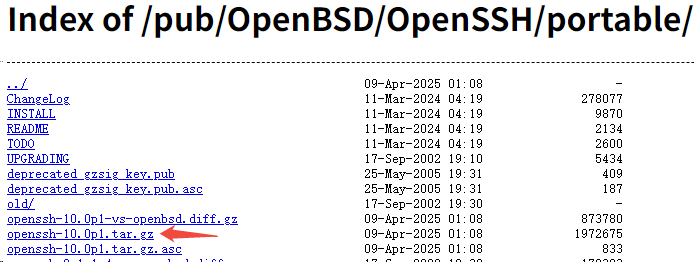
1、下载openssh源码包
https://ftp.openbsd.org/pub/OpenBSD/OpenSSH/portable/
2、编译
./configure --prefix=/usr/local/openssh [--sysconfdir=/etc/ssh] --with-md5-passwords --with-pam --with-zlib --with-tcp-wrappers [--with-ssl-dir=/usr/local/openssl] --with-ssl --without-hardening
参数解析与默认值对比:
–prefix=/usr/local/openssh
作用:指定 OpenSSH 的安装根目录。编译后的二进制文件、库、配置文件等会安装在此目录的子文件夹(如 bin、lib、etc 等)。
默认值:–prefix=/usr/local,若不指定,OpenSSH 默认安装到 /usr/local 下,例如:
可执行文件:/usr/local/bin/ssh
配置文件:/usr/local/etc/ssh/sshd_config
–sysconfdir=/etc/ssh
作用:指定配置文件(如 sshd_config、ssh_config)的安装目录。
默认值:–sysconfdir=$prefix/etc(即 /usr/local/openssh/etc,因为 prefix 被设置为 /usr/local/openssh)。
–with-md5-passwords
 最低0.47元/天 解锁文章






 扫一扫
扫一扫


 5449
5449

 被折叠的 条评论
为什么被折叠?
被折叠的 条评论
为什么被折叠?
 到【灌水乐园】发言





