



前天被要求做类似于Nasa一样框选查询区域并进行下载的功能,具体功能类似于这样,将框选的范围作为查询条件并进行筛选

或者像这样
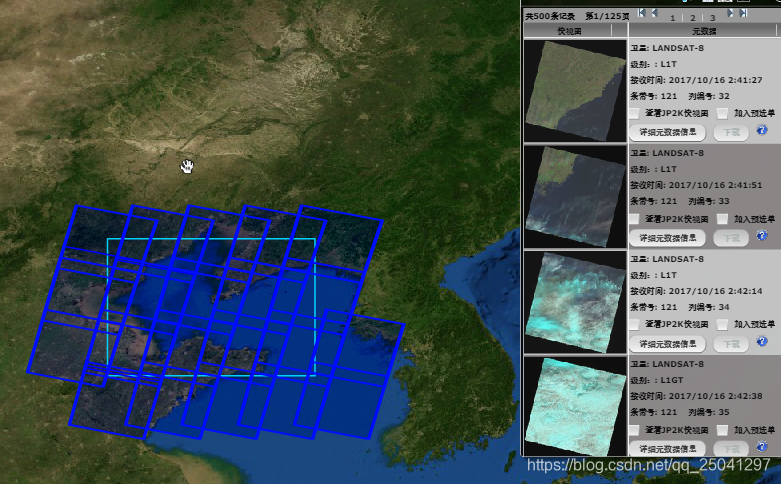
然后具体有两个问题,一个是我下载的影像资源文件如何获取他的文件头里面(待研究),一个是如何通过勾选的范围来查询数据库里面的影像文件
第一个问题暂时回头再说
第二个问题可以细化为两个问题
- 如何在地图上勾选矩形
- 如何将勾选的矩形和数据库进行比较得出是否相交
前者我们可以用一个arcgis of js 的一个小部件来解决 Sketch
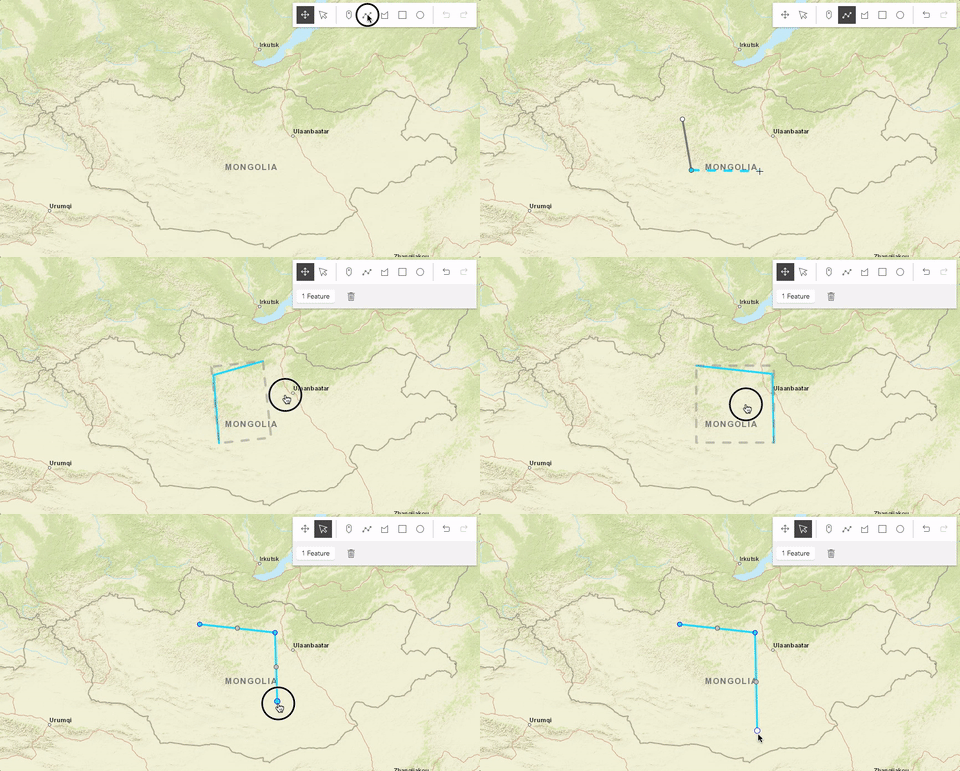
具体链接为Sketch
然后第二个问题就是两个矩形在平面是否相交的问题,这个就是计算机几何的问题,具体参考判断两矩形是否相交提供的思路,就先完成了这个简单的算法(可能还可以简化,但是这也最容易理解)
/**
 * @program: szyjjk
 * @description: 测试矩形
 * @author: yangyue
 * @create: 2020-04-27 09:11
 */
public class JuXingTest {


    //如何判断两个矩形是否相交
    public static void main(String[] args) {
        System.out.println(doubleersect(132,37,140,48,131,48,142,37
        ));
    }


    //判断是否相交 一个矩形的坐标是(x1,y1),(x2,y2) 另外一个矩形坐标是(x3,y3)(x4,y4)
    public static boolean doubleersect(double x1, double y1, double x2, double y2, double x3, double y3, double x4, double y4) {
        //首先判断矩形x值和y值最小的坐标,即右上角的坐标。在判断x值和y值最大的坐标,即右下角的坐标
        double[] rectangle1 = MaxAndMin(x1, y1, x2, y2);
        double[] rectangle2 = MaxAndMin(x3, y3, x4, y4);
        //首先选出p点坐标
        double[] PodoubleP=PandN(rectangle1[0],rectangle1[1],rectangle2[0],rectangle2[1],0);
        double[] PodoubleN=PandN(rectangle1[2],rectangle1[3],rectangle2[2],rectangle2[3],1);
        if(PodoubleP[0]<=PodoubleN[0]&&PodoubleP[1]<=PodoubleN[1]){
            return true;
        }else{
            return false;
        }
    }

    //判断P点   取小  type=0  判断N 点 取大 type=1
    public static double[] PandN(double MinX1, double MinY1, double MinX2, double MinY2, double type) {
        double PodoubleX = MinX2;
        double PondoubleY = MinY2;
        if (type == 0) {
            if (MinX1 > MinX2) {
                PodoubleX = MinX1;
            }
            if (MinY1 > MinY2) {
                PondoubleY = MinY1;
            }
        }else {
            if (MinX1 < MinX2) {
                PodoubleX = MinX1;
            }
            if (MinY1 < MinY2) {
                PondoubleY = MinY1;
            }
        }
        double[] result = {PodoubleX, PondoubleY};
        return result;
    }


    //判断最大值和最小值
    public  static  double[] MaxAndMin(double x1, double y1, double x2, double y2) {
        double MinX = x1;
        double MinY = y1;
        double MaxX = x2;
        double MaxY = y2;
        //不存在相等的情况,如果相等的话矩形不存在
        if (x1 > x2) {
            MinX = x2;
            MaxX = x1;
        }
        if (y1 > y2) {
            MinY = y2;
            MaxY = y1;
        }
        double[] result = {MinX, MinY, MaxX, MaxY};
        return result;
    }


}
然后将其移动到对应的html 进行测试,先随便加上一个矩形
var polygon = {
	type: "polygon", // autocasts as new Polygon()
	rings: [
		[118.149, 39.639],
		[118.149, 35.331],
		[125.655, 35.331],
		[125.655, 39.639],
		[118.149, 39.639],
	]
};

var fillSymbol = {
	type: "simple-fill",
	color: [227, 139, 79, 0.2],
	outline: {
		color: [255, 255, 255],
		width: 1
	}
};
var polygonGraphic = new Graphic({
	geometry: polygon,
	symbol: fillSymbol
});
view.graphics.addMany([polygonGraphic]);
然后开始画矩形 ,并且监听矩形完成时输出对应的 经纬度进行比较
const layer = new GraphicsLayer( );

//省略其他
const sketch = new Sketch({
	layer: layer,
	view: view,
	creationMode: "update",
	availableCreateTools: ["rectangle"] //设置只有矩形
});
sketch.on("create", function(event) {

	if (event.state === "complete") {
	   console.log(event.graphic.geometry);
	}
});
	// console.log(layer)
		view.ui.add(sketch, "top-right");
但是现在出现一个问题,就是他们的坐标系不匹配
数据对不上
其中一个是
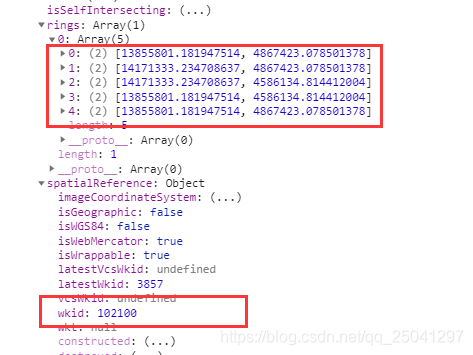
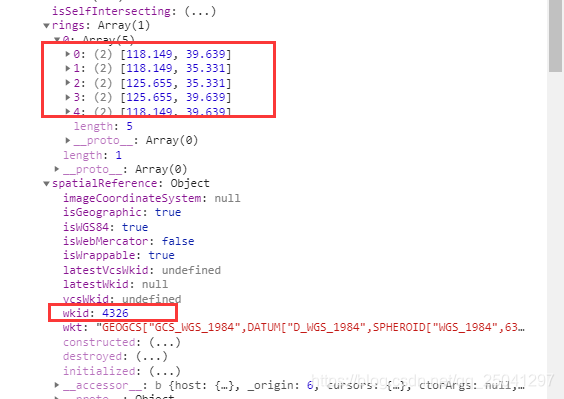
然后两个不是一个坐标系,然后就想办法进行转化或者设定其中一个的坐标系
在找了整整 半个上午加半个下午 的终于找到对应的方法
通过esri/geometry/support/webMercatorUtils 的 webMercatorToGeographic进行转化,具体代码
	//将几何图形从Web墨卡托单位(wkid:3857)转换为地理单位(wkid:4326)。
	var values = webMercatorUtils.webMercatorToGeographic(你要转化的图形);
然后最后整体的html效果如下,到时候框选后的经纬度传递到后台进行查询,这样就可以初步打到框选的效果(我只选择了矩形进行框选,嘿嘿嘿)
效果如下
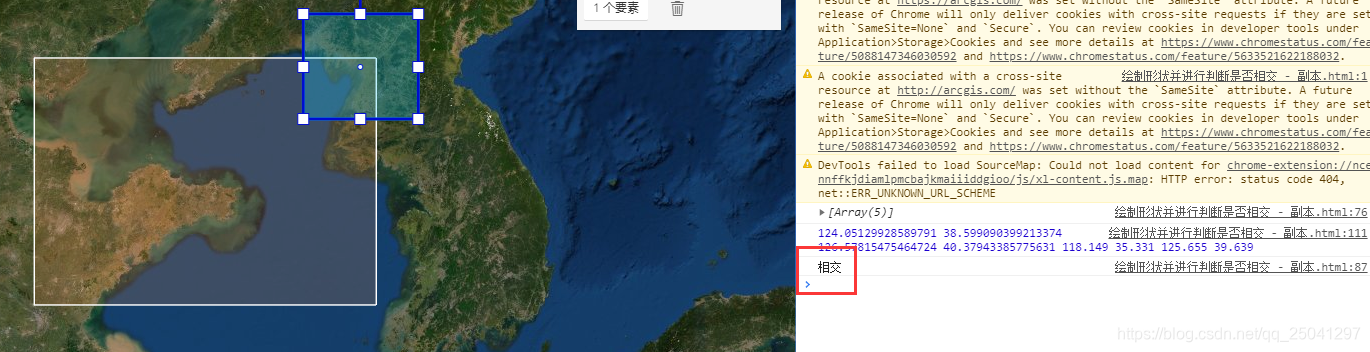
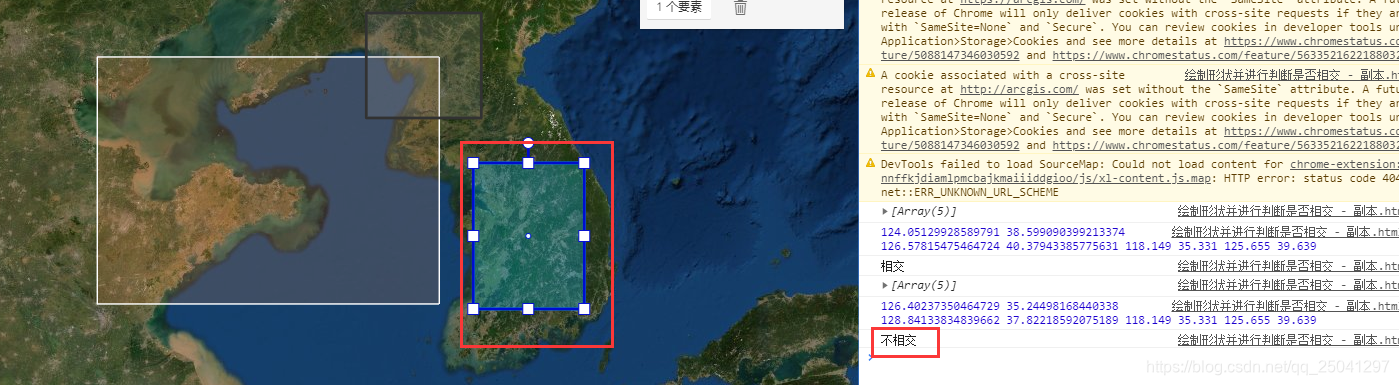
具体代码如下
<!DOCTYPE html>
<html>
	<head>
		<meta charset="utf-8" />
		<meta name="viewport" content="initial-scale=1,maximum-scale=1,user-scalable=no" />
		<title>Sketch widget - 4.15</title>

		<link rel="stylesheet" href="https://js.arcgis.com/4.15/esri/themes/light/main.css" />
		<script src="https://js.arcgis.com/4.15/"></script>

		<style>
			html,
			body,
			#viewDiv {
				padding: 0;
				margin: 0;
				height: 100%;
				width: 100%;
			}
		</style>
		<script>
			require([
				"esri/widgets/Sketch",
				"esri/Map",
				"esri/layers/GraphicsLayer",
				"esri/views/MapView", "esri/Graphic", "esri/widgets/Popup", "esri/geometry/support/webMercatorUtils"
			], function(Sketch, Map, GraphicsLayer, MapView, Graphic, Popup, webMercatorUtils) {
				const layer = new GraphicsLayer();
				const map = new Map({
					basemap: "satellite",
					layers: [layer]
				});
				var view = new MapView({
					container: "viewDiv",
					map: map,
					zoom: 4,
					center: [123.9634086609, 35.9595912264],
				});

				const sketch = new Sketch({
					layer: layer,
					view: view,
					creationMode: "update",
					availableCreateTools: ["rectangle"] //设置只有矩形
				});
			var polygon = {
					type: "polygon", // autocasts as new Polygon()
					rings: [
						[118.149, 39.639],
						[118.149, 35.331],
						[125.655, 35.331],
						[125.655, 39.639],
						[118.149, 39.639],
					]
				};
				var fillSymbol = {
					type: "simple-fill", // autocasts as new SimpleFillSymbol()
					color: [227, 139, 79, 0.2],
					outline: {
						// autocasts as new SimpleLineSymbol()
						color: [255, 255, 255],
						width: 1
					}
				};
				sketch.on("create", function(event) {
					if (event.state === "complete") {
						//将几何图形从Web墨卡托单位(wkid:3857)转换为地理单位(wkid:4326)。
						var values = webMercatorUtils.webMercatorToGeographic(event.graphic.geometry).rings;
						console.log(values);
						var x1 = values[0][3][0];
						var y1 = values[0][3][1];
						var x2 = values[0][1][0];
						var y2 = values[0][1][1];
						var x3 = polygon.rings[1][0];
						var y3 = polygon.rings[1][1];
						var x4 = polygon.rings[3][0];
						var y4 = polygon.rings[3][1];
						var reuslt = intersect(x1, y1, x2, y2, x3, y3, x4, y4);
						console.log(reuslt)
						//console.log(values);
					}
				});

				var polygonGraphic = new Graphic({
					geometry: polygon,
					symbol: fillSymbol
				});
				// console.log(polygonGraphic);
				layer.addMany([polygonGraphic]);

				// console.log(layer)
				view.ui.add(sketch, "top-right");


				//判断是否相交
				function intersect(x1, y1, x2, y2, x3, y3, x4, y4) {
					console.log(x1, y1, x2, y2, x3, y3, x4, y4)
					var rectangle1 = MaxAndMin(x1, y1, x2, y2);
					var rectangle2 = MaxAndMin(x3, y3, x4, y4);

					//首先选出p点坐标
					var PointP = PandN(rectangle1[0], rectangle1[1], rectangle2[0], rectangle2[1], 0);
					var PointN = PandN(rectangle1[2], rectangle1[3], rectangle2[2], rectangle2[3], 1);
					// console.log(PointP);
					// console.log(PointN);
					if (PointP[0] <= PointN[0] && PointP[1] <= PointN[1]) {
						return "相交";
					} else {
						return "不相交";
					}
				}


				function PandN(MinX1, MinY1, MinX2, MinY2, type) {
					// console.log(MinX1, MinY1, MinX2, MinY2, type)
					var PointX = MinX2;
					var PonintY = MinY2;
					if (type == 0) {
						if (MinX1 > MinX2) {
							PointX = MinX1;
						}
						if (MinY1 > MinY2) {
							PonintY = MinY1;
						}
					} else {
						if (MinX1 < MinX2) {
							PointX = MinX1;
						}
						if (MinY1 < MinY2) {
							PonintY = MinY1;
						}
					}
					var result = new Array(PointX, PonintY)
					return result;
				}


				//判断最大值和最小值
				function MaxAndMin(x1, y1, x2, y2) {
					var MinX = x1;
					var MinY = y1;
					var MaxX = x2;
					var MaxY = y2;
					//不存在相等的情况,如果相等的话矩形不存在
					if (x1 > x2) {
						MinX = x2;
						MaxX = x1;
					}
					if (y1 > y2) {
						MinY = y2;
						MaxY = y1;
					}
					var result = new Array(MinX, MinY, MaxX, MaxY)
					return result;
				}

			});
		</script>
	</head>

	<body>
		<div id="viewDiv"></div>
	</body>
</html>
最后发现,主要还是自己菜,不然找就弄出来了






 扫一扫
扫一扫


 445
445

 被折叠的 条评论
为什么被折叠?
被折叠的 条评论
为什么被折叠?
 到【灌水乐园】发言





