


注意事项一:
慎用
ComThread.InitSTA();
ComThread.Release();
因为经常会在 ComThread.Release(); 发生阻塞,导致程序一直卡在这里,不能被调用;
建议不要使用这个初始化和释放线程的代码,看似很高级,其实没啥用而且会出现很多东西
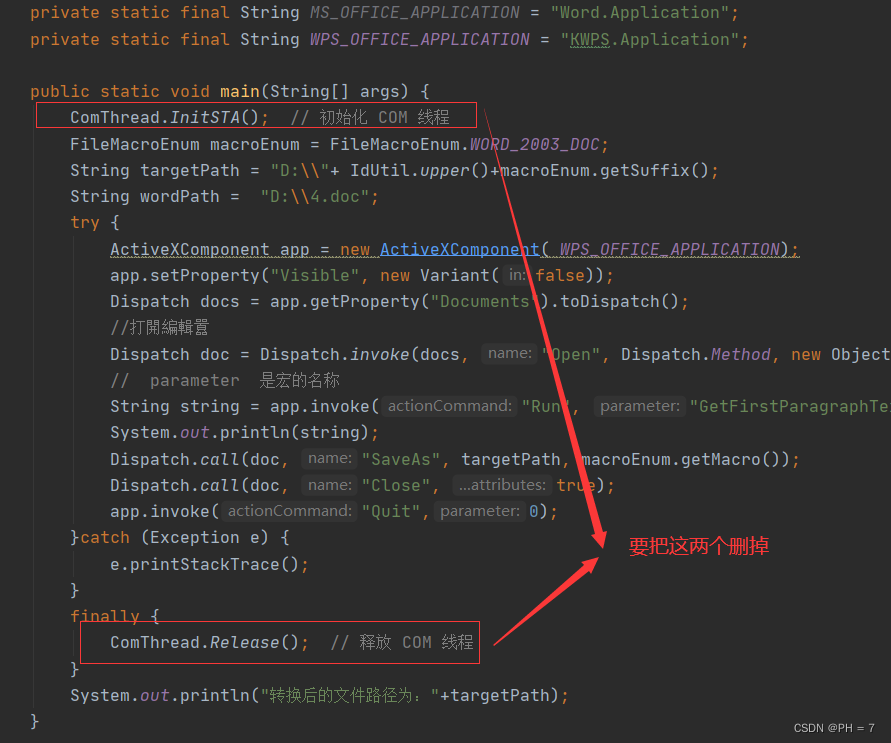
变为如下代码:
package com.example.worddemo.test.jacob;
import com.example.worddemo.test.jacob.enums.FileMacroEnum;
import com.example.worddemo.utils.IdUtil;
import com.jacob.activeX.ActiveXComponent;
import com.jacob.com.ComThread;
import com.jacob.com.Dispatch;
import com.jacob.com.Variant;

/**
 * @program: word-demo
 * @description: 运用宏  有返回值
 * @author: wjl
 * @create: 2024-01-14 22:54
 **/
public class RunMacroWithReturn {

    // 这里需要根据当前环境安装的是 MicroSoft Office还是WPS来选择
    // 如果安装的是WPS,则需要使用 KWPS.Application
    // 如果安装的是微软的 Office,需要使用 Word.Application
    private static final String MS_OFFICE_APPLICATION = "Word.Application";
    private static final String WPS_OFFICE_APPLICATION = "KWPS.Application";

    public static void main(String[] args) {
        FileMacroEnum macroEnum = FileMacroEnum.WORD_2003_DOC;
        String targetPath = "D:\\"+ IdUtil.upper()+macroEnum.getSuffix();
        String wordPath =  "D:\\4.doc";
        try {
            ActiveXComponent app = new ActiveXComponent( WPS_OFFICE_APPLICATION);
            app.setProperty("Visible", new Variant(false));
            Dispatch docs = app.getProperty("Documents").toDispatch();
            //打開編輯囂
            Dispatch doc = Dispatch.invoke(docs, "Open", Dispatch.Method, new Object[] {wordPath, new Variant(false), new Variant(true)} , new int[1]).toDispatch(); //打開word文檔
            //  parameter  是宏的名称
            String string = app.invoke("Run", "GetFirstParagraphText").getString();
            System.out.println(string);
            Dispatch.call(doc, "SaveAs", targetPath, macroEnum.getMacro());
            Dispatch.call(doc, "Close", true);
            app.invoke("Quit",0);
        }catch (Exception e) {
            e.printStackTrace();
        }
        System.out.println("转换后的文件路径为:"+targetPath);
    }


}
注意事项二:
一定要指定Tomcat的临时文件夹,而不是使用默认的,Windows系统会进行Tomcat临时文件夹的清理;
可以在编译器添加如下参数进行开发时的设置
#定临时目录为/app/xxx/tmp
-Djava.io.tmpdir=/app/xxx/tmp(自定义路径)
也可以加在jar包的启动的命令行中,如
java -Xmx6144m -jar -Dfile.encoding=UTF-8 -Djava.io.tmpdir=./upload_tmp xxx.jar当然还有很多处理方式,比如Yml的配置,configuration配置等,参考上面的连接
注意事项三:
Jacob的Variant类,可以处理COM组件返回的各种数据类型的,包括(Boolean,Date,String,Int,数组等)
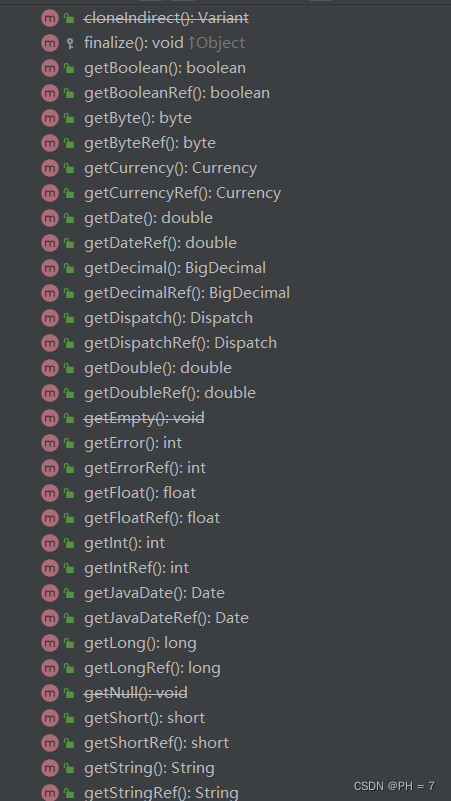
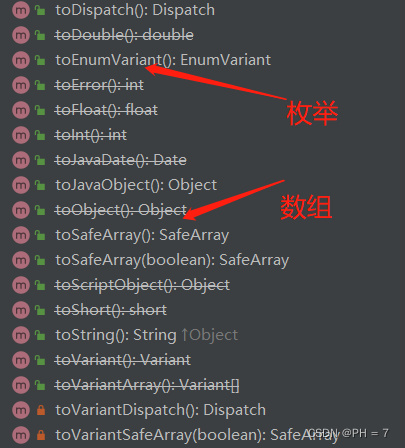
下面将演示,处理宏返回的二维数组,关于怎么使用宏,可以查看本人的系列文章
- VBA宏
' 在 Excel VBA 中定义一个返回二维数组的宏
Public Function Get2DArray() As Variant
    Dim arr(1 To 2, 1 To 3) As String
    arr(1, 1) = "One"
    arr(1, 2) = "Two"
    arr(1, 3) = "Three"
    arr(2, 1) = "Four"
    arr(2, 2) = "Five"
    arr(2, 3) = "Six"
    Get2DArray = arr
End Function
- jacob代码
import com.jacob.activeX.ActiveXComponent;
import com.jacob.com.Dispatch;
import com.jacob.com.SafeArray;
import com.jacob.com.Variant;

public class VBA2DArrayExample {
    public static void main(String[] args) {
        // 启动 Excel 应用
        ActiveXComponent excel = new ActiveXComponent("Excel.Application");

        try {
            // 设置 Excel 为不可见
            excel.setProperty("Visible", new Variant(false));

            // 打开 Excel 工作簿
            Dispatch workbooks = excel.getProperty("Workbooks").toDispatch();
            Dispatch workbook = Dispatch.call(workbooks, "Open", "C:\\path\\to\\your\\workbook.xlsm").toDispatch();

            // 获取宏结果
            Variant result = Dispatch.call(excel, "Run", "Get2DArray");

            // 检查返回的类型并处理二维数组
            if (result.getvt() == 8204) {
                SafeArray safeArray = result.toSafeArray();

                // 获取数组的边界
                int lBound1 = safeArray.getLBound(1);
                int uBound1 = safeArray.getUBound(1);
                int lBound2 = safeArray.getLBound(2);
                int uBound2 = safeArray.getUBound(2);

                // 遍历二维数组并输出元素
                for (int i = lBound1; i <= uBound1; i++) {
                    for (int j = lBound2; j <= uBound2; j++) {
                        Variant item = safeArray.getVariant(i, j);
                        System.out.println("[" + i + "," + j + "] = " + item.toString());
                    }
                }
            } else {
                System.out.println("Macro did not return a 2D array.");
            }

            // 关闭工作簿,不保存更改
            Dispatch.call(workbook, "Close", new Variant(false));

        } catch (Exception e) {
            e.printStackTrace();
        } finally {
            // 退出 Excel 应用
            excel.invoke("Quit", new Variant[]{});
        }
    }
}
 https://blog.youkuaiyun.com/qq_33265520/article/details/79911381





 扫一扫
扫一扫


 2826
2826

 被折叠的 条评论
为什么被折叠?
被折叠的 条评论
为什么被折叠?
 到【灌水乐园】发言





