


 本文介绍谷歌已废弃的百分比布局库,并转向推荐使用约束布局。曾广泛使用的AndroidPercentSupportLibrary现已过时,文章回顾其使用方法,包括依赖添加、自定义属性及示例代码。同时,提及第三方库PercentLinearLayout的引入与应用案例。
谷歌的百分比库已废弃,转用约束布局,本博文仅供参考思路。新方法请参考:https://blog.youkuaiyun.com/qq_21480607/article/details/98790567
一、首先说一下Google官方提供的百分比布局兼容库:
https://developer.android.google.cn/reference/android/support/percent/package-summary?hl=en#interfaces
Android Percent Support Library,目前它支持RelativeLayout和FrameLayout的百分比布局。
使用前添加依赖,定义在support中
implementation 'com.android.support:percent:xx.x.x'
目前最新版本为:implementation ‘com.android.support:percent:28.0.0’
查看网址:https://developer.android.google.cn/topic/libraries/support-library/revisions.html?hl=en
关于compile、implementation与api的区别请查看:https://blog.youkuaiyun.com/qq_21480607/article/details/98477660
由于百分比布局不是内置在系统SDK当中,所以要把完整的包路径写出来。同时要定义一个app的命名空间,这样才能使用百分比布局的自定义属性。
xmlns:app:"http://schemas.android.com/apk/res-auto”
之后就可以使用app:layout_widthPercent和layout_heightPercent属性了。
主要有以下属性
- app:layout_heightPercent:用百分比表示高度
- app:layout_widthPercent:用百分比表示宽度
- app:layout_marginPercent:用百分比表示View之间的间隔
- app:layout_marginLeftPercent:用百分比表示左边间隔
- app:layout_marginRight:用百分比表示右边间隔
- app:layout_marginTopPercent:用百分比表示顶部间隔
- app:layout_marginBottomPercent:用百分比表示底部间隔
- app:layout_marginStartPercent:用百分比表示距离第一个View之间的距离
- app:layout_marginEndPercent:用百分比表示距离最后一个View之间的距离
- app:layout_aspectRatio:用百分比表示View的宽高比
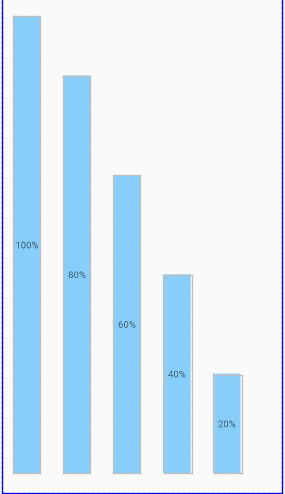
<?xml version="1.0" encoding="utf-8"?>
<android.support.percent.PercentRelativeLayout
    xmlns:android="http://schemas.android.com/apk/res/android"
    android:layout_width="match_parent"
    android:layout_height="match_parent"
    xmlns:app="http://schemas.android.com/apk/res-auto"
    >
<TextView
    android:layout_alignParentBottom="true"
    android:id="@+id/textView"
    android:layout_width="wrap_content"
    android:layout_height="wrap_content"
    android:background="#87CEFA"
    app:layout_heightPercent="100%"
    app:layout_marginPercent="4%"
    app:layout_widthPercent="10%"
    android:text="100%"
    android:gravity="center"
    />

<TextView
    android:layout_alignParentBottom="true"
    android:id="@+id/textView1"
    android:layout_width="wrap_content"
    android:layout_height="wrap_content"
    android:layout_toRightOf="@id/textView"
    android:background="#87CEFA"
    app:layout_heightPercent="80%"
    app:layout_marginPercent="4%"
    app:layout_widthPercent="10%"
    android:text="80%"
    android:gravity="center"
    />

<TextView
    android:layout_alignParentBottom="true"
    android:id="@+id/textView2"
    android:layout_width="wrap_content"
    android:layout_height="wrap_content"
    android:layout_toRightOf="@id/textView1"
    android:background="#87CEFA"
    app:layout_heightPercent="60%"
    app:layout_marginPercent="4%"
    app:layout_widthPercent="10%"
    android:text="60%"
    android:gravity="center"
    />

<TextView
    android:layout_alignParentBottom="true"
    android:id="@+id/textView3"
    android:layout_width="wrap_content"
    android:layout_height="wrap_content"
    android:layout_toRightOf="@id/textView2"
    android:background="#87CEFA"
    app:layout_heightPercent="40%"
    app:layout_marginPercent="4%"
    app:layout_widthPercent="10%"
    android:text="40%"
    android:gravity="center"
    />

<TextView
    android:layout_alignParentBottom="true"
    android:id="@+id/textView4"
    android:layout_width="wrap_content"
    android:layout_height="wrap_content"
    android:layout_toRightOf="@id/textView3"
    android:background="#87CEFA"
    app:layout_heightPercent="20%"
    app:layout_marginPercent="4%"
    app:layout_widthPercent="10%"
    android:text="20%"
    android:gravity="center"
    />
</android.support.percent.PercentRelativeLayout>
二、有大牛改写了官方库 添加了PercentLinearLayout
对于如何导入,也是相当的简单,android studio的用户,直接:
dependencies {
    //...
    compile 'com.zhy:percent-support-extends:1.0.1'
}
不需要导入官方的percent-support-lib了。
三个类分别为:
com.zhy.android.percent.support.PercentLinearLayout
com.zhy.android.percent.support.PercentRelativeLayout
com.zhy.android.percent.support.PercentFrameLayout
使用案例:
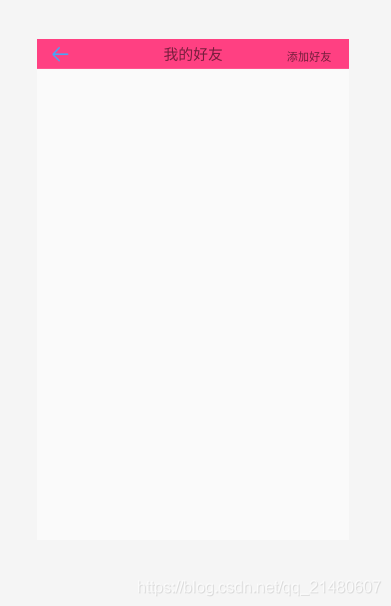
<?xml version="1.0" encoding="utf-8"?>
<com.zhy.android.percent.support.PercentLinearLayout
    xmlns:android="http://schemas.android.com/apk/res/android"
    xmlns:app="http://schemas.android.com/apk/res-auto"
    android:layout_width="match_parent"
    android:layout_height="wrap_content"
    android:orientation="vertical">
<com.zhy.android.percent.support.PercentFrameLayout
    android:layout_width="match_parent"
    android:layout_height="match_parent"
    android:background="#FF4082">
  <ImageView
      android:layout_width="0dp"
      android:layout_height="0dp"
      android:src="@drawable/actbar_home_up_indicator"
      app:layout_heightPercent="6%"
      app:layout_widthPercent="15%"/>
    <TextView
        android:layout_alignParentTop="true"
        android:id="@+id/textView"
        android:layout_width="wrap_content"
        android:layout_height="wrap_content"
        android:background="@color/white"
        app:layout_marginTopPercent="1%"
        app:layout_marginBottomPercent="1%"
        app:layout_heightPercent="4%"
        app:layout_widthPercent="100%"
        android:autoSizeMaxTextSize="80dp"
        android:autoSizeMinTextSize="16dp"
        android:autoSizeTextType="uniform"
        android:text="我的好友"
        android:textSize="26dp"
        android:gravity="center"
        />
    <TextView
        android:layout_alignParentTop="true"
        android:id="@+id/textView2"
        android:layout_width="wrap_content"
        android:layout_height="wrap_content"
        android:background="@color/white"
        app:layout_marginTopPercent="2%"
        app:layout_marginBottomPercent="1%"
        app:layout_marginLeftPercent="80%"
        app:layout_heightPercent="3%"
        app:layout_widthPercent="100%"
        android:autoSizeMaxTextSize="80dp"
        android:autoSizeMinTextSize="16dp"
        android:autoSizeTextType="uniform"
        android:text="添加好友"
        android:textSize="26dp"
        />
  </com.zhy.android.percent.support.PercentFrameLayout>
</com.zhy.android.percent.support.PercentLinearLayout>
详细介绍请见博主博文:https://blog.youkuaiyun.com/lmj623565791/article/details/46767825






 扫一扫
扫一扫


 2948
2948

 被折叠的 条评论
为什么被折叠?
被折叠的 条评论
为什么被折叠?
 到【灌水乐园】发言





