



 本文介绍了一种基于自动生成dimens资源文件的万能适配方案,通过将屏幕宽度和高度均分,实现不同分辨率设备上的精准适配,避免了传统dp适配的繁琐计算。
1,解决方法(自动创建多dimens)
-
手机默认什么多少分辨率,他会自己调用对应的Values 文件
【1】创建Values文件

【2】拷贝dimens.xml 文件
-
修改对应的值
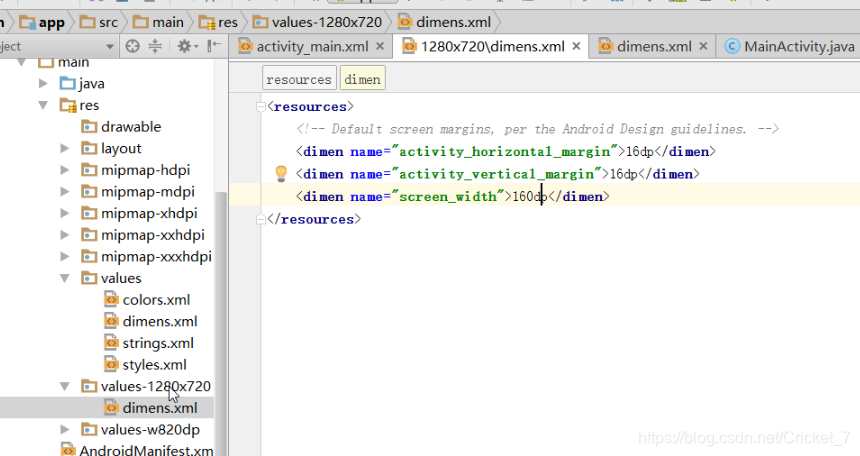
【3】调用不同机型就会进行不同适配
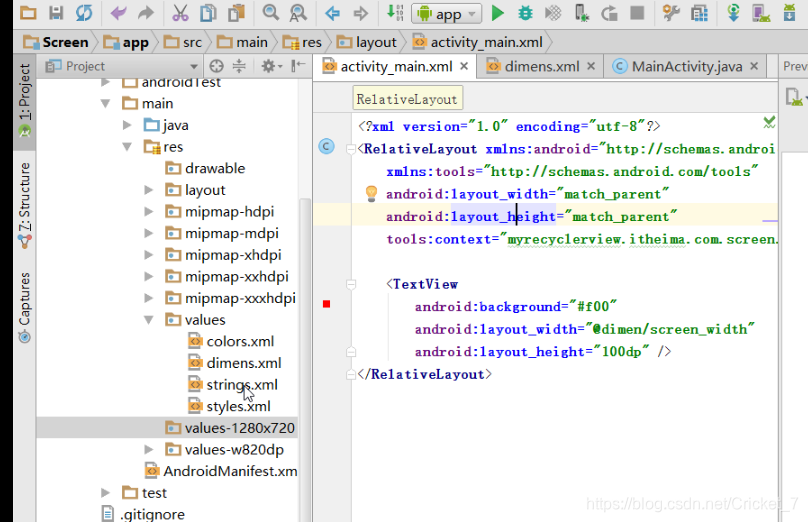
2,万能适配
-
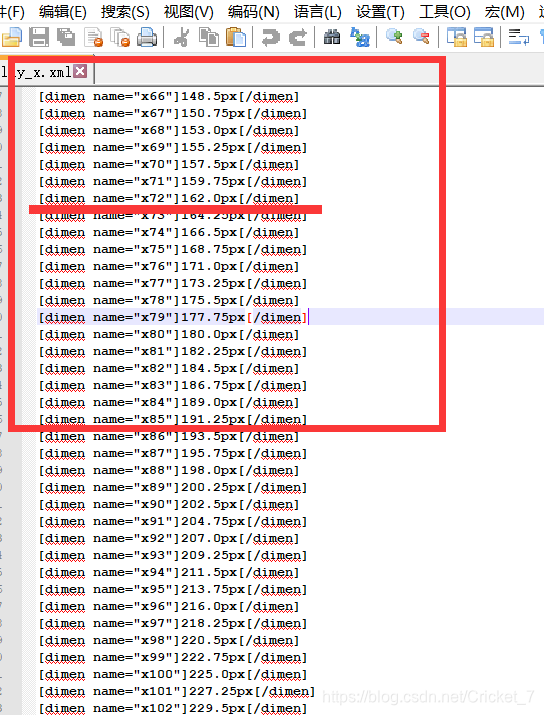
首先问美工是根据哪个分辨率切的图 1280x720 x71=160px
【1】ScreenUtils .java 放置桌面,javac 进行调用
-
"C:\\Users\\lenovo\\Desktop\\layoutroot\\values-{0}x{1}\\"; 中Lenovo 是当前主机的名字
import java.io.File;
import java.io.FileNotFoundException;
import java.io.FileOutputStream;
import java.io.PrintWriter;
class MakeXml {
private final static String rootPath = "C:\\Users\\lenovo\\Desktop\\layoutroot\\values-{0}x{1}\\";
private final static float dw = 320f;
private final static float dh = 480f;
private final static String WTemplate = "[dimen name=\"x{0}\"]{1}px[/dimen]\n";
private final static String HTemplate = "[dimen name=\"y{0}\"]{1}px[/dimen]\n";
public static void main(String[] args) {
makeString(320, 480);
makeString(480,800);
makeString(480, 854);
makeString(540, 960);
makeString(600, 1024);
makeString(720, 1184);
makeString(720, 1196);
makeString(720, 1280);
makeString(768, 1024);
makeString(800, 1280);
makeString(1080, 1812);
makeString(1080, 1920);
makeString(1440, 2560);
}
public static void makeString(int w, int h) {
StringBuffer sb = new StringBuffer();
sb.append("[?xml version=\"1.0\" encoding=\"utf-8\"?]\n");
sb.append("[resources]");
float cellw = w / dw;
for (int i = 1; i < 320; i++) {
sb.append(WTemplate.replace("{0}", i + "").replace("{1}",
change(cellw * i) + ""));
}
sb.append(WTemplate.replace("{0}", "320").replace("{1}", w + ""));
sb.append("[/resources]");
StringBuffer sb2 = new StringBuffer();
sb2.append("[?xml version=\"1.0\" encoding=\"utf-8\"?]\n");
sb2.append("[resources]");
float cellh = h / dh;
for (int i = 1; i < 480; i++) {
sb2.append(HTemplate.replace("{0}", i + "").replace("{1}",
change(cellh * i) + ""));
}
sb2.append(HTemplate.replace("{0}", "480").replace("{1}", h + ""));
sb2.append("[/resources]");
String path = rootPath.replace("{0}", h + "").replace("{1}", w + "");
File rootFile = new File(path);
if (!rootFile.exists()) {
rootFile.mkdirs();
}
File layxFile = new File(path + "lay_x.xml");
File layyFile = new File(path + "lay_y.xml");
try {
PrintWriter pw = new PrintWriter(new FileOutputStream(layxFile));
pw.print(sb.toString());
pw.close();
pw = new PrintWriter(new FileOutputStream(layyFile));
pw.print(sb2.toString());
pw.close();
} catch (FileNotFoundException e) {
e.printStackTrace();
}
}
public static float change(float a) {
int temp = (int) (a * 100);
return temp / 100f;
}
}
【2】javac 调用.java文件

【3】cd 进入Desktop 调用.class
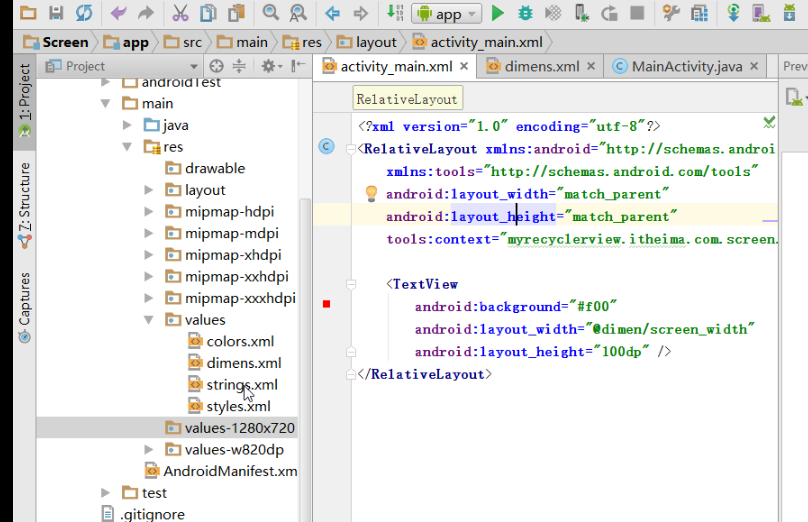
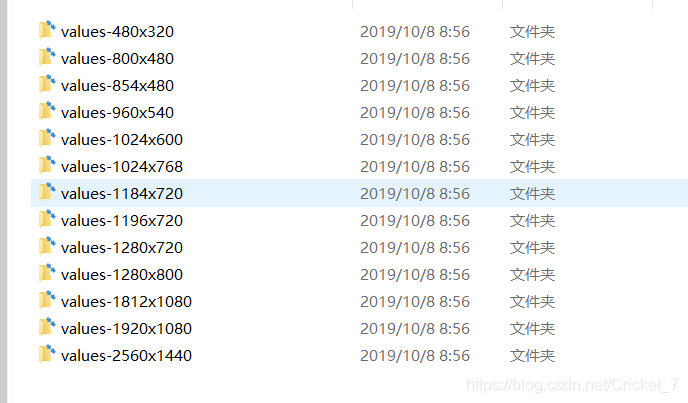
【4】获取到不同的分辨率
-
例如需要找1280 *720 中160px ,可以直接调用x72
百分比适配
虽然上述的dimens+dp能达到适配的目的,但是项目中如果要适配市场上常见的机型时,我们只能一个个的去计算,然后写上我们计算好的dp值,而且ui妹子在效果图上标记的都是px,我们还要根据这个再计算转换,很麻烦,有没有那种一劳永逸的?
参考了hongyang的博客之后,有这么一套适配方案,如下:
-
思路:把任何设备的手机宽度像素均分为320份,高度像素均分为480份,使用我们写好的程序自动生成资源values-***×***文件夹,里面包含lay_x.xml和lay_y.xml,分别对应宽度和高度的像素。
现在我们以320x480的分辨率为基准:
将屏幕的宽度分为320份,取值为x1~x320
将屏幕的高度分为480份,取值为y1~y480
然后生成该分辨率对应像素数的列表,如下:
lay_x.xml(宽):
<?xml version="1.0" encoding="utf-8"?>

<resources><dimen name="x1">1.0px</dimen>

<dimen name="x2">2.0px</dimen>

<dimen name="x3">3.0px</dimen>

<dimen name="x4">4.0px</dimen>

<dimen name="x5">5.0px</dimen>

<dimen name="x6">6.0px</dimen>

<dimen name="x7">7.0px</dimen>

<dimen name="x8">8.0px</dimen>

<dimen name="x9">9.0px</dimen>

<dimen name="x10">10.0px</dimen>

...

<dimen name="x300">300.0px</dimen>

<dimen name="x301">301.0px</dimen>

<dimen name="x302">302.0px</dimen>

<dimen name="x303">303.0px</dimen>

<dimen name="x304">304.0px</dimen>

<dimen name="x305">305.0px</dimen>

<dimen name="x306">306.0px</dimen>

<dimen name="x307">307.0px</dimen>

<dimen name="x308">308.0px</dimen>

<dimen name="x309">309.0px</dimen>

<dimen name="x310">310.0px</dimen>

<dimen name="x311">311.0px</dimen>

<dimen name="x312">312.0px</dimen>

<dimen name="x313">313.0px</dimen>

<dimen name="x314">314.0px</dimen>

<dimen name="x315">315.0px</dimen>

<dimen name="x316">316.0px</dimen>

<dimen name="x317">317.0px</dimen>

<dimen name="x318">318.0px</dimen>

<dimen name="x319">319.0px</dimen>

<dimen name="x320">320px</dimen>

</resources>
然后lay_y.xml(高):
<?xml version="1.0" encoding="utf-8"?>

<resources><dimen name="y1">1.0px</dimen>

<dimen name="y2">2.0px</dimen>

<dimen name="y3">3.0px</dimen>

<dimen name="y4">4.0px</dimen>

...

<dimen name="y480">480px</dimen>

</resources>
我们直接在dimens里面写上具体的px值,而不是dp值,这样给定一个写死的值,在手机上运行的时候就是我们所写上的px值。可能到这里各位又有疑问了,这样的话怎么做到适配的呢?别着急,我们假设手机屏幕的宽度都是320某单位,那么我们将一个屏幕宽度的总像素数平均分成320份,每一份对应具体的像素就可以了。我们可以创建多个values文件夹,多到覆盖市面上绝大多数流行的手机机型,并且用相应的比例计算好px值,由于现在是以320x480为基准的,所以如果我们要编写其他的values,要进行如下计算,比如我们以1920x1080为例:
由于基准是320x480,所以1080/320=3.375px,1920/480=4px,所以相应文件应该是这样的
lay_x.xml
<?xml version="1.0" encoding="utf-8"?>

<resources><dimen name="x1">3.375px</dimen>

<dimen name="x2">6.65px</dimen>

<dimen name="x3">10.125px</dimen>

...

<dimen name="x320">1080px</dimen>

</resources>
lay_y.xml
<?xml version="1.0" encoding="utf-8"?>

<resources><dimen name="y1">4px</dimen>

<dimen name="y2">8px</dimen>

<dimen name="y3">12px</dimen>

<dimen name="y4">16px</dimen>

...

<dimen name="y480">1920px</dimen>

</resources>
我们可以按照这种计算的方式补全当今市面上流行的机型。
但是我们怎么可能会去做这么蠢的事呢?肯定有工具类之类的东西!在此,再次感谢hongyang提供的工具类,工具类代码如下:
import java.io.File;

import java.io.FileNotFoundException;

import java.io.FileOutputStream;

import java.io.PrintWriter;

public class MakeXml {

    private final static String rootPath = "C:\\Users\\Administrator\\Desktop\\layoutroot\\values-{0}x{1}\\";

    private final static float dw = 320f;

    private final static float dh = 480f;

    private final static String WTemplate = "[dimen name=\"x{0}\"]{1}px[/dimen]\n";

    private final static String HTemplate = "[dimen name=\"y{0}\"]{1}px[/dimen]\n";

    public static void main(String[] args) {

        makeString(320, 480);

        makeString(480,800);

        makeString(480, 854);

        makeString(540, 960);

        makeString(600, 1024);

        makeString(720, 1184);

        makeString(720, 1196);

        makeString(720, 1280);

        makeString(768, 1024);

        makeString(800, 1280);

        makeString(1080, 1812);

        makeString(1080, 1920);

        makeString(1440, 2560);

    }

    public static void makeString(int w, int h) {

        StringBuffer sb = new StringBuffer();

        sb.append("[?xml version=\"1.0\" encoding=\"utf-8\"?]\n");

        sb.append("[resources]");

        float cellw = w / dw;

        for (int i = 1; i < 320; i++) {

            sb.append(WTemplate.replace("{0}", i + "").replace("{1}",

                    change(cellw * i) + ""));

        }

        sb.append(WTemplate.replace("{0}", "320").replace("{1}", w + ""));

        sb.append("[/resources]");

        StringBuffer sb2 = new StringBuffer();

        sb2.append("[?xml version=\"1.0\" encoding=\"utf-8\"?]\n");

        sb2.append("[resources]");

        float cellh = h / dh;

        for (int i = 1; i < 480; i++) {

            sb2.append(HTemplate.replace("{0}", i + "").replace("{1}",

                    change(cellh * i) + ""));

        }

        sb2.append(HTemplate.replace("{0}", "480").replace("{1}", h + ""));

        sb2.append("[/resources]");

        String path = rootPath.replace("{0}", h + "").replace("{1}", w + "");

        File rootFile = new File(path);

        if (!rootFile.exists()) {

            rootFile.mkdirs();

        }

        File layxFile = new File(path + "lay_x.xml");

        File layyFile = new File(path + "lay_y.xml");

        try {

            PrintWriter pw = new PrintWriter(new FileOutputStream(layxFile));

            pw.print(sb.toString());

            pw.close();

            pw = new PrintWriter(new FileOutputStream(layyFile));

            pw.print(sb2.toString());

            pw.close();

        } catch (FileNotFoundException e) {

            e.printStackTrace();

        }

    }

    public static float change(float a) {

        int temp = (int) (a * 100);

        return temp / 100f;

    }

}
代码应该很好懂,我们将一个屏幕宽度分为320份,高度480份,然后按照实际像素对每一个单位进行复制,放在对应values-widthxheight文件夹下面的lax.xml和lay.xml里面,这样就可以统一所有你想要的分辨率的单位了,无论在什么分辨率下,x320都是代表屏幕宽度,y480都是代表屏幕高度。
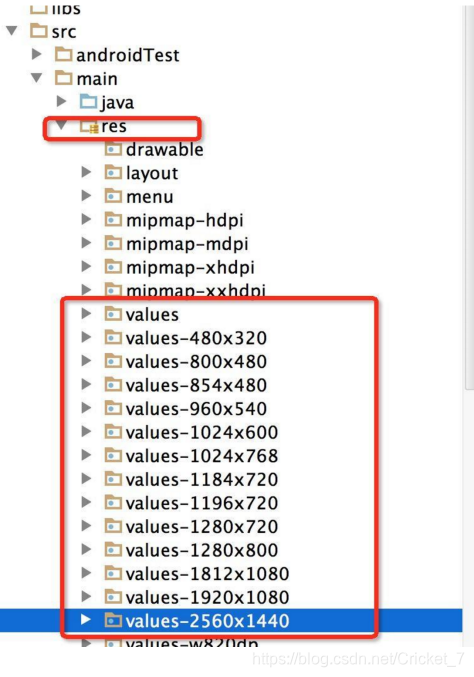
当执行了上述代码之后,会在本地生成很多个values文件夹,我们把这些values拷贝到项目的res下面,如下所示:
注:
分辨率为480x320的资源文件应放在res/values-480x320文件夹中;同理分辨率为1920x1080的资源文件应放在res/values-1920x1080文件夹中。(其中values-480x320是分辨率限定符)
必须在默认values里面也创建对应默认lay_x.xml和lay_y.xml文件,如下
lay_x.xml
<?xml version="1.0" encoding="utf-8">
<resources>
<dimen name="x1">1.0dp</dimen>
<dimen name="x2">2.0dp</dimen>
...
</resources>
因为对于没有生成对应分辨率文件的手机,会使用默认values文件夹,如果默认values文件夹没有(即没有对应的分辨率、没有对应dimen)就会报错,从而无法进行屏幕适配。
(注意对应单位改为dp,而不同于上面的px。因为不知道机型的分辨率,所以默认分辨率文件只好默认为x1=1dp以保证尽量兼容(又回到dp老方法了),这也是这个解决方案的一个弊端)
而我们怎么用呢?
工作中只需要根据UI妹子给出的某一个分辨率设计图的尺寸,然后找到对应像素数的单位,然后设置给控件就可以了,如下
<TextView
android:text="@string/hello_world"
android:layout_width="@dimen/x160"
android:layout_height="@dimen/y160"/>
关于这种适配方案的详情,请查看hongyang的博客http://blog.youkuaiyun.com/lmj623565791/article/details/45460089 。
Android 屏幕适配,我写了9篇关于适配的详解。查看我的专栏
https://blog.youkuaiyun.com/cricket_7/article/category/9408535





 扫一扫
扫一扫


 1612
1612

 被折叠的 条评论
为什么被折叠?
被折叠的 条评论
为什么被折叠?
 到【灌水乐园】发言





