



 本文通过代码示例展示了接口在类设计中的应用,包括USB设备的接口定义及其实现,以及工厂设计模式的使用。此外,还介绍了泛型改进的工厂模式,用于创建不同类型的食品对象,并通过代理设计模式来演示如何在真实主题执行操作前进行准备工作和后续清理工作。
接口标准定义
package com.msc.example;
interface IUSB{
    public boolean check() ;
    public void work() ;

}
class Computer{
    public void plugin(IUSB iusb){
        if (iusb.check()){
            iusb.work();
        }else{
            System.out.println("硬件设备出错");
        }
    }
}
class keyBoard implements IUSB{
    public boolean check() {
        return  true ;
    }
    @Override
    public void work() {
        System.out.println("键盘开始工作");
    }
}
class Print implements IUSB{
    public boolean check() {
        return  false ;
    }
    @Override
    public void work() {
        System.out.println("打印机开始工作");
    }
}
public class InterfaceDemo {
    public static void main(String[] args) {
    Computer computer = new Computer() ;
    computer.plugin(new keyBoard());
    computer.plugin(new Print());
    }
}
工厂设计模式
泛型改进工厂设计模式
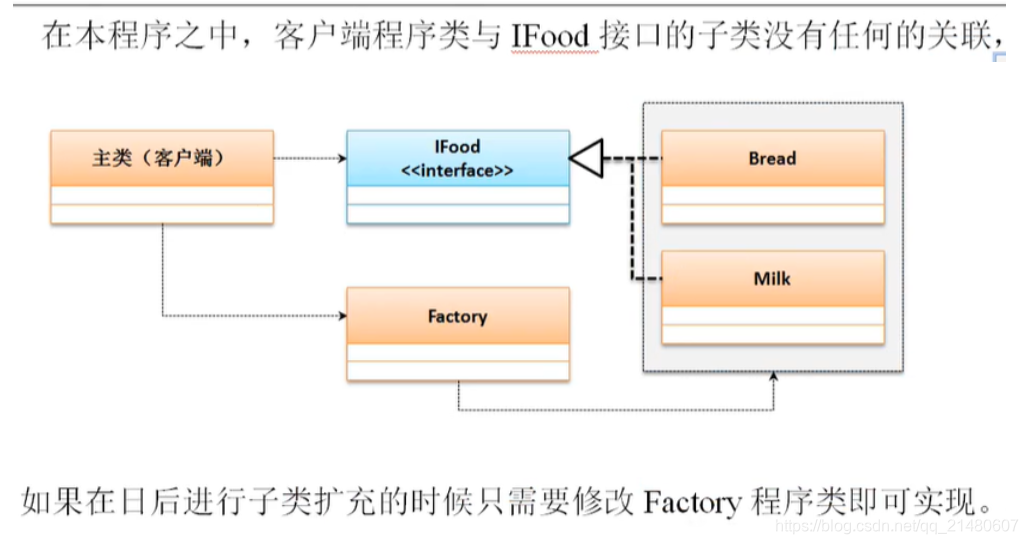
package com.msc.example;
interface IFood{
     public void eat() ;
}
class Factory{
    public static IFood getInstance(String classname) {
        switch(classname){
            case "bread": {
                return new Bread();
            } case "milk" : {
                return new Milk() ;
            } default:{
                return null;
            }
        }
    }
}
class Bread implements IFood{
    @Override
    public void eat(){
        System.out.println("吃面包");
    }
}
class Milk implements IFood{
    @Override
    public void eat() {
        System.out.println("喝牛奶");
    }
}

public class FactoryModel {
    public static void main(String[] args) {
        IFood ifood = Factory.getInstance("milk");
        ifood.eat();
        ifood = Factory.getInstance("bread");
        ifood.eat();
    }
}
代理设计模式
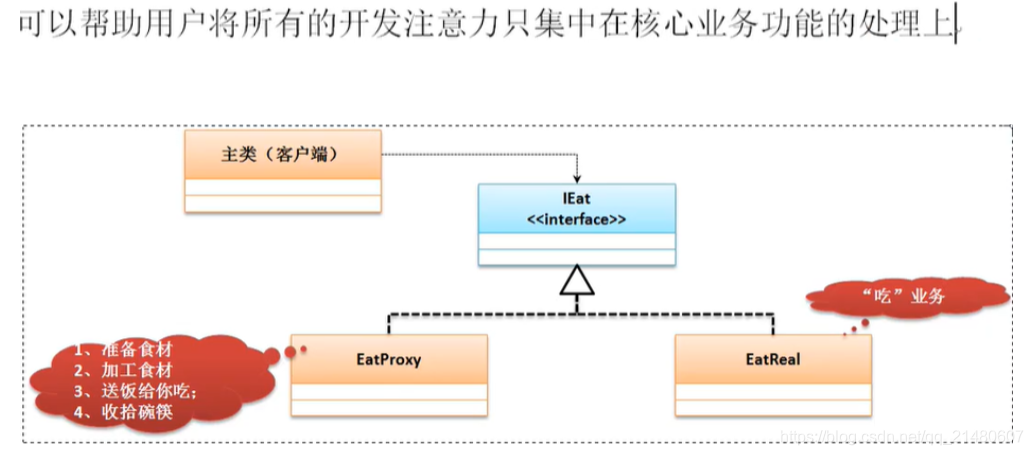
package com.msc.example;
interface IEat{
    public void get() ;
}
class EatNeed implements IEat{
    public void get() {
        System.out.println("【真实主题】获得食物开吃");
    }
}
class EatProxy implements IEat{
    private IEat eat ;
    public EatProxy () {} ;
    public EatProxy(IEat eat){
        this.eat = eat ;
    }
    public void get() {
        this.prepare() ;
        this.eat.get() ;
        this.clear() ;
    }
    public void prepare() {	// 准备过程
        System.out.println("【代理主题】1、精心购买食材。") ;
        System.out.println("【代理主题】2、小心的处理食材。") ;
    }
    public void clear() {
        System.out.println("【代理主题】3、收拾碗筷。");
    }
}
public class ProxyModel {
    public static void main(String[] args) {
        IEat eat = new EatProxy(new EatNeed()) ;
        eat.get() ;
    }
}





 扫一扫
扫一扫


 被折叠的 条评论
为什么被折叠?
被折叠的 条评论
为什么被折叠?
 到【灌水乐园】发言





