


 本文详细介绍了Django命令行工具的各种命令及其用法,包括如何检查项目问题、创建缓存表、运行服务器等,为Django开发者提供了实用指南。
check compilemessages createcachetable dbshell diffsettings dumpdata flush inspectdb loaddata makemessages makemigrations migrate runserver sendtestemail shell showmigrations sqlflush sqlmigrate sqlsequencereset squashmigrations startapp startproject test testserver
一 、解释:
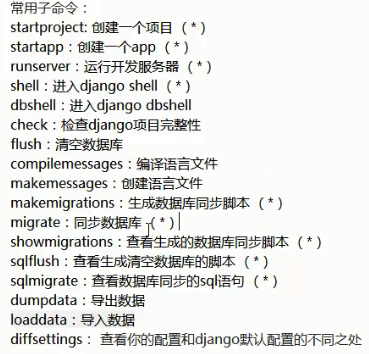
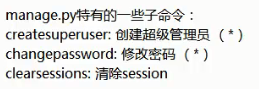
二、如何查看命令解释
在电工开发环境中使用 django-admin.py + help + 命令行 既可以查看命令的解释
example:我们要查看check命令
(django_basic_venv) C:\Users\xuchunlin>django-admin.py help check
usage: django-admin.py check [-h] [--version] [-v {0,1,2,3}]
                             [--settings SETTINGS] [--pythonpath PYTHONPATH]
                             [--traceback] [--no-color] [--tag TAGS]
                             [--list-tags] [--deploy]
                             [app_label [app_label ...]]

Checks the entire Django project for potential problems.

positional arguments:
  app_label

optional arguments:
  -h, --help            show this help message and exit
  --version             show program's version number and exit
  -v {0,1,2,3}, --verbosity {0,1,2,3}
                        Verbosity level; 0=minimal output, 1=normal output,
                        2=verbose output, 3=very verbose output
  --settings SETTINGS   The Python path to a settings module, e.g.
                        "myproject.settings.main". If this isn't provided, the
                        DJANGO_SETTINGS_MODULE environment variable will be
                        used.
  --pythonpath PYTHONPATH
                        A directory to add to the Python path, e.g.
                        "/home/djangoprojects/myproject".
  --traceback           Raise on CommandError exceptions
  --no-color            Don't colorize the command output.
  --tag TAGS, -t TAGS   Run only checks labeled with given tag.
  --list-tags           List available tags.
  --deploy              Check deployment settings.





 扫一扫
扫一扫


 1774
1774

 被折叠的 条评论
为什么被折叠?
被折叠的 条评论
为什么被折叠?
 到【灌水乐园】发言





