    void addComponentsInDependentLayout(){
        DependentLayout dl = (DependentLayout) findComponentById(ResourceTable.Id_id_dl);

        Text textA = new Text(this);
        int IDA = 1000;
        textA.setId(IDA);
        textA.setText("A");
        textA.setTextAlignment(TextAlignment.CENTER);
        textA.setTextSize(20, Text.TextSizeType.VP);
        ShapeElement shapeElementA = new ShapeElement();
        shapeElementA.setRgbColor(RgbColor.fromArgbInt(0xFF00ff00));
        textA.setBackground(shapeElementA);

        //LayoutConfig(int width, int height)
        DependentLayout.LayoutConfig configA = new DependentLayout.LayoutConfig(200, 200);
        //添加相对布局规则
        configA.addRule(DependentLayout.LayoutConfig.CENTER_IN_PARENT);

        //textA.setMarginRight(20);
        textA.setLayoutConfig(configA);
        dl.addComponent(textA);

        Text textB = new Text(this);
        textB.setText("B");
        textB.setTextAlignment(TextAlignment.CENTER);
        textB.setTextSize(20, Text.TextSizeType.VP);
        ShapeElement shapeElementB = new ShapeElement();
        shapeElementB.setRgbColor(RgbColor.fromArgbInt(0xFF00ff00));
        textB.setBackground(shapeElementB);

        //LayoutConfig(int width, int height)
        DependentLayout.LayoutConfig configB = new DependentLayout.LayoutConfig(200, 200);
        //添加相对布局规则
        configB.addRule(DependentLayout.LayoutConfig.LEFT_OF, IDA);
        configB.addRule(DependentLayout.LayoutConfig.ABOVE, IDA);

        textB.setLayoutConfig(configB);
        dl.addComponent(textB);

        Text textC = new Text(this);
        textC.setText("C");
        textC.setTextAlignment(TextAlignment.CENTER);
        textC.setTextSize(20, Text.TextSizeType.VP);
        ShapeElement shapeElementC = new ShapeElement();
        shapeElementC.setRgbColor(RgbColor.fromArgbInt(0xFF00ff00));
        textC.setBackground(shapeElementC);

        //LayoutConfig(int width, int height)
        DependentLayout.LayoutConfig configC = new DependentLayout.LayoutConfig(200, 200);
        //添加相对布局规则
        configC.addRule(DependentLayout.LayoutConfig.RIGHT_OF, IDA);
        configC.addRule(DependentLayout.LayoutConfig.ABOVE, IDA);

        textC.setLayoutConfig(configC);
        dl.addComponent(textC);

        Text textD = new Text(this);
        textD.setText("D");
        textD.setTextAlignment(TextAlignment.CENTER);
        textD.setTextSize(20, Text.TextSizeType.VP);
        ShapeElement shapeElementD = new ShapeElement();
        shapeElementD.setRgbColor(RgbColor.fromArgbInt(0xFF00ff00));
        textD.setBackground(shapeElementD);

        //LayoutConfig(int width, int height)
        DependentLayout.LayoutConfig configD = new DependentLayout.LayoutConfig(200, 200);
        //添加相对布局规则
        configD.addRule(DependentLayout.LayoutConfig.RIGHT_OF, IDA);
        configD.addRule(DependentLayout.LayoutConfig.BELOW, IDA);

        textD.setLayoutConfig(configD);
        dl.addComponent(textD);

        Text textE = new Text(this);
        textE.setText("E");
        textE.setTextAlignment(TextAlignment.CENTER);
        textE.setTextSize(20, Text.TextSizeType.VP);
        ShapeElement shapeElementE = new ShapeElement();
        shapeElementE.setRgbColor(RgbColor.fromArgbInt(0xFF00ff00));
        textE.setBackground(shapeElementE);

        //LayoutConfig(int width, int height)
        DependentLayout.LayoutConfig configE = new DependentLayout.LayoutConfig(200, 200);
        //添加相对布局规则
        configE.addRule(DependentLayout.LayoutConfig.LEFT_OF, IDA);
        configE.addRule(DependentLayout.LayoutConfig.BELOW, IDA);

        textE.setLayoutConfig(configE);
        dl.addComponent(textE);
    }
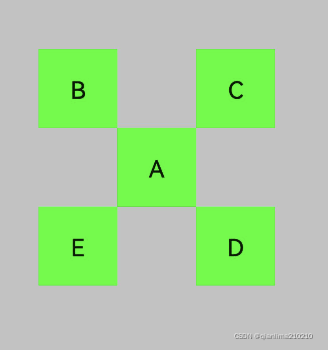



 该博客详细介绍了如何在Android开发中使用DependentLayout来创建并配置文本(Text)和ShapeElement元素,通过设置LayoutConfig实现A、B、C、D、E五个文本元素的相对布局,包括中心、左右、上下关系。





 扫一扫
扫一扫


 2049
2049

 被折叠的 条评论
为什么被折叠?
被折叠的 条评论
为什么被折叠?
 到【灌水乐园】发言





