 ThingsBoard编译与调试



 本文详细记录了ThingsBoard项目的编译过程,包括下载源码、编译准备、解决ngx-flowchart问题、编译项目及IDEA调试步骤。解决了license-maven-plugin插件冲突、依赖问题和编译错误。
网上有很多资料,每个人遇到的情况也都不一样。本人成功编译花费将近一周时间,过程整理如下:
1、下载GIT源码
- 目录右键,选择Git Bash Here
- 输入git命令克隆源代码:
git clone https://github.com/thingsboard/thingsboard.git
- 进入thingsboard文件夹:
cd thingsboard
git branch
- 列出所有版本:
git branch -a
- checkout 最新realease版本
git checkout realease-3.1
2、编译准备
- 注释插件
打开项目源码中的文件,查看其中的检查插件,打开thingsboard跟目录,pom.xml,查找license-maven-plugin,并注释掉
<!--
  <plugin>
      <groupId>com.mycila</groupId>
      <artifactId>license-maven-plugin</artifactId>
      <version>3.0</version>
      <configuration>
          <header>${main.dir}/license-header-template.txt</header>
          <properties>
              <owner>The Thingsboard Authors</owner>
          </properties>
          <excludes>
              <exclude>**/.env</exclude>
              <exclude>**/*.env</exclude>
              <exclude>**/.eslintrc</exclude>
              <exclude>**/.babelrc</exclude>
              <exclude>**/.jshintrc</exclude>
              <exclude>**/.gradle/**</exclude>
              <exclude>**/nightwatch</exclude>
              <exclude>**/README</exclude>
              <exclude>**/LICENSE</exclude>
              <exclude>**/banner.txt</exclude>
              <exclude>node_modules/**</exclude>
              <exclude>**/*.properties</exclude>
              <exclude>src/test/resources/**</exclude>
              <exclude>src/vendor/**</exclude>
              <exclude>src/font/**</exclude>
              <exclude>src/sh/**</exclude>
              <exclude>packaging/*/scripts/control/**</exclude>
              <exclude>packaging/*/scripts/windows/**</exclude>
              <exclude>packaging/*/scripts/init/**</exclude>
              <exclude>**/*.log</exclude>
              <exclude>**/*.current</exclude>
              <exclude>.instance_id</exclude>
              <exclude>src/main/scripts/control/**</exclude>
              <exclude>src/main/scripts/windows/**</exclude>
              <exclude>src/main/resources/public/static/rulenode/**</exclude>
              <exclude>**/*.proto.js</exclude>
              <exclude>docker/haproxy/**</exclude>
              <exclude>docker/tb-node/**</exclude>
              <exclude>ui/**</exclude>
              <exclude>src/browserslist</exclude>
              <exclude>**/*.raw</exclude>
          </excludes>
          <mapping>
              <proto>JAVADOC_STYLE</proto>
              <cql>DOUBLEDASHES_STYLE</cql>
              <scss>JAVADOC_STYLE</scss>
              <jsx>SLASHSTAR_STYLE</jsx>
              <tsx>SLASHSTAR_STYLE</tsx>
              <conf>SCRIPT_STYLE</conf>
              <gradle>JAVADOC_STYLE</gradle>
          </mapping>
      </configuration>
      <executions>
          <execution>
              <goals>
                  <goal>check</goal>
              </goals>
          </execution>
      </executions>
  </plugin>
-->
- 修改ui-ngx工程的pom.xml文件中node的版本。
install-node-and-npm 改为当前机器安装的版本。感觉作用不大,但是我改了。
3、 ngx-flowchart调整
因为ngx-flowchart是直接从GitHub上下载下来的,虽然编译能成功,但是会发现规则链画面打开出错。会有类似的错误提示TypeError: Class constructor X cannot be invoked without ‘new’。
修改ui-ngx的tsconfig.json,重新编译。虽然显示规则链没有问题,但是编辑规则链还是会提示错误。
"target": "es5", ===> "target": "es6",
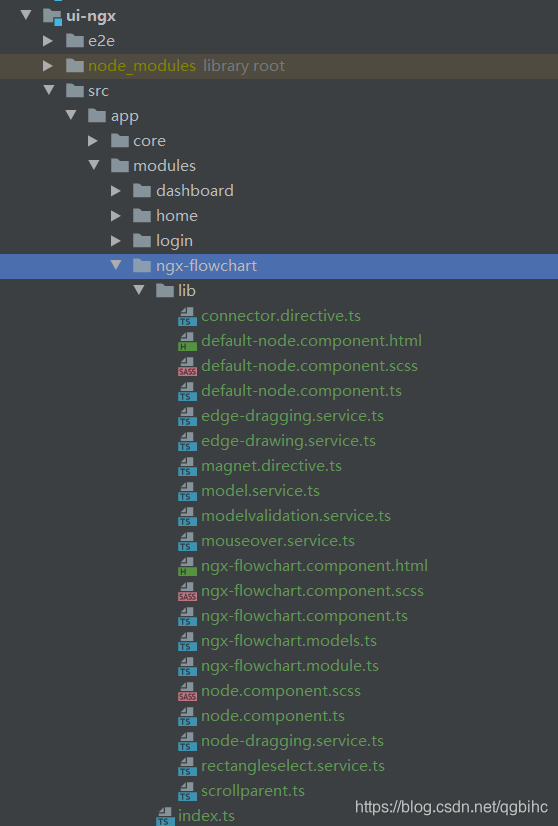
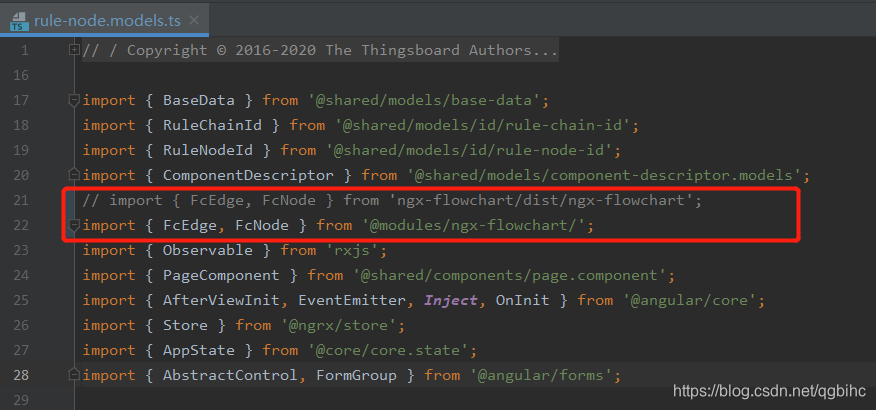
对应方式是把ngx-flowchart的源码放到ui-ngx中,target还是原来es5,原来依赖的地方修改一下,编译后就正常了。
- 把public-api.ts改名为index.ts.
- 搜索’ngx-flowchart/dist,分别修改。
4、编译项目
- 为了编译顺利,请使用管理员运行命令,如果遇到问题,请多试几次。
mvn clean install -DskipTests
遇到问题,可以使用命令清楚,继续运行
mvn clear - java编译问题不大,关键是在ui-ngx出错。
主要解决方法时,在cmd进入thingsboard\ui-ngx目录,直接运行npm install 安装需要的依赖包。
安装过程中如有问题,基本时npm的问题。可以参考此文
本人解决主要是删除C:\Users{用户名}\AppData\Roaming下的npm。 - 编译成功会显示如下,此过程时间较长,12分钟左右。
[INFO] Reactor Summary for Thingsboard 3.1.0:
[INFO]
[INFO] Thingsboard ........................................ SUCCESS [ 0.218 s]
[INFO] Netty MQTT Client .............................. 最低0.47元/天 解锁文章






 扫一扫
扫一扫


 5241
5241

 被折叠的 条评论
为什么被折叠?
被折叠的 条评论
为什么被折叠?
 到【灌水乐园】发言





