


讲一个我这几天遇到的坑,因为我的镜像仓库是主要是自己测试用,就没有配置tls,走的是http协议。可能是因为我太久没有玩containerd了,我发现这玩意更新,以前我们配置http的私有仓库只需要类似这样配置:
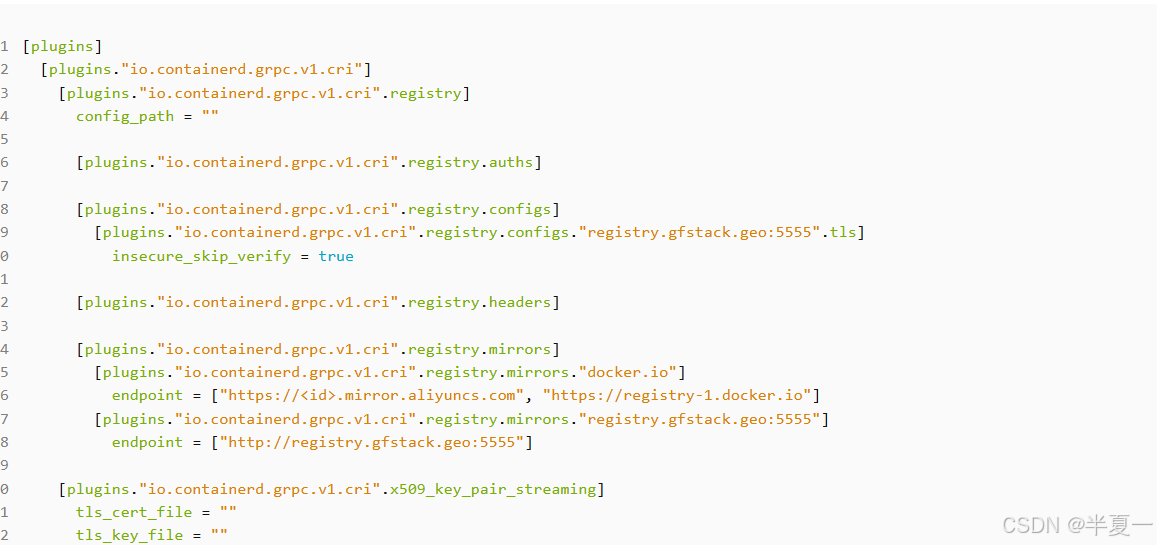
但是我发现目前不行了(好像是1.5以后就废弃了),简单翻了下github的官方文档:
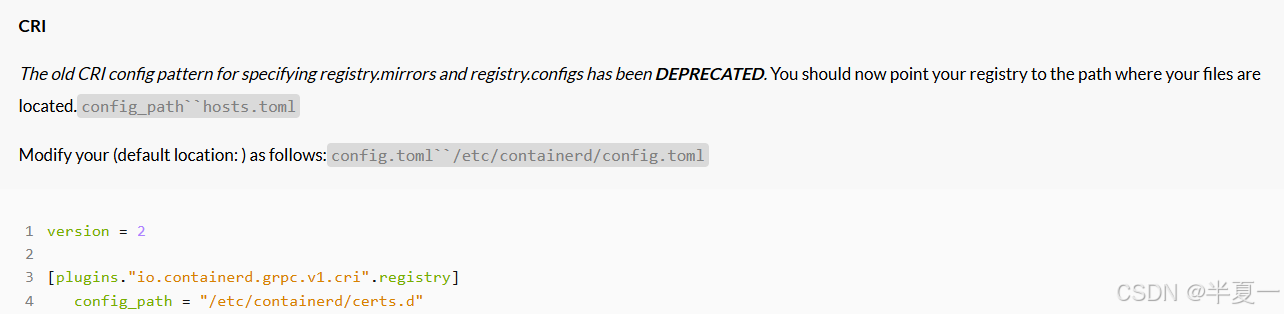
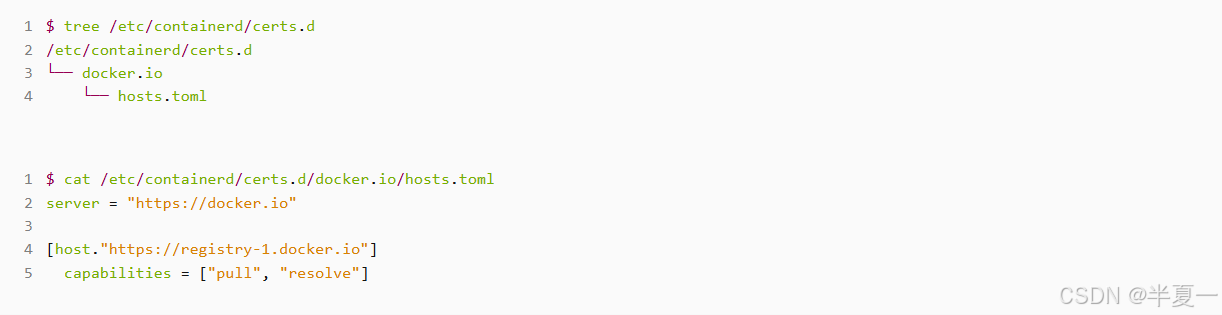
The registry host namespace portion is . Example tree for docker.io:[registry_host_name|IP address][:port]
Bypass TLS Verification Example
To bypass the TLS verification for a private registry at 192.168.31.250:5000
Create a path and text at the path “/etc/containerd/certs.d/docker.io/hosts.toml” with following or similar contents:hosts.toml

简单来说就是containerd把这一块单独摘出来了,你需要单独放到一个配置文件里面。比如我们最常用的registry.gfstack.geo:5555,示例配置是:
/etc/containerd/config.toml

必须带上配置路径参数才可以:
$ ctr images pull --hosts-dir “/etc/containerd/certs.d” -k registry.gfstack.geo:5555/memcached:20230808
INFO[0000] host will try HTTPS first since it is configured for HTTP with a TLS configuration, consider changing host to HTTPS or removing unused TLS configuration host=“registry.gfstack.geo:5555”
INFO[0000] host will try HTTPS first since it is configured for HTTP with a TLS configuration, consider changing host to HTTPS or removing unused TLS configuration host=“registry.gfstack.geo:5555”
INFO[0000] host will try HTTPS first since it is configured for HTTP with a TLS configuration, consider changing host to HTTPS or removing unused TLS configuration host=“registry.gfstack.geo:5555”
INFO[0000] host will try HTTPS first since it is configured for HTTP with a TLS configuration, consider changing host to HTTPS or removing unused TLS configuration host=“registry.gfstack.geo:5555”
registry.gfstack.geo:5555/memcached:20230808: resolved |++++++++++++++++++++++++++++++++++++++|
manifest-sha256:a378fc88e1cf862023111260e78e1b10fb0d60b8ad87fe7869a691b20e9dfb23: done |++++++++++++++++++++++++++++++++++++++|
layer-sha256:a8aa3384848b1da533a93fef8f83235205ba54e25477b0decc4dd2af37d79ee4: done |++++++++++++++++++++++++++++++++++++++|
layer-sha256:ec6231f619cff25219570cbe828d5aa2b0bd9cc8561ece4dbd6efd4d68c9a045: done |++++++++++++++++++++++++++++++++++++++|
layer-sha256:924900cefc78e2b86773a1c6b4f9f73246ec32dc26d72aaec5560a05a99d2e66: done |++++++++++++++++++++++++++++++++++++++|
config-sha256:d53843c7e570e7c2fca82b193906e90dd053c8b8dc6485d10fd19b43de63e963: done |++++++++++++++++++++++++++++++++++++++|
layer-sha256:a1d0c75327776413fa0db9ed3adcdbadedc95a662eb1d360dad82bb913f8a1d1: done |++++++++++++++++++++++++++++++++++++++|
layer-sha256:2923d284c7b91601b2f866a733232190bcad0492c14b623be388abb3fab06c11: done |++++++++++++++++++++++++++++++++++++++|
layer-sha256:5ab10d3b8d744fd97ade43bac4190e1369785abc35d45e9e4f73827ed7d8ea50: done |++++++++++++++++++++++++++++++++++++++|
layer-sha256:392a6e5a5c6ef37cf0d35fb4974f18943e692db5534d565b39e4bdb2b9c6c8ce: done |++++++++++++++++++++++++++++++++++++++|
layer-sha256:1d94b5844b27755d3a07b1a88e29344bdc874e83ab915849ab305aa7c213070a: done |++++++++++++++++++++++++++++++++++++++|
elapsed: 0.1 s total: 0.0 B (0.0 B/s)
unpacking linux/amd64 sha256:a378fc88e1cf862023111260e78e1b10fb0d60b8ad87fe7869a691b20e9dfb23…
done: 18.894916ms






 扫一扫
扫一扫


 3073
3073

 被折叠的 条评论
为什么被折叠?
被折叠的 条评论
为什么被折叠?
 到【灌水乐园】发言





