


在我学习大模型之前,我一直是一个java哥,现在学习了大模型,我看视频学习,就只知道一个base llm,还有一个是instruction tuned llm,我理解了这些词汇的意义,然后进入了正式学习,那我们正式开始吧!
资源,配置,环境
首先我是通过DeepLearning.AI进行最基础的学习,网址是:DLAI - Learning Platform (deeplearning.ai),在这里你可以学习到最基础的知识,里面有内置Jupyter,可以方便读者学习,通过视频的讲解加上自己的编写可以学的更快!
开始
首先我们会有两条对应原则,具体内容我们后面会进行讲解 如果你是在本机运行这些代码,那我们首先需要
pip install openai
当然如果你是在网站用内置jupyter那就不需要管这些问题了
好了让我们来看看这些晦涩难懂的大模型是什么吧
运行
import openai
import os

from dotenv import load_dotenv, find_dotenv
_ = load_dotenv(find_dotenv())

openai.api_key  = os.getenv('OPENAI_API_KEY')
这段代码的目的是设置并使用OpenAI的API密钥以访问OpenAI的服务
import openai
import os
这两行代码导入了需要的模块:
openai模块用于与OpenAI的API进行交互。os模块用于与操作系统进行交互,特别是用于获取环境变量。
from dotenv import load_dotenv, find_dotenv
_ = load_dotenv(find_dotenv())
这两行代码的作用是加载环境变量:
load_dotenv和find_dotenv函数来自dotenv库,dotenv库用于读取.env文件中的环境变量。find_dotenv()函数会自动找到当前项目中的.env文件路径。load_dotenv(find_dotenv())会加载这个文件中的所有环境变量。
openai.api_key = os.getenv('OPENAI_API_KEY')
这行代码从环境变量中获取OpenAI的API密钥并设置它:
os.getenv('OPENAI_API_KEY')从环境变量中获取名为OPENAI_API_KEY的值。openai.api_key将该值设置为OpenAI库使用的API密钥,以便在之后的代码中可以使用OpenAI的API。
这段代码的总体目的是从.env文件中读取OpenAI的API密钥,并配置OpenAI库以便后续代码可以使用该密钥与OpenAI的服务进行交互。
然后点击下图这个按钮就可以运行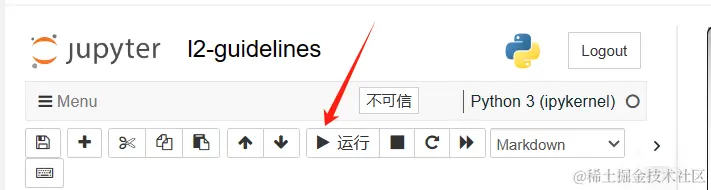 然后显示为这个形式就是运行成功
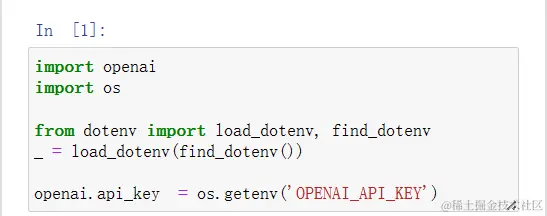
然后我们继续运行后续的代码
def get_completion(prompt, model="gpt-3.5-turbo"):
    messages = [{"role": "user", "content": prompt}]
    response = openai.ChatCompletion.create(
        model=model,
        messages=messages,
        temperature=0, # this is the degree of randomness of the model's output
    )
    return response.choices[0].message["content"]
这里我们写了一个辅助函数,何为辅助函数,用简单的话来说就是为了减少代码的冗余,而存在的函数
这里定义了一个名为get_completion的辅助函数,用于通过OpenAI的gpt-3.5-turbo模型生成聊天补全
def get_completion(prompt, model="gpt-3.5-turbo"):
这行代码定义了一个函数get_completion,它接受两个参数:
prompt:这是用户提供的提示信息或问题。model:这是使用的模型名称,默认为gpt-3.5-turbo。
messages = [{"role": "user", "content": prompt}]
这行代码创建了一个包含字典的列表messages,用于向OpenAI API发送请求。字典中有两个键:
"role":指定消息的角色,这里是"user",表示用户的消息。"content":包含实际的提示内容,即用户提供的prompt。
    response = openai.ChatCompletion.create(
        model=model,
        messages=messages,
        temperature=0, # this is the degree of randomness of the model's output
    )
这段代码调用OpenAI的ChatCompletion.create方法生成聊天补全。传递的参数包括:
model:使用的模型名称,这里使用函数参数model,默认是gpt-3.5-turbo。messages:消息列表,这里是包含用户提示的messages。temperature:设置为0,控制模型输出的随机性。温度值越低,输出越确定和一致;温度值越高,输出越随机。
return response.choices[0].message["content"]
这行代码从API的响应中提取并返回生成的消息内容:
response.choices[0].message["content"]:从响应中提取第一个选择的消息内容,并将其返回。 总体来说,这个函数的作用是:
- 接收用户提供的提示信息。
- 调用OpenAI的gpt-3.5-turbo模型生成响应。
- 返回生成的消息内容。
然后我们就可以运行了
然后下面那个我们可以不用管他,如果这个In [2]显示了,就证明运行成功了 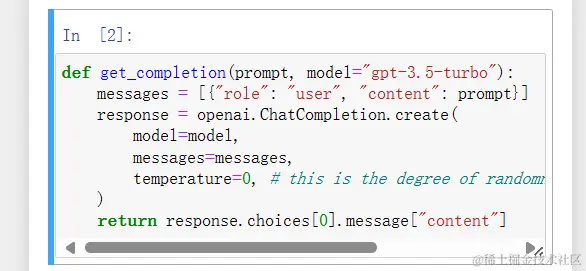
接下来就我们前面提到的两个原则:
- 原则1:编写清晰而具体的指令
- 原则2:给模型时间进行“思考” 然后我们运行这个后面的代码:
text = f"""
You should express what you want a model to do by \
providing instructions that are as clear and \
specific as you can possibly make them. \
This will guide the model towards the desired output, \
and reduce the chances of receiving irrelevant \
or incorrect responses. Don't confuse writing a \
clear prompt with writing a short prompt. \
In many cases, longer prompts provide more clarity \
and context for the model, which can lead to \
more detailed and relevant outputs.
"""
prompt = f"""
Summarize the text delimited by triple backticks \
into a single sentence.
```{text}```
"""
response = get_completion(prompt)
print(response)
这里定义了一个包含多行文本的字符串,并使用OpenAI的get_completion函数生成一个总结。
text = f"""
You should express what you want a model to do by \
providing instructions that are as clear and \
specific as you can possibly make them. \
This will guide the model towards the desired output, \
and reduce the chances of receiving irrelevant \
or incorrect responses. Don't confuse writing a \
clear prompt with writing a short prompt. \
In many cases, longer prompts provide more clarity \
and context for the model, which can lead to \
more detailed and relevant outputs.
"""
这段代码使用三重引号定义了一个多行字符串text。其中的\ 用于在行尾进行换行,使代码更易读。这个字符串包含了关于如何编写有效提示的信息,强调了清晰和具体的重要性。
prompt = f"""
Summarize the text delimited by triple backticks \
into a single sentence.
```{text}```
"""
这段代码构建了一个新的字符串prompt,该字符串是一个提示,要求模型总结用三重反引号括起来的文本。使用了f字符串格式化方法,将前面定义的text嵌入到提示中。生成的提示内容如下:
Summarize the text delimited by triple backticks
into a single sentence.
```You should express what you want a model to do by providing instructions that are as clear and specific as you can possibly make them. This will guide the model towards the desired output, and reduce the chances of receiving irrelevant or incorrect responses. Don't confuse writing a clear prompt with writing a short prompt. In many cases, longer prompts provide more clarity and context for the model, which can lead to more detailed and relevant outputs.```
response = get_completion(prompt)
这行代码调用了前面定义的get_completion函数,传入构建的prompt作为参数。该函数使用OpenAI的API生成对提示的响应。
print(response)
这行代码将API的响应打印出来,即模型对提示生成的总结。 总结起来,这段代码的作用是:
- 定义一段关于如何编写有效提示的文本。
- 构建一个提示,要求模型对这段文本进行总结。
- 使用OpenAI的模型生成总结并打印输出。
然后我们运行这个代码即可,以下图片是我运行时的结果 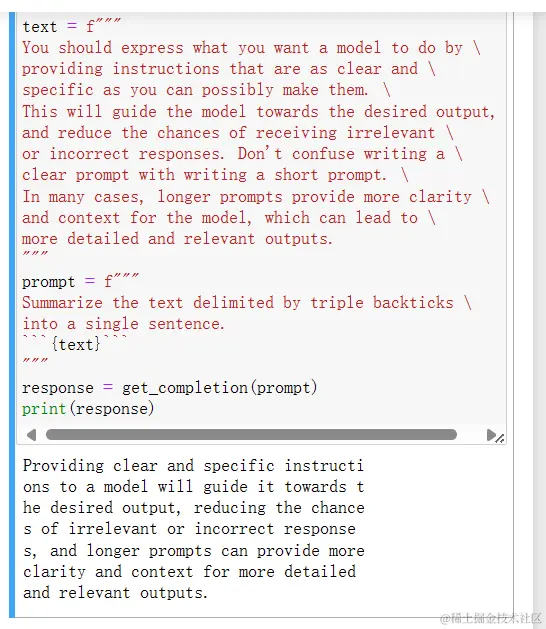
这里就可以看到我们通过openai进行了最基础的询问操作
然后就是结构化进行输出
我们为了使传递模型的输出更加容易我们可以让其输出HTML或者是JSON格式
然后我们运行后面这个代码
prompt = f"""
Generate a list of three made-up book titles along \
with their authors and genres.
Provide them in JSON format with the following keys:
book_id, title, author, genre.
"""
response = get_completion(prompt)
print(response)
这里定义了一个提示,要求OpenAI的模型生成三个虚构的书籍标题,并提供相关的作者和体裁信息,然后返回这些数据的JSON格式。
prompt = f"""
Generate a list of three made-up book titles along \
with their authors and genres.
Provide them in JSON format with the following keys:
book_id, title, author, genre.
"""
这段代码使用了多行字符串构建了一个提示字符串prompt,内容如下:
Generate a list of three made-up book titles along
with their authors and genres.
Provide them in JSON format with the following keys:
book_id, title, author, genre.
具体来说,这个提示的意思是:
- 生成三个虚构的书名。
- 提供每本书的作者和体裁。
- 以JSON格式提供这些信息,并包含以下键:
book_id,title,author,genre。
response = get_completion(prompt)
这行代码调用了前面定义的get_completion函数,传入构建的prompt作为参数。该函数使用OpenAI的API生成对提示的响应。
print(response)
这行代码将API的响应打印出来。模型生成的响应将是一个包含三个虚构书籍信息的JSON格式字符串。 总结起来,这段代码的作用是:
- 构建一个提示,要求模型生成三本虚构书籍的标题、作者和体裁。
- 使用OpenAI的模型生成响应,并以JSON格式提供这些信息。
- 打印生成的响应。
然后我们运行代码 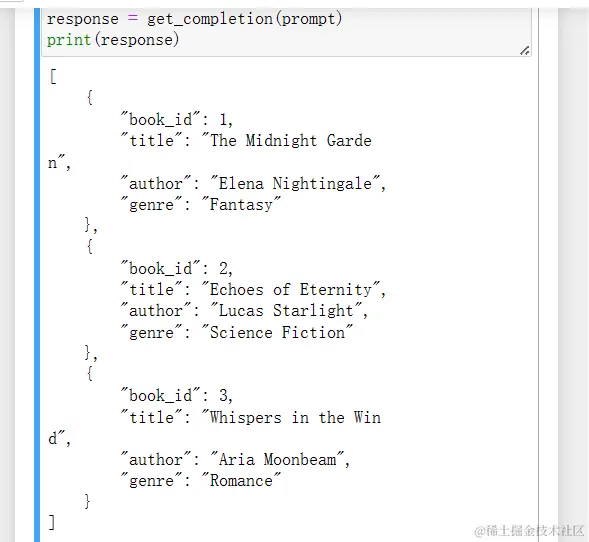
很显然,我们运行成功了,同样确实实现了相应功能
如果我们想要进行对应格式化输出其他的内容我们还可以这样进行,比如下列代码:
text_1 = f"""
Making a cup of tea is easy! First, you need to get some \
water boiling. While that's happening, \
grab a cup and put a tea bag in it. Once the water is \
hot enough, just pour it over the tea bag. \
Let it sit for a bit so the tea can steep. After a \
few minutes, take out the tea bag. If you \
like, you can add some sugar or milk to taste. \
And that's it! You've got yourself a delicious \
cup of tea to enjoy.
"""
prompt = f"""
You will be provided with text delimited by triple quotes.
If it contains a sequence of instructions, \
re-write those instructions in the following format:

Step 1 - ...
Step 2 - …
…
Step N - …

If the text does not contain a sequence of instructions, \
then simply write \"No steps provided.\"

\"\"\"{text_1}\"\"\"
"""
response = get_completion(prompt)
print("Completion for Text 1:")
print(response)
这段代码的目的是处理一段文本,并将其中的指令按步骤格式化
text_1 = f"""
Making a cup of tea is easy! First, you need to get some \
water boiling. While that's happening, \
grab a cup and put a tea bag in it. Once the water is \
hot enough, just pour it over the tea bag. \
Let it sit for a bit so the tea can steep. After a \
few minutes, take out the tea bag. If you \
like, you can add some sugar or milk to taste. \
And that's it! You've got yourself a delicious \
cup of tea to enjoy.
"""
这段代码定义了一个包含多行文本的字符串text_1,描述了制作一杯茶的步骤。文本中包含了一些换行符\以保持代码格式的整洁。
prompt = f"""
You will be provided with text delimited by triple quotes.
If it contains a sequence of instructions, \
re-write those instructions in the following format:

Step 1 - ...
Step 2 - …
…
Step N - …

If the text does not contain a sequence of instructions, \
then simply write "No steps provided."

\"\"\"{text_1}\"\"\"
"""
这段代码构建了一个新的提示字符串prompt,其内容如下:
You will be provided with text delimited by triple quotes.
If it contains a sequence of instructions,
re-write those instructions in the following format:

Step 1 - ...
Step 2 - …
…
Step N - …

If the text does not contain a sequence of instructions,
then simply write "No steps provided."

"""Making a cup of tea is easy! First, you need to get some water boiling. While that's happening, grab a cup and put a tea bag in it. Once the water is hot enough, just pour it over the tea bag. Let it sit for a bit so the tea can steep. After a few minutes, take out the tea bag. If you like, you can add some sugar or milk to taste. And that's it! You've got yourself a delicious cup of tea to enjoy."""
这个提示要求模型将包含在三重引号中的文本重新格式化为分步骤的指令格式。如果文本不包含指令,则输出“No steps provided.”
response = get_completion(prompt)
这行代码调用了前面定义的get_completion函数,传入构建的prompt作为参数。该函数使用OpenAI的API生成对提示的响应。
print("Completion for Text 1:")
print(response)
这两行代码打印出模型生成的响应。具体来说,将显示模型如何将给定的制作茶的步骤重新格式化为分步骤的形式。
总结起来,这段代码的作用是:
- 定义一段描述如何制作茶的文本。
- 构建一个提示,要求模型将文本中的指令重新格式化为分步骤的形式。
- 使用OpenAI的模型生成响应并打印输出。
然后我们运行代码
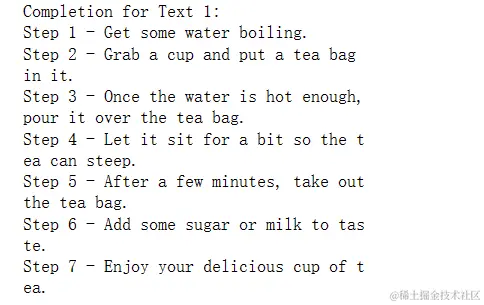
这个就是输出内容
后面我们就开始介绍对应代码了,因为后面几乎都是相同概念
text_2 = f"""
The sun is shining brightly today, and the birds are \
singing. It's a beautiful day to go for a \
walk in the park. The flowers are blooming, and the \
trees are swaying gently in the breeze. People \
are out and about, enjoying the lovely weather. \
Some are having picnics, while others are playing \
games or simply relaxing on the grass. It's a \
perfect day to spend time outdoors and appreciate the \
beauty of nature.
"""
prompt = f"""
You will be provided with text delimited by triple quotes.
If it contains a sequence of instructions, \
re-write those instructions in the following format:

Step 1 - ...
Step 2 - …
…
Step N - …

If the text does not contain a sequence of instructions, \
then simply write \"No steps provided.\"

\"\"\"{text_2}\"\"\"
"""
response = get_completion(prompt)
print("Completion for Text 2:")
print(response)
这段代码定义了一个新的文本,并要求模型判断该文本是否包含指令。如果包含指令,将其重新格式化为步骤形式;如果不包含指令,则输出“No steps provided”。
text_2 = f"""
The sun is shining brightly today, and the birds are \
singing. It's a beautiful day to go for a \
walk in the park. The flowers are blooming, and the \
trees are swaying gently in the breeze. People \
are out and about, enjoying the lovely weather. \
Some are having picnics, while others are playing \
games or simply relaxing on the grass. It's a \
perfect day to spend time outdoors and appreciate the \
beauty of nature.
"""
这段代码定义了一个包含多行文本的字符串text_2,描述了一个美好的户外场景。文本中使用了换行符\以保持代码格式的整洁。
prompt = f"""
You will be provided with text delimited by triple quotes.
If it contains a sequence of instructions, \
re-write those instructions in the following format:

Step 1 - ...
Step 2 - …
…
Step N - …

If the text does not contain a sequence of instructions, \
then simply write "No steps provided."

\"\"\"{text_2}\"\"\"
"""
这段代码构建了一个新的提示字符串prompt,其内容如下:
You will be provided with text delimited by triple quotes.
If it contains a sequence of instructions,
re-write those instructions in the following format:

Step 1 - ...
Step 2 - …
…
Step N - …

If the text does not contain a sequence of instructions,
then simply write "No steps provided."

"""The sun is shining brightly today, and the birds are singing. It's a beautiful day to go for a walk in the park. The flowers are blooming, and the trees are swaying gently in the breeze. People are out and about, enjoying the lovely weather. Some are having picnics, while others are playing games or simply relaxing on the grass. It's a perfect day to spend time outdoors and appreciate the beauty of nature."""
这个提示要求模型将包含在三重引号中的文本重新格式化为分步骤的指令格式。如果文本不包含指令,则输出“No steps provided.”
response = get_completion(prompt)
这行代码调用了前面定义的get_completion函数,传入构建的prompt作为参数。该函数使用OpenAI的API生成对提示的响应。
print("Completion for Text 2:")
print(response)
这两行代码打印出模型生成的响应。具体来说,将显示模型判断文本是否包含指令,并根据判断结果输出相应内容。
总结起来,这段代码的作用是:
- 定义一段描述户外美好场景的文本。
- 构建一个提示,要求模型判断文本是否包含指令,并根据判断结果重新格式化或输出“No steps provided.”
- 使用OpenAI的模型生成响应并打印输出。
运行后,我们会发现text2是一段描写美好的风景,并没有指令所以很显然这个就是No steps provided.

先发布一下吧!!! 然后过段时间再更新
2024年6月6日更新
昨天写到十点要睡觉了,今天接着写,吃了个中饭,继续开始学习
首先我们会看到下面的代码是一个有关于对话的自动生成代码,具体的内容我放在了下面,代码的解析和上述的代码是几乎一样的
prompt = f"""
Your task is to answer in a consistent style.

<child>: Teach me about patience.

<grandparent>: The river that carves the deepest \
valley flows from a modest spring; the \
grandest symphony originates from a single note; \
the most intricate tapestry begins with a solitary thread.

<child>: Teach me about resilience.
"""
response = get_completion(prompt)
print(response)
这个是对应结果 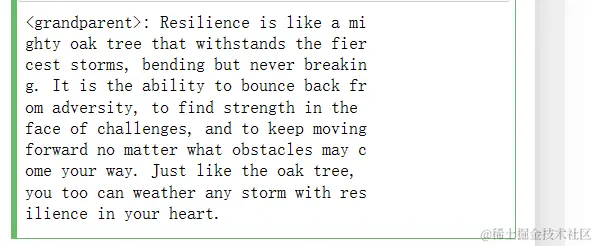
原理2:给机器思考时间
实例一:
text = f"""
In a charming village, siblings Jack and Jill set out on \
a quest to fetch water from a hilltop \
well. As they climbed, singing joyfully, misfortune \
struck—Jack tripped on a stone and tumbled \
down the hill, with Jill following suit. \
Though slightly battered, the pair returned home to \
comforting embraces. Despite the mishap, \
their adventurous spirits remained undimmed, and they \
continued exploring with delight.
"""
# example 1
prompt_1 = f"""
Perform the following actions:
1 - Summarize the following text delimited by triple \
backticks with 1 sentence.
2 - Translate the summary into French.
3 - List each name in the French summary.
4 - Output a json object that contains the following \
keys: french_summary, num_names.

Separate your answers with line breaks.

Text:
```{text}```
"""
response = get_completion(prompt_1)
print("Completion for prompt 1:")
print(response)
这里是对给定的文本进行一系列处理,包括总结、翻译和提取信息,然后以JSON格式输出结果。
text = f"""
In a charming village, siblings Jack and Jill set out on \
a quest to fetch water from a hilltop \
well. As they climbed, singing joyfully, misfortune \
struck—Jack tripped on a stone and tumbled \
down the hill, with Jill following suit. \
Though slightly battered, the pair returned home to \
comforting embraces. Despite the mishap, \
their adventurous spirits remained undimmed, and they \
continued exploring with delight.
"""
这段代码定义了一个包含多行文本的字符串text,描述了杰克和吉尔去取水的故事
prompt_1 = f"""
Perform the following actions:
1 - Summarize the following text delimited by triple \
backticks with 1 sentence.
2 - Translate the summary into French.
3 - List each name in the French summary.
4 - Output a json object that contains the following \
keys: french_summary, num_names.

Separate your answers with line breaks.

Text:
```{text}```
"""
这段代码构建了一个新的提示字符串prompt_1,其内容如下:
Perform the following actions:
1 - Summarize the following text delimited by triple backticks with 1 sentence.
2 - Translate the summary into French.
3 - List each name in the French summary.
4 - Output a json object that contains the following keys: french_summary, num_names.

Separate your answers with line breaks.

Text:
```In a charming village, siblings Jack and Jill set out on a quest to fetch water from a hilltop well. As they climbed, singing joyfully, misfortune struck—Jack tripped on a stone and tumbled down the hill, with Jill following suit. Though slightly battered, the pair returned home to comforting embraces. Despite the mishap, their adventurous spirits remained undimmed, and they continued exploring with delight.```
这个提示要求模型对包含在三重引号中的文本执行以下操作:
- 用一句话总结该文本。
- 将总结翻译成法语。
- 列出法语总结中的每个名字。
- 输出一个包含
french_summary和num_names键的JSON对象。
要求每个答案用换行符分隔。
response = get_completion(prompt_1)
这行代码调用了前面定义的get_completion函数,传入构建的prompt_1作为参数。该函数使用OpenAI的API生成对提示的响应。
print("Completion for prompt 1:")
print(response)
这两行代码打印出模型生成的响应。具体来说,将显示模型按步骤处理后的结果。
总结起来,这段代码的作用是:
- 定义一段描述杰克和吉尔去取水的故事文本。
- 构建一个提示,要求模型总结文本、翻译总结、提取名字,并以JSON格式输出。
- 使用OpenAI的模型生成响应并打印输出。
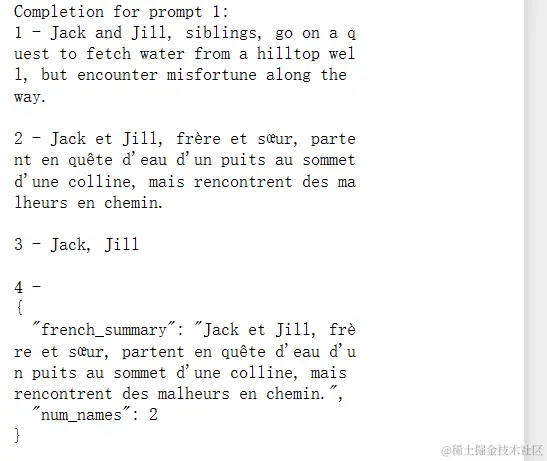
在这里,我们没有看到明显的机器思考的过程,但是我们可以发现在这里我们确实可以通过指令的方式让机器有条不紊的按照要求进行输出,这种方法有助于提高模型输出的质量和准确性
实例二:
我们给出一个很有意思的问题
prompt = f"""
Determine if the student's solution is correct or not.

Question:
I'm building a solar power installation and I need \
 help working out the financials.
- Land costs $100 / square foot
- I can buy solar panels for $250 / square foot
- I negotiated a contract for maintenance that will cost \
me a flat $100k per year, and an additional $10 / square \
foot
What is the total cost for the first year of operations
as a function of the number of square feet.

Student's Solution:
Let x be the size of the installation in square feet.
Costs:
1. Land cost: 100x
2. Solar panel cost: 250x
3. Maintenance cost: 100,000 + 100x
Total cost: 100x + 250x + 100,000 + 100x = 450x + 100,000
"""
response = get_completion(prompt)
print(response)
我丢,数学题,我们在写数学题的时候需要动脑筋,同样的,我们的模型也需要进行思考,这个是很重要的事情,证明了我们训练模型时同样需要让机器具有人的思维方式
让我们看看这些是什么意思吧
这里在检查一个学生的解决方案是否正确,具体是针对一个太阳能发电站的财务计算问题。
定义提示字符串
prompt = f"""
Determine if the student's solution is correct or not.

Question:
I'm building a solar power installation and I need \
 help working out the financials.
- Land costs $100 / square foot
- I can buy solar panels for $250 / square foot
- I negotiated a contract for maintenance that will cost \
me a flat $100k per year, and an additional $10 / square \
foot
What is the total cost for the first year of operations
as a function of the number of square feet.

Student's Solution:
Let x be the size of the installation in square feet.
Costs:
1. Land cost: 100x
2. Solar panel cost: 250x
3. Maintenance cost: 100,000 + 10x
Total cost: 100x + 250x + 100,000 + 10x = 360x + 100,000
"""
这段代码构建了一个提示字符串prompt,其内容如下:
Determine if the student's solution is correct or not.

Question:
I'm building a solar power installation and I need help working out the financials.
- Land costs $100 / square foot
- I can buy solar panels for $250 / square foot
- I negotiated a contract for maintenance that will cost me a flat $100k per year, and an additional $10 / square foot
What is the total cost for the first year of operations as a function of the number of square feet.

Student's Solution:
Let x be the size of the installation in square feet.
Costs:
1. Land cost: 100x
2. Solar panel cost: 250x
3. Maintenance cost: 100,000 + 10x
Total cost: 100x + 250x + 100,000 + 10x = 360x + 100,000
这个提示要求模型判断学生的解决方案是否正确。问题描述了构建一个太阳能发电站的费用计算,包括土地成本、太阳能板成本和维护成本。学生的解决方案列出了每项成本并给出了总成本的计算公式。
调用函数生成响应
response = get_completion(prompt)
这行代码调用了前面定义的get_completion函数,传入构建的prompt作为参数。该函数使用OpenAI的API生成对提示的响应。
打印结果
print(response)
这行代码打印出模型生成的响应。具体来说,将显示模型判断学生解决方案的结果。
分析学生的解决方案 学生的解决方案如下:
- 土地成本:100x
- 太阳能板成本:250x
- 维护成本:100000 + 10x
- 总成本:100x + 250x + 100000 + 10x = 360x + 100000
根据问题描述,学生的解决方案看起来是正确的,因为所有成本都被正确计算并总和在一起。模型会检查这些计算并确认是否正确。 总结
这段代码的作用是:
- 构建一个提示,要求模型检查并确认一个学生解决方案的正确性。
- 使用OpenAI的模型生成响应并打印输出。
- 通过打印输出,确认学生对太阳能发电站费用的计算是否正确。
然后我们看到模型给我们的回答是
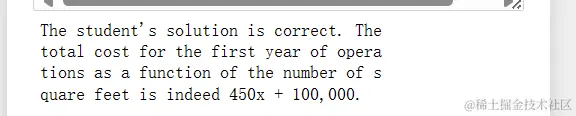
这里是不是就恍然大明白了
同样的,我们可以让机器模型充当导师的作用,我们可以给学生写上评价
菜鸟第一节总结如下:
我们的大模型在回答相应问题时,必然的会出现很多错误,这些我们称之为幻觉(Hallucinations),这个是正常现象,我们需要去优化和反馈,不断的训练模型,在后面有一些作业,作为大菜菜会及时写完验收学习成果!!!
希望各位看到这篇文章会有所收获,你们的支持是我前进的动力!!!
 5774


 扫一扫


 被折叠的 条评论
为什么被折叠?
 到【灌水乐园】发言


