


文章目录
1、概述
-
分布式系统面临的问题
分布式系统面临的问题
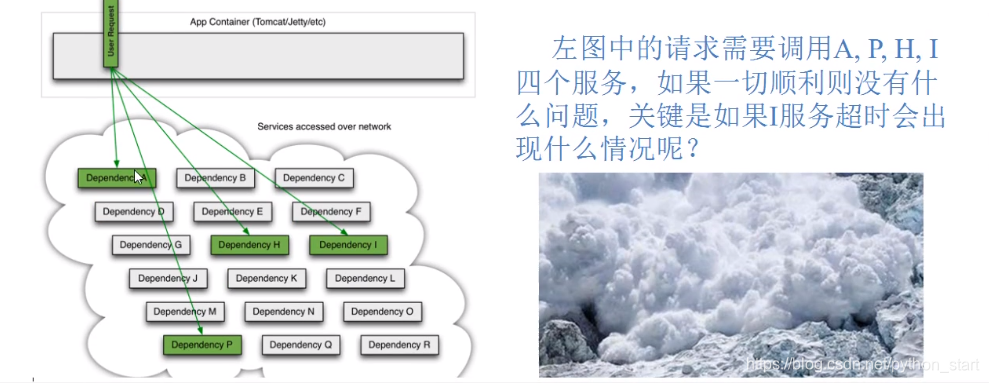
复杂分布式体系结构中的应用程序 有数10个依赖关系,每个依赖关系在某些时候将不可避免地失败
-
服务雪崩
多个微服务之间调用的时候,假设微服务A调用微服务B和微服务C,微服务B和微服务C又调用其它的微服务,这就是所谓的"扇出"。
如果扇出的链路上某个微服务的调用响应时间过长或者不可用,对微服务A的调用就会占用越来越多的系统资源,进而引起系统崩溃,所谓的“雪崩效应”.对于高流量的应用来说,单-的后端依赖可能会导致所有服务器上的所有资源都在几秒钟内饱和。比失败更糟糕的是,这些应用程序还可能导致服务之间的延迟增加,备份队列,线程和其他系统资源紧张,导致整个系统发生更多的级联故障。这些都表示需要对故障和延迟进行隔离和管理,以便单个依赖关系的失败,不能取消整个应用程序或系统。
所以,通常当你发现一个模块下的某个实例失败后,这时候这个模块依然还会接收流量,然后这个有问题的模块还调用了其他的模块,这样就会发生级联故障,或者叫雪崩。
-
是什么

-
作用
服务降级
服务熔断
接近实时的监控
2、HyStrix重要概念
-
服务降级(fallback)
1、 服务器忙,请稍后再试,不让客户端等待并立刻返回一个友好提示,fallback
2、哪些情况会发出降级
程序运行异常 超时 服务熔断触发服务降级 线程池/信号量也会导致服务降级 -
服务熔断(break)
类比保险丝达到最大服务访问后,直接拒绝访问,拉闸限电,然后调用服务降级的方法并返回友好提示
就是保险丝 : 服务的降级->进而熔断->恢复调用链路
-
服务限流(flowlimit)
秒杀高并发等操作,严禁一窝蜂的过来拥挤,大家排队,一秒钟N个,有序进行
3、hystrix案例
构建案例
1、新建cloud-provider-hystrix-payment8001
2、POM
  <!--hystrix-->
        <dependency>
            <groupId>org.springframework.cloud</groupId>
            <artifactId>spring-cloud-starter-netflix-hystrix</artifactId>
        </dependency>
        <!--eureka client-->
        <dependency>
            <groupId>org.springframework.cloud</groupId>
            <artifactId>spring-cloud-starter-netflix-eureka-client</artifactId>
        </dependency>
        <!--web-->
        <dependency>
            <groupId>org.springframework.boot</groupId>
            <artifactId>spring-boot-starter-web</artifactId>
        </dependency>
        <dependency>
            <groupId>org.springframework.boot</groupId>
            <artifactId>spring-boot-starter-actuator</artifactId>
        </dependency>
        <!--引入自定义的api通用包,可用使用Payment支付Entity-->
        <dependency>
            <groupId>com.atguigu.springcloud</groupId>
            <artifactId>cloud-api-common</artifactId>
            <version>${project.version}</version>
        </dependency>
        <dependency>
            <groupId>org.springframework.boot</groupId>
            <artifactId>spring-boot-devtools</artifactId>
            <scope>runtime</scope>
            <optional>true</optional>
        </dependency>
        <dependency>
            <groupId>org.projectlombok</groupId>
            <artifactId>lombok</artifactId>
            <optional>true</optional>
        </dependency>
        <dependency>
            <groupId>org.springframework.boot</groupId>
            <artifactId>spring-boot-starter-test</artifactId>
            <scope>test</scope>
        </dependency>
    </dependencies>
3、yml
server:
  port: 8001
spring:
  application:
    name: cloud-provider-hystrix-payment
eureka:
  client:
    register-with-eureka: true
    fetch-registry: true
    service-url:
      defaultZone: http://eureka7001.com:7001/eureka,http://eureka7002.com:7002/eureka
4、主启动类
@SpringBootApplication
@EnableEurekaClient
public class PaymentHystrixMain8001 {
    public static void main(String[] args) {
        SpringApplication.run(PaymentHystrixMain8001.class, args);
    }
}
5、业务类
-
service
@Service public class PaymentService { public String paymentInfo_OK(Integer id) { return "线程池:" + Thread.currentThread().getName() + " paymentInfo_OK,id:" + id + "\t" + "O(∩_∩)O哈哈~"; } public String paymentInfo_TimeOut(Integer id) { int timeNumber = 3; try { // 暂停3秒钟 TimeUnit.SECONDS.sleep(timeNumber); } catch (InterruptedException e) { e.printStackTrace(); } return "线程池:" + Thread.currentThread().getName() + " paymentInfo_TimeOut,id:" + id + "\t" + "O(∩_∩)O哈哈~ 耗时(秒)" + timeNumber; } } -
controller
@RestController
@Slf4j
public class PaymentController {
    @Resource
    private PaymentService paymentService;

    @Value("${server.port}")
    private String servicePort;

    @GetMapping("/payment/hystrix/ok/{id}")
    public String paymentInfo_OK(@PathVariable("id") Integer id) {
        String result = paymentService.paymentInfo_OK(id);
        log.info("*****result:" + result);
        return result;
    }

    @GetMapping("/payment/hystrix/timeout/{id}")
    public String paymentInfo_TimeOut(@PathVariable("id") Integer id) {
        String result = paymentService.paymentInfo_TimeOut(id);
        log.info("*****result:" + result);
        return result;

    }
}
6、测试
正常的方法
- http://localhost:8001/payment/hystrix/ok/31

延时的方法
- http://localhost:8001/payment/hystrix/timeout/31

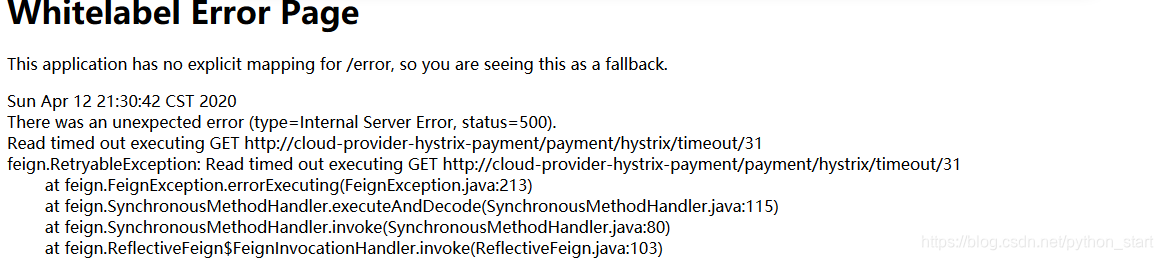
解决办法
ribbon:
  # 指的是建立连接所用的时间,适用于网络状态正常的情况下,两端连接所用的时间
  ReadTimeout: 5000
# 指的是建立连接后从服务器读取到可用资源所用的时间
  ConnectTimeout: 5000
高并发的测试:
开启Jmeter,来20000个并发压死8001,20000个请求都去访问paymentInfo_TimeOut服务
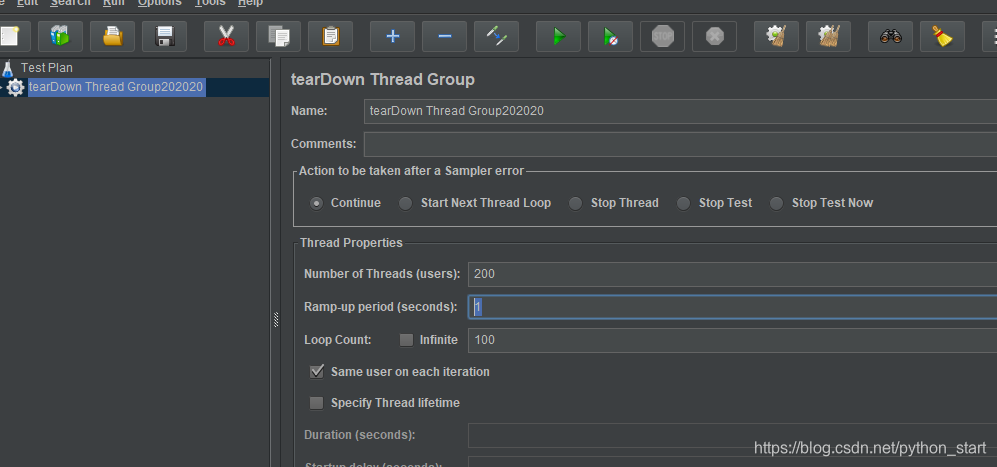
http://localhost:8001/payment/hystrix/timeout/31
http://localhost:8001/payment/hystrix/ok/31
都在转圈,没延迟的也受到了高并发的影响
原因:
tomcat的默认工作线程数被打满了,没有多余的线程来分解压力和处理
结论
上面还只是服务提供者8001自己测试,假如此时外部的消费者80也来访问,那消费者只能干等,最终导致消费端80不满意,服务端8001直接被拖死
80新建加入
1、新建cloud-consumer-feign-hystrix-order80
2、POM
    <dependencies>
        <dependency>
            <groupId>org.springframework.cloud</groupId>
            <artifactId>spring-cloud-starter-netflix-hystrix</artifactId>
        </dependency>
        <!--openfeign-->
        <dependency>
            <groupId>org.springframework.cloud</groupId>
            <artifactId>spring-cloud-starter-openfeign</artifactId>
        </dependency>
        <!--eureka client-->
        <dependency>
            <groupId>org.springframework.cloud</groupId>
            <artifactId>spring-cloud-starter-netflix-eureka-client</artifactId>
        </dependency>
        <dependency>
            <groupId>com.atguigu.springcloud</groupId>
            <artifactId>cloud-api-common</artifactId>
            <version>${project.version}</version>
        </dependency>
        <dependency>
            <groupId>org.springframework.boot</groupId>
            <artifactId>spring-boot-starter-web</artifactId>
        </dependency>
        <!--监控-->
        <dependency>
            <groupId>org.springframework.boot</groupId>
            <artifactId>spring-boot-starter-actuator</artifactId>
        </dependency>
        <!--热部署-->
        <dependency>
            <groupId>org.springframework.boot</groupId>
            <artifactId>spring-boot-devtools</artifactId>
            <scope>runtime</scope>
            <optional>true</optional>
        </dependency>
        <dependency>
            <groupId>org.projectlombok</groupId>
            <artifactId>lombok</artifactId>
            <optional>true</optional>
        </dependency>
        <dependency>
            <groupId>org.springframework.boot</groupId>
            <artifactId>spring-boot-starter-test</artifactId>
            <scope>test</scope>
        </dependency>
    </dependencies>
3、YML
server:
  port: 80
eureka:
  client:
    register-with-eureka: false
    fetch-registry: true
    service-url:
      defaultZone: http://eureka7001.com:7001/eureka,http://eureka7002.com:7002/eureka
4、主启动
@SpringBootApplication
@EnableEurekaClient
@EnableHystrix
@EnableFeignClients
public class OrderHystrixMain80 {
    public static void main(String[] args) {
        SpringApplication.run(OrderHystrixMain80.class, args);
    }
}
5、业务类
-
PaymentHystrixService
@Component @FeignClient(value = "cloud-provider-hystrix-payment") public interface PaymentHystrixService { @GetMapping("/payment/hystrix/ok/{id}") String paymentInfo_OK(@PathVariable("id") Integer id); @GetMapping("/payment/hystrix/timeout/{id}") String paymentInfo_TimeOut(@PathVariable("id") Integer id); } -
OrderHysrixController
@RestController
@Slf4j
public class OrderHysrixController {

    @Resource
    private PaymentHystrixService paymentHystrixService;

    @GetMapping(value ="/consumer/payment/hystrix/ok/{id}")
    public String paymentInfoOK(@PathVariable("id") Integer id){
        return paymentHystrixService.paymentInfo_OK(id);
    }

    @GetMapping(value ="/consumer/payment/hystrix/timeout/{id}")
    public String paymentInfo_TimeOut(@PathVariable("id") Integer id){
        return paymentHystrixService.paymentInfo_TimeOut(id);
    }
6、正常测试
http://localhost/consumer/payment/hystrix/ok/32 快速正常访问
7、高并发测试
-
消费者80微服务再去访问的OK服务8001地址
-
开启Jmeter,来20000个并发压死8001
-
访问http://localhost/consumer/payment/hystrix/ok/32
结果:
-
要么转圈圈
-
要么报错
-
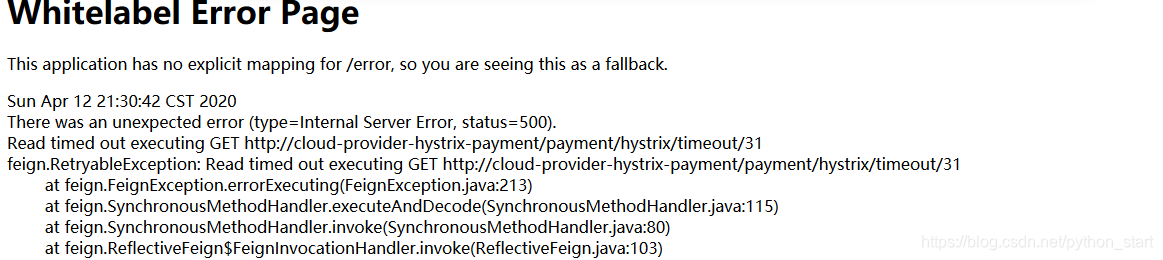
故障和导致现象
- 8001同一层次的其他接口被困死,因为tomcat线程池里面的工作线程已经被挤占完毕
- 80此时调用8001,客户端访问响应缓慢,转圈圈
上述结论
- 正因为有上述故障或不佳表现 才有我们的降级/容错/限流等技术诞生
如何解决?解决的要求
-
超时导致服务器变慢(转圈)
超时不再等待
-
出错(宕机或程序运行出错)
超时不再等待
-
解决
1、对方服务(8001)超时了,调用者(80)不能一直卡死等待,必须有服务降级
2、对方服务(8001)down机了,调用者(80)不能一直卡死等待,必须有服务降级
3、对方服务(8001)ok,调用者(80)自己有故障或有自我要求(自己的等待时间小于服务提供者)
4、服务降级
降级配置
- @HystrixCommand
8001先从自身找问题
- 设置自身调用超时时间的峰值,峰值内可以正常运行, 超过了需要有兜底的方法处理,做服务降级fallback
8001fallback
-
业务类启用
@HystrixCommand报异常后如何处理
PaymentService
  @HystrixCommand(fallbackMethod = "paymentInfo_TimeOutHandler",commandProperties = {
            @HystrixProperty(name="execution.isolation.thread.timeoutInMilliseconds",value = "3000")
    })
    public String paymentInfo_TimeOut(Integer id) {
        int timeNumber = 5;
        try {
            // 暂停3秒钟
            TimeUnit.SECONDS.sleep(timeNumber);
        } catch (InterruptedException e) {
            e.printStackTrace();
        }
        return "线程池:" + Thread.currentThread().getName() + " paymentInfo_TimeOut,id:" + id + "\t" +
                "O(∩_∩)O哈哈~  耗时(秒)" + timeNumber;
    }

    public String  paymentInfo_TimeOutHandler(Integer id){
        return "程序运行繁忙或报错,请稍后再试*****"+"当前线程: "+Thread.currentThread().getName()+id+"\t "+"orz!";
    }
分析:
一旦调用服务方法失败并抛出了错误信息后,会自动调用@HystrixCommand标注好的fallbckMethod调用类中的指定方法
-
主启动类激活
@EnableCircuitBreaker
@SpringBootApplication
@EnableEurekaClient
@EnableCircuitBreaker
public class PaymentHystrixMain8001 {
    public static void main(String[] args) {
        SpringApplication.run(PaymentHystrixMain8001.class, args);
    }
}
结果:
访问http://localhost:8001/payment/hystrix/timeout/31 超时走自定义回调函数

80fallback
我们自己配置过的热部署方式对java代码的改动明显,但对@HystrixCommand内属性的修改建议重启微服务
-
pom
<dependency> <groupId>org.springframework.cloud</groupId> <artifactId>spring-cloud-starter-netflix-hystrix</artifactId> </dependency> -
yml
server: port: 80 eureka: client: register-with-eureka: false fetch-registry: true service-url: defaultZone: http://eureka7001.com:7001/eureka,http://eureka7002.com:7002/eureka feign: hystrix: enaled: true -
主启动 @EnableHystrix
@SpringBootApplication @EnableEurekaClient @EnableHystrix @EnableFeignClients public class OrderHystrixMain80 { public static void main(String[] args) { SpringApplication.run(OrderHystrixMain80.class, args); } } -
业务类
controller进行业务降级
@RestController @Slf4j public class OrderHysrixController { @Resource private PaymentHystrixService paymentHystrixService; @GetMapping(value ="/consumer/payment/hystrix/ok/{id}") public String paymentInfoOK(@PathVariable("id") Integer id){ return paymentHystrixService.paymentInfo_OK(id); } @GetMapping(value ="/consumer/payment/hystrix/timeout/{id}") @HystrixCommand(fallbackMethod = "paymentTimeOutFallbackMethod",commandProperties = { @HystrixProperty(name="execution.isolation.thread.timeoutInMilliseconds",value = "1500") }) @HystrixCommand public String paymentInfo_TimeOut(@PathVariable("id") Integer id){ return paymentHystrixService.paymentInfo_TimeOut(id); } public String paymentTimeOutFallbackMethod(@PathVariable("id") Integer id){ return "我是消费者80,对方支付系统繁忙"+"当前线程: "+Thread.currentThread().getName()+id+"\t "+"mgd!"; } } -
测试结果

存在的问题
- 每个业务方法对应一个兜底的方法,代码膨胀
- 统一和自定义的分开
解决办法
-
每个方法配置一个造成的冗余
1、feign接口系列
2、@DefaultProperties(defaultFallback="")
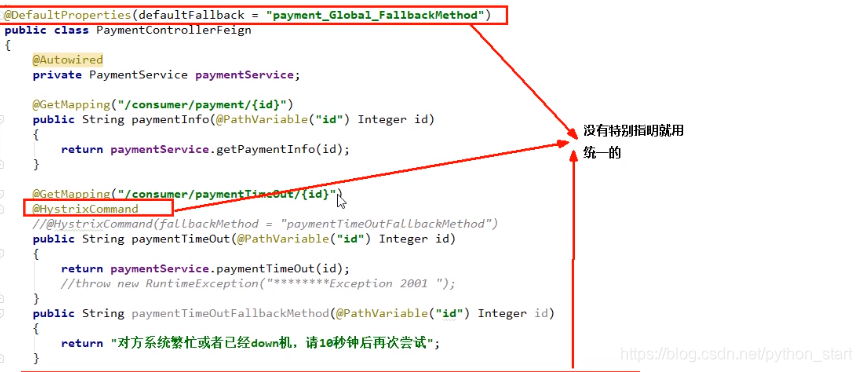
3、controller配置
@RestController
@Slf4j
@DefaultProperties(defaultFallback="paymentTimeOutFallbackMethod_Global")
public class OrderHysrixController {

    @Resource
    private PaymentHystrixService paymentHystrixService;

    @GetMapping(value ="/consumer/payment/hystrix/ok/{id}")
    public String paymentInfoOK(@PathVariable("id") Integer id){
        return paymentHystrixService.paymentInfo_OK(id);
    }

    @GetMapping(value ="/consumer/payment/hystrix/timeout/{id}")
    @HystrixCommand
    public String paymentInfo_TimeOut(@PathVariable("id") Integer id){
        return paymentHystrixService.paymentInfo_TimeOut(id);
    }

    public  String  paymentTimeOutFallbackMethod(@PathVariable("id") Integer id){
        return "我是消费者80,对方支付系统繁忙"+"当前线程: "+Thread.currentThread().getName()+id+"\t "+"mgd!";

    }

    public  String  paymentTimeOutFallbackMethod_Global(){
        return "我是全局异常"+"当前线程: "+Thread.currentThread().getName()+"\t "+"mgd!";

    }
}
-
和业务逻辑混在一起造成代码混乱
服务降级,客户端去调用服务端,碰上服务端宕机或关闭
本次案例服务降级处理是在客户端80实现完成,与服务端8001没有关系 只需要为Feign客户端定义的接口添加一个服务降级处理的实现类即可实现解耦
1、修改cloud-consumer-feign-hystrix-order80
PaymentFeignClientService接口
@Component
@FeignClient(value = "cloud-provider-hystrix-payment" ,fallback = PaymentFallbackService.class)
public interface PaymentHystrixService {

 @GetMapping("/payment/hystrix/ok/{id}")
 String paymentInfo_OK(@PathVariable("id") Integer id);

 @GetMapping("/payment/hystrix/timeout/{id}")
 String paymentInfo_TimeOut(@PathVariable("id") Integer id);

}
2、根据cloud-consumer-feign-hystrix-order80已经有的PaymentHystrixService接口,重新新建一个类(PaymentFallbackService)实现接口,统一为接口里面的方法进行异常处理
3、PaymentFallbackService类实现PaymentFeginService接口
import org.springframework.stereotype.Component;

@Component
public class PaymentFallbackService implements PaymentHystrixService{
    @Override
    public String paymentInfo_OK(Integer id) {
        return "=========================PaymentFallbackService fall  back-paymentInfo_ok=======";
    }

    @Override
    public String paymentInfo_TimeOut(Integer id) {
        return "=========================PaymentFallbackService fall  back-paymentInfo_TimeOut=======";
    }
}
4、测试
正常访问http://localhost/consumer/payment/hystrix/ok/32
故意关闭微服务8001
结果如图所示

5、服务熔断
说明
-
断路器
一句话就是家里的保险丝
-
熔断是什么
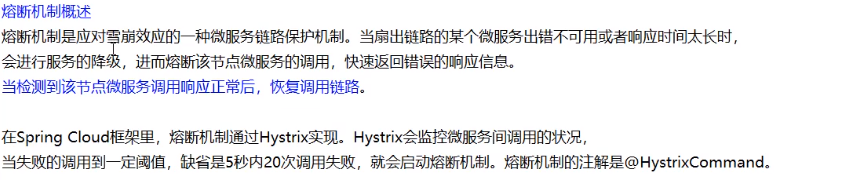
实操
1、 修改cloud-provider-hystrix-payment8001
2、PaymentService
@HystrixCommand(fallbackMethod="paymentCircuitBreakerFallback", commandProperties={
            @HystrixProperty(name = "circuitBreaker.enabled" ,value = "true"),//是否开启断路器
            @HystrixProperty(name = "circuitBreaker.requestVolumeThreshold",value = "10"),// 请求次数
            @HystrixProperty(name = "circuitBreaker.sleepWindowInMilliseconds",value = "10000"),//时间窗口期 "
            @HystrixProperty(name = "circuitBreaker.errorThresholdPercentage",value = "60")//失败率达到多少后跳闸
            })
    public String paymentCircuitBreaker(@PathVariable("id") Integer id){
        if (id<0){
            throw new RuntimeException();
        }
        String serialNumber = IdUtil.simpleUUID();
        return Thread.currentThread().getName()+"\t "+"调用成功,流水号: "+serialNumber;
    }
    public String paymentCircuitBreakerFallback(@PathVariable("id") Integer id){
        return "id不能为负数,请稍后再试~ id: "+ id;
    }
3、PaymentController
    @GetMapping("/payment/circuit/{id}")
    public String paymentCircuitBreaker(@PathVariable("id") Integer id){
        String circuitBreaker = paymentService.paymentCircuitBreaker(id);
        log.info("******result: "+circuitBreaker);
        return circuitBreaker;
    }
结果
自测cloud-provider-hystrix-payment8001
http://localhost:8001/payment/circuit/31

http://localhost:8001/payment/circuit/-31

http://localhost:8001/payment/circuit/1

参数说明
源码:
public abstract class HystrixCommandProperties {
    private static final Logger logger = LoggerFactory.getLogger(HystrixCommandProperties.class);

    /* defaults */
    /* package */ static final Integer default_metricsRollingStatisticalWindow = 10000;// default => statisticalWindow: 10000 = 10 seconds (and default of 10 buckets so each bucket is 1 second)
    private static final Integer default_metricsRollingStatisticalWindowBuckets = 10;// default => statisticalWindowBuckets: 10 = 10 buckets in a 10 second window so each bucket is 1 second
    private static final Integer default_circuitBreakerRequestVolumeThreshold = 20;// default => statisticalWindowVolumeThreshold: 20 requests in 10 seconds must occur before statistics matter
    private static final Integer default_circuitBreakerSleepWindowInMilliseconds = 5000;// default => sleepWindow: 5000 = 5 seconds that we will sleep before trying again after tripping the circuit
    private static final Integer default_circuitBreakerErrorThresholdPercentage = 50;// default => errorThresholdPercentage = 50 = if 50%+ of requests in 10 seconds are failures or latent then we will trip the circuit
    private static final Boolean default_circuitBreakerForceOpen = false;// default => forceCircuitOpen = false (we want to allow traffic)
    /* package */ static final Boolean default_circuitBreakerForceClosed = false;// default => ignoreErrors = false
    private static final Integer default_executionTimeoutInMilliseconds = 1000; // default => executionTimeoutInMilliseconds: 1000 = 1 second
    private static final Boolean default_executionTimeoutEnabled = true;
    private static final ExecutionIsolationStrategy default_executionIsolationStrategy = ExecutionIsolationStrategy.THREAD;
    private static final Boolean default_executionIsolationThreadInterruptOnTimeout = true;
    private static final Boolean default_executionIsolationThreadInterruptOnFutureCancel = false;
    private static final Boolean default_metricsRollingPercentileEnabled = true;
    private static final Boolean default_requestCacheEnabled = true;
    private static final Integer default_fallbackIsolationSemaphoreMaxConcurrentRequests = 10;
    private static final Boolean default_fallbackEnabled = true;
    private static final Integer default_executionIsolationSemaphoreMaxConcurrentRequests = 10;
    private static final Boolean default_requestLogEnabled = true;
    private static final Boolean default_circuitBreakerEnabled = true;
    private static final Integer default_metricsRollingPercentileWindow = 60000; // default to 1 minute for RollingPercentile
    private static final Integer default_metricsRollingPercentileWindowBuckets = 6; // default to 6 buckets (10 seconds each in 60 second window)
    private static final Integer default_metricsRollingPercentileBucketSize = 100; // default to 100 values max per bucket
    private static final Integer default_metricsHealthSnapshotIntervalInMilliseconds = 500; // default to 500ms as max frequency between allowing snapshots of health (error percentage etc)
    @SuppressWarnings("unused") private final HystrixCommandKey key;
    private final HystrixProperty<Integer> circuitBreakerRequestVolumeThreshold; // number of requests that must be made within a statisticalWindow before open/close decisions are made using stats
    private final HystrixProperty<Integer> circuitBreakerSleepWindowInMilliseconds; // milliseconds after tripping circuit before allowing retry
    private final HystrixProperty<Boolean> circuitBreakerEnabled; // Whether circuit breaker should be enabled.
    private final HystrixProperty<Integer> circuitBreakerErrorThresholdPercentage; // % of 'marks' that must be failed to trip the circuit
    private final HystrixProperty<Boolean> circuitBreakerForceOpen; // a property to allow forcing the circuit open (stopping all requests)
    private final HystrixProperty<Boolean> circuitBreakerForceClosed; // a property to allow ignoring errors and therefore never trip 'open' (ie. allow all traffic through)
    private final HystrixProperty<ExecutionIsolationStrategy> executionIsolationStrategy; // Whether a command should be executed in a separate thread or not.
    private final HystrixProperty<Integer> executionTimeoutInMilliseconds; // Timeout value in milliseconds for a command
    private final HystrixProperty<Boolean> executionTimeoutEnabled; //Whether timeout should be triggered
    private final HystrixProperty<String> executionIsolationThreadPoolKeyOverride; // What thread-pool this command should run in (if running on a separate thread).
    private final HystrixProperty<Integer> executionIsolationSemaphoreMaxConcurrentRequests; // Number of permits for execution semaphore
    private final HystrixProperty<Integer> fallbackIsolationSemaphoreMaxConcurrentRequests; // Number of permits for fallback semaphore
    private final HystrixProperty<Boolean> fallbackEnabled; // Whether fallback should be attempted.
    private final HystrixProperty<Boolean> executionIsolationThreadInterruptOnTimeout; // Whether an underlying Future/Thread (when runInSeparateThread == true) should be interrupted after a timeout
    private final HystrixProperty<Boolean> executionIsolationThreadInterruptOnFutureCancel; // Whether canceling an underlying Future/Thread (when runInSeparateThread == true) should interrupt the execution thread
    private final HystrixProperty<Integer> metricsRollingStatisticalWindowInMilliseconds; // milliseconds back that will be tracked
    private final HystrixProperty<Integer> metricsRollingStatisticalWindowBuckets; // number of buckets in the statisticalWindow
    private final HystrixProperty<Boolean> metricsRollingPercentileEnabled; // Whether monitoring should be enabled (SLA and Tracers).
    private final HystrixProperty<Integer> metricsRollingPercentileWindowInMilliseconds; // number of milliseconds that will be tracked in RollingPercentile
    private final HystrixProperty<Integer> metricsRollingPercentileWindowBuckets; // number of buckets percentileWindow will be divided into
    private final HystrixProperty<Integer> metricsRollingPercentileBucketSize; // how many values will be stored in each percentileWindowBucket
    private final HystrixProperty<Integer> metricsHealthSnapshotIntervalInMilliseconds; // time between health snapshots
    private final HystrixProperty<Boolean> requestLogEnabled; // whether command request logging is enabled.
    private final HystrixProperty<Boolean> requestCacheEnabled; // Whether request caching is enabled.
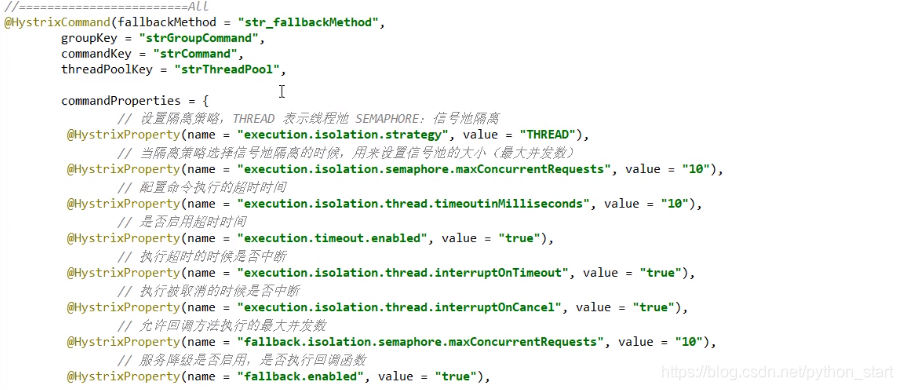
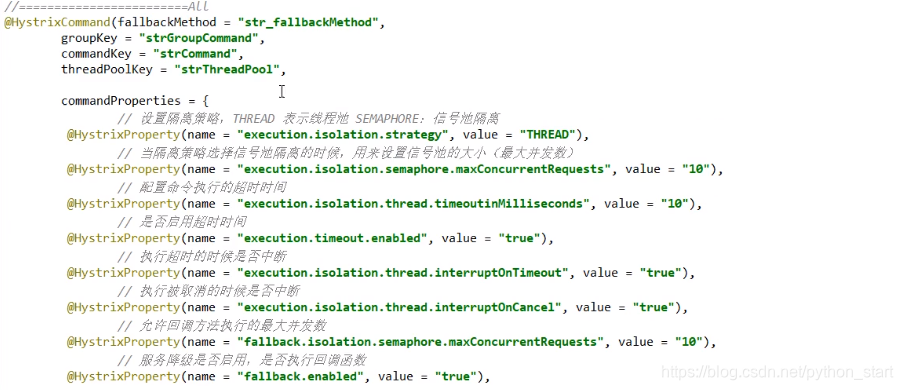
涉汲到断路器的三个重要参数:快照时间窗、请求总数阀值、错误百分比阀值**。
- 1、快照时间窗:断路器确定是否打开需要统计一些请求和错误数据,而统计的时间范围就是快照时间窗,默认为最近的10秒。
- 2、请求总数阀值:在快照时间窗内,必须满足请求总数阀值才有资格熔断。默认为20, 意味着在10秒内,如果该hystrix命令的调用次数不足20次,即使所有的请求都超时或其他原因失败,断路器都不会打开。
- 3、错误百分比阀值:当请求总、在快照时间窗内超过了阀值,比如发生了30次调用,如果在这30次调用中,有15次发生了超时异常,也就是超过50%的错误百分比,在默认设定50%阀值情况下,这时候就会将断路器打开。
原来的主逻辑要如何恢复呢?
对于这一-问题,hystrix也为我们实现了自动恢复功能。
- 当断路器打开,对主逻辑进行熔断之后,hystrix会启动一个休眠时间窗在这个时间窗内,降级逻辑是临时的成为主逻辑,
- 当休眠时间窗到期,断路器将进入半开状态,释放一次请求到原来的主逻辑上,如果此次请求正常返回,那么断路器将继续闭合,
- 主逻辑恢复,如果这次请求依然有问题,断路器继续进入打开状态,休眠时间窗重新计时。
原理/小总结
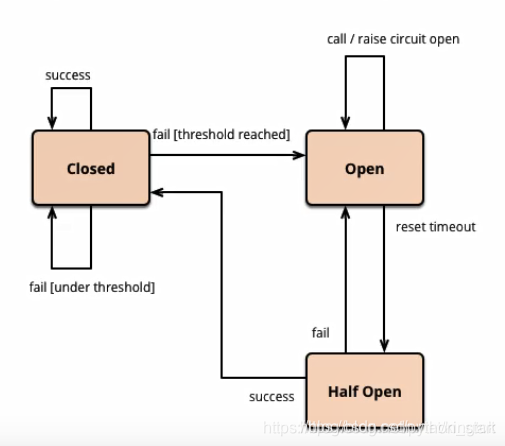
官网原理图
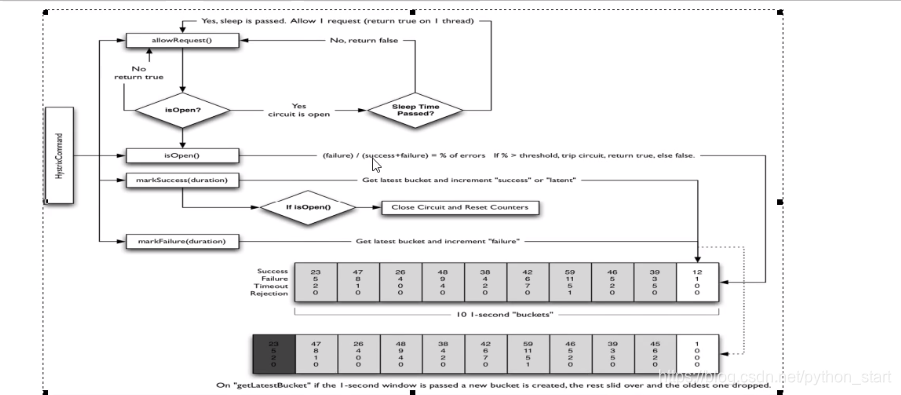
1、官网步骤
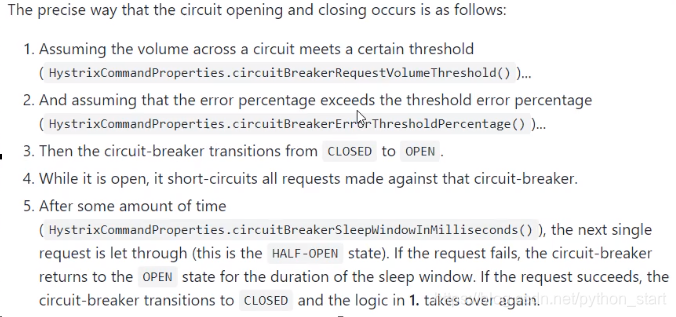
2、断路器开启或者关闭的条件
- 当满足一定的阈值的时候(默认10秒钟超过20个请求次数)
- 当失败率达到一定的时候(默认10秒内超过50%的请求次数)
- 到达以上阈值,断路器将会开启
- 当开启的时候,所有请求都不会进行转发
- 一段时间之后(默认5秒),这个时候断路器是半开状态,会让其他一个请求进行转发. 如果成功,断路器会关闭,若失败,继续开启.重复4和5
6、服务限流
后面高级篇讲解alibaba的Sentinel说明
7、hystrix工作流程
图例
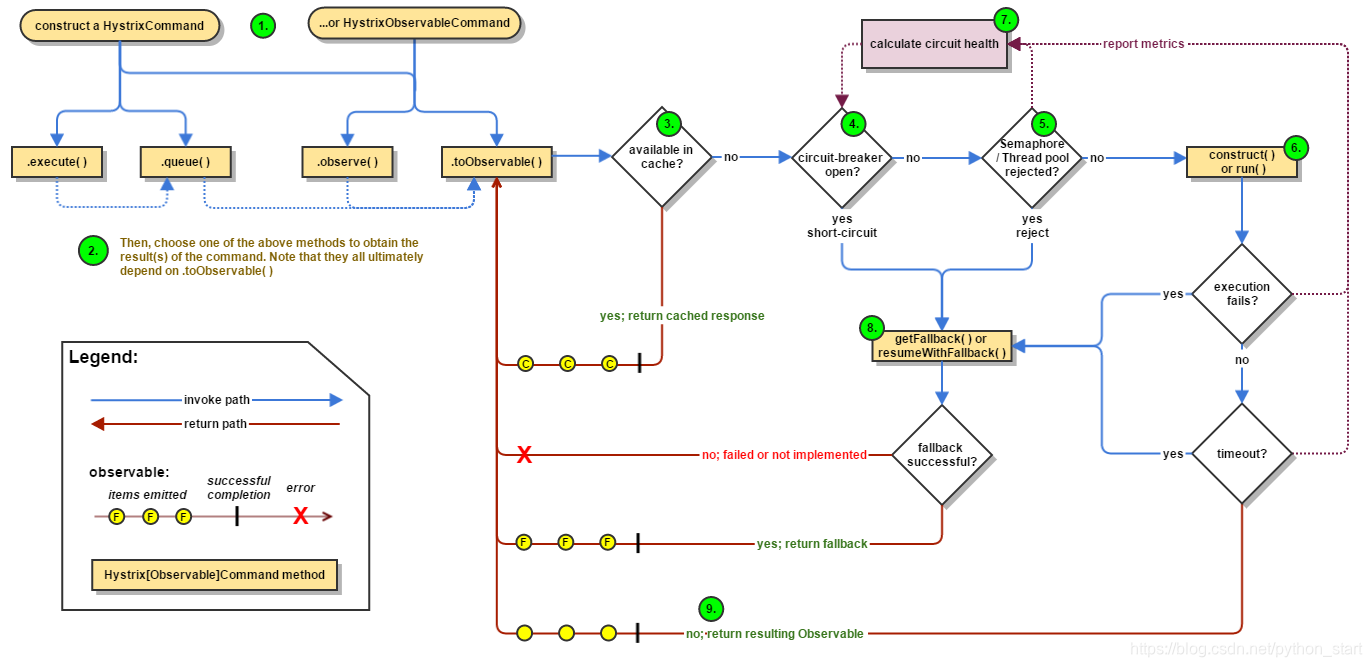
步骤说明
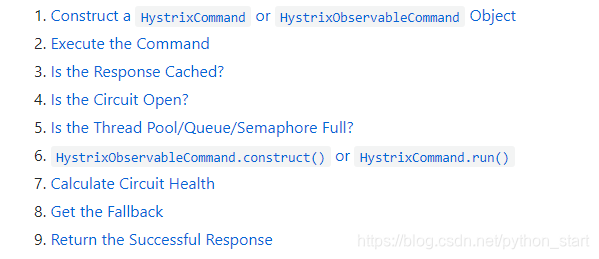
8、服务监控hystrixDashboard
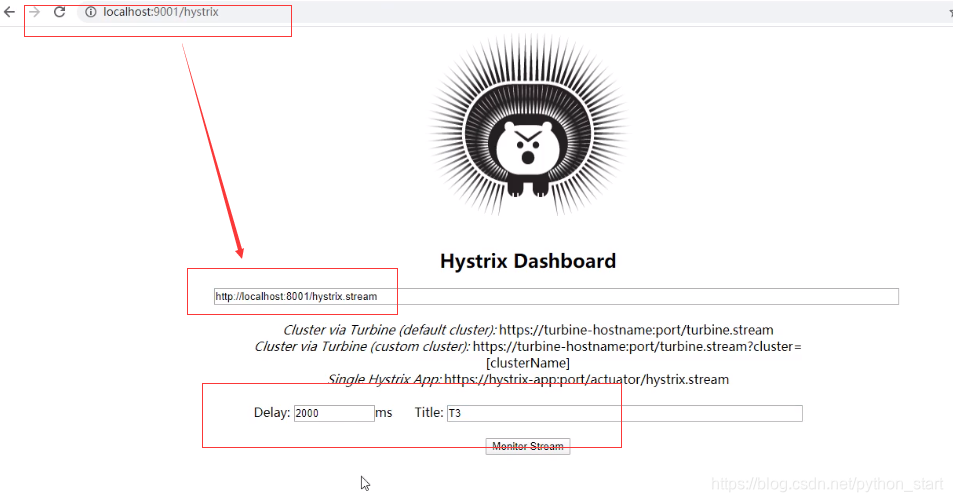
- 概述

-
仪表盘9001搭建
1、新建cloud-consumer-hystrix-dashboard9001
2、POM
  <dependencies>
        <!--hystrix dashboard-->
        <dependency>
            <groupId>org.springframework.cloud</groupId>
            <artifactId>spring-cloud-starter-netflix-hystrix-dashboard</artifactId>
        </dependency>
        <!--监控-->
        <dependency>
            <groupId>org.springframework.boot</groupId>
            <artifactId>spring-boot-starter-actuator</artifactId>
        </dependency>
        <!--热部署-->
        <dependency>
            <groupId>org.springframework.boot</groupId>
            <artifactId>spring-boot-devtools</artifactId>
            <scope>runtime</scope>
            <optional>true</optional>
        </dependency>
        <dependency>
            <groupId>org.projectlombok</groupId>
            <artifactId>lombok</artifactId>
            <optional>true</optional>
        </dependency>
        <dependency>
            <groupId>org.springframework.boot</groupId>
            <artifactId>spring-boot-starter-test</artifactId>
            <scope>test</scope>
        </dependency>
    </dependencies>
3、YML
server:
  port: 9001
4、HystrixDashboardMain9001+新注解@EnableHystrixDashboard
@SpringBootApplication
@EnableHystrixDashboard
public class HystrixDashboardMain9001 {
    public static void main(String[] args) {
        SpringApplication.run(HystrixDashboardMain9001.class,args);
    }
}
5、测试
启动一个eureka或者3个eureka集群均可
-
9001监控8001
填写监控地址:http://localhost:8001/hystrix.stream
-
测试地址
http://localhost:8001/payment/circuit/31
http://localhost:8001/payment/circuit/-31
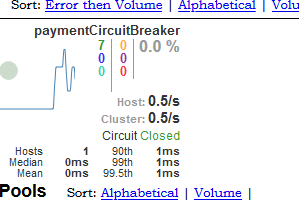
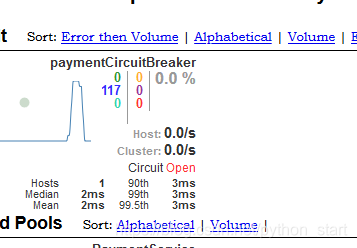
先访问正确地址,再访问错误地址,再正确地址,会发现图标断路器都是慢慢放开的.
-
监控结果,成功
- 测试结果,失败
6、如何看?
-
七色

-
一圈
实心圆:共有两种含义。它通过颜色的变化代表了实例的健康程度,它的健康度从绿色<黄色<橙色<红色递减。
该实心圆除了颜色的变化之外,它的大小也会根据实例的请求流量发生变化,流量越大该实心圆就越大。所以通过该实心圆的展示,就可以在大量的实例中快速的发现故障实例和高压力实例。
-
一线
一条曲线可以观察到流量的上升与下降的趋势
图片参数说明
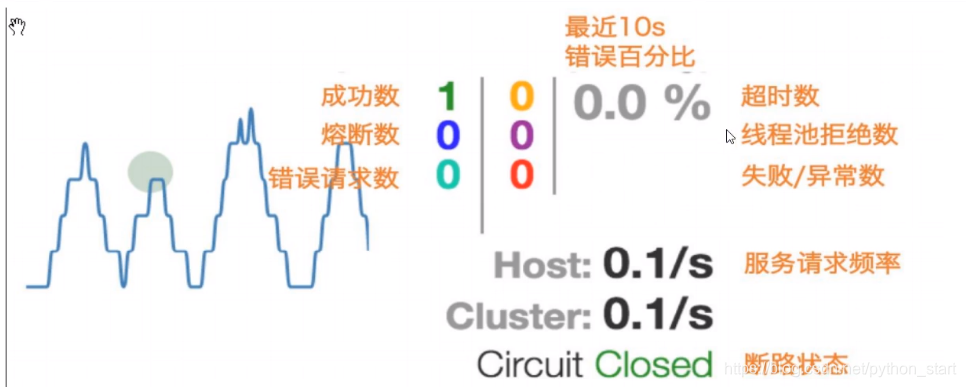
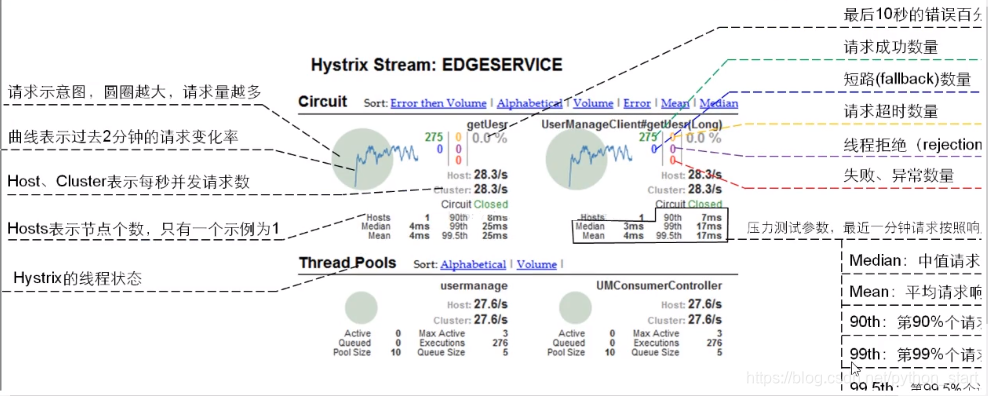
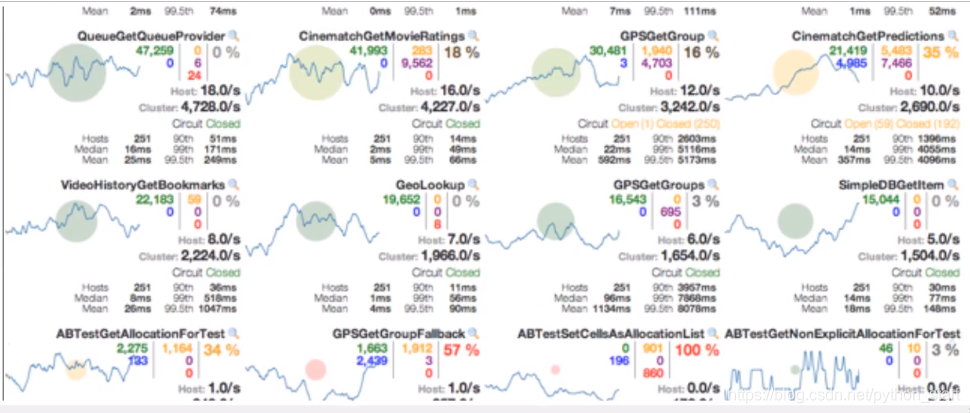
最终搞懂的集群图例

 5242


 扫一扫


 被折叠的 条评论
为什么被折叠?
 到【灌水乐园】发言


