



 这篇博客详细介绍了在Linux环境下,如何解决MySQL 5.7远程连接提示'Can’t connect to MySQL server on ‘192.168.1.5’ (10061)'的错误。步骤包括在MySQL中为用户赋权,修改配置文件/etc/mysql/mysql.conf.d/mysqld.cnf,取消'bind-address=127.0.0.1'的限制,使MySQL允许远程访问。同时,文章还澄清了my.ini和my.cnf的区别,并指出在MySQL 5.7中,配置文件的变化。
以下内容转载自 https://blog.youkuaiyun.com/zhoucheng05_13/article/details/78589025
最近在用workbench远程连接数据库是一直提示Can’t connect to MySQL server on ‘192.168.1.5’ (10061)的错误,百度了各种解决方法,大部分都没用。写这篇博客的原因是想要分析网络上教程到底适用于那些情况。
解决方案
MySQL默认是不可以通过远程机器访问的,通过下面的配置可以开启远程访问 。
要让服务器的mysql能够远程连接,至少需要两个步骤:
一、在mysql中为用户赋权
在linux中,执行下列命令:
- 1.登录数据库
root@VM-32-73-ubuntu:/etc/mysql/mysql.conf.d# mysql -uroot -p
Enter password:
Welcome to the MySQL monitor. Commands end with ; or \g.
Your MySQL connection id is 7
Server version: 5.7.20-0ubuntu0.16.04.1 (Ubuntu)Copyright (c) 2000, 2017, Oracle and/or its affiliates. All rights reserved.
Oracle is a registered trademark of Oracle Corporation and/or its
affiliates. Other names may be trademarks of their respective
owners.Type 'help;' or '\h' for help. Type '\c' to clear the current input statement.
-
2.使用mysql数据库并查询用户:
-
mysql> use mysql;
Reading table information for completion of table and column names
You can turn off this feature to get a quicker startup with -ADatabase changed
mysql> select host,user from mysql.user;
+-----------+------------------+
| host | user |
+-----------+------------------+
| localhost | debian-sys-maint |
| localhost | mysql.session |
| localhost | mysql.sys |
| localhost | root |
+-----------+------------------+
5 rows in set (0.00 sec)
user字段表示mysql中的所有用户,host表示相应用户能从哪儿登录。我们看到目前所有的host都是localhost,也就是说,当前所有用户都只能从本机登录。因此,我们需要添加一个能从其他地址登录的用户。 -
3.创建用户并赋权
-
mysql> GRANT ALL PRIVILEGES ON *.* TO 'usrabc'@'%' IDENTIFIED BY 'usrabc' WITH GRANT OPTION;
Query OK, 0 rows affected (0.02 sec)mysql> select host,user from mysql.user;
+-----------+------------------+
| host | user |
+-----------+------------------+
| % | usrabc |
| localhost | debian-sys-maint |
| localhost | mysql.session |
| localhost | mysql.sys |
| localhost | root |
+-----------+------------------+
6 rows in set (0.00 sec)
-
这里的%表示所有的地址均可以通过账户usrabc登录,你也可以指定为具体的ip地址。 到此,数据库用户创建好了,权限也赋予了,但此时远程连接仍然会失败。
-
二、配置文件的修改 网上的很多教程说“修改/etc/init.d/my.cnf文件,将文件中的“bind-address = 127.0.0.1”改为“bind-address = 0.0.0.0”,让所有IP都能访问”。但是当我进入该目录后发现该文件中只有两行:
-
#
# The MySQL database server configuration file.
#
# You can copy this to one of:
# - "/etc/mysql/my.cnf" to set global options,
# - "~/.my.cnf" to set user-specific options.
#
# One can use all long options that the program supports.
# Run program with --help to get a list of available options and with
# --print-defaults to see which it would actually understand and use.
#
# For explanations see
# http://dev.mysql.com/doc/mysql/en/server-system-variables.html#
# * IMPORTANT: Additional settings that can override those from this file!
# The files must end with '.cnf', otherwise they'll be ignored.
#!includedir /etc/mysql/conf.d/
!includedir /etc/mysql/mysql.conf.d/ -
并没有bind-address = 127.0.0.1。于是阅读注释,注意到这句: -
# * IMPORTANT: Additional settings that can override those from this file!
-
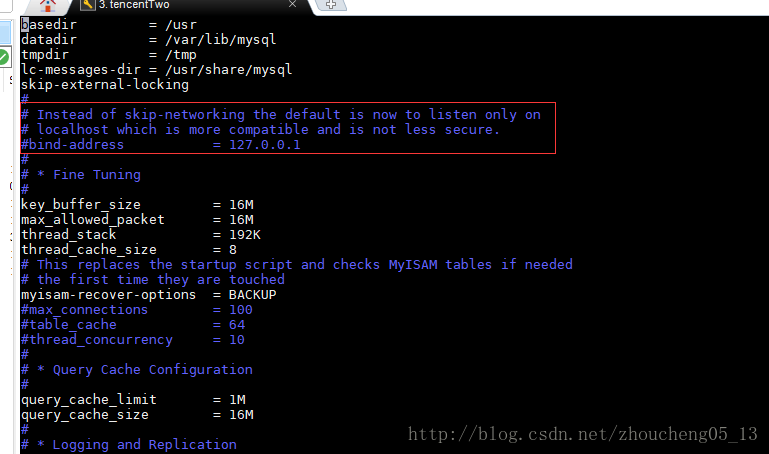
意思是其他配置文件中的配置会覆盖本文件。于是查看其他的配置文件,最后终于在
/etc/mysql/mysql.conf.d/mysqld.cnf中找到了字段“bind-address = 127.0.0.1”,将其注释掉: -
-
最后远程使用usrabc用户测试,终于成功连接!
问题
一、my.ini与my.cnf的区别
如果你去网上搜索远程连接mysql数据库,那么很多博客都是叫你去修改mysql文件夹下的my.ini或者my.cnf文件。首先需要明确,my.ini是windows安装的的mysql下的配置文件,位置就在安装目录下。而my.cnf是linux下安装的mysql的配置文件,位置在
/etc/mysql/my.cnf。也就是说,如果你要远程连接的数据库在Windows系统上,那么你应该去找my.ini来修改,而如果是在linux系统长,那么就去找my.cnf修改。二、Mysql5.7的my.cnf中并没有配置
网上的很多教程都已经过时了,在mysql5.7中,my.cnf是没有配置东西的,要修改配置,必须要去路径
/etc/mysql/mysql.conf.d/下修改mysqld.cnf文件才行。





 扫一扫
扫一扫


 4655
4655

 被折叠的 条评论
为什么被折叠?
被折叠的 条评论
为什么被折叠?
 到【灌水乐园】发言





