



screenshot-to-code可以将屏幕截图转化为 HTML/JS/Tailwind CSS 代码,它使用 GPT-4 Vision 生成代码、DALL-E 3 生成相似的图片。
56200 Stars 6900 Forks 54 Issues 23 贡献者 MIT License Python 语言
代码: https://github.com/abi/screenshot-to-code
更多AI开源软件:AI开源 - 小众AI
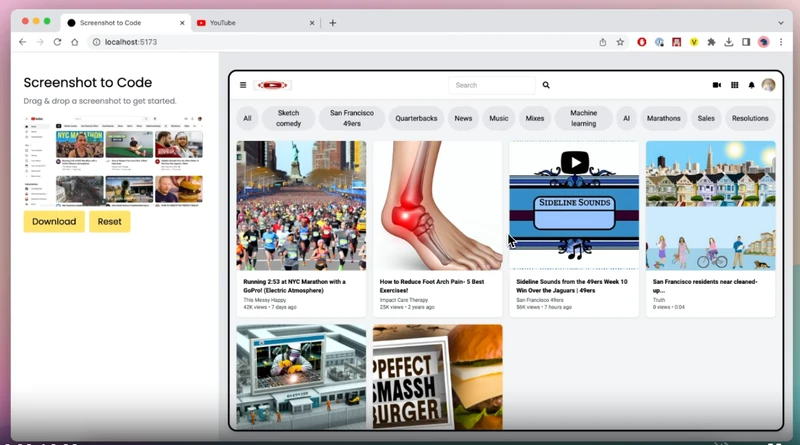
主要功能
支持的技术栈
-
HTML + Tailwind
-
HTML + CSS
-
React + Tailwind
-
Vue + Tailwind
-
Bootstrap
-
Ionic + Tailwind
-
SVG
支持的模型
-
Claude Sonnet 3.5 - Best model!
-
GPT-4O - also recommended!
-
GPT-4 Turbo (Apr 2024)
-
GPT-4 Vision (Nov 2023)
-
Claude 3 Sonnet
-
DALL-E 3 for image generation
开始使用
使用React/Vite 前端和 FastAPI 后端.
关键依赖:
- OpenAI API key with access to GPT-4
- Anthropic key (optional) - 使用Claude Sonnet时需要, 或者尝试视频.
运行后端 (使用Poetry进行包管理 - 可以使用 pip install poetry,如果你不使用它):
cd backend
echo "OPENAI_API_KEY=sk-your-key" > .env
poetry install
poetry shell
poetry run uvicorn main:app --reload --port 7001
如果你想使用 Anthropic,请将 ANTHROPIC_API_KEY 添加到 backend/.env 中。您还可以使用前端的设置对话框设置按键(加载前端后单击齿轮图标).
运行前端:
cd frontend
yarn
yarn dev
打开 http://localhost:5173 开始使用.
如果您更喜欢在不同的端口上运行后端,请在 frontend/.env.local 中更新VITE_WS_BACKEND_URL
出于调试目的,如果您不想浪费 GPT4-Vision 积分,您可以在模拟模式下运行后端(流式传输预先录制的响应):
MOCK=true poetry run uvicorn main:app --reload --port 7001





 扫一扫
扫一扫


 1391
1391

 被折叠的 条评论
为什么被折叠?
被折叠的 条评论
为什么被折叠?
 到【灌水乐园】发言





