






 本文详细记录了在CentOS7环境中,利用Docker CE社区版创建名为hello的Docker镜像的全过程。从环境搭建,包括gcc及必要库的安装,到C语言程序的编写与编译,再到Dockerfile的编写与镜像的构建,直至镜像的运行与验证。
在centos7环境下使用docker-ce社区版,创建hello镜像的记录
参考链接:
代码操作
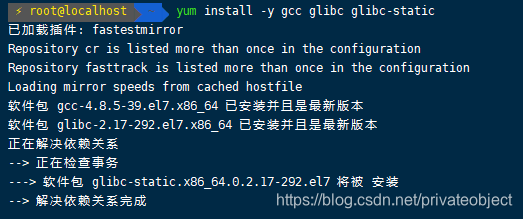
yum install -y gcc glibc glibc-static #安装c环境
pwd
/root/winsonzhao/hello-zyl
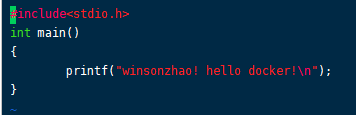
vim hello.c #编辑c文档
    #include<stdio.h>
    int main()
    {
      printf("winsonzhao! hello docker!\n");
    }
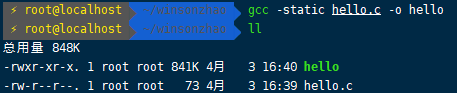
gcc -static hello.c -o hello #编译
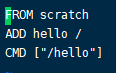
vim Dockerfile #创建镜像
    FROM scratch #从头创建docker镜像,不依赖任何base镜像
    ADD hello / #将本地的hello文件添加到镜像的根目录下/
    CMD ["/hello"] #执行根目录下的hello文件
ls   #创建docker前的所有的文件
Dockerfile  hello  hello.c
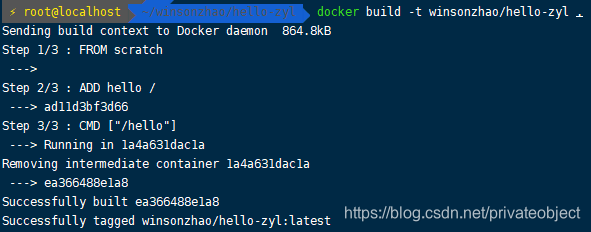
docker build -t winsonzhao/hello-zyl . #创建docker,-t后面接tag名称,.表示在当前目录下找dockerfile
    Sending build context to Docker daemon  864.8kB
    Step 1/3 : FROM scratch
     --->
    Step 2/3 : ADD hello /
     ---> ad11d3bf3d66
    Step 3/3 : CMD ["/hello"]
     ---> Running in 1a4a631dac1a
    Removing intermediate container 1a4a631dac1a
     ---> ea366488e1a8
    Successfully built ea366488e1a8
    Successfully tagged winsonzhao/hello-zyl:latest
docker images #镜像
REPOSITORY				TAG                 IMAGE ID            CREATED             SIZE
winsonzhao/hello-zyl 	latest              ea366488e1a8        11 seconds ago      861kB
docker run winsonzhao/hello-zyl #运行
winsonzhao! hello docker!
安装gcc
当前目录

编辑hello.c
编译hello
编辑Dockerfile
当前目录下的文件

Docker创建hello镜像
镜像列表

运行镜像

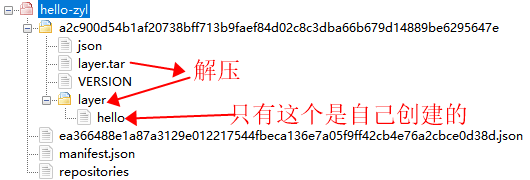
导出镜像


压缩包的结构
到此结束,d=====( ̄▽ ̄*)b





 扫一扫
扫一扫


 781
781

 被折叠的 条评论
为什么被折叠?
被折叠的 条评论
为什么被折叠?
 到【灌水乐园】发言





