 HTML与JavaScript实现交互式用户表单


 文章展示了一个使用HTML创建的用户信息表单,包括姓名、性别、生日等字段,利用JavaScript进行交互控制,如电话号码输入的启用/禁用,以及点击确认按钮时对输入值的console.log操作。
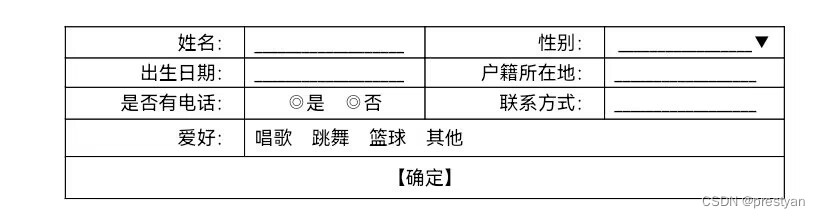
简单来说,html负责界面。javascript负责操作,例如console,动画等。
下面是示例代码,有问题可以留言:
<style>
table {
border-collapse: collapse;
width: 100%;
}
th, td {
text-align: center;
border: 1px solid black;
}
</style>
<table>
<tr>
<th>姓名</th>
<td><input type="text"></td>
<th>性别</th>
<td>
<select>
<option value="男">男</option>
<option value="女">女</option>
</select>
</td>
</tr>
<tr>
<th>生日</th>
<td><input type="text"></td>
<th>户籍所在地</th>
<td><input type="text"></td>
</tr>
<tr>
<th>是否有电话</th>
<td colspan="3">
<input type="radio" name="phone" value="yes" onclick="document.getElementById('phone').disabled = false;">是
<input type="radio" name="phone" value="no" onclick="document.getElementById('phone').disabled = true;">否
联系方式:<input type="text" id="phone" disabled></td>
</tr>
<tr>
<th>爱好</th>
<td colspan="3">
<input type="checkbox" name="hobby" value="唱歌">唱歌
<input type="checkbox" name="hobby" value="跳舞">跳舞
<input type="checkbox" name="hobby" value="篮球">篮球
<input type="checkbox" name="hobby" value="其他">其他
其他:<input type="text"></td>
</tr>
<tr>
<td colspan="4"><button onclick="myFunction()">确认</button></td>
</tr>
</table>
<script>
function myFunction() {
var x = document.getElementById("myText").value;
console.log(x);
}
</script>





 扫一扫
扫一扫


 727
727

 被折叠的 条评论
为什么被折叠?
被折叠的 条评论
为什么被折叠?
 到【灌水乐园】发言





