


 本文介绍了一个使用C++编写的简单文本编辑器,包括文件的新建、打开、编辑、存储以及文件管理功能,如删除、重命名,并利用文件记录文件名和数量,体现了面向对象编程思想。
要求
简单文本编辑器的设计,设计一个类似记事本这样的文本编辑器,具备基本的
新建、打开,编辑、存储,查找等功能。版权部分要有你自己作为设计者的标注。
代码
//texteditor.h
#pragma once
#include <iostream>
#include <fstream>
#include <string>
#include <algorithm>
#include<vector>
using namespace std;

class TextEditor
{
private:
    vector<string> file_list;
public:
    TextEditor();
    int Getfilenum() { return file_num; }
    void createNew();
    void Manage(TextEditor editor);
    void Delfile();
    void Rename();
    static int file_num;

};


void Renewfilelist(const vector<string>& file_list_vec);

void main_meau();
void meau1(TextEditor& editor);
void meau2();
//texteditor.cpp
#include"texteditor.h"

int TextEditor::file_num = 0;

TextEditor::TextEditor() : file_list()
{
	ifstream ofs;
	ofs.open("file_num.txt", ios::in);
	ofs >> file_num;
	ofs.close();

	ifstream ofs_;
	ofs_.open("file_list.txt", ios::in);

	string filename;
	while (ofs_ >> filename)
	{
		file_list.push_back(filename);
	}
	ofs_.close();
}

void TextEditor::Manage(TextEditor editor)//管理文件
{
	while (1)
	{
		meau1(editor);
		meau2();
		cout << "请选择功能:";
		int m2;
		cin >> m2;
		switch (m2)
		{
		case 1:
			createNew();//增加文件
			break;
		case 2:
			Delfile();//删除文件
			break;
		case 3:
			Rename();//重命名文件
			break;
		case 0:
			cout << endl;
			return ;
		default:
			cout << "请输入正确的数字!" << endl;
		}
		cout << endl;
	}
}


void TextEditor::createNew()
{
	char new_filename[20] = { 0 };
	cout << "输入添加文件名:";
	cin >> new_filename;

	// 清空输入缓冲区
	cin.ignore( numeric_limits< streamsize>::max(), '\n');

	ofstream ofs;
	ofs.open(new_filename, ios::out);

	if (!ofs.is_open()) {
		cout <<"文件打开失败" << endl;
		exit(0);
	}
	else
	{
		cout << "输入文本:(输入END结束编辑)"<< endl;
		string input;
		while (true)
		{
			getline(cin, input);
			if (input == "END")	break;
			ofs << input + "\n";
		}
	}

		cout << "添加成功!" << endl;

		// 将新文件名添加到file_list中
		file_list.push_back(new_filename);

		ofs.close();

		// 文件数增加
		file_num++;

		//更新文件数文件
		ofstream ofsnum;
		ofsnum.open("file_num.txt", ios::trunc);
		ofsnum << file_num;
		ofsnum.close();


		// 对文件列表进行排序
		sort(file_list.begin(), file_list.end());

		// 更新文件名文件
		Renewfilelist(file_list);
}

void TextEditor::Delfile()
{
	string del_filename;
	cout << "输入要删除的文件名:";
	cin >> del_filename;

	if (remove(del_filename.c_str()) == 0)
	{
		cout << "删除成功!\n\n";

		// 文件数减少
		file_num--;

		// 更新文件数文件
		ofstream ofs_num("file_num.txt", ios::trunc);
		ofs_num << file_num;
		ofs_num.close();

		// 更新文件名文件
		Renewfilelist(file_list);

		// 查找要删除的文件名在文件列表中的位置
		auto it = find(file_list.begin(), file_list.end(), del_filename);
		if (it != file_list.end())
		{
			// 删除文件名
			file_list.erase(it);

			// 更新文件名文件
			Renewfilelist(file_list);
		}
	}
	else
	{
		perror("删除失败");
	}
}


void TextEditor::Rename()
{
	string old_filename, new_filename;
	cout << "输入原来的文件名和要重命名的文件名(空格隔开):";
	cin >> old_filename >> new_filename;

	if (rename(old_filename.c_str(), new_filename.c_str()) == 0)
	{
		cout << "修改成功!" << endl << endl;

		// 修改文件名数组
		auto it = find(file_list.begin(), file_list.end(), old_filename);
		if (it != file_list.end())
		{
			*it = new_filename;

			// 更新文件名文件
			Renewfilelist(file_list);
		}
	}
	else
	{
		perror("rename");
	}
}


void Renewfilelist(const vector<string>& file_list_vec)//更新file_list
{
	ofstream ofslist;
	ofslist.open("file_list.txt", ios::trunc);
	for (const string& filename : file_list_vec) {
		ofslist << filename << endl;
	}
	ofslist.close();
}


void main_meau()
{
	 cout << "***********************************" <<  endl;
	 cout << "***     欢迎来到文本编辑器     ****" <<  endl;
	 cout << "***********************************" <<  endl;
	 cout << "******       1.新建文本      ******" <<  endl;
	 cout << "******       2.管理文本      ******" <<  endl;
	 cout << "******       3.退出程序      ******" <<  endl;
	 cout << "***********************************" <<  endl;
	 cout << "***  创作人:################  ****" <<  endl;
}


void meau1(TextEditor& editor)
{
	cout <<"***************可管理的文件有:**********"<< endl << endl;
	ifstream ifs;
	ifs.open("file_list.txt", ios::in);
	for (int i = 0; i < editor.Getfilenum(); i++)
	{
		string filename;
		getline(ifs, filename);
		cout << filename << endl;
	}
	ifs.close();
}

void meau2()
{
	cout << endl;
	cout <<"********************************"<< endl;
	cout << "*****     1.增加文件       *****"<<endl;
	cout << "*****     2.删除文件       *****"<<endl;
	cout <<"*****     3.重命名文件     *****"<< endl;
	cout <<"*****     0.返回上一级     *****"<< endl;
	cout << "********************************" << endl;
}
//main.cpp
#include"texteditor.h"

int file_num;

int main() {
    TextEditor editor;

    while(1)
    {
        main_meau();
        int op;      cin >> op;
        switch (op)
        {
        case 1://新建文本
            editor.createNew();
            break;
        case 2://管理文本
            editor.Manage(editor);
            break;
        case 3: //退出程序
            cout << "感谢使用,作者:*******" << endl;
            return 0;
        default:
            cout << "请输入正确的数字!" << endl;
        }
    }

    return 0;
}
使用说明
1.本程序由两个源文件和一个头文件构成,另外需要file_list.txt和file_num.txt作为数据库存储文件名和文件个数。
2.在使用本程序前,如果需要,需提前将txt文件写在与源文件的同目录下,并提前将file_list.txt和file_num.txt写好。
3.本程序的数据库是以文件名英文首字母顺序排序,下面的展示没有体现
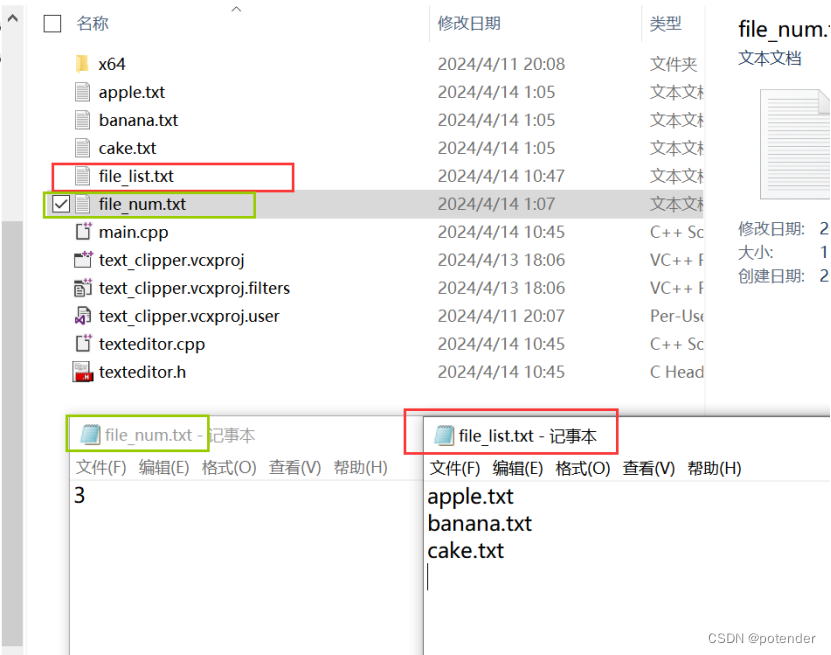
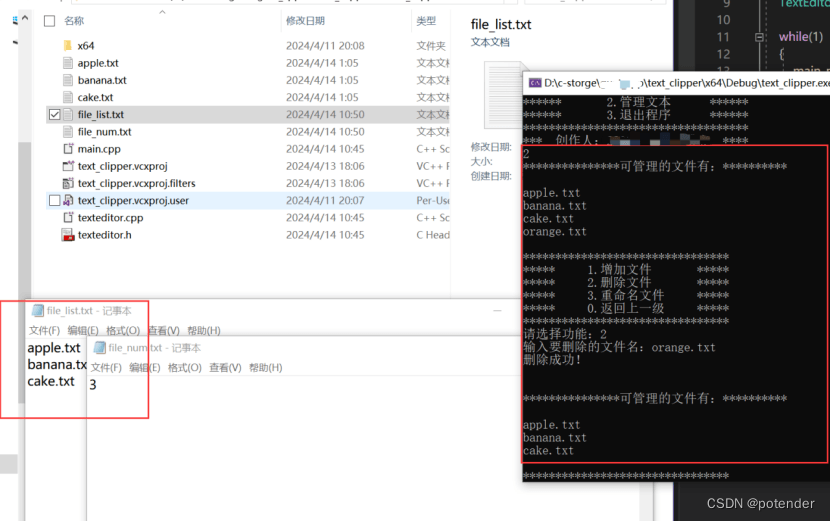
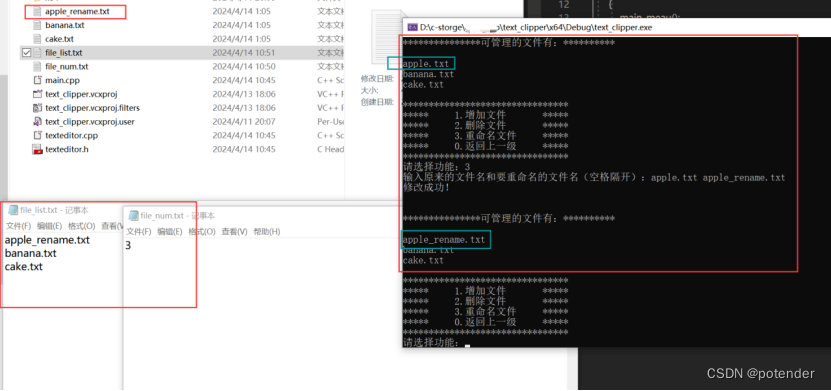
运行展示
1.新建文本
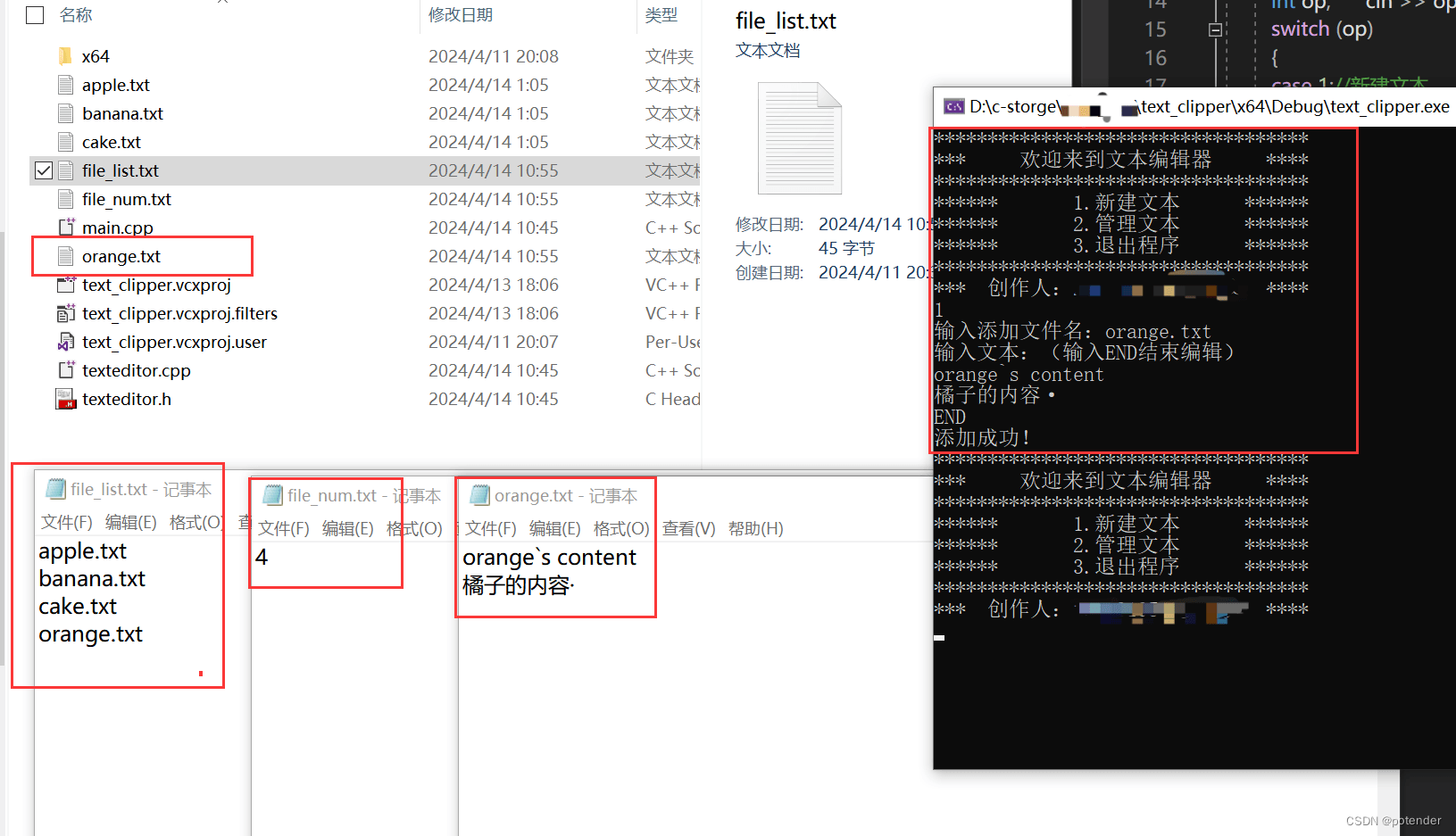
2.删除文本
3.重命名文本
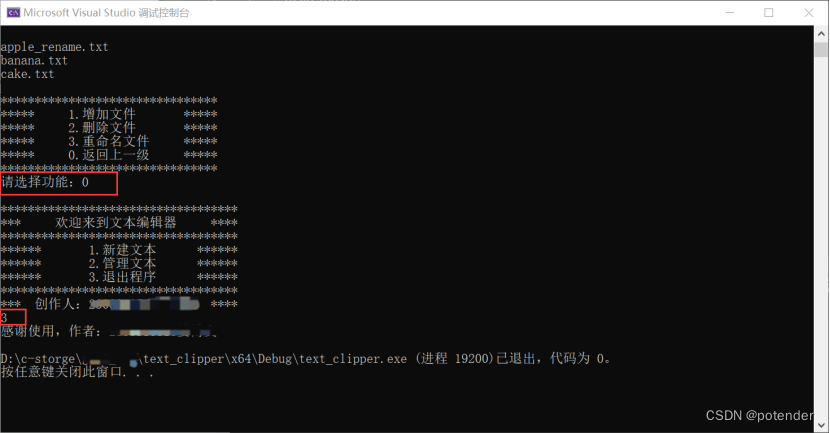
4.返回上一级与退出
心得
1.首先遇到的困难是没有很好的办法用c++像python那样打开文件夹,读取文件之类的操作,最后想到在源文件目录下放两个文件专门记录文件数和文件名,每次建立TextEditor类的时候都读取这两个文件,后来发现好像是数据库的思想(第一次用c++当了回全栈工程师哈哈哈【狗头】)。
2.最开始我是用数组存放文件名的,但是在按首字母排序的时候代码很不简洁,然后改用vector,因为sort会很方便排序,但是也疯狂报错,各种越界和格式不对,好在最后都改过来了。
3.file_num每个文件都需要访问,最初打算main中全局变量,其他文件extern,但是一直解决不了,接着让作为类的私有成员,解决了一些问题但是还是没解决全,最后索性把它当成公有成员了…(好吧我承认有些偷懒了)
结语
编程语言有种分类叫面向对象编程和面向过程编程。我是面向csdn编程和面向chetGPT编程,哈哈哈哈哈~~~好在终于结束啦!!





 扫一扫
扫一扫


 1万+
1万+

 被折叠的 条评论
为什么被折叠?
被折叠的 条评论
为什么被折叠?
 到【灌水乐园】发言





