 TeXLive中下载缺失包的方法


1. 问题
在引入emotion包(\usepackage{emotion})时报错说没有这个包:
File `emotion.sty' not found.
这个包在ctan上是有的:https://ctan.org/pkg/emotion
2. 解决方案
我使用的LaTeX编译工具是TeXLive,下载与使用方式可参考我写的另一篇博文:使用TeXLive+VSCode实现Windows系统本地读写、编译LaTeX文件
2.1 使用TeXLive的包管理器tlmgr来下载包
需要本地TeXLive和云端的一致。如果不一致请试用2.2中的方案。
首先打开TeXLive命令行窗口:
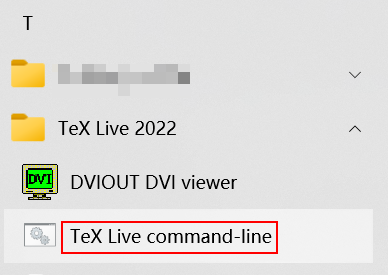
如果本地TeXLive版本和云端一致(在本文撰写的2025年8月6日,就是2025版),可以直接运行tlmgr install emotion命令。否则会报如下错误:
tlmgr.pl: Local TeX Live (2022) is older than remote repository (2025).
Cross release updates are only supported with
  update-tlmgr-latest(.sh/.exe) --update
See https://tug.org/texlive/upgrade.html for details.
2.2 将包文件下载到项目文件夹中
以emotion包为例,可以从上交镜像站(https://mirrors.sjtug.sjtu.edu.cn/ctan/macros/unicodetex/latex/emotion.zip)直接下载emotion.sty和emotion.def文件(都在压缩包里面),然后在本地运行mktexlsr命令,用LuaLaTeX编译(这个是因为这个包只能用LuaLaTeX编译),就可以了。





 扫一扫
扫一扫


 2109
2109

 被折叠的 条评论
为什么被折叠?
被折叠的 条评论
为什么被折叠?
 到【灌水乐园】发言





