



 本文详细介绍了如何搭建Redis集群,包括下载Redis、配置redis.conf文件、启动Redis实例、安装Ruby及依赖包,并最终通过redis-trib.rb脚本完成集群配置。
曾今也遭遇到这种情况,导致redis内存不够挂掉的情况,当然这些都是我们及其不能容忍的,第一个必须要做到高可靠,其次才是高性能,好了,下面我来
逐一搭建一下。
一:Redis集群搭建
1. 下载
首先去官网下载较新的3.2.0版本,下载方式还是非常简单的,比如官网介绍的这样。
$ wget http://download.redis.io/releases/redis-3.2.0.tar.gz
$ tar xzf redis-3.2.0.tar.gz
$ cd redis-3.2.0
$ make
2. redis配置
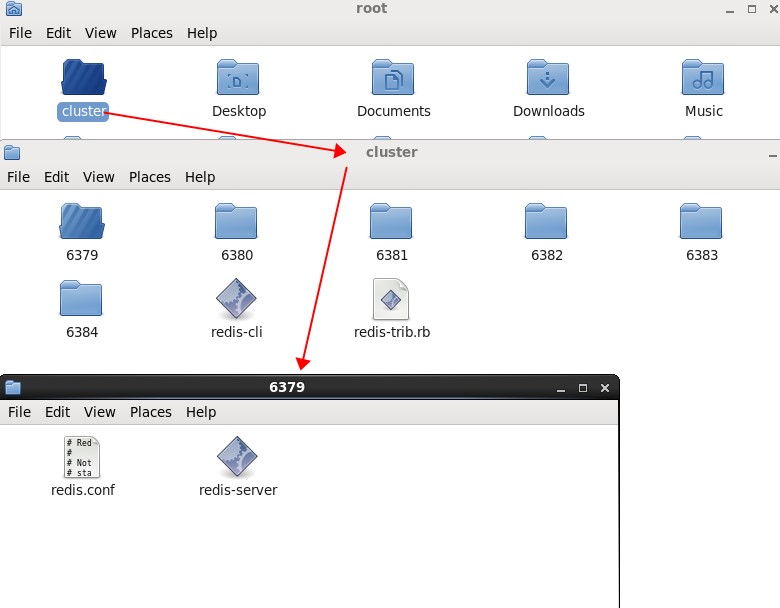
由于我们要做集群,而且还要redis自带的redis-trib.rb 能正常运行,我们需要在集群中开启三台master,三台slave,所以这里我需要建立6个文件
夹,而且文件夹的名称就使用端口地址的名字,比如:6389. 6380....6384。
3. config配置。
现在directory的分布情况大致如上图,接下来要做的事情就是配置redis.conf了,在这里需要配置四个选项。。。
<1> port 端口地址,比如6380文件夹下面的port就是6380,
# Accept connections on the specified port, default is 6379 (IANA #815344).
# If port 0 is specified Redis will not listen on a TCP socket.
port 6379
<2> cluster-enabled 和 cluster-config-file
这个顾名思义,首先需要开启redis的cluster模式,然后配置一个cluster-config-file文件,这个文件用于存放redis的实时信息,redis会动态追加和修
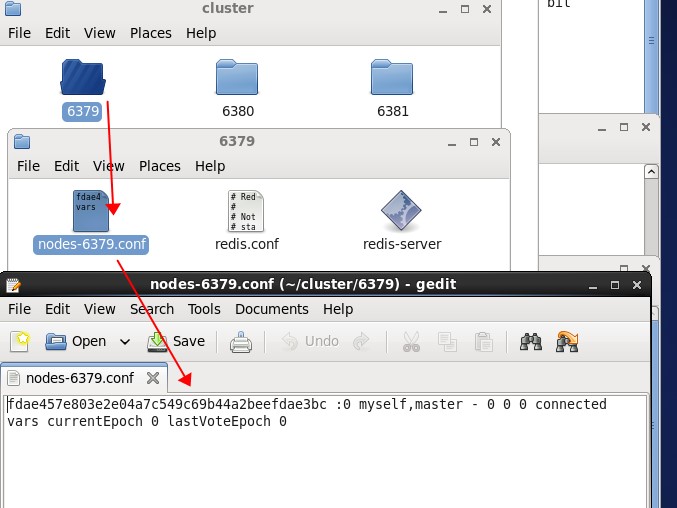
改这个conf下面的内容信息,不过要记住,这个nodes-6379.conf 可以根据 端口文件夹依次配置,比如6380文件夹可以改成nodes-6380.conf这样。。。

# Normal Redis instances can't be part of a Redis Cluster; only nodes that are
# started as cluster nodes can. In order to start a Redis instance as a
# cluster node enable the cluster support uncommenting the following:
#
cluster-enabled yes

# Every cluster node has a cluster configuration file. This file is not
# intended to be edited by hand. It is created and updated by Redis nodes.
# Every Redis Cluster node requires a different cluster configuration file.
# Make sure that instances running in the same system do not have
# overlapping cluster configuration file names.
#
cluster-config-file nodes-6379.conf
<3> directory
为了方便管理,我这里配置的root目录取决于在哪个文件夹,比如6380下面我的dir就是: dir ./6380/
# Note that you must specify a directory here, not a file name.
dir ./6379/
<4> protected-mode
这个是redis 3.2 才追加的一个功能,从功能注释中,我们就可以发现,这个默认就是不让外界可以访问redis,所以这里我们就改为no,可以远程访问。
# By default protected mode is enabled. You should disable it only if
# you are sure you want clients from other hosts to connect to Redis
# even if no authentication is configured, nor a specific set of interfaces
# are explicitly listed using the "bind" directive.
protected-mode no
ok,到现在为止,我们的config就修改完毕了,其他端口的文件夹也可以依次配置之~
二:开启redis
到现在为止,各个端口文件夹都配置成功了,接下来准备开启了,真的好么么哒~~~,窗口太多,有点萌萌的。
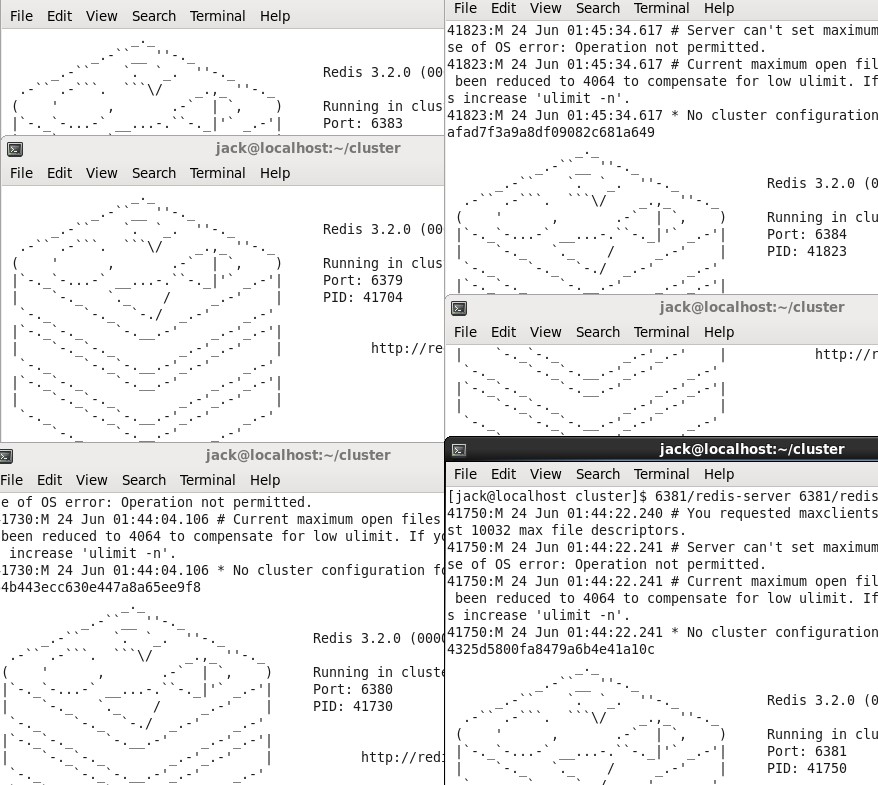
接下来我们可以看一下,在6379下面是不是有生成node-6379.conf文件,比如下面:
三:配置redis-trib.rb
因为redis-trib.rb是ruby写的,而我们的电脑肯定是没有ruby和一些配置依赖项,不过没关系,有强大的yum安装,一切都不是问题。
1. 执行replicas命令
[jack@localhost ~]$ cluster/redis-trib.rb  create --replicas 1 192.168.161.133:6379 192.168.161.133:6380 192.168.161.133:6381 192.168.161.133:6382 192.168.161.133:6383 192.168.161.133:6384
/usr/bin/env: ruby: No such file or directory
[jack@localhost ~]$
可以看到ruby是没有安装的,所以下一步我们要安装ruby了。。。
2. 安装ruby 【一定要是管理员权限哦】
[jack@localhost ~]$ sudo
usage: sudo [-D level] -h | -K | -k | -V
usage: sudo -v [-AknS] [-D level] [-g groupname|#gid] [-p prompt] [-u user
            name|#uid]
usage: sudo -l[l] [-AknS] [-D level] [-g groupname|#gid] [-p prompt] [-U user
            name] [-u user name|#uid] [-g groupname|#gid] [command]
usage: sudo [-AbEHknPS] [-r role] [-t type] [-C fd] [-D level] [-g
            groupname|#gid] [-p prompt] [-u user name|#uid] [-g groupname|#gid]
            [VAR=value] [-i|-s] [<command>]
usage: sudo -e [-AknS] [-r role] [-t type] [-C fd] [-D level] [-g
            groupname|#gid] [-p prompt] [-u user name|#uid] file ...
[jack@localhost ~]$ su
Password:
jacsu: incorrect password
[jack@localhost ~]$ yum install ruby
Loaded plugins: fastestmirror, refresh-packagekit, security
You need to be root to perform this command.
[jack@localhost ~]$ jack
bash: jack: command not found
[jack@localhost ~]$ su
Password:
[root@localhost jack]# yum install ruby
Loaded plugins: fastestmirror, refresh-packagekit, security
Loading mirror speeds from cached hostfile
 * base: mirror.bit.edu.cn
 * extras: mirror.bit.edu.cn
 * updates: mirror.bit.edu.cn
Setting up Install Process
Resolving Dependencies
--> Running transaction check
---> Package ruby.x86_64 0:1.8.7.374-4.el6_6 will be installed
--> Processing Dependency: ruby-libs = 1.8.7.374-4.el6_6 for package: ruby-1.8.7.374-4.el6_6.x86_64
--> Processing Dependency: libruby.so.1.8()(64bit) for package: ruby-1.8.7.374-4.el6_6.x86_64
--> Running transaction check
---> Package ruby-libs.x86_64 0:1.8.7.374-4.el6_6 will be installed
--> Processing Dependency: libreadline.so.5()(64bit) for package: ruby-libs-1.8.7.374-4.el6_6.x86_64
--> Running transaction check
---> Package compat-readline5.x86_64 0:5.2-17.1.el6 will be installed
--> Finished Dependency Resolution

Dependencies Resolved

================================================================================
 Package                Arch         Version                   Repository  Size
================================================================================
Installing:
 ruby                   x86_64       1.8.7.374-4.el6_6         base       538 k
Installing for dependencies:
 compat-readline5       x86_64       5.2-17.1.el6              base       130 k
 ruby-libs              x86_64       1.8.7.374-4.el6_6         base       1.7 M

Transaction Summary
================================================================================
Install       3 Package(s)

Total download size: 2.3 M
Installed size: 7.8 M
Is this ok [y/N]: y
Downloading Packages:
(1/3): compat-readline5-5.2-17.1.el6.x86_64.rpm          | 130 kB     00:00
(2/3): ruby-1.8.7.374-4.el6_6.x86_64.rpm                 | 538 kB     00:00
(3/3): ruby-libs-1.8.7.374-4.el6_6.x86_64.rpm            | 1.7 MB     00:02
--------------------------------------------------------------------------------
Total                                           747 kB/s | 2.3 MB     00:03
warning: rpmts_HdrFromFdno: Header V3 RSA/SHA256 Signature, key ID c105b9de: NOKEY
Retrieving key from file:///etc/pki/rpm-gpg/RPM-GPG-KEY-CentOS-6
Importing GPG key 0xC105B9DE:
 Userid : CentOS-6 Key (CentOS 6 Official Signing Key) <centos-6-key@centos.org>
 Package: centos-release-6-5.el6.centos.11.1.x86_64 (@anaconda-CentOS-201311272149.x86_64/6.5)
 From   : /etc/pki/rpm-gpg/RPM-GPG-KEY-CentOS-6
Is this ok [y/N]: y
Running rpm_check_debug
Running Transaction Test
Transaction Test Succeeded
Running Transaction
  Installing : compat-readline5-5.2-17.1.el6.x86_64                         1/3
  Installing : ruby-libs-1.8.7.374-4.el6_6.x86_64                           2/3
  Installing : ruby-1.8.7.374-4.el6_6.x86_64                                3/3
  Verifying  : compat-readline5-5.2-17.1.el6.x86_64                         1/3
  Verifying  : ruby-libs-1.8.7.374-4.el6_6.x86_64                           2/3
  Verifying  : ruby-1.8.7.374-4.el6_6.x86_64                                3/3

Installed:
  ruby.x86_64 0:1.8.7.374-4.el6_6

Dependency Installed:
  compat-readline5.x86_64 0:5.2-17.1.el6  ruby-libs.x86_64 0:1.8.7.374-4.el6_6

Complete!
[root@localhost jack]#
3. 安装rubygems
接着我们再次运行 replicas命令,看看会怎么样。。。
[root@localhost jack]# cluster/redis-trib.rb  create --replicas 1 192.168.161.133:6379 192.168.161.133:6380 192.168.161.133:6381 192.168.161.133:6382 192.168.161.133:6383 192.168.161.133:6384
cluster/redis-trib.rb:24:in `require': no such file to load -- rubygems (LoadError)
    from cluster/redis-trib.rb:24
[root@localhost jack]#
结果苦逼了,还是报错,看提示貌似是少了一个rubygems,这次我们还是通过yum安装。
[root@localhost jack]# yum install -y rubygems
Loaded plugins: fastestmirror, refresh-packagekit, security
Loading mirror speeds from cached hostfile
 * base: mirror.bit.edu.cn
 * extras: mirror.bit.edu.cn
 * updates: mirror.bit.edu.cn
Setting up Install Process
Resolving Dependencies
--> Running transaction check
---> Package rubygems.noarch 0:1.3.7-5.el6 will be installed
--> Processing Dependency: ruby-rdoc for package: rubygems-1.3.7-5.el6.noarch
--> Running transaction check
---> Package ruby-rdoc.x86_64 0:1.8.7.374-4.el6_6 will be installed
--> Processing Dependency: ruby-irb = 1.8.7.374-4.el6_6 for package: ruby-rdoc-1.8.7.374-4.el6_6.x86_64
--> Running transaction check
---> Package ruby-irb.x86_64 0:1.8.7.374-4.el6_6 will be installed
--> Finished Dependency Resolution

Dependencies Resolved

================================================================================
 Package           Arch           Version                    Repository    Size
================================================================================
Installing:
 rubygems          noarch         1.3.7-5.el6                base         207 k
Installing for dependencies:
 ruby-irb          x86_64         1.8.7.374-4.el6_6          base         317 k
 ruby-rdoc         x86_64         1.8.7.374-4.el6_6          base         381 k

Transaction Summary
================================================================================
Install       3 Package(s)

Total download size: 905 k
Installed size: 3.0 M
Downloading Packages:
(1/3): ruby-irb-1.8.7.374-4.el6_6.x86_64.rpm             | 317 kB     00:00
(2/3): ruby-rdoc-1.8.7.374-4.el6_6.x86_64.rpm            | 381 kB     00:00
(3/3): rubygems-1.3.7-5.el6.noarch.rpm                   | 207 kB     00:00
--------------------------------------------------------------------------------
Total                                           625 kB/s | 905 kB     00:01
Running rpm_check_debug
Running Transaction Test
Transaction Test Succeeded
Running Transaction
  Installing : ruby-irb-1.8.7.374-4.el6_6.x86_64                            1/3
  Installing : ruby-rdoc-1.8.7.374-4.el6_6.x86_64                           2/3
  Installing : rubygems-1.3.7-5.el6.noarch                                  3/3
  Verifying  : ruby-rdoc-1.8.7.374-4.el6_6.x86_64                           1/3
  Verifying  : ruby-irb-1.8.7.374-4.el6_6.x86_64                            2/3
  Verifying  : rubygems-1.3.7-5.el6.noarch                                  3/3

Installed:
  rubygems.noarch 0:1.3.7-5.el6

Dependency Installed:
  ruby-irb.x86_64 0:1.8.7.374-4.el6_6    ruby-rdoc.x86_64 0:1.8.7.374-4.el6_6

Complete!
[root@localhost jack]#
4. 安装redis驱动
还是继续不死心,我们继续运行replicas命令命令。
[root@localhost jack]# cluster/redis-trib.rb  create --replicas 1 192.168.161.133:6379 192.168.161.133:6380 192.168.161.133:6381 192.168.161.133:6382 192.168.161.133:6383 192.168.161.133:6384
/usr/lib/ruby/site_ruby/1.8/rubygems/custom_require.rb:31:in `gem_original_require': no such file to load -- redis (LoadError)
    from /usr/lib/ruby/site_ruby/1.8/rubygems/custom_require.rb:31:in `require'
    from cluster/redis-trib.rb:25
[root@localhost jack]#
卧槽,还是有问题,这次貌似是一个gem_original_require没有安装,当然这个一般是说ruby版本太老了,所以现在亲要么升级ruby版本,要么直接安装
ruby的redis驱动。
[root@localhost jack]# gem install redis
Successfully installed redis-3.3.0
1 gem installed
Installing ri documentation for redis-3.3.0...
Installing RDoc documentation for redis-3.3.0...
6. 运行replicas命令
终于貌似所有的依赖我们都解决了,接下来就可以真的执行了,真是一把辛酸泪啊。。。操。。。
[root@localhost jack]# cluster/redis-trib.rb  create --replicas 1 192.168.161.133:6379 192.168.161.133:6380 192.168.161.133:6381 192.168.161.133:6382 192.168.161.133:6383 192.168.161.133:6384
>>> Creating cluster
>>> Performing hash slots allocation on 6 nodes...
Using 3 masters:
192.168.161.133:6379
192.168.161.133:6380
192.168.161.133:6381
Adding replica 192.168.161.133:6382 to 192.168.161.133:6379
Adding replica 192.168.161.133:6383 to 192.168.161.133:6380
Adding replica 192.168.161.133:6384 to 192.168.161.133:6381
M: fdae457e803e2e04a7c549c69b44a2beefdae3bc 192.168.161.133:6379
   slots:0-5460 (5461 slots) master
M: 74285cee0fa65e64b443ecc630e447a8a65ee9f8 192.168.161.133:6380
   slots:5461-10922 (5462 slots) master
M: 14ed067a1b85044325d5800fa8479a6b4e41a10c 192.168.161.133:6381
   slots:10923-16383 (5461 slots) master
S: c50b1ff1fe3a00b16703f3b5705d2dafe046240b 192.168.161.133:6382
   replicates fdae457e803e2e04a7c549c69b44a2beefdae3bc
S: 8f7bd92f7ffb48e327820693a5820b5be7ea5556 192.168.161.133:6383
   replicates 74285cee0fa65e64b443ecc630e447a8a65ee9f8
S: 4a85ed078b4c99afad7f3a9a8df09082c681a649 192.168.161.133:6384
   replicates 14ed067a1b85044325d5800fa8479a6b4e41a10c
Can I set the above configuration? (type 'yes' to accept): yes
>>> Nodes configuration updated
>>> Assign a different config epoch to each node
>>> Sending CLUSTER MEET messages to join the cluster
Waiting for the cluster to join....
>>> Performing Cluster Check (using node 192.168.161.133:6379)
M: fdae457e803e2e04a7c549c69b44a2beefdae3bc 192.168.161.133:6379
   slots:0-5460 (5461 slots) master
M: 74285cee0fa65e64b443ecc630e447a8a65ee9f8 192.168.161.133:6380
   slots:5461-10922 (5462 slots) master
M: 14ed067a1b85044325d5800fa8479a6b4e41a10c 192.168.161.133:6381
   slots:10923-16383 (5461 slots) master
M: c50b1ff1fe3a00b16703f3b5705d2dafe046240b 192.168.161.133:6382
   slots: (0 slots) master
   replicates fdae457e803e2e04a7c549c69b44a2beefdae3bc
M: 8f7bd92f7ffb48e327820693a5820b5be7ea5556 192.168.161.133:6383
   slots: (0 slots) master
   replicates 74285cee0fa65e64b443ecc630e447a8a65ee9f8
M: 4a85ed078b4c99afad7f3a9a8df09082c681a649 192.168.161.133:6384
   slots: (0 slots) master
   replicates 14ed067a1b85044325d5800fa8479a6b4e41a10c
[OK] All nodes agree about slots configuration.
>>> Check for open slots...
>>> Check slots coverage...
[OK] All 16384 slots covered.
[root@localhost jack]#
从上面可以看到,trib程序告知我们是否用 6379,6380,6381 作为主, 6382,6383,6384作为从。。然后我就恩准了。。就这样我们的集群
就创建好了,好了,这篇就讲到这里,也不是特别复杂吧~~~





 扫一扫
扫一扫


 5264
5264

 被折叠的 条评论
为什么被折叠?
被折叠的 条评论
为什么被折叠?
 到【灌水乐园】发言





