






 本文详细介绍NumPy中concatenate及vstack函数的应用,并通过具体示例演示如何使用Matplotlib进行图像绘制,包括热图的生成及散点图的添加。
先把需要用到的参数都处理一下,如下:
X0 = np.concatenate((x0, 0*x0), 1) # (x0, 0)
X_lb = np.concatenate((0*tb + lb[0], tb), 1) # (lb[0], tb)
X_ub = np.concatenate((0*tb + ub[0], tb), 1) # (ub[0], tb)
X_u_train = np.vstack([X0, X_lb, X_ub])
np.concatenate()是用来对数列或矩阵进行合并的
例如:一维,只能把axis设为0

		import numpy as np
		a=[1,2,3]
		b=[4,5,6]
		np.concatenate((a,b),axis=0)

那么输出的结果是:
array([1, 2, 3, 4, 5, 6])

例如:二维,axis可以设为0和1

		import numpy as np
		a=np.array([[1,2,3],[111,222,333]])
		b=np.array([[4,5,6],[44,55,67]])
		print("\naxis=0的结果为:\n",np.concatenate((a,b),axis=0))
		print("\naxis=0的维度为:\n",np.concatenate((a,b),axis=0).shape)
		print("\naxis=1的结果为:\n",np.concatenate((a,b),axis=1))
		print("\naxis=1的维度为:\n",np.concatenate((a,b),axis=1).shape)

那么结果是:
[[  1   2   3]
 [111 222 333]]

矩阵a的维度为: (2, 3)
[[ 4  5  6]
 [44 55 67]]

axis=0的结果为:
 [[  1   2   3]
 [111 222 333]
 [  4   5   6]
 [ 44  55  67]]

axis=0的维度为:
 (4, 3)

axis=1的结果为:
 [[  1   2   3   4   5   6]
 [111 222 333  44  55  67]]

axis=1的维度为:
 (2, 6)
###############################################
axis=0可以看做直接把b矩阵接在a的下面,即按行进行合并
axis=1可以看做将矩阵连接在a的右边,即按列进行合并
##############################################

例如:三维,axis可以设0,1,2
		import numpy as np
		a=np.array([[[1,2,3],[111,222,333]],[[134,131,423],[134,6356,754]],[[984,1940,2940],[245,245,546]]])
		b=np.array([[[13,13,35],[697,2572,33633]],[[13354,132461,4723],[1374,63856,754]],[[9844,19640,2940],[23645,23645,56346]]])
		print(a)
		print('\n矩阵a的维度为:',a.shape)
		print(b)
		print("\naxis=0的结果为:\n",np.concatenate((a,b),axis=0)) #axis=0表示在行上加,axis=1表示在列上加
		print("\naxis=0的维度为:\n",np.concatenate((a,b),axis=0).shape)
		print("\naxis=1的结果为:\n",np.concatenate((a,b),axis=1)) #axis=0表示在行上加,axis=1表示在列上加
		print("\naxis=1的维度为:\n",np.concatenate((a,b),axis=1).shape)
		print("\naxis=2的结果为:\n",np.concatenate((a,b),axis=2)) #axis=0表示在行上加,axis=1表示在列上加
		print("\naxis=2的维度为:\n",np.concatenate((a,b),axis=2).shape)

结果如下:
[[[   1    2    3]
  [ 111  222  333]]

 [[ 134  131  423]
  [ 134 6356  754]]

 [[ 984 1940 2940]
  [ 245  245  546]]]

矩阵a的维度为: (3, 2, 3)
[[[    13     13     35]
  [   697   2572  33633]]

 [[ 13354 132461   4723]
  [  1374  63856    754]]

 [[  9844  19640   2940]
  [ 23645  23645  56346]]]

axis=0的结果为:
 [[[     1      2      3]
  [   111    222    333]]

 [[   134    131    423]
  [   134   6356    754]]

 [[   984   1940   2940]
  [   245    245    546]]

 [[    13     13     35]
  [   697   2572  33633]]

 [[ 13354 132461   4723]
  [  1374  63856    754]]

 [[  9844  19640   2940]
  [ 23645  23645  56346]]]

axis=0的维度为:
 (6, 2, 3)

axis=1的结果为:
 [[[     1      2      3]
  [   111    222    333]
  [    13     13     35]
  [   697   2572  33633]]

 [[   134    131    423]
  [   134   6356    754]
  [ 13354 132461   4723]
  [  1374  63856    754]]

 [[   984   1940   2940]
  [   245    245    546]
  [  9844  19640   2940]
  [ 23645  23645  56346]]]

axis=1的维度为:
 (3, 4, 3)

axis=2的结果为:
 [[[     1      2      3     13     13     35]
  [   111    222    333    697   2572  33633]]

 [[   134    131    423  13354 132461   4723]
  [   134   6356    754   1374  63856    754]]

 [[   984   1940   2940   9844  19640   2940]
  [   245    245    546  23645  23645  56346]]]

axis=2的维度为:
 (3, 2, 6)
######################################################
axis=0,则表示合并后第一个维度数据要变(axis是从0开始计算的,即第一维表示0)
axis=1,则表示合并后第二个维度的数据要变
axis=2,则表示合并后第三个维度数据要变
数据变换一般是两个数组相同维度数值相加
#####################################################
numpy.vstack(tup) 返回竖直堆叠后的数组
tup:输入的参数应该为一个元组,即(tuple)对象
例如:
        array1 = np.array([1, 2, 3])
        array2 = np.array([2, 3, 4])
        array = np.vstack((array1, array2))

那么输出的数组array的值为:
[[1 2 3]
 [2 3 4]]
接下来开始创建画布画画
fig, ax = newfig(1.3, 1.0) #创建一个宽为1.3,1个框框的画布
ax.axis('off') #关闭坐标轴

其中在plotting.py中,
def newfig(width, nplots = 1):
    fig = plt.figure(figsize=figsize(width, nplots))
    ax = fig.add_subplot(111)
    return fig, ax
备注:fig理解为画布,ax理解为图层
开始画一个图
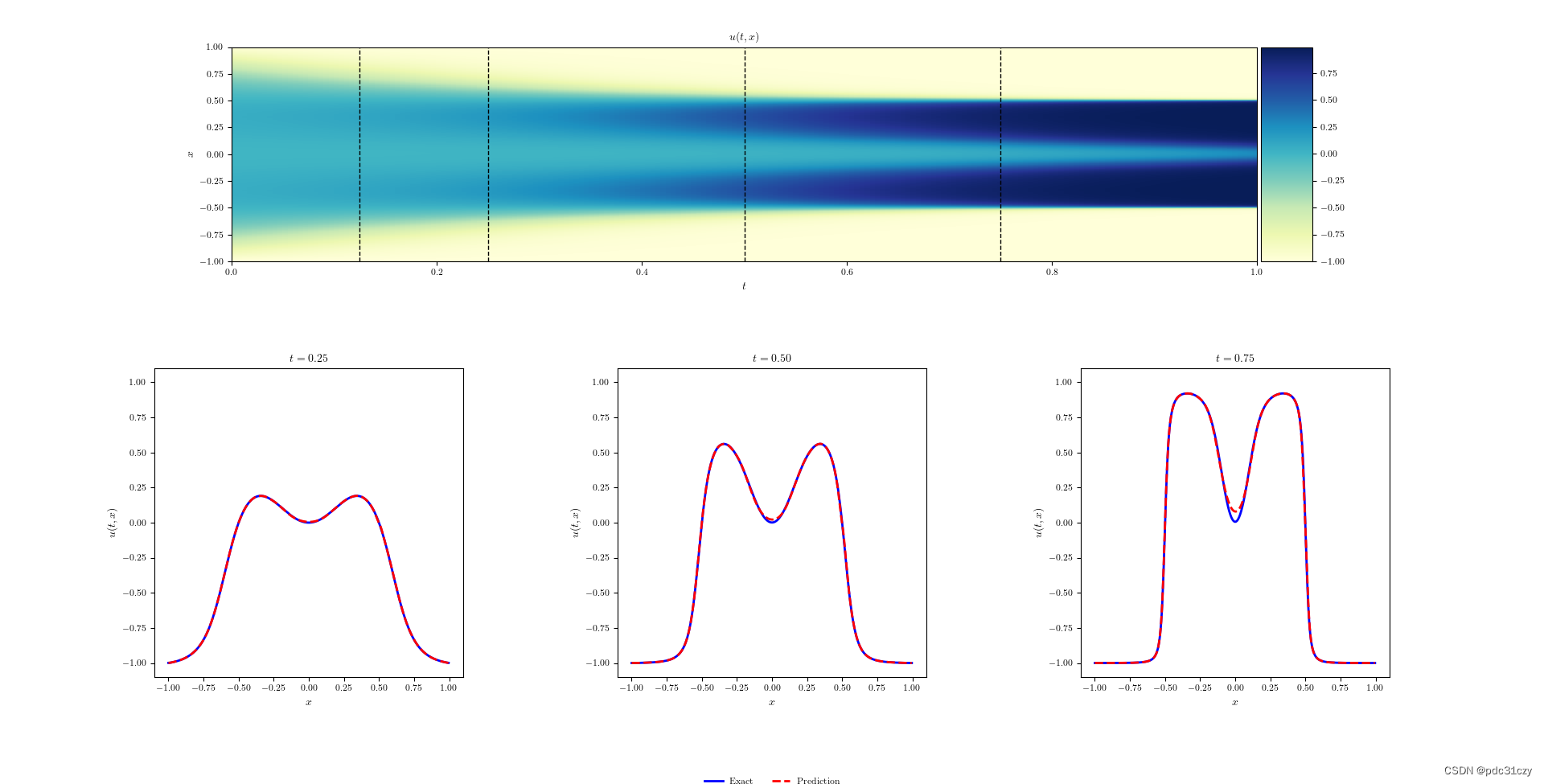
####### Row 0: h(t,x) ################## 上部分
gs0 = gridspec.GridSpec(1, 2) #一行两列
gs0.update(top=1-0.06, bottom=1-1/3, left=0.15, right=0.85, wspace=0)
ax = plt.subplot(gs0[:, :])

h = ax.imshow(U_pred.T, interpolation='nearest', cmap='YlGnBu',
              extent=[lb[1], ub[1], lb[0], ub[0]],
              origin='lower', aspect='auto')
divider = make_axes_locatable(ax)
cax = divider.append_axes("right", size="5%", pad=0.05)
fig.colorbar(h, cax=cax)


line = np.linspace(x.min(), x.max(), 2)[:,None]
ax.plot(t[25]*np.ones((2,1)), line, 'k--', linewidth = 1)
ax.plot(t[50]*np.ones((2,1)), line, 'k--', linewidth = 1)
ax.plot(t[100]*np.ones((2,1)), line, 'k--', linewidth = 1)
ax.plot(t[150]*np.ones((2,1)), line, 'k--', linewidth = 1)

ax.set_xlabel('$t$')
ax.set_ylabel('$x$')
leg = ax.legend(frameon=False, loc = 'best')
#    plt.setp(leg.get_texts(), color='w')
ax.set_title('$u(t,x)$', fontsize = 10)

####### Row 1: h(t,x) slices ##################下部分
gs1 = gridspec.GridSpec(1, 3) #一行三列
gs1.update(top=1-1/3, bottom=0, left=0.1, right=0.9, wspace=0.5)

ax = plt.subplot(gs1[0, 0])
ax.plot(x,Exact_u[:,50], 'b-', linewidth = 2, label = 'Exact')
ax.plot(x,U_pred[50,:], 'r--', linewidth = 2, label = 'Prediction')
ax.set_xlabel('$x$')
ax.set_ylabel('$u(t,x)$')
ax.set_title('$t = %.2f$' % (t[50]), fontsize = 10)
ax.axis('square')
ax.set_xlim([-1.1,1.1])
ax.set_ylim([-1.1,1.1])

ax = plt.subplot(gs1[0, 1])
ax.plot(x,Exact_u[:,100], 'b-', linewidth = 2, label = 'Exact')
ax.plot(x,U_pred[100,:], 'r--', linewidth = 2, label = 'Prediction')
ax.set_xlabel('$x$')
ax.set_ylabel('$u(t,x)$')
ax.axis('square')
ax.set_xlim([-1.1,1.1])
ax.set_ylim([-1.1,1.1])
ax.set_title('$t = %.2f$' % (t[100]), fontsize = 10)
ax.legend(loc='upper center', bbox_to_anchor=(0.5, -0.3), ncol=5, frameon=False)

ax = plt.subplot(gs1[0, 2])
ax.plot(x,Exact_u[:,150], 'b-', linewidth = 2, label = 'Exact')
ax.plot(x,U_pred[150,:], 'r--', linewidth = 2, label = 'Prediction')
ax.set_xlabel('$x$')
ax.set_ylabel('$u(t,x)$')
ax.axis('square')
ax.set_xlim([-1.1,1.1])
ax.set_ylim([-1.1,1.1])
ax.set_title('$t = %.2f$' % (t[150]), fontsize = 10)
ax.imshow():热图(heatmap)是数据分析的常用方法,通过色差、亮度来展示数据的差异、易于理解。Python在Matplotlib库中,调用imshow()函数实现热图绘制。
plt.imshow(
    X,
    cmap=None,
    norm=None,
    aspect=None,
    interpolation=None,
    alpha=None,
    vmin=None,
    vmax=None,
    origin=None,
    extent=None,
    shape=None,
    filternorm=1,
    filterrad=4.0,
    imlim=None,
    resample=None,
    url=None,
    *,
    data=None,
    **kwargs,
)
**X:**
图像数据。支持的数组形状是:
(M,N) :带有标量数据的图像。数据可视化使用色彩图。
(M,N,3) :具有RGB值的图像(float或uint8)。
(M,N,4) :具有RGBA值的图像(float或uint8),即包括透明度。
前两个维度(M,N)定义了行和列图片,即图片的高和宽;
RGB(A)值应该在浮点数[0, ..., 1]的范围内,或者
整数[0, ... ,255]。超出范围的值将被剪切为这些界限。
**cmap:**
将标量数据映射到色彩图
颜色默认为:rc:image.cmap。
**norm :**
~matplotlib.colors.Normalize
如果使用scalar data ,则Normalize会对其进行缩放[0,1]的数据值内。
默认情况下,数据范围使用线性缩放映射到颜色条范围。 RGB(A)数据忽略该参数。
**aspect:**
{'equal','auto'}或float,可选
控制轴的纵横比。该参数可能使图像失真,即像素不是方形的。
equal:确保宽高比为1,像素将为正方形。(除非像素大小明确地在数据中变为非正方形,坐标使用 extent )。
auto: 更改图像宽高比以匹配轴的宽高比。通常,这将导致非方形像素。
**interpolation:**
str
使用的插值方法
支持的值有:'none', 'nearest', 'bilinear', 'bicubic','spline16', 'spline36', 'hanning', 'hamming', 'hermite', 'kaiser',
'quadric', 'catrom', 'gaussian', 'bessel', 'mitchell', 'sinc','lanczos'.
如果interpolation = 'none',则不执行插值
**alpha:**
alpha值,介于0(透明)和1(不透明)之间。RGBA输入数据忽略此参数。
**vmin, vmax : scalar,**
如果使用* norm 参数,则忽略 vmin , vmax *。
vmin,vmax与norm结合使用以标准化亮度数据。
**origin : {'upper', 'lower'}**
将数组的[0,0]索引放在轴的左上角或左下角。
'upper'通常用于矩阵和图像。
请注意,垂直轴向上指向“下”但向下指向“上”。
**extent:(left, right, bottom, top)**
数据坐标中左下角和右上角的位置。 如果为“无”,则定位图像使得像素中心落在基于零的(行,列)索引上。
画第二个图
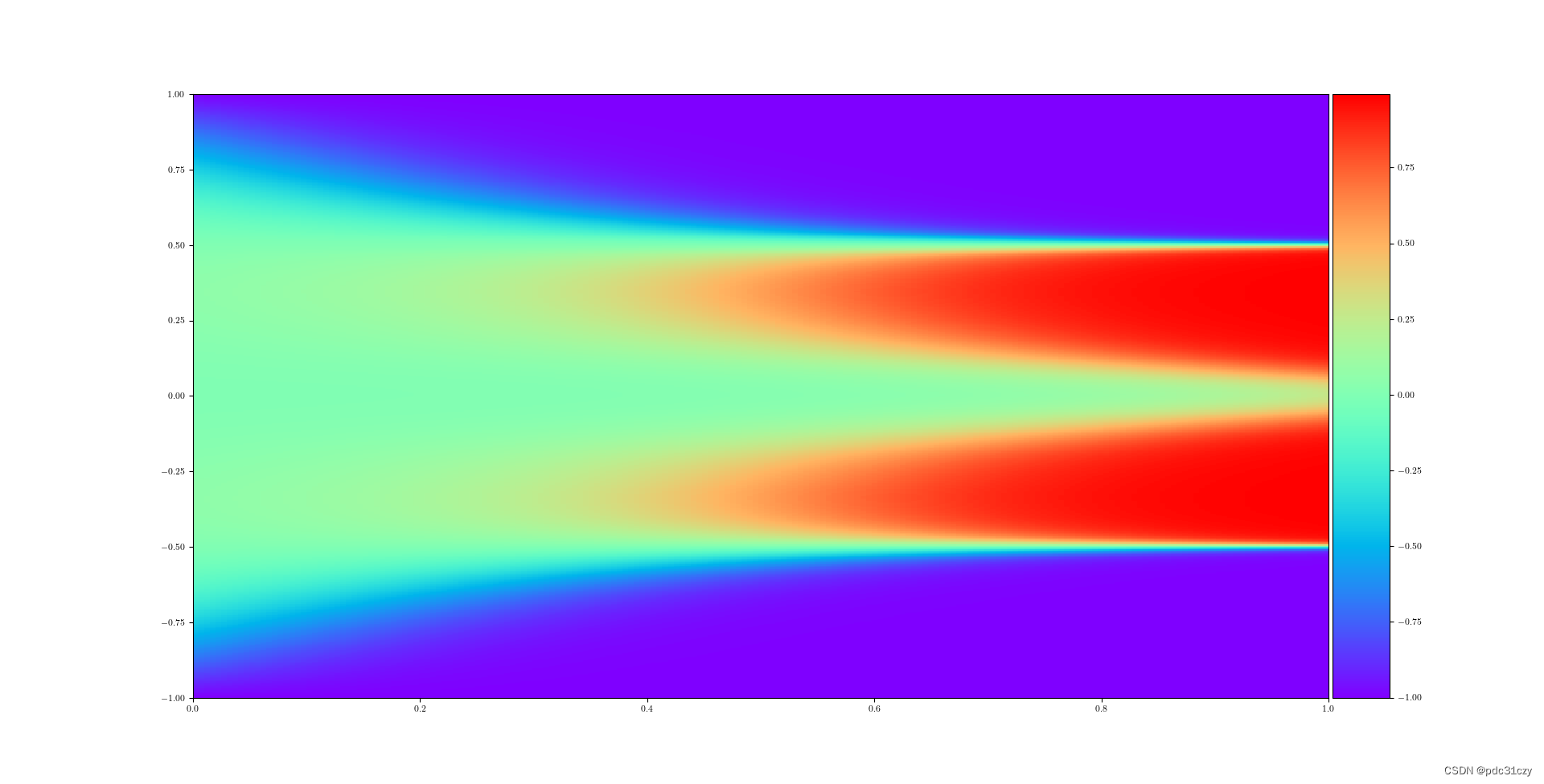
imshow()其实就是将数组的值以图片的形式展示出来,数组的值对应着不同的颜色深浅,而数值的横纵坐标就是数组的索引,比如一个1000X1000的数组,图片里的点也就有1000X1000个,比如第一个行第一个点的坐标就是(0,0)
#show u_pred across domain
fig, ax = plt.subplots() #新建第二个画布

h = plt.imshow(U_pred.T, interpolation='nearest', cmap='rainbow',
            extent=[0.0, 1.0, -1.0, 1.0],
            origin='lower', aspect='auto')
########################################
###这里U_pred.T是图像数据;
###interpolation='nearest'指使用的插值方法为最邻近插值;
###cmap='rainbow'是将标量数据映射到色彩图;
###extent=[0.0, 1.0, -1.0, 1.0]即extent=[left,right,bottom,top]指数据坐标中左下角和右上角的位置;
###origin='lower'指将数组的[0,0]索引放在轴的左下角;
###aspect='auto'是可选控制轴的纵横比,这里auto指更改图像宽高比以匹配轴的宽高比,通常这将导致非方形像素。
#######################################

#使用轴分隔符
divider = make_axes_locatable(ax) #使用make_axes_locatable的实例来划分轴,并创建与图像绘图完全对齐的新轴
cax = divider.append_axes("right", size="5%", pad=0.05) #pad参数将允许设置两个轴之间的间距。
fig.colorbar(h, cax=cax) #将色条添加到指示色标的图,传入了h里的等值线,cax为指定色条位置参数

plt.legend(frameon=False, loc = 'best') #用于给图像加图例,这里是指去掉图例边框

plt.show() #显示所有的 figure
U_pred.T
data = scipy.io.loadmat('AC.mat')
t = data['tt'].flatten()[:,None]
x = data['x'].flatten()[:,None]
X, T = np.meshgrid(x,t)
X_star = np.hstack((X.flatten()[:,None], T.flatten()[:,None]))
u_pred, f_u_pred = predict(X_star)

def predict(X_star):
    X_star = tf.convert_to_tensor(X_star, dtype=tf.float32)
    u_star, _ = u_x_model(u_model, X_star[:,0:1],
                     X_star[:,1:2])

    f_u_star = f_model(X_star[:,0:1],
                 X_star[:,1:2])

    return u_star.numpy(), f_u_star.numpy()

U_pred = griddata(X_star, u_pred.flatten(), (X, T), method='cubic')
画第三个图
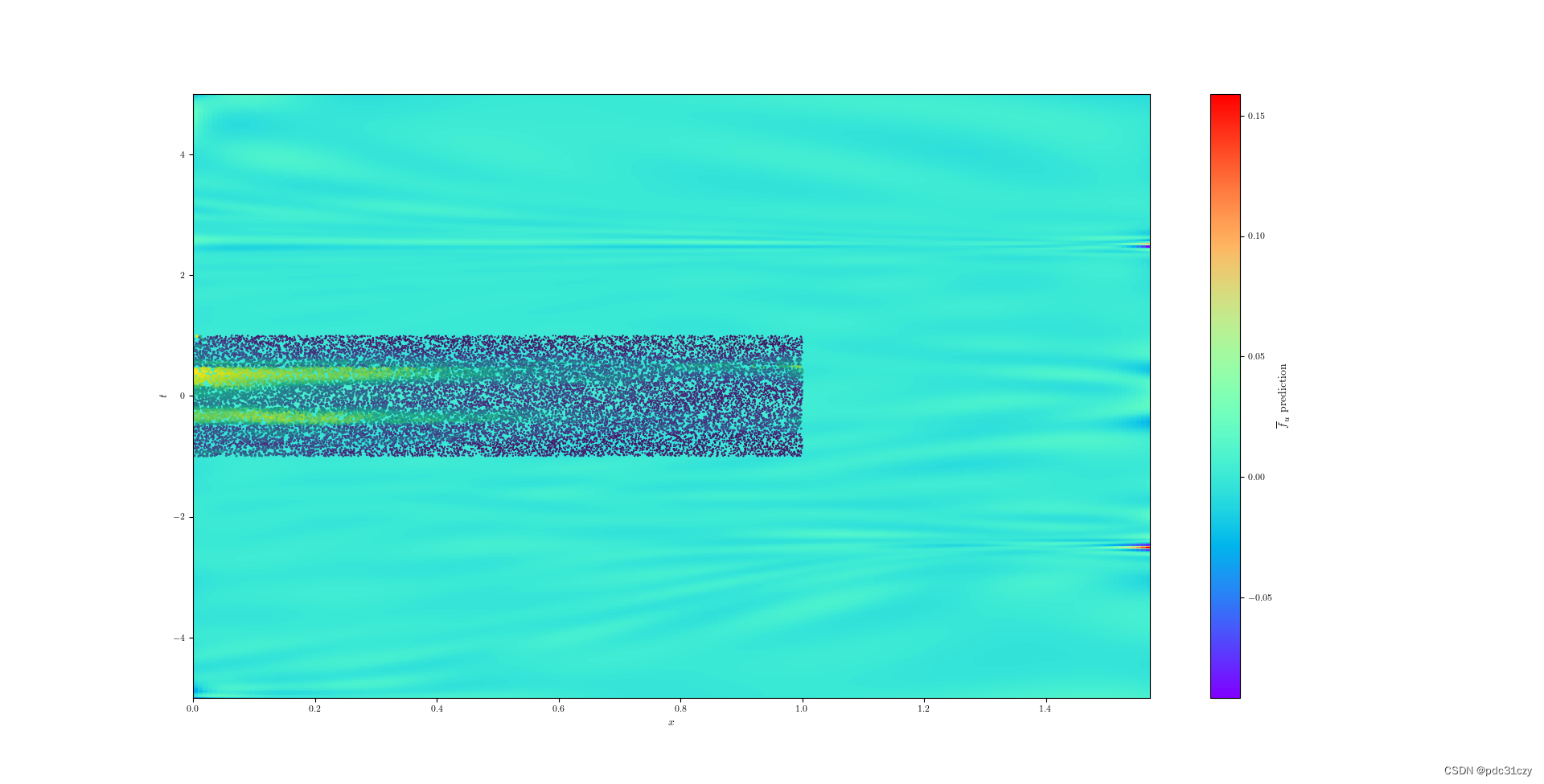
imshow()接收一张图像,只是画出该图,并不会立刻显示出来。
imshow后还可以进行其他draw操作,比如scatter散点等。
所有画完后使用plt.show()才能进行结果的显示。
fig, ax = plt.subplots() #新建第三个画布
ec = plt.imshow(FU_pred.T, interpolation='nearest', cmap='rainbow',
            extent=[0.0, math.pi/2, -5.0, 5.0],
            origin='lower', aspect='auto')
########################################
###这里FU_pred.T是图像数据;
###interpolation='nearest'指使用的插值方法为最邻近插值;
###cmap='rainbow'是将标量数据映射到色彩图;
###extent=[0.0, math.pi/2, -5.0, 5.0]即extent=[left,right,bottom,top]指数据坐标中左下角和右上角的位置;
###origin='lower'指将数组的[0,0]索引放在轴的左下角;
###aspect='auto'是可选控制轴的纵横比,这里auto指更改图像宽高比以匹配轴的宽高比,通常这将导致非方形像素。
#######################################
#ax.add_collection(ec) #用于向ax的集合添加一个集合;返回集合
ax.autoscale_view() #此函数用于使用数据限制自动缩放视图限制
ax.set_xlabel('$t$')
ax.set_ylabel('$x$')
cbar = plt.colorbar(ec) #将色条添加到指示色标的图,传入了ec里的等值线
cbar.set_label('$\overline{f}_u$ prediction')
plt.show() #显示所有的 figure
#在上面画好的图上再画散点图
plt.scatter(t_f, x_f, c = col_weights.numpy(), s = col_weights.numpy()/10)
#####################################
###t_f, x_f是即将绘制散点图的数据点,输入数据,即是散点的坐标
###c = col_weights.numpy()表示的是色彩或颜色序列。c可以是一个RGB或RGBA二维行数组。即是散点的颜色
###s = col_weights.numpy()/10表示的是大小,是一个标量或者是一个数组,即是散点的面积
#####################################
plt.show() #显示所有的 figure
plt.scatter()函数用于生成一个scatter散点图
matplotlib.pyplot.scatter(x,
    y,
    s=20,
    c='b',
    marker='o',
    cmap=None,
    norm=None,
    vmin=None,
    vmax=None,
    alpha=None,
    linewidths=None,
    verts=None,
    hold=None,
    **kwargs)
plt.scatter()参数解释如下:
参数:

x,y:表示的是shape大小为(n,)的数组,也就是我们即将绘制散点图的数据点,输入数据。
s:表示的是大小,是一个标量或者是一个shape大小为(n,)的数组,可选,默认20。
c:表示的是色彩或颜色序列,可选,默认蓝色’b’。但是c不应该是一个单一的RGB数字,也不应该是一个RGBA的序列,因为不便区分。c可以是一个RGB或RGBA二维行数组。

marker:MarkerStyle,表示的是标记的样式,可选,默认’o’。
cmap:Colormap,标量或者是一个colormap的名字,cmap仅仅当c是一个浮点数数组的时候才使用。如果没有申明就是image.cmap,可选,默认None。
norm:Normalize,数据亮度在0-1之间,也是只有c是一个浮点数的数组的时候才使用。如果没有申明,就是默认None。
vmin,vmax:标量,当norm存在的时候忽略。用来进行亮度数据的归一化,可选,默认None。
alpha:标量,0-1之间,可选,默认None。
linewidths:也就是标记点的长度,默认None。
FU_pred.T
data = scipy.io.loadmat('AC.mat')
t = data['tt'].flatten()[:,None]
x = data['x'].flatten()[:,None]
X, T = np.meshgrid(x,t)  # 将这些点摞起来,变成(N_u,x,t)的数据结构
X_star = np.hstack((X.flatten()[:,None], T.flatten()[:,None])) #将参数元组的元素数组按水平方向进行叠加
u_pred, f_u_pred = predict(X_star)

def predict(X_star):
    X_star = tf.convert_to_tensor(X_star, dtype=tf.float32)
    u_star, _ = u_x_model(u_model, X_star[:,0:1],
                     X_star[:,1:2])

    f_u_star = f_model(X_star[:,0:1],
                 X_star[:,1:2])

    return u_star.numpy(), f_u_star.numpy()

FU_pred = griddata(X_star, f_u_pred.flatten(), (X, T), method='cubic')
t_f
lb = np.array([-1.0])
ub = np.array([1.0])
N_f = 20000  # 内部点的数量
X_f = lb + (ub-lb)*lhs(2, N_f) # lhs这个函数是随机生成N_f个0-1的数据,2代表生成的维度,因为(x,t)所以设置为2。因此这一行代表在定义域内随机生成N_f个(x,t)坐标
t_f = tf.convert_to_tensor(np.abs(X_f[:,1:2]), dtype=tf.float32)
x_f
lb = np.array([-1.0])
ub = np.array([1.0])
N_f = 20000
X_f = lb + (ub-lb)*lhs(2, N_f)
x_f = tf.convert_to_tensor(X_f[:,0:1], dtype=tf.float32)






 扫一扫
扫一扫


 1749
1749

 被折叠的 条评论
为什么被折叠?
被折叠的 条评论
为什么被折叠?
 到【灌水乐园】发言





