





 本文详细介绍了使用Netty实现客户端与服务端双向通信的过程。包括基本思路、通信流程及代码实现,展示了如何通过责任链模式处理连接数据的读写逻辑。
一.基本思路
读写逻辑处理均是启动阶段通过给逻辑处理链Pipeline添加逻辑处理器实现连接数据的读写逻辑。
-
客户端连接成功回调逻辑处理器的
channelActive()方法 -
客户端和服务端接收到对方的数据回调用各自逻辑处理器的
channelRead()方法。 -
客户端和服务端向对方写数据调用
writeAndFlush()方法 -
客户端和服务端交互的二进制数据传输载体为
ByteBuf
二.通信流程
![[外链图片转存失败,源站可能有防盗链机制,建议将图片保存下来直接上传(img-lxx6KkVY-1580725870430)(http://note.youdao.com/yws/res/9840/76DC2AB9464A4D1882346E496B1C9518)]](https://i-blog.csdnimg.cn/blog_migrate/426014894004d6c7f260a68aa6c2c7de.png)
三.代码实现
- NIOServer
/**
 * @Auther: ARong
 * @Description: 服务端-客户端双向通信,服务端在接收到客户端信息后向客户端发出响应
 */
public class NIOServer {
    public static void main(String[] args) {
        ServerBootstrap serverBootstrap = new ServerBootstrap();
        NioEventLoopGroup bossGroup = new NioEventLoopGroup(); // 监听组
        NioEventLoopGroup workerGroup = new NioEventLoopGroup(); // 工作组

        serverBootstrap.group(bossGroup, workerGroup)
                .channel(NioServerSocketChannel.class) //NIO模式
                .childHandler(new ChannelInitializer<SocketChannel>() {
                    @Override
                    // 初始化channel
                    protected void initChannel(SocketChannel ch) throws Exception {
                        ch.pipeline().addLast(new FirstServerHandler());
                    }
                }).bind(8000);
    }
}
- NIOClient
/**
 * @Auther: ARong
 * @Description: 服务端-客户端双向通信,客户端向服务端发送信息
 */
public class NIOClient {
    public static void main(String[] args) throws InterruptedException {
        Bootstrap bootstrap = new Bootstrap();
        NioEventLoopGroup group = new NioEventLoopGroup();

        bootstrap.group(group).channel(NioSocketChannel.class).handler(new ChannelInitializer<SocketChannel>() {
            @Override
            protected void initChannel(SocketChannel ch) throws Exception {
                // 责任链模式,添加第一次连接的客户端处理逻辑
                ch.pipeline().addLast(new FirstClientHandler());
            }
        });

        Channel channel = bootstrap.connect("127.0.0.1", 8000).channel();
        String message = String.format("HelloWorld From %s", new SimpleDateFormat("hh:mm:ss").format(new Date()));
        channel.writeAndFlush(message);
    }
}
- FirstServerHandler
/**
 * @Auther: ARong
 * @Description: 服务端被首次连接的处理逻辑
 */
public class FirstServerHandler extends ChannelInboundHandlerAdapter {
    @Override
    /*
     * @Author ARong
     * @Description 接收到服务端消息时触发
     * @Param [ctx, msg]
     * @return void
     **/
    public void channelRead(ChannelHandlerContext ctx, Object msg) throws Exception {
        ByteBuf byteBuf = (ByteBuf) msg;
        System.out.println(String.format("服务端读取到数据%s From %s",
                byteBuf.toString(Charset.forName("utf-8")),
                getCurTime()));

        ByteBuf byteBuf1 = getByteBuf(ctx);
        ctx.channel().writeAndFlush(byteBuf1);
    }

    /*
     * @Author ARong
     * @Description 获取二进制抽象 ByteBuf
     * @Param [ctx]
     * @return io.netty.buffer.ByteBuf
     **/
    private ByteBuf getByteBuf(ChannelHandlerContext ctx) {
        // 获取二进制抽象 ByteBuf
        ByteBuf buffer = ctx.alloc().buffer();

        // 准备数据,指定字符串的字符集为 utf-8
        String response = String.format("服务端返回HelloWorld From %s", getCurTime());
        byte[] bytes = response.getBytes(Charset.forName("utf-8"));

        // 填充数据到 ByteBuf
        buffer.writeBytes(bytes);

        return buffer;
    }

    private String getCurTime() {
        return new SimpleDateFormat("hh:mm:ss").format(new Date());
    }
}
- FirstClientHandler
/**
 * @Auther: ARong
 * @Description: 首次连接的客户端处理逻辑
 */
public class FirstClientHandler extends ChannelInboundHandlerAdapter {
    @Override
    /*
     * @Author ARong
     * @Description 客户端与服务端首次连接的处理逻辑
     * @Param [ctx]
     * @return void
     **/
    public void channelActive(ChannelHandlerContext ctx) throws Exception {
        // 编码数据
        ByteBuf byteBuf = getByteBuf(ctx);
        // 写回给服务端
        ctx.channel().writeAndFlush(byteBuf);
    }

    @Override
    /*
     * @Author ARong
     * @Description 接收到服务端消息时触发
     * @Param [ctx, msg]
     * @return void
     **/
    public void channelRead(ChannelHandlerContext ctx, Object msg) throws Exception {
        ByteBuf byteBuf = (ByteBuf) msg;
        System.out.println(String.format("客户端读取到数据%s From %s",
                byteBuf.toString(Charset.forName("utf-8")),
                getCurTime()));
    }

    /*
     * @Author ARong
     * @Description 获取二进制抽象 ByteBuf
     * @Param [ctx]
     * @return io.netty.buffer.ByteBuf
     **/
    private ByteBuf getByteBuf(ChannelHandlerContext ctx) {
        // 获取二进制抽象 ByteBuf
        ByteBuf buffer = ctx.alloc().buffer();

        // 准备数据,指定字符串的字符集为 utf-8
        String response = String.format("客户端返回HelloWorld From %s", getCurTime());
        byte[] bytes = response.getBytes(Charset.forName("utf-8"));

        // 填充数据到 ByteBuf
        buffer.writeBytes(bytes);

        return buffer;
    }

    private String getCurTime() {
        return new SimpleDateFormat("hh:mm:ss").format(new Date());
    }
}
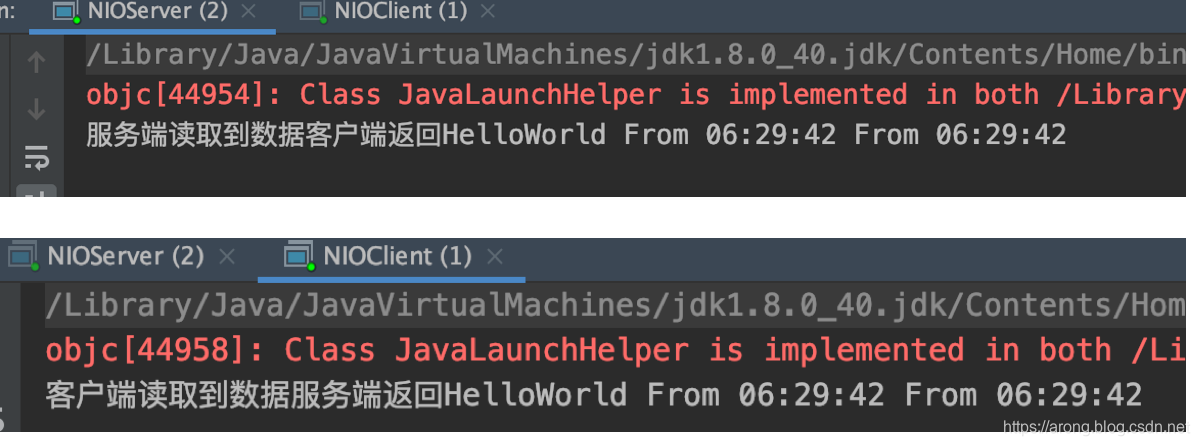
依次启动客户端和服务端,实现双向通信:






 扫一扫
扫一扫


 1134
1134

 被折叠的 条评论
为什么被折叠?
被折叠的 条评论
为什么被折叠?
 到【灌水乐园】发言





