


 本文详细介绍了如何通过修改注册表解决Word中出现的‘Therewasaproblemsendingthecommandtotheprogram’错误,提供了具体的步骤和注意事项。
工作环境(蓝色粗体字为特别注意内容)
1,软件环境:Windows 7 Ultimate sp1、MicroSoft OFFICE 2007
2,参考文献:
在双击word文档的时候,不知道什么原因,出现“There was a problem sending the command to the program”(向程序发送命令的时候出现问题),症状如下:

尝试了很多方法,包括“word选项”-“高级”-“ Ignore other applications that use Dynamic Data Exchange (DDE)(同意使用其他应用程序动态数据库交换(DDE))”,都没有任何效果。不忍吐槽,国内的东西都是抄来抄去。于是到国外网站看看相关解决方案,按照参考文献①中修改注册表的方法才把问题解决了~~具体步骤如下:
The problem was not related to the file or its content.  I could stop the message by changing the name of the file to end .doc without changing the format of the file content.
I searched for and found many suggested fixes for the problem ... and none of the fixes worked for me.  I eventually fixed the message “There was a problem sending the command to the program” with a change in the registry.
I edited “HKEY_CLASSES_ROOT\Word.Document.12\shell\Open “ and deleted the “ddeexec” key.

The “ddeexec” key can also be deleted from “HKEY_CLASSES_ROOT\Word.DocumentMacroEnabled.12\shell\Open”.  A similar change may work for earlier versions of Word.

For Word 2013, you can change the registry by right-clicking and saving  this file ...
Double-click the file after downloading to update the registry.  WARNING ... It is you that knows the situation of your own computer.  I cannot know about your computer and cannot be responsible for any unintended consequnces.  I have tested this process and I am confident that it is safe.
也就是:
① Win+R 输入regedit
② 展开HKEY_CLASSES_ROOT\Word.DocumentMacroEnabled.12\shell\Open
③ 删除“ddeexec”键 ④如果还不行,则试试把HKEY_CLASSES_ROOT\Word.TemplateMacroEnabled.12\shell\Open下面的也删掉。
⑤如果还不行,那可以试试下面的方法:右键-》打开方式-选择默认程序-》定位到默认程序的可执行文件。
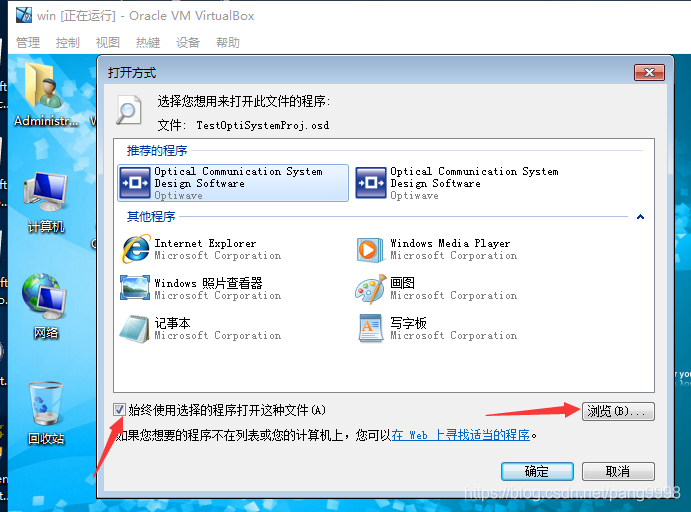
注意:按照上述步骤操作的时候必须把下面的这个单选框取消掉(如果有这个选项的话,我的word就没有这个选项,但是excel有这个选项):
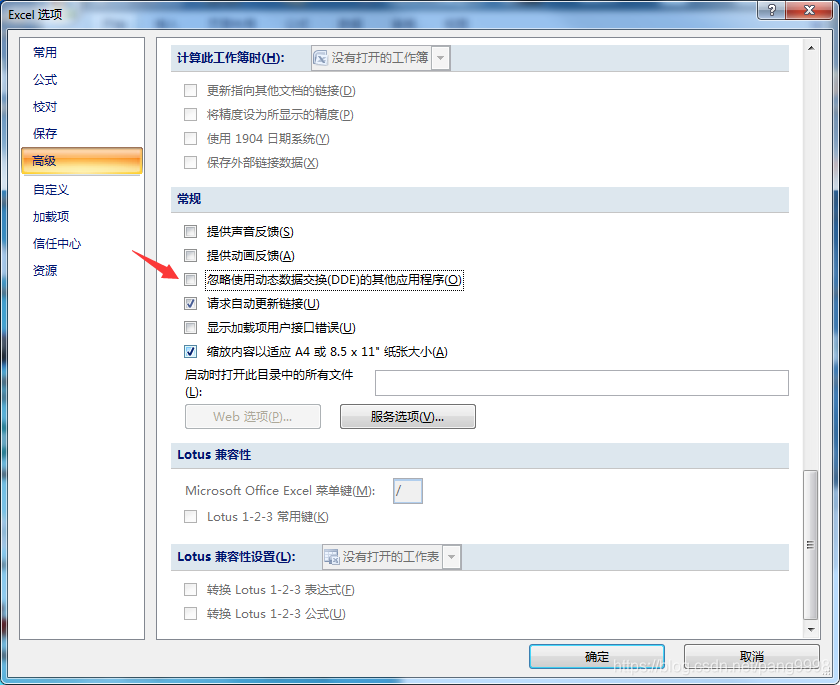
其他word版本可以按照类似的方法试试,在修改之前记得备份好注册表,祝好运 :)





 扫一扫
扫一扫


 952
952

 被折叠的 条评论
为什么被折叠?
被折叠的 条评论
为什么被折叠?
 到【灌水乐园】发言





