



 本文详细介绍如何在Spring框架中配置和使用AOP(面向切面编程),包括定义切入点、配置切面及各种通知类型如前置、后置、异常、最终和环绕通知。并通过具体示例展示如何将AOP应用于日志记录。
F:\spring\day03_eesy_04adviceType
bean.xml
<?xml version="1.0" encoding="UTF-8"?>
<beans xmlns="http://www.springframework.org/schema/beans"
       xmlns:xsi="http://www.w3.org/2001/XMLSchema-instance"
       xmlns:aop="http://www.springframework.org/schema/aop"
       xsi:schemaLocation="http://www.springframework.org/schema/beans
        http://www.springframework.org/schema/beans/spring-beans.xsd
        http://www.springframework.org/schema/aop
        http://www.springframework.org/schema/aop/spring-aop.xsd">
    <!-- 配置spring的ioc ,把service对象配置进来-->
    <bean id="accountService" class="com.itheima.service.impl.AccountServiceImpl"></bean>

    <!-- 配置Logger类-->
    <bean id="logger" class="com.itheima.utils.logger"></bean>

    <!-- 配置AOP-->
    <aop:config>
        <!-- 配置切入点表达式
                id属性用于指定表达式的唯一标识
                expression属性用于指定表达式内容
                此标签写在aop:aspect标签内部只能当前切面用
                它还可以卸载aop:aspect外面,此时就变成所有切面可用
            -->
        <aop:pointcut id="pt1" expression="execution(* com.itheima.service.impl.*.*(..))"></aop:pointcut>
        <!--配置切面-->
        <aop:aspect id="logAdvice" ref="logger">
            <!-- 配置前置通知:在切入点方法执行之前执行-->
            <!--<aop:before method="beforePrintLog" pointcut-ref="pt1"></aop:before>-->
            <!-- 配置后置通知:在切入点方法执行之后执行,它和异常通知永远只能执行一个-->
            <!--<aop:after-returning method="afterReturningPrintLog" pointcut-ref="pt1"></aop:after-returning>-->
            <!-- 配置异置通知:在切入点方法执行产生异常之后执行,它和后置通知永远只能执行一个-->
            <!--<aop:after-throwing method="afterThrowingPrintLog" pointcut-ref="pt1"></aop:after-throwing>-->
            <!-- 配置最终通知:无论切入点方法是否正常执行它都会在其后面执行-->
            <!--<aop:after method="afterPrintLog" pointcut-ref="pt1"></aop:after>-->

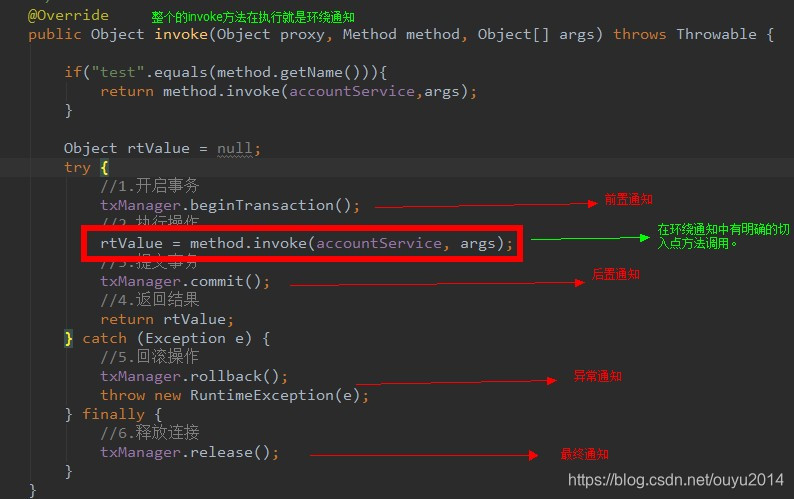
            <!-- 配置环绕通知 详细的注释看Logger类中-->
            <aop:around method="arroundPrintLog" pointcut-ref="pt1"></aop:around>
        </aop:aspect>
    </aop:config>
</beans>
logger.java
package com.itheima.utils;

import org.aspectj.lang.ProceedingJoinPoint;

/**
 * 用于记录日志的工具类,它里面提供了公共的代码
 */
public class logger {

    /**
     * 前置通知
     */
    public void beforePrintLog(){
        System.out.println("logger类中的 beforePrintLog方法开始记录日志了。。。");
    }

    /**
     * 后置通知
     */
    public void afterReturningPrintLog(){
        System.out.println("logger类中的afterReturningPrintLog方法开始记录日志了。。。");
    }

    /**
     * 异常通知
     */
    public void afterThrowingPrintLog(){
        System.out.println("logger类中的afterThrowingPrintLg方法开始记录日志了。。。");
    }

    /**
     * 最终通知
     */
    public void afterPrintLog(){
        System.out.println("logger类中的afterPrintLog方法开始记录日志了。。。");
    }

    /**
     * 环绕通知
     * 问题:
     *      当我们配置了环绕通知之后,切入点方法没有执行,而通知方法执行了。
     * 分析:
     *      通过对比动态代理的环绕通知代码,发现动态代理的环绕通知由明确的切入点方法调用,而我们的代码中没有
     * 解决:
     *      Spring框架为我们提供了一个接口:ProceedingJoinPoint 该接口有一个方法proceed(),此方法就相当于明确调用切入点方法。
     *      该接口可以作为环绕通知方法参数,在程序执行时,spring框架会为我们提供该接口的实现类供我们使用
     * spring中的环绕通知:
     *       他是spring框架为我们提供的一种可以在代码中手动控制增强方法何时执行的方式
     */
    public Object arroundPrintLog(ProceedingJoinPoint pjp){
        Object rtValue = null;
        try {
            Object[] args = pjp.getArgs();//得到方法执行时所需的参数

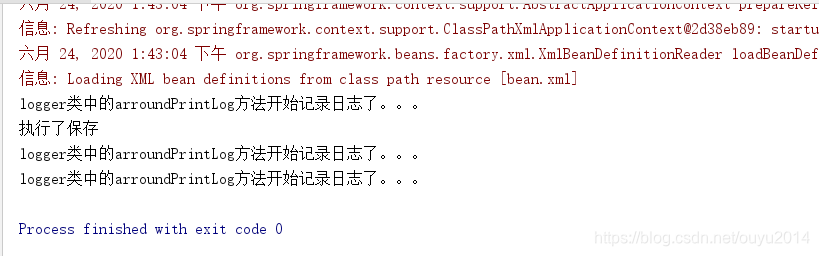
            System.out.println("logger类中的arroundPrintLog方法开始记录日志了。。。");

            rtValue = pjp.proceed(args);//明确调用业务层方法(切入点方法)

            System.out.println("logger类中的arroundPrintLog方法开始记录日志了。。。");

            return rtValue;
        } catch (Throwable throwable) {
            System.out.println("logger类中的arroundPrintLog方法开始记录日志了。。。");
            throw new RuntimeException(throwable);
        } finally {
            System.out.println("logger类中的arroundPrintLog方法开始记录日志了。。。");
        }

    }
}





 扫一扫
扫一扫


 6415
6415

 被折叠的 条评论
为什么被折叠?
被折叠的 条评论
为什么被折叠?
 到【灌水乐园】发言





