





 本文介绍了如何在Vue.js项目中使用Vant的日期组件van-datetime-picker,设置选择范围为当前时间到一年以后。通过定义最小时间变量为当前时间,并在计算属性中计算最大时间为当前时间加一年。同时,详细说明了在methods和mounted阶段的相关配置方法,最终实现了预期的效果。
直接贴代码
1.调用日期组件
  <van-field v-model="timeValue" @click="showPopFn()" placeholder="请选择到期日" readonly/>
    <van-popup v-model="show" position="bottom" :style="{ height: '40%' }">
      <van-datetime-picker
        v-model="currentDate"
        type="date"
        :min-date="minDate"
        :max-date="this.maxDate"
        @change="changeFn()"
        @confirm="confirmFn()"
        @cancel="cancelFn()"
        />
    </van-popup>
2.定义变量,最小时间就是当前时间
data() {
    return {
      value: '',
      timeValue: '',
      currentDate: new Date(),
      changeDate: new Date(),
      minDate: new Date(),
      show: false, // 用来显示弹出层
    };
3. 通过计算属性算出最大时间并返回
computed: {

    maxDate(){

      let curDate = (new Date()).getTime();
      let one = 365 * 24 * 3600 * 1000;
      let oneYear = curDate + one;
      return new Date(oneYear);
    }
 },
4.method里面写对应的方法
methods: {


      changeFn() { // 值变化是触发
        this.changeDate = this.currentDate // Tue Sep 08 2020 00:00:00 GMT+0800 (中国标准时间)
      },
      confirmFn() { // 确定按钮
        this.timeValue = this.timeFormat(this.currentDate);
        this.show = false;
      },
      cancelFn(){
        this.show = false;
      },

       timeFormat(time) { // 时间格式化 2019-09-08
        let year = time.getFullYear();
        let month = time.getMonth() + 1;
        let day = time.getDate();
        return year + '-' + month + '-' + day
      },
    },
5.mounted
mounted(){
    this.timeFormat(new Date());
}
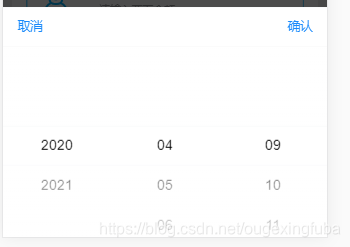
效果如下图






 扫一扫
扫一扫


 4573
4573

 被折叠的 条评论
为什么被折叠?
被折叠的 条评论
为什么被折叠?
 到【灌水乐园】发言





