


 本文介绍了如何在前端开发中中断fetch和axios发起的网络请求。通过AbortController接口与axios的CancelToken,分别展示了两种不同的中断请求方法,并讨论了它们的实际效果。在fetch中,调用abort()方法可中断请求;而axios则需要结合isCancel()和executor函数来实现。示例代码和在线实例辅助理解。
最近在看一些面试题,无意中翻到一些有意思的问题,发出去的请求还可以取消的?然后自己看文章试了一下,还真他娘的可以。所以在这里我记录一下,不然过个几个月又给全忘了。
Fetch中断请求
我们要用到的是AbortController (AbortController - Web API 接口参考 | MDN)接口中的AbortController()构造函数,然后将AbortController()中的signal对象作为请求项传递,再调用AbortController()中的abort()方法中断。
<body>
		<button class="download">开始请求</button>
		<button class="abort">终止请求</button>
		<script>
            // 使用AbortController()构造函数创建一个控制器
			const controller = new AbortController();
            let signal = controller.signal;
			console.log("signal 的初始状态:", signal);

			const downloadBtn = document.querySelector(".download");
			const abortBtn = document.querySelector(".abort");

			downloadBtn.addEventListener("click", fetchWay);
			abortBtn.addEventListener("click", () => {
				controller.abort();
				console.log("signal 的中止状态:", signal);
			});

			function fetchWay() {
				fetch("https:mdn.github.io/dom-examples/abort-api/sintel.mp4", {
					signal,
				})
				.then((response) => {})
				.catch((e) => {
					reports.textContent = "Download error:" + e.message;
				});
			}
	    </script>
</body>
请求前aborted为false,中断后aborted为true。

axios中断请求
方法一
axios第一种方法是使用CancelToken.source工厂方法创建一个cancel token,代码在下面:
<body>
		<div id="main">
			<button class="download">开始请求</button>
			<button class="abort">终止请求</button>
		</div>
        <script src="https://unpkg.com/axios/dist/axios.min.js"></script>
		<script>
			// 使用CancelToken.souce工厂方法创建一个cancel token
			const CancelToken = axios.CancelToken;
			const source = CancelToken.source();
			console.log("source 的初始状态:", source);

			const downloadBtn = document.querySelector(".download");
			const abortBtn = document.querySelector(".abort");

			downloadBtn.addEventListener("click", axiosWay);
			abortBtn.addEventListener("click", () => {
				// 取消请求(message 参数是可选的)
				source.cancel("Operation canceled by the user.");
				console.log("source 的中止状态:", source);
			});

			function axiosWay() {
				axios
					.get("https:mdn.github.io/dom-examples/abort-api/sintel.mp4", {
						cancelToken: source.token,
					})
					.catch(function (thrown) {
						// 判断请求是否已中止
						if (axios.isCancel(thrown)) {
							// 参数 thrown 是自定义的信息
							console.log("Request canceled", thrown.message);
						} else {
							// 处理错误
						}
					});
			}
		</script>
</body>
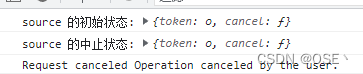
当我们去控制台看的时候发现source状态的时候发现中断前后并没有改变。所以axios给我们提供了一个isCancel()方法给我们进行了判断,isCancel中的参数就是source.cancel()中的。
方法二
说实话写到这里我又不想写了,别问为什么,就是懒而已,不过还是写完算了。
这个第二中方法是传递一个executor函数到CancelToken的构造函数来创建一个cancel token,我直接上代码算了,懒得解释了,自己去试试就知道了。
<body>
		<div id="main">
			<button class="download">开始请求</button>
			<button class="abort">终止请求</button>
		</div>
        <script src="https://unpkg.com/axios/dist/axios.min.js"></script>
		<script>
			// 传递一个executor函数到CancelToken的构造函数来创建一个canceltoken
			const CancelToken = axios.CancelToken;
			let cancel;

			const downloadBtn = document.querySelector(".download");
			const abortBtn = document.querySelector(".abort");

			downloadBtn.addEventListener("click", axiosWay);
			abortBtn.addEventListener("click", () => {
				// 取消请求
				cancel("Operation canceled by the user.");
			});

			function axiosWay() {
				axios.get("https:mdn.github.io/dom-examples/abort-api/sintel.mp4", {
					cancelToken: new CancelToken(function executor(c) {
						// executor 函数接收一个 cancel 函数作为参数
						cancel = c;
					}),
				});
			}
		</script>
</body>其实也没有中断去看看网络那里就知道了,然后发现只有这个axios的方法二还能中断后继续新的请求。这里还有别人的线上实例:https://codesandbox.io/s/axios-cancel-request-qp0q7?file=/index.html
我不写了哈,跑路跑路






 扫一扫
扫一扫


 1311
1311

 被折叠的 条评论
为什么被折叠?
被折叠的 条评论
为什么被折叠?
 到【灌水乐园】发言





