


 本文详细介绍了Android中PopupWindow弹出对话框的使用方法,包括两种类型的对话框区别、PopupWindow的多种展示方式及代码实现。
Android之PopupWindow弹出对话框
Android的对话框常用的有两种:PopupWindow和AlertDialog。
- popupWindow是一个阻塞式的弹出框,这就意味着在我们退出这个弹出框之前,程序会一直等待,,这就意味着在我们退出这个弹出框之前,程序会一直等待,
- *这和AlertDialog不同哦,AlertDialog是非阻塞式弹出框,AlertDialog弹出的时候,后台可是还可以做其他事情的哦。
PopupWindow顾名思义为弹出菜单,不同于AlertDialog对话框,PopupWindow弹出的位置可以很多变化,按照有无偏移分,可以分为无偏移和偏移两种;按照参照类型不同又可以分为两种:相对某个控件(Anchor锚)的位置和父容器内部的相对位置。具体如下:
| 函数 | 简介 |
| showAsDropDown(View anchor) | 相对某个控件的位置(正左下方),无偏移 |
| showAsDropDown(View anchor, int xoff, int yoff) | 相对某个控件的位置,有偏移(正数表示下方右边,负数表示(上方左边)) |
| showAtLocation(View parent, int gravity, int x, int y) | 父容器容器相对位置,例如正中央Gravity.CENTER,下方Gravity.BOTTOM等 |
下面是运行程序截图:
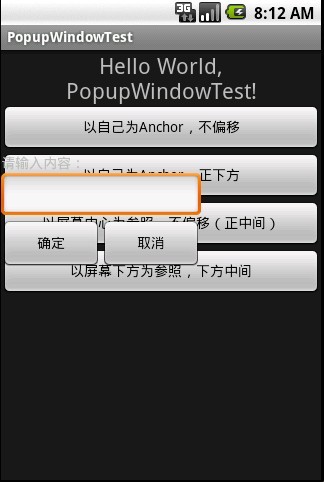
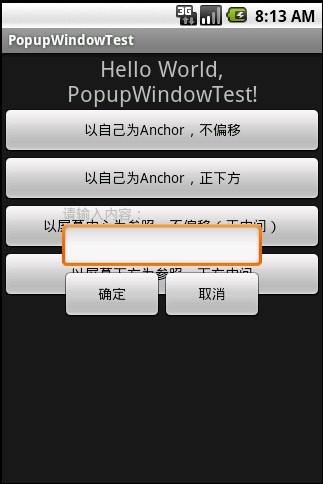
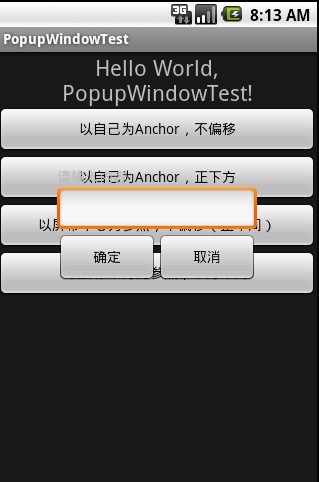
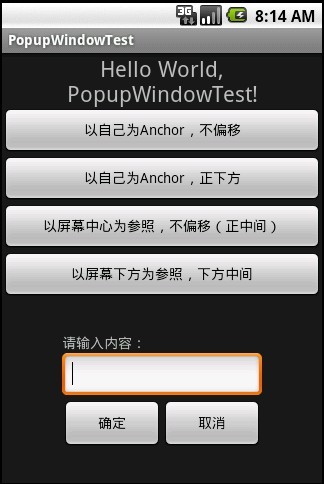
程序代码:
布局:main.xml

 main.xml
<?xml version="1.0" encoding="utf-8"?>
<LinearLayout xmlns:Android="http://schemas.android.com/apk/res/android"
    Android:id="@+id/layout"
    Android:orientation="vertical"
    Android:layout_width="fill_parent"
    Android:layout_height="fill_parent"
    >
<TextView
    Android:id="@+id/tv_showText"
    Android:layout_width="fill_parent"
    Android:layout_height="wrap_content"
    Android:gravity="center"
    Android:text="@string/hello"
    Android:textSize="22px"
    />

<Button
    Android:id="@+id/bt_PopupWindow1"
    Android:text="以自己为Anchor,不偏移"
    Android:layout_width="fill_parent"
    Android:layout_height="wrap_content"
    />

<Button
    Android:id="@+id/bt_PopupWindow2"
    Android:text="以自己为Anchor,正下方"
    Android:layout_width="fill_parent"
    Android:layout_height="wrap_content"
    />

<Button
    Android:id="@+id/bt_PopupWindow3"
    Android:text="以屏幕中心为参照,不偏移(正中间)"
    Android:layout_width="fill_parent"
    Android:layout_height="wrap_content"
    />

<Button
    Android:id="@+id/bt_PopupWindow4"
    Android:text="以屏幕下方为参照,下方中间"
    Android:layout_width="fill_parent"
    Android:layout_height="wrap_content"
    />


</LinearLayout>
自定义对话框dialog.xml
dialog.xml
<?xml version="1.0" encoding="utf-8"?>
<LinearLayout xmlns:Android="http://schemas.android.com/apk/res/android"
    Android:orientation="vertical"
    Android:layout_width="fill_parent"
    Android:layout_height="fill_parent"
    >
<TextView
    Android:id="@+id/tv_tip"
    Android:layout_width="fill_parent"
    Android:layout_height="wrap_content"
    Android:text="请输入内容:"
    />

 <EditText
    Android:id="@+id/et_text"
    Android:layout_width="fill_parent"
    Android:layout_height="wrap_content"
 ></EditText>

<LinearLayout
    Android:gravity="center_horizontal"
    Android:layout_width="fill_parent"
    Android:layout_height="fill_parent"
>
<Button
    Android:id="@+id/bt_ok"
    Android:text="确定"
    Android:layout_width="100px"
    Android:layout_height="50px"
    />

<Button
    Android:id="@+id/bt_cancle"
    Android:text="取消"
    Android:layout_width="100px"
    Android:layout_height="50px"
    />
</LinearLayout>
</LinearLayout>
import
Android.app.Activity;
import
Android.content.Context;
import
Android.content.SharedPreferences.Editor;
import
Android.os.Bundle;
import
Android.util.Log;
import
Android.view.Gravity;
import
Android.view.LayoutInflater;
import
Android.view.View;
import
Android.view.View.OnClickListener;
import
Android.view.ViewGroup.LayoutParams;
import
Android.widget.Button;
import
Android.widget.EditText;
import
Android.widget.Gallery;
import
Android.widget.PopupWindow;
import
Android.widget.TextView;
public
class
PopupWindowTest
extends
Activity {
//PopupWindow属于不阻塞的对话框,AlertDialog则是阻塞的。
private
Button bt_popupWindow1;
private
Button bt_popupWindow2;
private
Button bt_popupWindow3;
private
Button bt_popupWindow4;
private
TextView tv_showText;
private
PopupWindow popupWindow;
private
int
screenWidth;
private
int
screenHeight;
private
int
dialgoWidth;
private
int
dialgoheight;
/** Called when the activity is first created. */
@Override
public
void
onCreate(Bundle savedInstanceState) {
super
.onCreate(savedInstanceState);
setContentView(R.layout.main);
initView();
}
/**
* 初始化控件和响应事件
*/
private
void
initView() {
bt_popupWindow1 = (Button)findViewById(R.id.bt_PopupWindow1);
bt_popupWindow2 = (Button)findViewById(R.id.bt_PopupWindow2);
bt_popupWindow3 = (Button)findViewById(R.id.bt_PopupWindow3);
bt_popupWindow4 = (Button)findViewById(R.id.bt_PopupWindow4);
tv_showText = (TextView)findViewById(R.id.tv_showText);
bt_popupWindow1.setOnClickListener(
new
ClickEvent());
bt_popupWindow2.setOnClickListener(
new
ClickEvent());
bt_popupWindow3.setOnClickListener(
new
ClickEvent());
bt_popupWindow4.setOnClickListener(
new
ClickEvent());
}
/**
* 按钮点击事件处理
* @author Kobi
*
*/
private
class
ClickEvent
implements
OnClickListener {
@Override
public
void
onClick(View v) {
// TODO Auto-generated method stub
switch
(v.getId()) {
case
R.id.bt_PopupWindow1:
//以自己为Anchor,不偏移
getPopupWindow();
popupWindow.showAsDropDown(v);
break
;
case
R.id.bt_PopupWindow2:
//以自己为Anchor,偏移(screenWidth-dialgoWidth)/2, 0)--按钮正下方
getPopupWindow();
popupWindow.showAsDropDown(v, (screenWidth-dialgoWidth)/
2
,
0
);
break
;
case
R.id.bt_PopupWindow3:
//以屏幕中心为参照,不偏移
getPopupWindow();
popupWindow.showAtLocation(findViewById(R.id.layout), Gravity.CENTER,
0
,
0
);
break
;
case
R.id.bt_PopupWindow4:
//以屏幕左下角为参照,偏移(screenWidth-dialgoWidth)/2, 0) --屏幕下方中央
getPopupWindow();
popupWindow.showAtLocation(findViewById(R.id.layout),
Gravity.BOTTOM,
0
,
0
);
break
;
default
:
break
;
}
}
}
/**
* 创建PopupWindow
*/
protected
void
initPopuptWindow() {
// TODO Auto-generated method stub
View popupWindow_view = getLayoutInflater().inflate(
//获取自定义布局文件dialog.xml的视图
R.layout.dialog,
null
,
false
);
popupWindow =
new
PopupWindow(popupWindow_view,
200
,
150
,
true
);
//创建PopupWindow实例
Button bt_ok = (Button)popupWindow_view.findViewById(R.id.bt_ok);
//dialog.xml视图里面的控件
Button bt_cancle = (Button)popupWindow_view.findViewById(R.id.bt_cancle);
final
EditText et_text = (EditText)popupWindow_view.findViewById(R.id.et_text);
bt_ok.setOnClickListener(
new
OnClickListener() {
@Override
public
void
onClick(View v) {
// TODO Auto-generated method stub
tv_showText.setText(et_text.getText());
//在标签里显示内容
popupWindow.dismiss();
//对话框消失
}
});
bt_cancle.setOnClickListener(
new
OnClickListener() {
@Override
public
void
onClick(View v) {
// TODO Auto-generated method stub
popupWindow.dismiss();
}
});
//获取屏幕和对话框各自高宽
screenWidth = PopupWindowTest.
this
.getWindowManager().getDefaultDisplay().getWidth();
screenHeight = PopupWindowTest.
this
.getWindowManager().getDefaultDisplay().getHeight();
dialgoWidth = popupWindow.getWidth();
dialgoheight = popupWindow.getHeight();
}
/*
* 获取PopupWindow实例
*/
private
void
getPopupWindow() {
if
(
null
!= popupWindow) {
popupWindow.dismiss();
return
;
}
else
{
initPopuptWindow();
}
}
@Override
protected
void
onPause() {
// TODO Auto-generated method stub
super
.onPause();
Log.e(
"ActivityState"
,
"onPause"
);
}
@Override
protected
void
onResume() {
// TODO Auto-generated method stub
super
.onResume();
Log.e(
"ActivityState"
,
"onResume"
);
}
}
|





 扫一扫
扫一扫


 2419
2419

 被折叠的 条评论
为什么被折叠?
被折叠的 条评论
为什么被折叠?
 到【灌水乐园】发言





