


1. Preferences 首选项概念
掌握首选项的基本使用
基本概念:
- 用户首选项为应用提供Key-Value键值型的数据处理能力,支持应用持久化轻量级数据,并对其修改和查询。
- 数据存储形式为键值对,键的类型为字符串型,值的存储数据类型包括数字型、字符型、布尔型以及这3种类型的数组类型。
条件限制:
- Key键为string类型,要求非空且长度不超过1024个字节。
- 如果Value值为string类型,请使用UTF-8编码格式,可以为空,不为空时长度不超过16 * 1024 * 1024个字节(16MB)。
- 内存会随着存储数据量的增大而增大,所以存储的数据量应该是轻量级的,建议存储的数据不超过一万条,否则会在内存方面产生较大的开销
2. Preferences使用
2.1 获取首选项实例
import { preferences } from '@kit.ArkData';

context = getContext(this)

store = preferences.getPreferencesSync(this.context, { name: 'my_store' });
2.2 写入或修改 并持久化
// 写入
this.store.putSync('name', '小王');
修改
this.store.putSync('name', '小李');
// 持久化
this.store.flush()
2.3 读取
// 读取
this.store.getSync('name','我是默认的名字 如果获取不到则展示我')
2.4 删除 并持久化
// 删除
this.store.deleteSync('name');
// 持久化
this.store.flush()
2.5 删除实例
// 删除实例
preferences.deletePreferences(context, { name: 'my_store' })
2.5 删除所有
this.getStore().clearSync()
this.getStore().flush()
2.6 获取所有
const obj = this.getStore().getAllSync() // 返回一个对象
3.代码完整示例
import { preferences } from '@kit.ArkData'

@Entry
@Component
struct Index {
  // 实例化首选项 并给仓库起名字
  store = preferences.getPreferencesSync(getContext(), { name: 'my_store' })

  build() {
    Column({ space: 15 }) {
      Text('Preferences首选项')
        .fontSize(30)
        .margin(50)
      Button('保存首选项')
        .onClick(() => {
          // 2. 存储数据 要持久化数据
          this.store.putSync('name', '杨萌萌')
          this.store.flush() // --- 别忘了保存
        })
      Button('修改首选项')
        .onClick(() => {
          this.store.putSync('name', '孙某某')
          this.store.flush()
        })
      Button('获取首选项')
        .onClick(() => {
          // 第二个默认的必填
          this.store.getSync('name', '我是默认名字')
        })
      Button('删除数据')
        .onClick(() => {
          this.store.deleteSync('name')
          this.store.flush()
        })
      Button('删除仓库')
        .onClick(() => {
          preferences.deletePreferences(getContext(), { name: 'my_store' })
        })
    }
    .width('100%')
    .height('100%')
  }
}
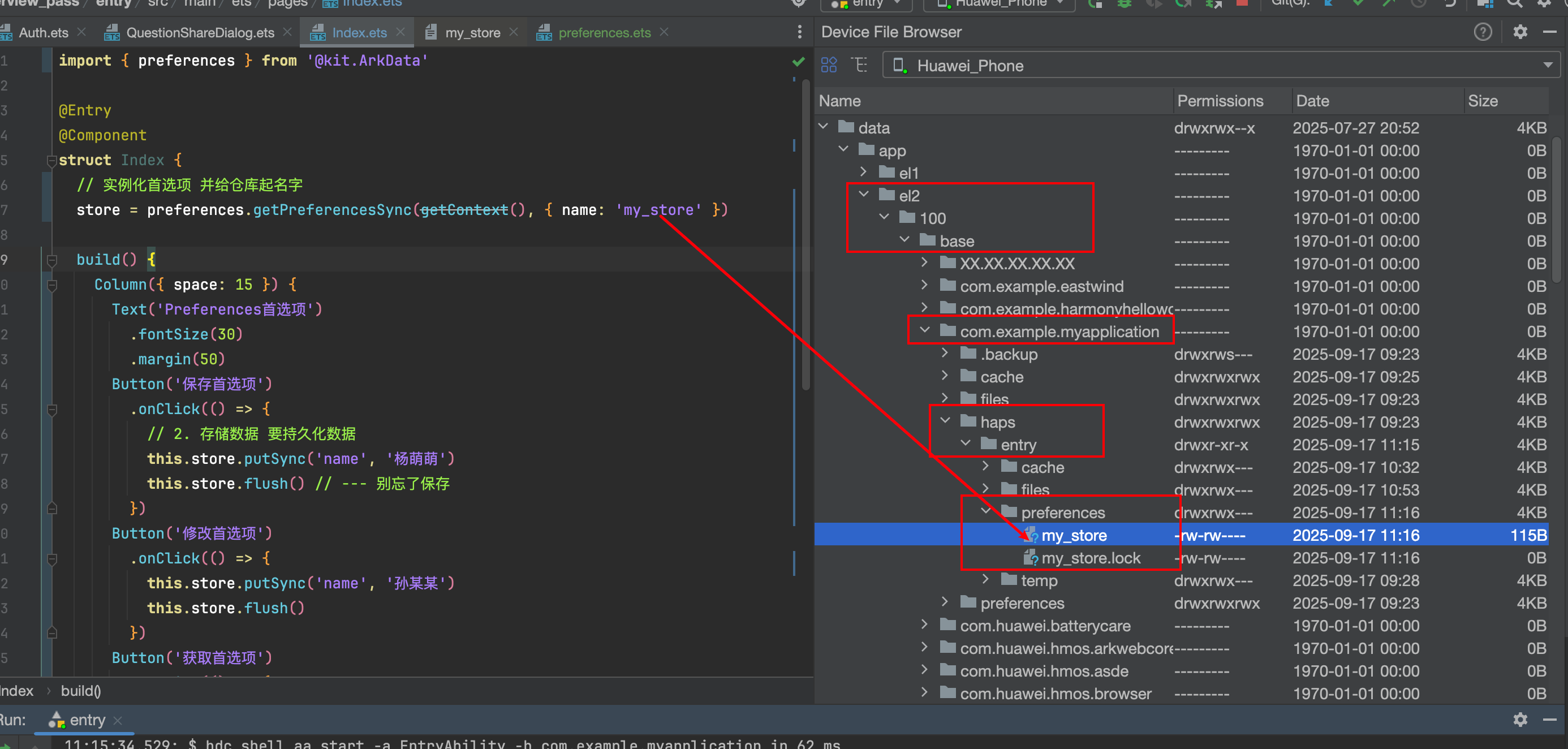
4.如何查看存储的文件





 扫一扫
扫一扫


 1万+
1万+

 被折叠的 条评论
为什么被折叠?
被折叠的 条评论
为什么被折叠?
 到【灌水乐园】发言





