


[root@localhost ~]# yum install -y python-pip python-devel 已加载插件:fastestmirror Determining fastest mirrors Could not retrieve mirrorlist http://mirrorlist.centos.org/?release=7&arch=x86_64&repo=os&infra=stock error was 14: curl#6 - "Could not resolve host: mirrorlist.centos.org; 未知的错误" One of the configured repositories failed (未知), and yum doesn't have enough cached data to continue. At this point the only safe thing yum can do is fail. There are a few ways to work "fix" this: 1. Contact the upstream for the repository and get them to fix the problem. 2. Reconfigure the baseurl/etc. for the repository, to point to a working upstream. This is most often useful if you are using a newer distribution release than is supported by the repository (and the packages for the previous distribution release still work). 3. Run the command with the repository temporarily disabled yum --disablerepo=<repoid> ... 4. Disable the repository permanently, so yum won't use it by default. Yum will then just ignore the repository until you permanently enable it again or use --enablerepo for temporary usage: yum-config-manager --disable <repoid> or subscription-manager repos --disable=<repoid> 5. Configure the failing repository to be skipped, if it is unavailable. Note that yum will try to contact the repo. when it runs most commands, so will have to try and fail each time (and thus. yum will be be much slower). If it is a very temporary problem though, this is often a nice compromise: yum-config-manager --save --setopt=<repoid>.skip_if_unavailable=true Cannot find a valid baseurl for repo: base/7/x86_64
您遇到的问题是由于 yum 无法解析 mirrorlist.centos.org,这通常意味着系统无法访问 CentOS 的镜像列表服务器。这可能是由网络问题、DNS 配置错误或 CentOS 镜像服务器暂时不可用引起的。以下是一些的解决方法:
1、检查网络连接
ping www.baidu.com
如果无法 ping 通,可能是网络配置问题或网络连接问题。
-
检查 DNS 配置:
确保
/etc/resolv.conf文件中配置了正确的 DNS 服务器。您可以尝试使用公共 DNS 服务器,如 Google 的 8.8.8.8 和 8.8.4.4。 -
临时禁用 SELinux:
有时 SELinux 的策略可能会阻止
yum正常工作。您可以尝试临时禁用 SELinux 来查看是否是安全策略导致的问题:
setenforce 0
然后再次尝试运行yum命令
2、手动设置CentOS镜像URL
如果 mirrorlist 无法访问,您可以尝试手动设置 CentOS 的基础仓库 URL。编辑 /etc/yum.repos.d/CentOS-Base.repo 文件,将 mirrorlist 行替换为具体的 URL。例如:
[base]
name=CentOS-$releasever - Base - mirrors.aliyun.com
baseurl=http://mirrors.aliyun.com/centos/$releasever/os/$basearch/
gpgcheck=1
gpgkey=http://mirrors.aliyun.com/centos/RPM-GPG-KEY-CentOS-7
#released updates
[updates]
name=CentOS-$releasever - Updates - mirrors.aliyun.com
baseurl=http://mirrors.aliyun.com/centos/$releasever/updates/$basearch/
gpgcheck=1
gpgkey=http://mirrors.aliyun.com/centos/RPM-GPG-KEY-CentOS-7
替换为您信任的镜像源
3、清理yum缓存
在尝试上述步骤后,清理 yum 的缓存可能有助于解决问题:
yum clean all
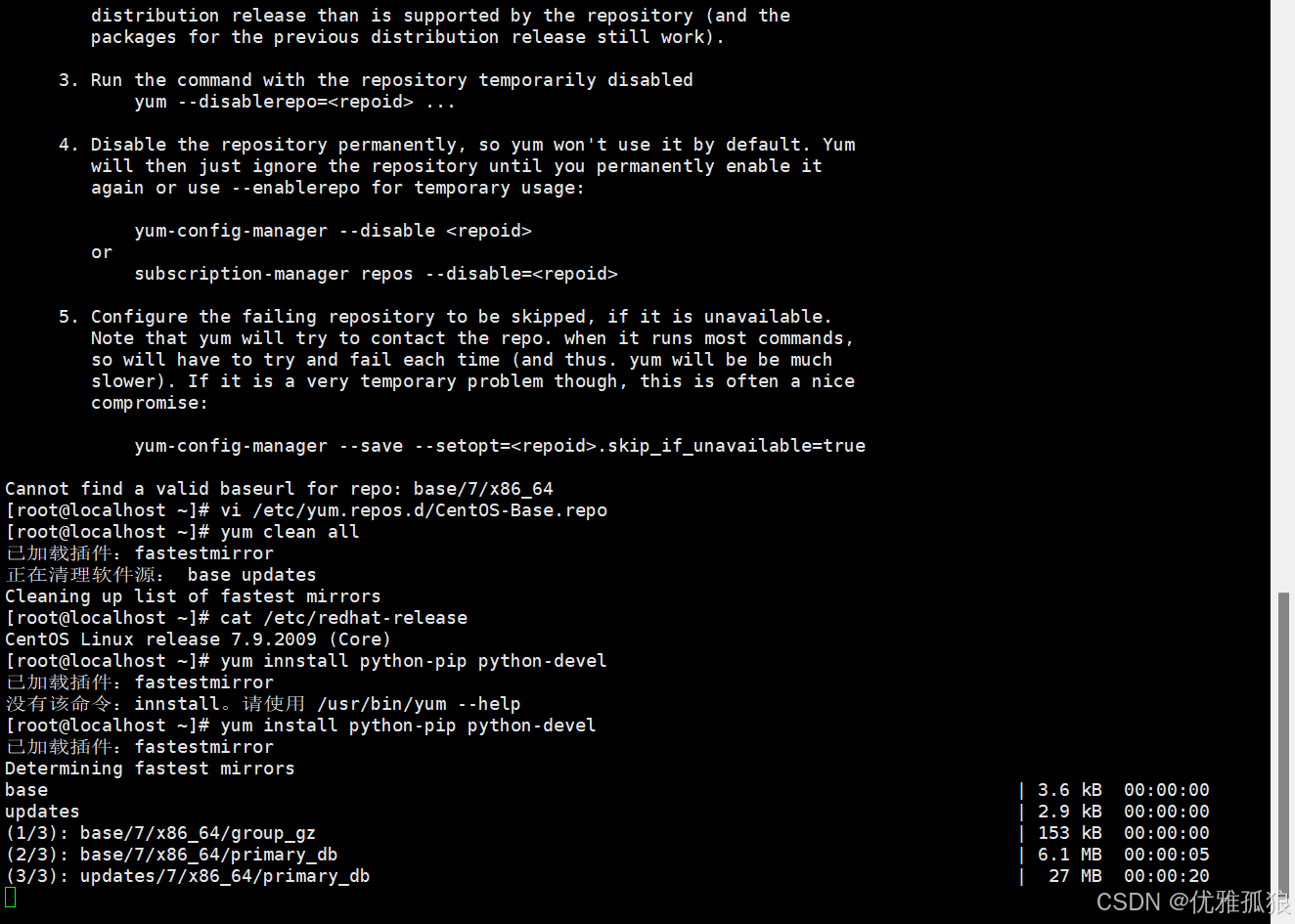 这时候我们再yum下载就可以使用啦
#检查防火墙设置
确保没有防火墙规则阻止访问外部网络,特别是 HTTP/HTTPS 端口。
如果以上步骤都不能解决问题,可能需要考虑是否 CentOS 仓库服务器本身存在问题,或者您的服务器所在的地理位置访问 CentOS 仓库服务器存在困难。在这种情况下,您可以考虑使用其他可靠的镜像源或等待一段时间再试。






 扫一扫
扫一扫


 715
715

 被折叠的 条评论
为什么被折叠?
被折叠的 条评论
为什么被折叠?
 到【灌水乐园】发言





