



 文章描述了在使用Yarn通过VSCode终端执行命令时遇到的错误,该错误与npm镜像源有关。解决方案是检查并更新Yarn的registry设置,从http://registry.npmmirror.com切换到https://registry.npmmirror.com,以适应淘宝镜像的新域名变更。
一、背景
使用yarn在vscode终端执行yarn
二、遇到的问题
报错:
error An unexpected error occurred: "https://registry.npmmirror.com/@icon-park/vue-next/-/vue-next-1.4.2.tgzinfo If you think this is a bug, please open a bug report with the information provided in "E:\\college\\bloinfo Visit https://yarnpkg.com/en/docs/cli/install for documentation about this command.
yarn run v1.22.19

三、解决办法
方法1:
如使用yarn命令:
查看:
yarn config get registry
设置淘宝镜像:
yarn config set registry https://registry.npm.taobao.org
效果图:
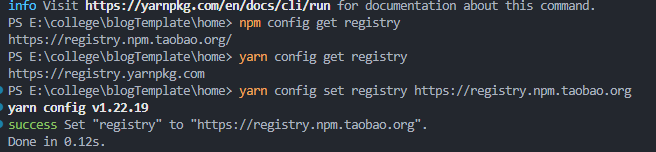
如使用mpm命令:
查看
npm config get registry
切换淘宝镜像
npm config set registry https://registry.npm.taobao.org
老域名 http://npm.taobao.org 和 http://registry.npm.taobao.org 已经在 > >2022.06.30 号正式下线和停止 DNS 解析了
切换成 新的淘宝镜像
npm config set registry https://registry.npmmirror.com/
附件:

参考1: yarn : 无法将“yarn”项识别为 cmdlet、函数、脚本文件或可运行程序的名称 (推荐)
参考2:error An unexpected error occurred: “https://registry.npmmirror.com/moment: tunneling socket could





 扫一扫
扫一扫


 501
501

 被折叠的 条评论
为什么被折叠?
被折叠的 条评论
为什么被折叠?
 到【灌水乐园】发言





