


 本文详细介绍了Hive中的分区表概念,包括创建分区表的语法、创建多分区表、加载数据到分区、查看和管理分区(如添加、删除)的方法。这些操作有助于优化大数据处理和存储管理。
文章中关于分区表常用操作目录:
分区表:
一、概念
在大数据中,最常用的一种思想就是分治,我们可以把大的文件切割划分成一个个的小的文件,这样每次操作一个小的文件就会很容易了,同样的道理,在hive当中也是支持这种思想的,就是我们可以把大的数据,按照每天,或者每小时进行切分成一个个的小的文件,这样去操作小的文件就会容易得多了。
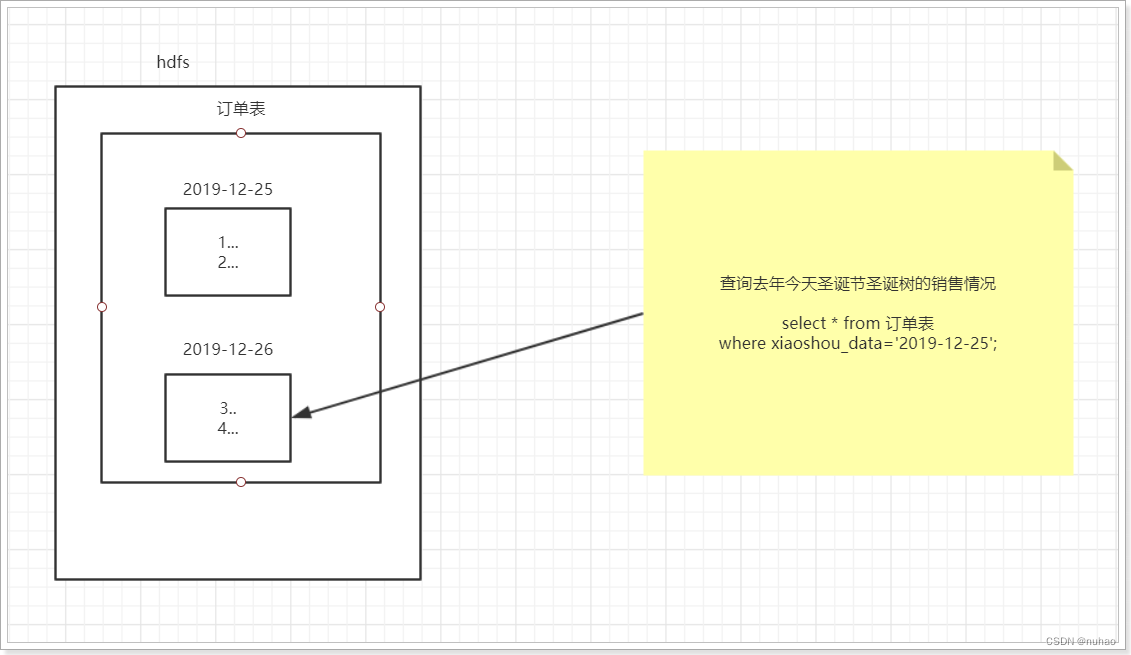
二、创建分区表语法
| create table score(s_id string,c_id string, s_score int) partitioned by (month string) row format delimited fields terminated by '\t'; |
三、创建一个表带多个分区
| create table score2 (s_id string,c_id string, s_score int) partitioned by (year string,month string,day string) row format delimited fields terminated by '\t'; |
四、加载数据到分区表中
| load data local inpath '/export/data/hive_data/score.txt' into table score partition (month='202006'); |
五、加载数据到一个多分区的表中去
| load data local inpath '/export/data/hive_data/score.txt' into table score2 partition(year='2020',month='06',day='01'); |
六、查看分区
| show partitions score; |
七、添加一个分区
| alter table score add partition(month='202005'); |
八、同时添加多个分区
| alter table score add partition(month='202004') partition(month = '202003'); |
注意:添加分区之后就可以在hdfs文件系统当中看到表下面多了一个文件夹
九、删除分区
| alter table score drop partition(month = '202006'); |






 扫一扫
扫一扫


 1369
1369

 被折叠的 条评论
为什么被折叠?
被折叠的 条评论
为什么被折叠?
 到【灌水乐园】发言





