


 本文详细介绍了在Android自定义View中使用TypeArray的方法和流程,包括定义属性声明文件、在自定义View类中使用TypeArray获取属性以及在XML布局中应用自定义属性的过程。
自定义View下TypeArray的使用流程
TypeArray 存放了我们在自定义控件时需要使用的常量 ,在xml文件中罗列需要使用的对象名和类型,使代码更加简洁,方便修改。
代码流程
一:定义属性的声明文件
1)新建attrs.xml文件 定义attr对象和形象 declare-styleable 也可以不定义,不定以的时候可以在类的构造函数里定义指定的
也可以定义xml界面的属性,比如 和自定义的属性区别就是没有format,在类里获取属性或者赋值:
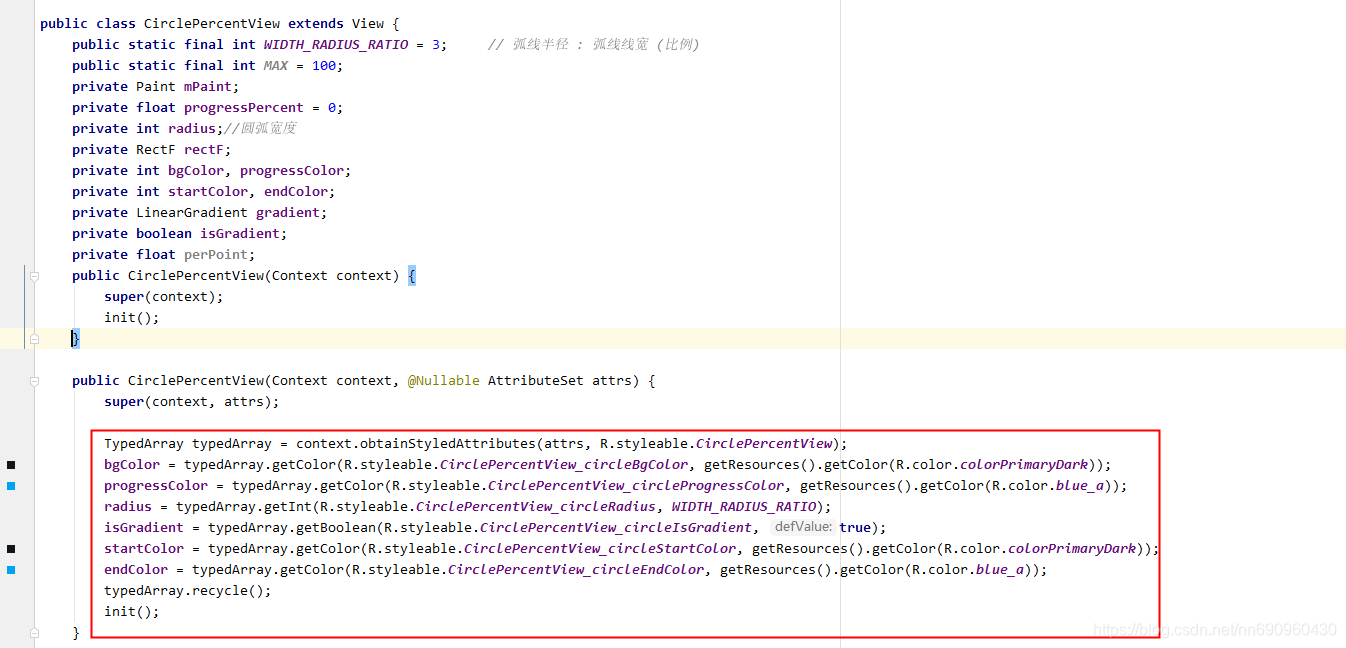
TypedArray typedArray = context.obtainStyledAttributes(attrs, R.styleable.CirclePercentView);
typedArray.getColor(R.styleable.CirclePercentView_android_textColor,getResources().getColor(R.color.colorPrimaryDark));
 <declare-styleable name="CirclePercentView">
        <!--圆弧背景色-->
        <attr name="circleBgColor" format="reference" />
        <!--圆弧进度条颜色-->
        <attr name="circleProgressColor" format="reference" />
        <!--圆弧宽度-->
        <attr name="circleRadius" format="integer" />
        <!--渐变开始颜色-->
        <attr name="circleStartColor" format="reference" />
        <!--渐变结束颜色-->
        <attr name="circleEndColor" format="reference" />
        <!--是否渐变-->
        <attr name="circleIsGradient" format="boolean" />
    </declare-styleable>
2)format的参数类别有:
- reference 表示引用,参考某一资源ID
- integer
- string 字符串
- fraction 表示百分数
- enum 表示枚举值
- flag 表示位运算
- float 表示浮点值
- dimension 表示尺寸值
二:定义属性的使用
1)在自定义view类的构造函数里使用
调用TypeArray context.obtainStyledAttributes()
源码:
   /**
     * Retrieve styled attribute information in this Context's theme.  See
     * {@link android.content.res.Resources.Theme#obtainStyledAttributes(int[])}
     * for more information.
     *
     * @see android.content.res.Resources.Theme#obtainStyledAttributes(int[])
     */
    @NonNull
    public final TypedArray obtainStyledAttributes(@NonNull @StyleableRes int[] attrs) {
        return getTheme().obtainStyledAttributes(attrs);
    }

    /**
     * Retrieve styled attribute information in this Context's theme.  See
     * {@link android.content.res.Resources.Theme#obtainStyledAttributes(int, int[])}
     * for more information.
     *
     * @see android.content.res.Resources.Theme#obtainStyledAttributes(int, int[])
     */
    @NonNull
    public final TypedArray obtainStyledAttributes(@StyleRes int resid,
            @NonNull @StyleableRes int[] attrs) throws Resources.NotFoundException {
        return getTheme().obtainStyledAttributes(resid, attrs);
    }

    /**
     * Retrieve styled attribute information in this Context's theme.  See
     * {@link android.content.res.Resources.Theme#obtainStyledAttributes(AttributeSet, int[], int, int)}
     * for more information.
     *
     * @see android.content.res.Resources.Theme#obtainStyledAttributes(AttributeSet, int[], int, int)
     */
    @NonNull
    public final TypedArray obtainStyledAttributes(
            @Nullable AttributeSet set, @NonNull @StyleableRes int[] attrs) {
        return getTheme().obtainStyledAttributes(set, attrs, 0, 0);
    }

    /**
     * Retrieve styled attribute information in this Context's theme.  See
     * {@link android.content.res.Resources.Theme#obtainStyledAttributes(AttributeSet, int[], int, int)}
     * for more information.
     *
     * @see android.content.res.Resources.Theme#obtainStyledAttributes(AttributeSet, int[], int, int)
     */
    @NonNull
    public final TypedArray obtainStyledAttributes(@Nullable AttributeSet set,
            @NonNull @StyleableRes int[] attrs, @AttrRes int defStyleAttr,
            @StyleRes int defStyleRes) {
        return getTheme().obtainStyledAttributes(
            set, attrs, defStyleAttr, defStyleRes);
    }
context.obtainStyledAttributes用到的两个参数 第一个是AttributeSet对象 该对象可以获取布局中所有已定义属性的key和value,为什么不用AttributeSet对象获取属性呢?主要是因为当AttributeSet对象在获取如引用属性时会比较繁琐,需要先获取id 再解析id,获取到的可能会是@+上一串数字的形式:如下,TypeArray便是简化这一过程。


typeArray.getColor();这里的Color对应format的值,参数一是xml里定义的属性名,第二个是默认值,使用完后要调用recycle();回收变量主要是因为TypeArray变量的原理是使用池+单例模式
2) 在界面xml里使用
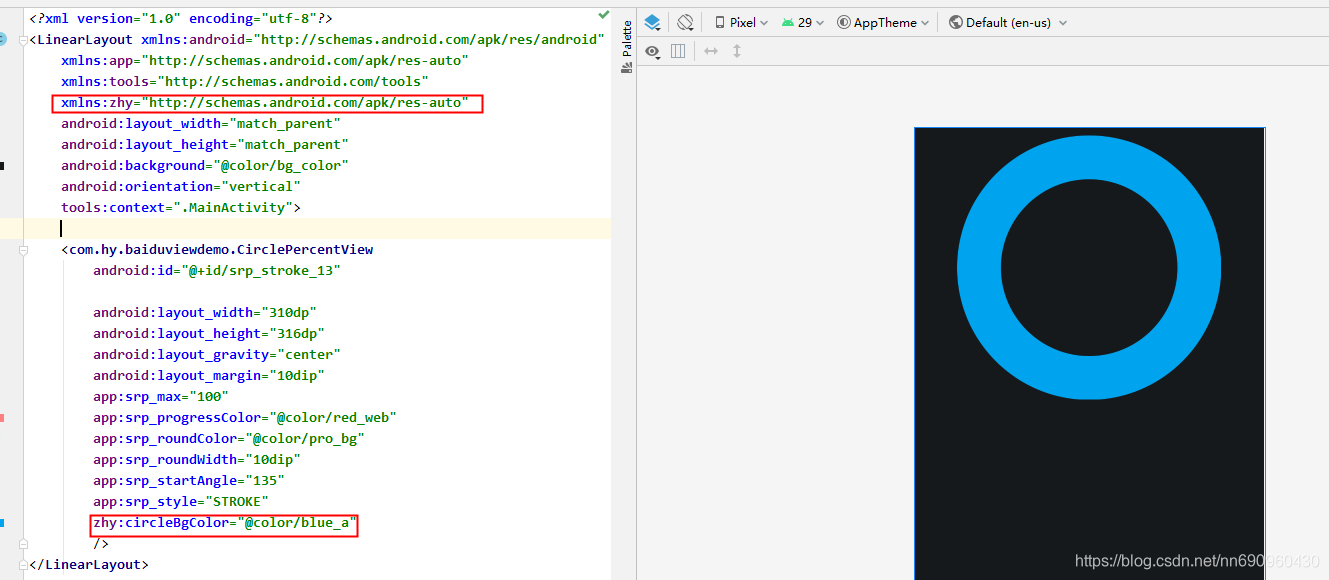
要先加一行: xmlns:zhy="http://schemas.android.com/apk/res-auto" 在 zhy:xml里的自定义属性名=“”,在xml里赋值的内容会覆盖在类里定于的默认值





 扫一扫
扫一扫


 4670
4670


 到【灌水乐园】发言



