


1.目录结构
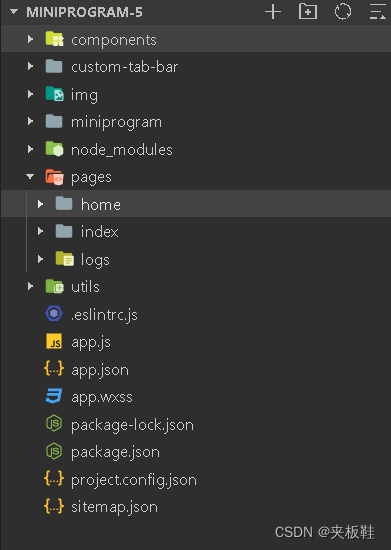
2.创建custom-tab-bar文件夹
1、在代码根目录下添加入口文件:
custom-tab-bar/index.js
custom-tab-bar/index.json
custom-tab-bar/index.wxml
custom-tab-bar/index.wxss
2.引入vant中 tabBar组件
在app.json或index.json中引入组件,详细介绍见vant 快速上手。
"usingComponents": {
"van-tabbar": "@vant/weapp/tabbar/index",
"van-tabbar-item": "@vant/weapp/tabbar-item/index"
}
3.编辑custom-tab-bar文件夹下的文件
index.wxml
可以根据自己的喜好做修改 https://vant-contrib.gitee.io/vant-weapp/#/tabbar
根据vant中给予的属性进行修改添加会让你的页面更加动人
<van-tabbar active="{{ active }}" active-color="#FF0000"   bind:change="onChange"  >


   <van-tabbar-item wx:for="{{list}}" data-path="{{item.pagePath}}"  wx:key="index"  >
    <image
      slot="icon"
      src="{{item.iconPath}}"
      mode="aspectFit"
      style="width: 30px; height: 18px;"
    />
    <image
      slot="icon-active"
      src="{{item.selectedIconPath}}"
      mode="aspectFit"
      style="width: 30px; height: 18px;"
    />
    {{item.text}}
  </van-tabbar-item>


</van-tabbar>
index.js
Page({
  data: {
    active: 0,
    list:[ {
      "pagePath": "pages/index/index",
      "text": "首页",
      "iconPath": "../img/icon/home.png",
      "selectedIconPath": "../img/icon/home-o.png"
    },{
      "pagePath": "pages/index/index",
      "text": "电影/影院",
      "iconPath": "../img/icon/电影.png",
      "selectedIconPath": "../img/icon/电影-o.png"
    },{
      "pagePath": "pages/index/index",
      "text": "演出",
      "iconPath": "../img/icon/演出.png",
      "selectedIconPath": "../img/icon/演出-o.png"

    },{
      "pagePath": "pages/index/index",
      "text": "体育/赛事",
      "iconPath": "../img/icon/赛事.png",
      "selectedIconPath": "../img/icon/赛事-o.png"

    },{
      "pagePath": "pages/index/index",
      "text": "我的",
      "iconPath": "../img/icon/我的.png",
      "selectedIconPath": "../img/icon/我的-o.png"

    }
  ],

  },
  onChange(event) {
    this.setData({ active: event.detail });
  },
});
还有两个文件根据自己需求做修改
4.在app.json加入tabBar
 "tabBar": {
    "selected": 0,
    "color": "#515151",
    "selectedColor": "#d81e06",
    "list": [
      {
        "pagePath": "pages/home/home",
        "text": "首页",
        "iconPath": "./img/icon/home.png",
        "selectedIconPath": "./img/icon/home-o.png"
      },
      {
        "pagePath": "pages/index/index",
        "text": "电影/影院",
        "iconPath": "./img/icon/电影.png",
        "selectedIconPath": "./img/icon/电影-o.png"
      },
      {
        "pagePath": "pages/index/index",
        "text": "演出",
        "iconPath": "./img/icon/演出.png",
        "selectedIconPath": "./img/icon/演出-o.png"
      },
      {
        "pagePath": "pages/index/index",
        "text": "体育/赛事",
        "iconPath": "./img/icon/赛事.png",
        "selectedIconPath": "./img/icon/赛事-o.png"
      },
      {
        "pagePath": "pages/index/index",
        "text": "我的",
        "iconPath": "./img/icon/我的.png",
        "selectedIconPath": "./img/icon/我的-o.png"
      }
    ]
  }
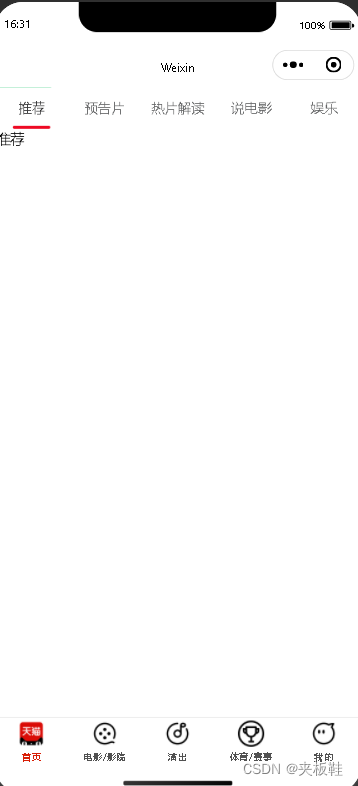
5 预览图





 扫一扫
扫一扫


 5496
5496

 被折叠的 条评论
为什么被折叠?
被折叠的 条评论
为什么被折叠?
 到【灌水乐园】发言





