


 本文档提供了JuniperSecureAccess(SA)虚拟设备的安装步骤。首先从官方网站下载适用于服务提供商和服务演示训练的虚拟设备文件,然后使用OVF工具将其转换为VMWareWorkstation可读格式。文中详细记录了使用OVF工具进行转换的具体命令,并说明了在VMWare中加载该设备的过程及所需耐心等待的时间。
This products looks similar as
UAC products.
http://www.juniper.net/support/products/sa/
1. Download file
SPE Virtual Appliance
2. Convert to VMWare Workstation Version
OVFtool Download page:
http://communities.vmware.com/community/vmtn/vsphere/automationtools/ovf
C:Program FilesVMwareVMware OVF Tool>ovftool.exe C:vmSecure_Access_DTE_Virt
ual_Appliance_7.0VA-DTE-16007-VT.ovf C:vmvte
Opening OVF source: C:vmSecure_Access_DTE_Virtual_Appliance_7.0VA-DTE-16007-V T.ovf
Warning: No manifest file
Opening VMX target: C:vmvte
Writing VMX file: C:vmvteVA-DTE-16007-VTVA-DTE-16007-VT.vmx
Disk Transfer Completed
Completed successfully
C:Program FilesVMwareVMware OVF Tool>


Opening OVF source: C:vmSecure_Access_DTE_Virtual_Appliance_7.0VA-DTE-16007-V T.ovf
Warning: No manifest file
Opening VMX target: C:vmvte
Writing VMX file: C:vmvteVA-DTE-16007-VTVA-DTE-16007-VT.vmx
Disk Transfer Completed
Completed successfully
C:Program FilesVMwareVMware OVF Tool>
3. Load it from Vmware , my version is 7.1.0 build-261024

please be patient, first time it takes a really long time to get it loaded.
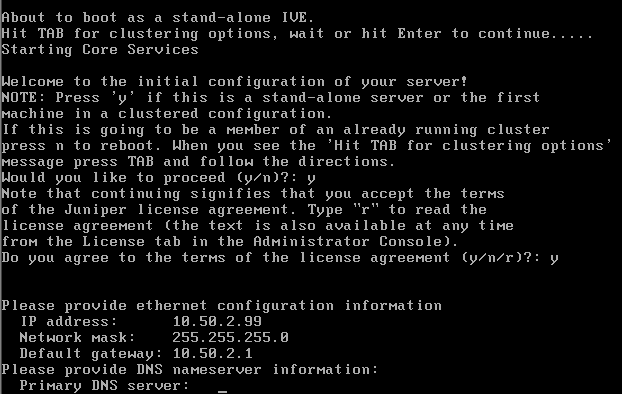
4. Basic Configuration


5. Load login page

6. Stats of system





 扫一扫
扫一扫


 1066
1066

 被折叠的 条评论
为什么被折叠?
被折叠的 条评论
为什么被折叠?
 到【灌水乐园】发言





