


 本文详细介绍了如何将虚拟设备转换为VMware Workstation版本,并通过VMware加载虚拟设备,包括下载、转换、配置等步骤。适用于初次接触虚拟设备加载的用户。
This products looks similar as
UAC products.
http://www.juniper.net/support/products/sa/
1. Download file
SPE Virtual Appliance
2. Convert to VMWare Workstation Version
OVFtool Download page:
http://communities.vmware.com/community/vmtn/vsphere/automationtools/ovf
C:Program FilesVMwareVMware OVF Tool>ovftool.exe C:vmSecure_Access_DTE_Virt
ual_Appliance_7.0VA-DTE-16007-VT.ovf C:vmvte
Opening OVF source: C:vmSecure_Access_DTE_Virtual_Appliance_7.0VA-DTE-16007-V T.ovf
Warning: No manifest file
Opening VMX target: C:vmvte
Writing VMX file: C:vmvteVA-DTE-16007-VTVA-DTE-16007-VT.vmx
Disk Transfer Completed
Completed successfully
C:Program FilesVMwareVMware OVF Tool>


Opening OVF source: C:vmSecure_Access_DTE_Virtual_Appliance_7.0VA-DTE-16007-V T.ovf
Warning: No manifest file
Opening VMX target: C:vmvte
Writing VMX file: C:vmvteVA-DTE-16007-VTVA-DTE-16007-VT.vmx
Disk Transfer Completed
Completed successfully
C:Program FilesVMwareVMware OVF Tool>
3. Load it from Vmware , my version is 7.1.0 build-261024

please be patient, first time it takes a really long time to get it loaded.
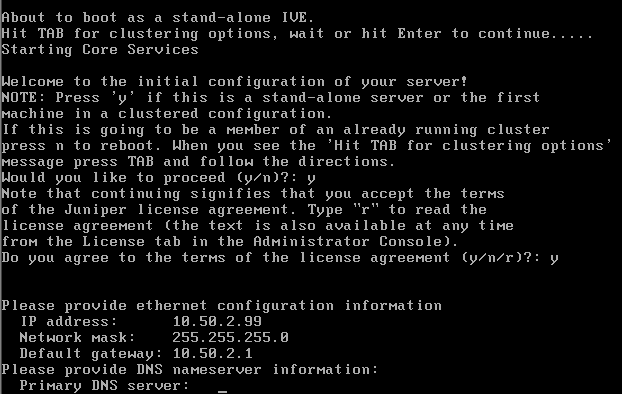
4. Basic Configuration


5. Load login page

6. Stats of system





 扫一扫
扫一扫


 1066
1066

 被折叠的 条评论
为什么被折叠?
被折叠的 条评论
为什么被折叠?
 到【灌水乐园】发言





