Android 中LayoutInflater的使用

Android中LayoutInflater和MenuInflater的使用 来生成菜单,你会发现是多么的爽朗,呵呵,我今天的小Demo,是定义四个菜单,并且实现了一个菜单事件。的编码,这里写的代码很少哦,我这里只写了第四个菜单(5、最后执行之,点击Button,将得到上述效果。我们传统意义上 的定义菜单感觉比较繁琐,当我们使用。)菜单,进入手机设置状态!目录下的菜单布局文件呢?的 使用,而这一节我将讲一下。//下面俩种方法都可以。是不是用来解析定义在。 阅读详情

LayoutInflater的使用,在实际开发种LayoutInflater这个类还是非常有用的,它的作用类似于 findViewById(),不同点是:

LayoutInflater是用来找layout下xml布局文件,并且实例化!

findViewById()是找具体xml下的具体 widget控件(如:Button,TextView等)。

为了让大家容易理解我做了一个简单的Demo,主布局main.xml里有一个TextView和一个Button,当点击Button,出现 Dialog,而这个Dialog的布局方式是我们在layout目录下定义的custom_dialog.xml文件(里面左右分布,左边 ImageView,右边TextView)。

效果图如下:
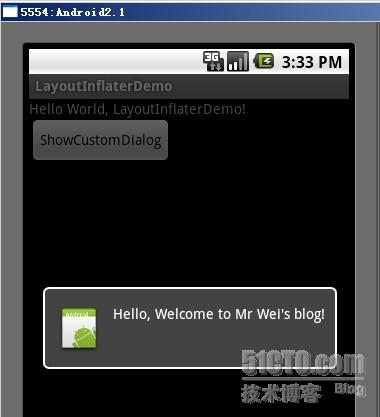
下面我将详细的说明Demo的实现过程:

1、新建一个 Android工程,我们命名为LayoutInflaterDemo.

2、修改main.xml布局,里面主要在原来基础上增加了一个Button.代码如下:

复制代码
<?xml version="1.0" encoding="utf-8"?>     
<LinearLayout      
xmlns:android="http://schemas.android.com/apk/res/android"    
    android:orientation="vertical"    
    android:layout_width="fill_parent"    
    android:layout_height="fill_parent"    
    >     
<TextView       
    android:layout_width="fill_parent"      
    android:layout_height="wrap_content"      
    android:text="@string/hello"    
    />     
<Button     
    android:id="@+id/button"    
    android:layout_width="wrap_content"    
    android:layout_height="wrap_content"    
    android:text="ShowCustomDialog"    
    />     
</LinearLayout>    
复制代码

3.定义对话框的布局方式,我们在layout目录下,新建一个名为 custom_dialog.xml文件具体代码如下:

复制代码
<?xml version="1.0" encoding="utf-8"?>     
<LinearLayout      
xmlns:android="http://schemas.android.com/apk/res/android"    
              android:orientation="horizontal"    
              android:layout_width="fill_parent"    
              android:layout_height="fill_parent"    
              android:padding="10dp"    
              >     
    <ImageView android:id="@+id/image"    
               android:layout_width="wrap_content"    
               android:layout_height="fill_parent"    
               android:layout_marginRight="10dp"    
               />     
    <TextView android:id="@+id/text"    
              android:layout_width="wrap_content"    
              android:layout_height="fill_parent"    
              android:textColor="#FFF"    
              />     
</LinearLayout>  
复制代码
4.修改主程序LayouInflaterDemo.java代码如下:
复制代码
  
package com.android.tutor; import android.app.Activity; import android.app.AlertDialog; import android.content.Context; import android.os.Bundle; import android.view.LayoutInflater; import android.view.View; import android.view.View.OnClickListener; import android.widget.Button; import android.widget.ImageView; import android.widget.TextView; public class LayoutInflaterDemo extends Activity implements OnClickListener { private Button button; public void onCreate(Bundle savedInstanceState) { super .onCreate(savedInstanceState); setContentView(R.layout.main); button = (Button)findViewById(R.id.button); button.setOnClickListener( this ); } @Override public void onClick(View v) { showCustomDialog(); } public void showCustomDialog() { AlertDialog.Builder builder; AlertDialog alertDialog; Context mContext = LayoutInflaterDemo. this ; // 下面俩种方法都可以 //// LayoutInflater inflater = getLayoutInflater(); LayoutInflater inflater = (LayoutInflater)mContext.getSystemService(LAYOUT_INFLATER_SERVICE);  
View layout = inflater.inflate(R.layout.custom_dialog, null );  
TextView text = (TextView) layout.findViewById(R.id.text); text.setText( " Hello, Welcome to Mr Wei's blog! " ); ImageView image = (ImageView) layout.findViewById(R.id.image); image.setImageResource(R.drawable.icon); builder = new AlertDialog.Builder(mContext); builder.setView(layout); alertDialog = builder.create(); alertDialog.show(); } }
复制代码

摘录自:http://weizhulin.blog.51cto.com/1556324/311450

补充总结:

1.一般来讲,我们用LayoutInflater做一件事:inflate。inflate这个方法总共有四种形式,目的都是把xml表述的layout转化为View。(This class is used to instantiate layout XML file into its corresponding View objects . It is never be used directly -- use getLayoutInflater() or getSystemService(String)getLayoutInflater() or getSystemService(String) to retrieve a standard LayoutInflater instance that is already hooked up to the current context and correctly configured for the device you are running on)

2.获得LayoutInflater的方法:

1)通过SystemService获得

LayoutInflater inflater=(LayoutInflater)context.getSystemService(Context.LAYOUT_INFLATER_SERVICE);

2)从给定的context中获得

LayoutInflater inflater = LayoutInflater.from(context); 

两者区别:实质是一样的,看方法(2)源码

code

3.LayoutInflater.inflate()

将Layout文件转换为View,顾名思义,专门供Layout使用的Inflater。虽然Layout也是View的子类,但在android中如果想将xml中的Layout转换为View放入.java代码中操作,只能通过Inflater,而不能通过findViewById(),这一段描述有误,看如下代码 。看下面文档写的已经很清楚。

.placeslist_linearlayout.xml

LinearLayout linearLayout = (LinearLayout) findViewById(R.id.placeslist_linearlayout);

linearLayout.addView(place_type_text);

这是可运行的,这上面的xml中,LinearLayout不再是Layout的代表,而只是一个普通的View。

Rocky Linux 9 离线环境Docker部署实战:从依赖打包到服务启动 本文提供了一份详尽的Rocky Linux 9离线环境Docker部署实战指南。针对无法访问外网的生产或内网服务器,文章详细讲解了如何在联网跳板机上下载Docker二进制包及所有系统依赖RPM包,并完成打包。随后,手把手指导在离线服务器上进行依赖安装、二进制文件部署、systemd服务配置、SELinux与防火墙调优,最终实现Docker服务的成功启动与验证。 阅读详情

相关推荐

eda、gnm、anm究竟是个啥?

eda:主成分分析 gnm:高斯网络模型 anm:各向异性网络模型

药研猿的博客 1243

Android 之 LayoutInflater

[code="java"]import android.view.LayoutInflater;[/code] 它的作用就是这样地: [code="java"]LayoutInflater inflater = (LayoutInflater) mContext.getSystemService(LAYOUT_INFLATER_SERVICE); View layo...

Android星空 220

6-3 根据派生类写出基类(Java解法)(PTA)

主要是看main函数里调用了什么方法和输出样例,一一对应一下有思路再写就很简单.建议使用IDEA自动生成,可以少写很多代码。

u012137663的博客 1142

LayoutInflater的使用:动态加载布局

LayoutInflater的作用和findViewById()差不多,不同之处在于LayoutInflater是找layout文件夹下的某个xml布局文件!而 findViewById()是找某一个xml下的具体 widget控件。LayoutInflater可以将一个xml布局文件转化为View 类型,其代码如下:View Code package hzx.one;

独钓寒江雪 832

pycharm报错cannot start the IED:Error occurred during initialization of VMagent library failed...如何解决?

🏆本文收录于 《全栈 Bug 调优(实战版)》 专栏。专栏聚焦真实项目中的各类疑难 Bug,从成因剖析 → 排查路径 → 解决方案 → 预防优化全链路拆解,形成一套可复用、可沉淀的实战知识体系。无论你是初入职场的开发者,还是负责复杂项目的资深工程师,都可以在这里构建一套属于自己的「问题诊断与性能调优」方法论,助你稳步进阶、放大技术价值 。

**My Coding Family** 1925

如何实现Docker镜像导入导出 ?

摘要: Docker镜像迁移与备份可通过两种方式实现:1)镜像操作(save/load)完整保存分层结构和元数据,适用于完整备份;2)容器操作(export/import)仅保存文件系统快照,适合创建轻量模板。关键区别在于前者保留历史记录和分层,后者生成单层镜像。save/load命令示例:docker save -o nginx.tar nginx:latest,export/import示例:docker export -o container.tar abc123 && docker

weixin_39291964的博客 875

LayoutInflater作用及使用

作用:  1、对于一个没有被载入或者想要动态载入的界面, 都需要使用inflate来载入.  2、对于一个已经载入的Activity, 就可以使用实现了这个Activiyt的的findViewById方法来获得其中的界面元素.  方法:     Android里面想要创建一个画面的时候, 初学一般都是新建一个类, 继承Activity基类, 然后在onCreate里面使用setCo

kokodudu的专栏 737

Jetson Nano 实战指南:深度学习环境配置与 YOLOv5 边缘端部署解析

Jetson Nano是NVIDIA推出的嵌入式AI开发板,凭借其强大的GPU计算能力和完善的软件生态系统,成为边缘AI部署的理想平台。本教程源于作者团队参加2024中国机器人大赛暨RoboCup机器人世界杯中国赛机器人先进视觉3D识别赛道的实战经验,是一份经过验证的环境部署指南。

FJN110的博客 152

Android高手进阶教程(五)之----Android 中LayoutInflater的使用!

Android高手进阶教程(五)之----Android 中LayoutInflater的使用! from“http://blog.youkuaiyun.com/android_tutor/article/details/5513869 大家好我们这一节讲的是Layout...

weixin_33910460的博客 127

23 RAG 为什么答不准:召回、分块、排序的常见坑

RAG 答不准时,不要先怪模型。本文把常见失败拆成召回不到、召回不准、分块不完整、排序靠后、上下文污染和生成不忠实六类,并给出从 Top-K 检查到评估集的排查流程。

老于的笔记的专栏 246

桌面实施远程光电体积描记法:使用面部视频测量心率的C++详细指南

在现代医疗和健康监测领域,心率是一个非常重要的生理参数,它可以为我们提供关于身体健康状况的重要信息。但是,随着技术的进步,现在我们有了一种新的方法,称为远程光电体积描记法(rPPG),它可以无需与皮肤接触就测量心率。然后,我们从面部颜色的信号序列中提取绿色通道的值,因为绿色通道对于心率的变化最为敏感。在上述代码中,我们使用了OpenCV库,它是一个开源的计算机视觉库,非常适合这种应用。这种变化是由于血液流动引起的,当心脏跳动时,血液流经面部,导致肤色的轻微变化。要实现rPPG,首先需要检测并跟踪人脸。

qq_38334677的博客 608

Android LayoutInflater深度解析 给你带来全新的认识

转载请标明出处:http://blog.youkuaiyun.com/lmj623565791/article/details/38171465, 本文出自:http://blog.youkuaiyun.com/lmj623565791/article/details/381714651、 题外话 相信大家对LayoutInflate都不陌生,特别在ListView的Adapter的getView方法中基本都会出...

weixin_30883311的博客 567

蓝牙模块HM-10手册

蓝牙模块HM-10手册,该手册对蓝牙模块HM-10进行了详细的介绍和使用方法以及一些AT指令。

android中LayoutInflater的使用

Inflater英文意思是膨胀,在Android中应该是扩展的意思吧。LayoutInflater的作用类似于 findViewById(),不同点是LayoutInflater是用来找layout文件夹下的xml布局文件,并且实例化!而 findViewById()是找具体某一个xml下的具体 widget控件(如:Button,TextView等)。 (0)她可以有很多地方可以使用...

weixin_30776863的博客 124

Devexpress16.2.6破解工具

Devexpress16.2.6破解工具Devexpress16.2.6破解工具Devexpress16.2.6破解工具Devexpress16.2.6破解工具

Data-Structures-and-Algorithm-Analysis-in-Java.pdf

作者: Weiss, Mark A. 出版社: Addison Wesley Data Structures and Algorithm Analysis in Java is an “advanced algorithms” book that fits between traditional CS2 and Algorithms Analysis courses. In the old ACM Curriculum Guidelines, this course was known as CS7. This text is for readers who want to learn good programming and algorithm analysis skills simultaneously so that they can develop such programs with the maximum amo...

android LayoutInflater 的使用

LayoutInflater作用是将layout的xml布局文件实例化为View类对象。 获取LayoutInflater的方法有如下三种: //第一种 LayoutInflater inflater=(LayoutInflater)context.getSystemService(Context.LAYOUT_INFLATER_SERVICE); View layout = inflat

dgdisme 966

文档:亲测可用解决vnc灰屏,黑屏,鼠标大黑叉情况

主要解决vnc-viewer灰屏,黑屏,鼠标大黑叉等现象,详细见文档。

Android LayoutInflater 的使用

LayoutInflater 有三种实现方法 1LayoutInflater inflater = LayoutInflater.from(context) 这种方法常用在弹框 2LayoutInflater inflater = getLayoutInflater(); 这样方法自己用在Fragment 以用布局 3LayoutInflater inflater = (Layout...

小牧在一直在学习,在前进的道路上大家一起学习,进步。 818

Android之LayoutInflater的使用

在实际工作中,事先写好的布局文件往往不能满足我们的需求,有时会根据情况在代码中自定义控件,这就需要用到LayoutInflater。 LayoutInflater在Android中是“扩展”的意思,作用类似于findViewById(),不同的是LayoutInflater是用来获得布局文件对象的,而 findViewById()是用来获得具体控件的。LayoutInflater经常在Ba

逍遥飞鹤的专栏 1132

Android 中LayoutInflater的使用!

推荐安卓开发神器(里面有各种UI特效和android代码库实例) 大家好我们这一节讲的是LayoutInflater的使用,在实际开发种LayoutInflater这个类还是非常有用的,它的作用类似于 findViewById(),不同点是LayoutInflater是用来找layout下xml布局文件,并且实例化!而findViewById()是找具体xml下的具体 widget控件(如:B...

xSTARx 92

LayoutInflater作用及使用(Android)

作用:  1、对于一个没有被载入或者想要动态载入的界面, 都需要使用inflate来载入.  2、对于一个已经载入的Activity, 就可以使用实现了这个Activiyt的的findViewById方法来获得其中的界面元素.  方法:     Android里面想要创建一个画面的时候, 初学一般都是新建一个类, 继承Activity基类, 然后在onCreate里面使用setCo

aw77k的专栏 382

Android LayoutInflater 使用说明及原理介绍

Android LayoutInflater 使用说明及原理介绍在看了郭大神的博客之后,打算自己总结一下,加深一下印象,如有问题欢迎指正哦!LayoutInflater 使用说明 LayoutInflater 主要用于加载布局,在Activity中我们可以直接用setContentView()来加载布局文件,因为setContentView()的内部也是使用LayoutInflater来加载布局

Lily900923的博客 362

Android LayoutInflater使用方法

在实际开发中LayoutInflater这个类还是非常有用的,它的作用类似于findViewById()。 不同点是LayoutInflater是用来找res/layout/下的xml布局文件,并且实例化; 而findViewById()是找xml布局文件下的具体widget控件(如Button、TextView等)。 具体作用: 1、对于一个没有被载入或者想要动态载入的界面,

月女冬舞的博客 476

java layoutinflater_Android中使用LayoutInflater要注意的一些坑

前言在平时的开发过程中,我们经常会用LayoutInflater这个类,比如说在Fragment$onCreateView和RecyclerView.Adapter$onCreateViewHolder中都会用到。它的用法也无非就是LayoutInflater.inflate(resourceId, root, attachToRoot),第一个参数没什么好说的,但第二个和第三个参数结合起来会带来...

weixin_39967938的博客 356
上一篇: View 编程(0): 认识 LayoutInflater
下一篇: LayoutInflater inflate参数详解
mywebstudy
博客等级 码龄15年 30粉丝 0原创
评论
成就一亿技术人!
拼手气红包6.0元
还能输入1000个字符
 
 条评论被折叠 查看
添加红包

请填写红包祝福语或标题

个

红包个数最小为10个

元

红包金额最低5元

当前余额3.43元 前往充值 >
需支付:10.00元
成就一亿技术人!
领取后你会自动成为博主和红包主的粉丝 规则
hope_wisdom
发出的红包
实付元
使用余额支付
点击重新获取
扫码支付
钱包余额 0

抵扣说明:

1.余额是钱包充值的虚拟货币,按照1:1的比例进行支付金额的抵扣。
2.余额无法直接购买下载,可以购买VIP、付费专栏及课程。

余额充值