
关于watch监听和页码序号的真实渲染

本文介绍了Vue中的watch监听机制,包括默认行为和deep选项的使用。同时,讨论了在分页场景下如何实现页码变化时表格序号的实时更新,并给出了具体的实现方法。此外,还分享了一些VSCode的快捷键和Vue的具名插槽与作用域插槽的使用技巧,以及树形数据的处理方法。

目录

watch监听

页码序号的真实渲染

附加其他的一些常用: 


watch监听

watch:默认侦听栈的变化,基本数据类型都能侦听,复杂数据类型,引用地址改变了它默认可以侦听到

使用deep的话

堆与栈都能侦听,默认值是false,默认只侦听栈的变化

immediate:初次绑定时就立马执行回调,默认是false

关于使用如下:

export default {
  data() {
    return {
      obj: {
        a: 10
      }
    }
  },
  watch: {
    // watch:默认侦听栈的变化,基本数据类型都能侦听,复杂数据类型,引用地址改变了它默认可以侦听到
    /*
    deep:堆与栈都能侦听,默认值是false,默认只侦听栈的变化
    immediate:初次绑定时就立马执行回调,默认是false
    */
    // obj(newVal) {
    //   console.log(newVal)
    // }
    obj: {
      // deep: true,
      immediate: true,
      handler(newVal, oldVal) {
        console.log(newVal, oldVal)
      }
    }
  },
  methods: {
    btnClick() {
      // this.obj.a = Math.random() * 999
      this.obj = {
        a: Math.random() * 999
      }
    }
  }
}

页码序号的真实渲染

在渲染表格数据的时候如下:
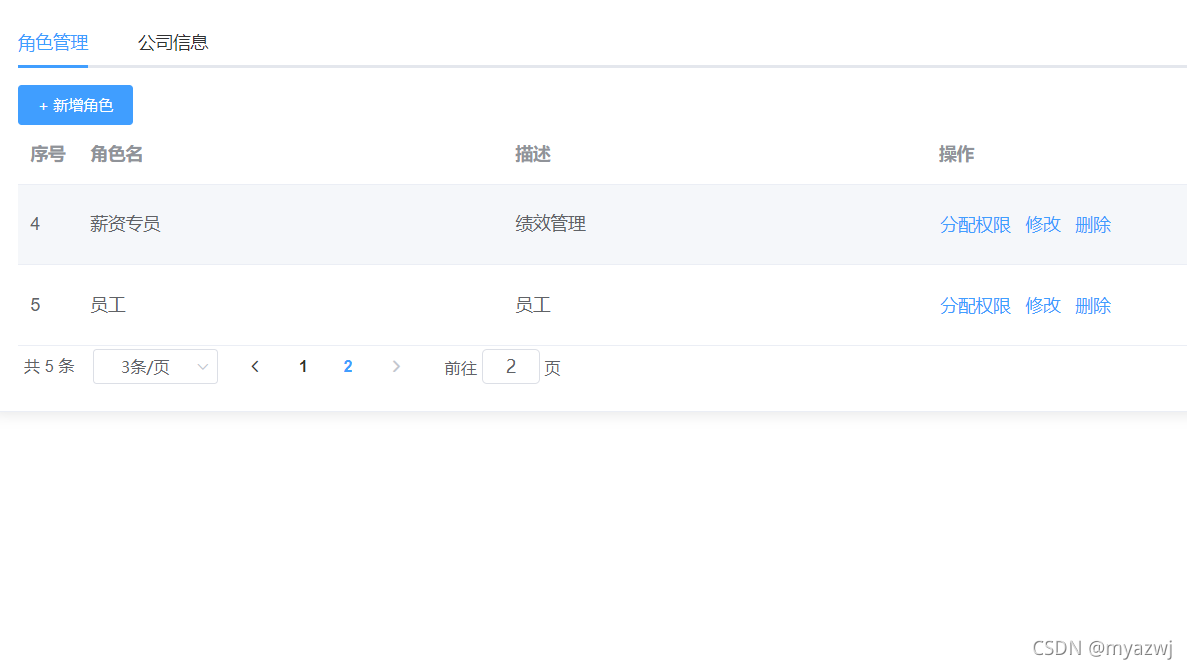
 

 这个序号我们希望下面的页码改变,它的序号值也发生改变,就是我点击几页第几条的时候,让它跟着我发生变化,而不是序号还是1

以下是算法和使用方法
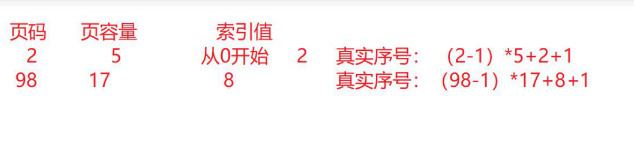
 这个是使用elemen组件   ,$index是索引号

<el-table-column label="序号" type="index">
              <template v-slot="{ $index }">
                <div>
                  {{ (page.page - 1) * page.pagesize + $index + 1 }}
                </div>
              </template>
            </el-table-column>

附加其他的一些常用: 

还有一些vscode的快捷键用法如下:

  1. ctrl+d 选中相同的

  2. alt+鼠标左键, 出现多个光标,

  3. ctrl+x 裁切

  4. ctrl+shift+左/右 选中光标前面或者后面一个词

  5. alt+上、下 能移动代码上下

 具名插槽和作用域插槽如下:

    具名插槽
         定义
          组件内xxx:
            div
                 <slot name="abc" />
       使用
          直接写  
            <xxx>
                <template v-slot:abc>
                    内容
                 <template>
            </xxx>  
            
     作用域插槽
         默认插槽
            定义
               <div>
               <slot num='123' />
               </div>
             使用
               <div   slot-scope="{num}"> 不建议使用
                <xxx>
                <template v-slot='scope/{num}'>
                scope:{
                    num:123
                }
                </template>
                </xxx>
              如果整个组件只有一个插槽且是作用域的默认插槽              
               <xxx v-slot='scope/{num}'>
                div。。。
                </xxx>                
                
                
           具名插槽
              定义
               <div>
               <slot num='123' name="abc" />
               </div>
             使用
               <div  slot="abc"   slot-scope="{num}"> 不建议使用
                <xxx>
                <template v-slot:abc='scope/{num}' #abc='scope/{num}'>
                scope:{
                    num:123
                }
                </template>
                </xxx>

用递归的方式进行树形数据处理

如下:

let arr=[
    {id:1,pid:0},
    {id:2,pid:1}    
    ...
]

function changeArr(arr,str=0){
    return arr.filter(item=>{
        if(item.pid===str){
           item.children=changeArr(arr,item.id)
            return true
        }
    })
}
changeArr(arr,0)===>[{id:1,pid:0,children:[]}]
changeArr(arr,1)====>[{id:2,pid:1}]

有些时候我们得到的数据是这样的
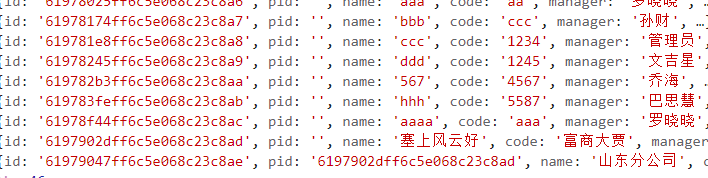
 但是我们想转换成树形一层套一层这样的
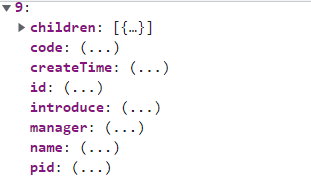
 

 如下:

created() {

    this.getData()

  },

methods: { 

    async getData() {

      const res = await companyDepartment()   

      console.log(res, '获得的数据')

    },


<template> <el-dialog v-model="localVisible" :title="dialogTitle" width="80%" top="10vh" :before-close="handleClose" > <!-- 添加按钮 --> <div class="table-toolbar"> <img src="@/assets/images/setup.png" alt="" @click="openColumnSelection" /> </div> <div v-if="!loading && props.dialogData" class="table-wrapper"> <el-table v-loading="loading" :data="props.dialogData" border :max-height="tableMaxHeight"> <el-table-column :label="t('序号')" type="index" :index="indexMethod" width="100" fixed ></el-table-column> <el-table-column v-for="(column, index) in visibleColumns" :key="index" :label="column.title" :prop="column.field" :width="column.width" show-overflow-tooltip > <template #default="scope"> {{ [null, undefined, ''].includes(scope.row[column.field]) ? '--' : scope.row[column.field] }} </template> </el-table-column> </el-table> </div> <div class="table-page"> <el-pagination v-model:current-page="localPageNo" v-model:page-size="localPageSize" :page-sizes="[10, 20, 30, 50, 100]" layout="total, sizes, prev, pager, next" :total="props.total" @size-change="handleSizeChange" @current-change="handleCurrentChange" ></el-pagination> </div> </el-dialog> <!-- 列选择对话框 --> <el-dialog v-model="columnDialogVisible" :title="t('列表字段筛选')" width="38%"> <div style="max-height: 400px; overflow-y: auto"> <el-checkbox v-model="checkedAll" :indeterminate="isIndeterminate" :label="t('全部')" @change="checkAllFun" /> <!-- 复选框容器(使用 flex 布局) --> <div class="checkbox-container"> <el-checkbox-group v-model="selectedColumns"> <el-checkbox v-for="(column, index) in allColumns" :key="index" :label="column.title" ></el-checkbox> </el-checkbox-group> </div> </div> <template #footer> <span class="dialog-footer"> <el-button @click="columnDialogVisible = false">{{ t('取消') }}</el-button> <el-button type="primary" @click="onColumnConfirm">{{ t('确定') }}</el-button> </span> </template> </el-dialog> </template> <script setup lang="ts"> import { computed, defineEmits, defineProps, onMounted, ref, watch } from 'vue'; import { useI18n } from 'vue-i18n'; const { t } = useI18n(); const props = defineProps<{ dialogVisible: boolean; dialogTitle: string; dialogColumns: Array<{ title: string; field: string; width: number; visible?: boolean; }>; dialogData: any[]; total?: number; pageNo?: number; pageSize?: number; }>(); const emit = defineEmits(['update:dialogVisible', 'update:pageNo', 'update:pageSize', 'refresh']); const localVisible = ref<boolean>(false); const loading = ref<boolean>(false); const tableMaxHeight = ref(450); // 使用 computed 实现双向绑定 v-model:pageNo / v-model:pageSize const localPageNo = computed({ get: () => props.pageNo ?? 1, set: val => { emit('update:pageNo', val); emit('refresh'); // 自动刷新数据 }, }); const localPageSize = computed({ get: () => props.pageSize ?? 10, set: val => { emit('update:pageSize', val); emit('update:pageNo', 1); emit('refresh'); }, }); // 同步外部传入的 dialogVisible 到本地(初始化后续变化都监听watch( () => props.dialogVisible, val => { localVisible.value = val; }, { immediate: true }, ); // 当用户关闭弹窗时,通知父组件同步关闭 const handleClose = (done: () => void) => { emit('update:dialogVisible', false); emit('update:pageNo', 1); done(); }; // 表格所有列管理 const allColumns = ref<Array<{ title: string; field: string; width: number; visible: boolean }>>( [], ); // 当前列显示集合 const visibleColumns = computed(() => allColumns.value.filter(col => col.visible)); // 分页逻辑 const total = computed(() => props.dialogData.length); const indexMethod = (index: number) => { const currentIndex = (localPageNo.value - 1) * localPageSize.value + index + 1; return currentIndex < 10 ? `0${currentIndex}` : `${currentIndex}`; }; // 分页相关函数 const handleSizeChange = (pageSize: number) => { emit('update:pageSize', pageSize); emit('update:pageNo', 1); // 切换每页数量时重置为第一页 emit('refresh'); }; const handleCurrentChange = (pageNo: number) => { emit('update:pageNo', pageNo); emit('refresh', pageNo); // 明确传递页码 }; // 列选择逻辑 const columnDialogVisible = ref(false); const selectedColumns = ref<string[]>([]); // 打开列选择对话框 const openColumnSelection = () => { selectedColumns.value = allColumns.value.filter(col => col.visible).map(col => col.title); columnDialogVisible.value = true; }; const checkedAll = computed({ get: () => selectedColumns.value.length === allColumns.value.length && allColumns.value.length > 0, set: (val: boolean) => { selectedColumns.value = val ? allColumns.value.map(col => col.title) : []; }, }); const isIndeterminate = computed(() => { const total = allColumns.value.length; const selected = selectedColumns.value.length; return selected > 0 && selected < total; }); // 全选/取消全选 const checkAllFun = (val: boolean) => { allColumns.value.forEach(col => { col.visible = val; }); }; // 确认列设置 const onColumnConfirm = () => { // 更新 allColumns.visible allColumns.value.forEach(col => { col.visible = selectedColumns.value.includes(col.title); }); columnDialogVisible.value = false; }; watch( () => props.dialogColumns, newCols => { if (!newCols || newCols.length === 0) { return; } const previousState = new Map<string, boolean>(); allColumns.value.forEach(col => { previousState.set(col.field, col.visible); }); allColumns.value = newCols.map(col => ({ ...col, visible: previousState.has(col.field) ? previousState.get(col.field)! : col.visible ?? true, })); }, { immediate: true, deep: true }, ); onMounted(() => { const asideElement = document.getElementsByClassName('aside-content')[0]; tableMaxHeight.value = asideElement ? asideElement.offsetHeight - 260 : 450; allColumns.value = props.dialogColumns.map(col => ({ ...col, visible: col.visible ?? true, })); }); </script> <style scoped lang="less"> :deep(.el-dialog) { display: block !important; z-index: 9999; } .table-toolbar { text-align: right; margin-bottom: 10px; } .checkbox-container { display: flex; flex-wrap: wrap; } .checkbox-container .el-checkbox { flex: 0 0 25%; } /* 可选:调整复选框的最小宽度 */ .checkbox-container .el-checkbox { min-width: 130px; } :deep(.el-pagination) { justify-content: flex-start; margin-top: 16px; } .el-table { --el-table-header-bg-color: #f2f5fc; } </style> 点击第二页的时候,第一次会出现21-40条数据,待会又渲染21-25条数据
10-11
<template> <el-dialog v-model="localVisible" :title="dialogTitle" width="80%" top="10vh" :before-close="handleClose" > <!-- 添加按钮 --> <div class="table-toolbar"> <img src="@/assets/images/setup.png" alt="" @click="openColumnSelection" /> </div> <div v-if="!loading && props.dialogData" class="table-wrapper"> <el-table v-loading="loading" :data="props.dialogData" border :max-height="tableMaxHeight"> <el-table-column :label="t('序号')" type="index" :index="indexMethod" width="100" fixed ></el-table-column> <el-table-column v-for="(column, index) in visibleColumns" :key="index" :label="column.title" :prop="column.field" :width="column.width" show-overflow-tooltip > <template #default="scope"> {{ [null, undefined, ''].includes(scope.row[column.field]) ? '--' : scope.row[column.field] }} </template> </el-table-column> </el-table> </div> <div class="table-page"> <el-pagination v-model:current-page="localPageNo" v-model:page-size="localPageSize" :page-sizes="[10, 20, 30, 50, 100]" layout="total, sizes, prev, pager, next" :total="props.total" @size-change="handleSizeChange" @current-change="handleCurrentChange" ></el-pagination> </div> </el-dialog> <!-- 列选择对话框 --> <el-dialog v-model="columnDialogVisible" :title="t('列表字段筛选')" width="38%"> <div style="max-height: 400px; overflow-y: auto"> <el-checkbox v-model="checkedAll" :indeterminate="isIndeterminate" :label="t('全部')" @change="checkAllFun" /> <!-- 复选框容器(使用 flex 布局) --> <div class="checkbox-container"> <el-checkbox-group v-model="selectedColumns"> <el-checkbox v-for="(column, index) in allColumns" :key="index" :label="column.title" ></el-checkbox> </el-checkbox-group> </div> </div> <template #footer> <span class="dialog-footer"> <el-button @click="columnDialogVisible = false">{{ t('取消') }}</el-button> <el-button type="primary" @click="onColumnConfirm">{{ t('确定') }}</el-button> </span> </template> </el-dialog> </template> <script setup lang="ts"> import { computed, defineEmits, defineProps, onMounted, ref, watch } from 'vue'; import { useI18n } from 'vue-i18n'; const { t } = useI18n(); const props = defineProps<{ dialogVisible: boolean; dialogTitle: string; dialogColumns: Array<{ title: string; field: string; width: number; visible?: boolean; }>; dialogData: any[]; total?: number; pageNo?: number; pageSize?: number; }>(); const emit = defineEmits(['update:dialogVisible', 'update:pageNo', 'update:pageSize', 'refresh']); const localVisible = ref<boolean>(false); const loading = ref<boolean>(false); const tableMaxHeight = ref(450); // 存储默认列配置(用于重置) const defaultColumns = ref< Array<{ title: string; field: string; width: number; visible: boolean }> >([]); // 表格所有列管理 const allColumns = ref<Array<{ title: string; field: string; width: number; visible: boolean }>>( [], ); // 当前列显示集合 const visibleColumns = computed(() => allColumns.value.filter(col => col.visible)); // 分页逻辑 const total = computed(() => props.dialogData.length); // 使用 computed 实现双向绑定 v-model:pageNo / v-model:pageSize const localPageNo = computed({ get: () => props.pageNo ?? 1, set: val => { emit('update:pageNo', val); emit('refresh'); // 自动刷新数据 }, }); const localPageSize = computed({ get: () => props.pageSize ?? 10, set: val => { emit('update:pageSize', val); emit('update:pageNo', 1); emit('refresh'); }, }); // 初始化默认列当前列 const initDefaultColumns = () => { defaultColumns.value = props.dialogColumns.map(col => ({ ...col, visible: col.visible ?? true, })); // 初始化 allColumns 为默认状态 allColumns.value = defaultColumns.value.map(col => ({ ...col })); }; // 当 dialogColumns 更新时,重新初始化默认列 watch( () => props.dialogColumns, () => { if (props.dialogColumns?.length > 0) { initDefaultColumns(); // 如果弹窗开着,也要刷新列状态 if (localVisible.value) { allColumns.value = defaultColumns.value.map(col => ({ ...col })); } } }, { immediate: true, deep: true }, ); // 当用户关闭弹窗时,通知父组件同步关闭 const handleClose = (done: () => void) => { emit('update:dialogVisible', false); emit('update:pageNo', 1); // 关闭时重置列设置为默认状态 if (defaultColumns.value.length > 0) { allColumns.value = defaultColumns.value.map(col => ({ ...col })); } done(); }; const indexMethod = (index: number) => { const currentIndex = (localPageNo.value - 1) * localPageSize.value + index + 1; return currentIndex < 10 ? `0${currentIndex}` : `${currentIndex}`; }; // 分页相关函数 const handleSizeChange = (pageSize: number) => { emit('update:pageSize', pageSize); emit('update:pageNo', 1); // 切换每页数量时重置为第一页 emit('refresh'); }; const handleCurrentChange = (pageNo: number) => { emit('update:pageNo', pageNo); emit('refresh', pageNo); // 明确传递页码 }; // 列选择逻辑 const columnDialogVisible = ref(false); const selectedColumns = ref<string[]>([]); // 打开列选择对话框 const openColumnSelection = () => { selectedColumns.value = allColumns.value.filter(col => col.visible).map(col => col.title); columnDialogVisible.value = true; }; const checkedAll = computed({ get: () => selectedColumns.value.length === allColumns.value.length && allColumns.value.length > 0, set: (val: boolean) => { selectedColumns.value = val ? allColumns.value.map(col => col.title) : []; }, }); const isIndeterminate = computed(() => { const total = allColumns.value.length; const selected = selectedColumns.value.length; return selected > 0 && selected < total; }); // 全选/取消全选 const checkAllFun = (val: boolean) => { allColumns.value.forEach(col => { col.visible = val; }); }; // 确认列设置 const onColumnConfirm = () => { // 更新 allColumns.visible allColumns.value.forEach(col => { col.visible = selectedColumns.value.includes(col.title); }); columnDialogVisible.value = false; }; watch( () => props.dialogColumns, newCols => { if (!newCols || newCols.length === 0) { return; } const previousState = new Map<string, boolean>(); allColumns.value.forEach(col => { previousState.set(col.field, col.visible); }); allColumns.value = newCols.map(col => ({ ...col, visible: previousState.has(col.field) ? previousState.get(col.field)! : col.visible ?? true, })); }, { immediate: true, deep: true }, ); onMounted(() => { const asideElement = document.getElementsByClassName('aside-content')[0]; tableMaxHeight.value = asideElement ? asideElement.offsetHeight - 260 : 450; if (props.dialogColumns?.length > 0) { initDefaultColumns(); allColumns.value = defaultColumns.value.map(col => ({ ...col })); } }); </script> <style scoped lang="less"> :deep(.el-dialog) { display: block !important; z-index: 9999; } .table-toolbar { text-align: right; margin-bottom: 10px; } .checkbox-container { display: flex; flex-wrap: wrap; } .checkbox-container .el-checkbox { flex: 0 0 25%; } /* 可选:调整复选框的最小宽度 */ .checkbox-container .el-checkbox { min-width: 130px; } :deep(.el-pagination) { justify-content: flex-start; margin-top: 16px; } .el-table { --el-table-header-bg-color: #f2f5fc; } </style> 帮我看下代码有错误吗,现在打不开弹窗了
10-15
<template> <div class="app-containers"> <!-- 弹出页面 --> <el-dialog v-model="isStudentDialogVisible" :title="dialogTitle" width="80%" > <el-form :model="queryParams" label-width="100px" inline> <!-- 第一行:学员账号、学员姓名查询按钮 --> <el-form-item style="margin-left: -35px;width: 22%;" label="学员账号" prop="user_id"> <el-input v-model="queryParams.user_id" placeholder="请输入学员账号" clearable @keyup.enter="handleQuery" /> </el-form-item> <el-form-item style="margin-left: -50px; width: 22%;" label="学员姓名" prop="nick_name"> <el-input v-model="queryParams.nick_name" placeholder="请输入学员姓名" clearable @keyup.enter="handleQuery" /> </el-form-item> <el-form-item style="margin-left: -50px; width: 22%;" label="身份证" prop="idcard"> <el-input v-model="queryParams.idcard" placeholder="请输入身份证号" clearable @keyup.enter="handleQuery" /> </el-form-item> <el-form-item style="margin-left: -50px; width: 22%;" label="手机号" prop="phonenumber"> <el-input v-model="queryParams.phonenumber" placeholder="请输入手机号" clearable @keyup.enter="handleQuery" /> </el-form-item> <el-form-item style="margin-left: -10px;"> <el-button type="primary" icon="Search" @click="handleQuery">搜索</el-button> <el-button icon="Refresh" @click="resetQuery">重置</el-button> </el-form-item> </el-form> <el-row :gutter="10" class="mb8"> <el-col :span="1.5"> <el-button type="warning" plain icon="Download" @click="handleExport">导出 </el-button> </el-col> </el-row> <!-- 表格 --> <el-table :data="LearningList" border @selection-change="handleSelectionChange"> <el-table-column label="序号" type="index" width="80" align="center"/> <el-table-column label="姓名" prop="nick_name" align="center"/> <el-table-column label="账号" prop="user_id" align="center"/> <el-table-column label="电话" prop="phonenumber" align="center"/> <el-table-column label="学员组" prop="group_name" align="center"/> <el-table-column label="学习情况" align="center" width="300"> <template #default="scope"> <div class="course_data"> <div class="icon-row"> <!-- 视频学习进度 --> <div title="视频学习进度" class="icon-item"> <div class="icon-container"> <el-icon class="icon-style"> <VideoCamera/> </el-icon> <span>{{ scope.row.stc_study_score }}%</span> </div> </div> <!-- 试题通过率 --> <div title="试题通过率" class="icon-item"> <div class="icon-container"> <el-icon class="icon-style"> <Document/> </el-icon> <span>{{ scope.row.stc_ques_score }}%</span> </div> </div> <!-- 结课考试成绩 --> <div title="结课考试成绩" class="icon-item"> <div class="icon-container"> <el-icon class="icon-style"> <Files/> </el-icon> <span>{{ scope.row.stc_exam_score }}分</span> </div> </div> </div> </div> </template> </el-table-column> <el-table-column label="综合成绩" align="center"> <template #default="scope"> <span> {{((scope.row.stc_study_score + 6) * 0.4 + scope.row.stc_exam_score * 0.6).toFixed(1) }} </span> </template> </el-table-column> </el-table> <!-- 分页 --> <pagination v-show="total > 0" :total="total" v-model:page="queryParams.pageNum" v-model:limit="queryParams.pageSize" @pagination="getList" /> </el-dialog> </div> <exportLearningRecords width="100%" height="100%" v-model:dialog-visible="exportLearningVisible" :form-data="exportLearningData" @reloaded="handleQuery" /> </template> <script setup> import {ref, computed, watch} from 'vue' import {ElButton} from "element-plus"; import {listLearningRecords} from "@/api/system/courses.js"; import {debounce} from 'lodash'; import exportLearningRecords from "@/views/training/courseInfo/exportLearningRecords.vue"; // props 接收数据 const props = defineProps({ dialogTitle: { type: String, default: '' }, dialogVisible: { type: Boolean, default: false }, formData: { type: Object, default: () => ({}) }, }) // 声明响应式数据 const exportLearningVisible = ref(false) const exportLearningData = ref({}) const loading = ref(true); const {proxy} = getCurrentInstance(); const LearningList = ref([]) // 学员详情列表 const total = ref(0) // 总记录数 // 定义需要用到的变量 const queryParams = ref({ cou_id: '', cou_name: '', user_id: '', nick_name: '', idcard: '', phonenumber: '', pageNum: 1, pageSize: 10, }) // 发出更新 dialog-visible 事件 const emit = defineEmits(['update:dialog-visible', 'reloaded']) // 控制弹窗是否显示的计算属性 const isStudentDialogVisible = computed({ get: () => props.dialogVisible, set: (value) => emit('update:dialog-visible', value), }) // 监听父组件传递的 formData,当课程 ID 变化时,更新 queryParams watch(() => props.formData, (val) => { if (val?.form?.cou_id) { queryParams.value.cou_id = val.form.cou_id; // 调用获取学员学习记录的函数 getList(); } }, {immediate: true}) /** 查询学员学习记录列表 */ function getList() { loading.value = true; listLearningRecords(proxy.addDateRange(queryParams.value)).then(response => { LearningList.value = response.rows; total.value = response.total; loading.value = false; }); } // 查询功能 const handleQuery = () => { // 查询操作 queryParams.value.pageNum = 1; getList(); } // 防抖重置查询条件 const resetQuery = debounce(() => { queryParams.value.user_id = ''; // 清空学员账号 queryParams.value.nick_name = ''; // 清空学员姓名 queryParams.value.idcard = ''; // 清空身份证 queryParams.value.phonenumber = ''; // 清空手机号 queryParams.value.pageNum = 1; // 重置分页页码为第一页 queryParams.value.pageSize = 10; // 重置分页每页显示条数 getList(); // 重新获取学员列表数据 }, 500); // 防抖500ms // 选择学员时的回调 const handleSelectionChange = (selection) => { } // 导出数据 const handleExport = () => { exportLearningData.value.form = { cou_id: queryParams.value.cou_id, // 传递课程ID }; exportLearningVisible.value = true; } </script> <style scoped> .app-containers { padding: 20px 20px 0 20px; } </style> 为啥我这个页面这样写了,然后子页面这样写的:<template> <el-dialog v-model="exportLearningVisible" title="课程-学习记录导出" width="50%" @close="resetDialog" class="center-dialog" <div class="dialog-content"> <!-- 选修时间 --> <div class="date-picker-container"> <label for="date-picker" class="date-picker-label">选修时间</label> <div class="date-picker-item"> <el-date-picker v-model="startDate" type="date" placeholder="开始日期" style="width: 100%;" ></el-date-picker> </div> <div class="date-picker-separator">至</div> <div class="date-picker-item"> <el-date-picker v-model="endDate" type="date" placeholder="结束日期" style="width: 100%;" ></el-date-picker> </div> </div> <!-- 提示信息 --> <p class="dialog-message">学员选修课程的开始时间的区间</p> </div> <!-- 底部按钮 --> <template #footer> <div class="footer-buttons"> <el-button @click="exportLearningRecord" type="primary"> 导出学习记录 </el-button> <el-button @click="closeDialog">取消</el-button> </div> </template> </el-dialog> <!-- 新页面内容 --> <div class="learning-record-page"> <h1>课程学习记录导出</h1> <div class="form-container"> <label for="start-date" class="form-label">选修时间:</label> <el-date-picker v-model="startDate" type="date" placeholder="选择开始日期" style="width: 100%;" ></el-date-picker> <span>至</span> <el-date-picker v-model="endDate" type="date" placeholder="选择结束日期" style="width: 100%;" ></el-date-picker> </div> <el-button type="primary" @click="exportLearningRecord" :disabled="!startDate || !endDate" > 导出学习记录 </el-button> <el-button @click="resetDialog" style="margin-left: 10px;"> 重置 </el-button> </div> </template> <script setup> import { ref, watch, defineProps, defineEmits } from 'vue'; import { ElDialog, ElDatePicker, ElButton } from 'element-plus'; // 定义响应式数据 const startDate = ref(null); const endDate = ref(null); const cou_id = ref(null); // 使用 ref 创建响应式变量 // props 接收数据 const props = defineProps({ dialogVisible: { type: Boolean, default: false }, formData: { type: Object, default: () => ({}) }, }); // 发出更新 dialog-visible 事件 const emit = defineEmits(['update:dialog-visible', 'reloaded']) // 定义一个新的响应式变量,用来控制弹窗显示状态 const exportLearningVisible = ref(false); // 监听父组件传递的 dialogVisible,并更新 exportLearningVisible 的值 watch(() => props.dialogVisible, (newVal) => { exportLearningVisible.value = newVal; }, { immediate: true }); // 监听父组件传递的 formData,当课程 ID 变化时,更新 cou_id watch(() => props.formData, (val) => { if (val?.form?.cou_id) { cou_id.value = val.form.cou_id; // 正确地使用 .value 更新 cou_id // 调用获取学员学习记录的函数 getList(); } }, { immediate: true }); // 模拟获取学员学习记录的函数 const getList = () => { // 在这里进行学员记录的查询 }; // 导出学习记录的函数 const exportLearningRecord = () => { if (startDate.value && endDate.value) { // 执行导出逻辑 console.log(导出时间区间: ${startDate.value} 至 ${endDate.value}); // 在这里加入导出文件的功能,例如导出为CSV等 } else { alert('请选择完整的时间区间'); } }; // 关闭弹窗 const closeDialog = () => { exportLearningVisible.value = false; // 使用 .value 来更新弹窗显示状态 emit('update:dialog-visible', false); // 通知父组件关闭弹窗 }; // 重置选定的时间 const resetDialog = () => { startDate.value = null; endDate.value = null; }; </script> <style scoped> .learning-record-page { padding: 20px; } .form-container { margin-bottom: 20px; } .form-label { font-size: 16px; font-weight: bold; margin-right: 10px; } .el-button { margin-top: 10px; } </style> 然后页面初始化后,子页面默认会出现在我这个页面的下面,而不是弹出啊
11-06
评论
添加红包

请填写红包祝福语或标题

红包个数最小为10个

红包金额最低5元

当前余额3.43前往充值 >
需支付:10.00
成就一亿技术人!
领取后你会自动成为博主和红包主的粉丝 规则
hope_wisdom
发出的红包
实付
使用余额支付
点击重新获取
扫码支付
钱包余额 0

抵扣说明:

1.余额是钱包充值的虚拟货币,按照1:1的比例进行支付金额的抵扣。
2.余额无法直接购买下载,可以购买VIP、付费专栏及课程。

余额充值


