



 这篇博客详细记录了如何在Android应用中打开本地文件的过程,包括在MainActivity中编写方法、获取文件类型、配置filepaths.xml、更新AndroidManifest.xml以添加权限,以及在高版本系统中动态申请权限的操作。
这个是别人的代码,自己忘了地址,只是给自己记录插个眼
获取本地文件
在MainActivity 中写方法
 /**
     * android 打开本地文件
     * @param path    本地文件路径(带文件名)
     */
    public void openFileNew(String path, Context context) {
        try {
            File file = new File(path);
            Uri uri = null;
            if (Build.VERSION.SDK_INT >= Build.VERSION_CODES.N) {//24 android7
                uri = FileProvider.getUriForFile(context, context.getPackageName() + ".fileprovider", file);
            } else {
                uri = Uri.fromFile(file);
            }
            context.grantUriPermission(context.getPackageName(), uri, Intent.FLAG_GRANT_READ_URI_PERMISSION);
            Intent intent2 = new Intent("android.intent.action.VIEW");
            intent2.addCategory("android.intent.category.DEFAULT");
            intent2.addFlags(Intent.FLAG_ACTIVITY_NEW_TASK);
            intent2.setFlags(Intent.FLAG_GRANT_READ_URI_PERMISSION);
            Log.d("sss", "opneFile: uri " + uri.toString());
            String type = AndroidFileUtil.getMIMEtype(path);
            intent2.setDataAndType(uri, type);
            context.startActivity(intent2);
        } catch (Exception e) {
            Log.d("sss", "loadAccessorySuccess: error " + e.toString());
        }
    }
再写获取文件类型的方法
public class AndroidFileUtil {

    public static String getMIMEtype(String path){
        String type="*/*";

        //获取后缀名前的分隔符“.”在fileName中的位置
        int dotIntex=path.lastIndexOf(".");
        if(dotIntex<0){
            return type;
        }
        /*获取文件的后缀*/
        String fileType=path.substring(dotIntex,path.length()).toLowerCase();
        if(fileType==null||"".equals(fileType)){
            return  type;
        }

        //在MIME和文件类型的匹配表中找到对应的mime 类型
        for(int i=0;i<MIME_MapTable.length;i++){
            if(fileType.equals(MIME_MapTable[i][0])){
                type=MIME_MapTable[i][1];
            }
        }
        return type;
    }


    private static final String[][] MIME_MapTable = {
            //{后缀名,    MIME类型}
            {".3gp", "video/3gpp"},
            {".apk", "application/vnd.android.package-archive"},
            {".asf", "video/x-ms-asf"},
            {".avi", "video/x-msvideo"},
            {".bin", "application/octet-stream"},
            {".bmp", "image/bmp"},
            {".c", "text/plain"},
            {".class", "application/octet-stream"},
            {".conf", "text/plain"},
            {".cpp", "text/plain"},
            {".doc", "application/msword"},
            {".docx", "application/msword"},
            {".exe", "application/octet-stream"},
            {".gif", "image/gif"},
            {".gtar", "application/x-gtar"},
            {".gz", "application/x-gzip"},
            {".h", "text/plain"},
            {".htm", "text/html"},
            {".html", "text/html"},
            {".jar", "application/java-archive"},
            {".java", "text/plain"},
            {".jpeg", "image/jpeg"},
            {".jpg", "image/jpeg"},
            {".js", "application/x-javascript"},
            {".log", "text/plain"},
            {".m3u", "audio/x-mpegurl"},
            {".m4a", "audio/mp4a-latm"},
            {".m4b", "audio/mp4a-latm"},
            {".m4p", "audio/mp4a-latm"},
            {".m4u", "video/vnd.mpegurl"},
            {".m4v", "video/x-m4v"},
            {".mov", "video/quicktime"},
            {".mp2", "audio/x-mpeg"},
            {".mp3", "audio/x-mpeg"},
            {".mp4", "video/mp4"},
            {".mpc", "application/vnd.mpohun.certificate"},
            {".mpe", "video/mpeg"},
            {".mpeg", "video/mpeg"},
            {".mpg", "video/mpeg"},
            {".mpg4", "video/mp4"},
            {".mpga", "audio/mpeg"},
            {".msg", "application/vnd.ms-outlook"},
            {".ogg", "audio/ogg"},
            {".pdf", "application/pdf"},
            {".png", "image/png"},
            {".pps", "application/vnd.ms-powerpoint"},
            {".ppt", "application/vnd.ms-powerpoint"},
            {".prop", "text/plain"},
            {".rar", "application/x-rar-compressed"},
            {".rc", "text/plain"},
            {".rmvb", "audio/x-pn-realaudio"},
            {".rtf", "application/rtf"},
            {".sh", "text/plain"},
            {".tar", "application/x-tar"},
            {".tgz", "application/x-compressed"},
            {".txt", "text/plain"},
            {".wav", "audio/x-wav"},
            {".wma", "audio/x-ms-wma"},
            {".wmv", "audio/x-ms-wmv"},
            {".wps", "application/vnd.ms-works"},
            //{".xml",    "text/xml"},
            {".xml", "text/plain"},
            {".xls", "application/vnd.ms-excel"},
            {".xlsx", "application/vnd.ms-excel"},
            {".z", "application/x-compress"},
            {".zip", "application/zip"},
            {"", "*/*"}
    };
}
这时还未结束
还需要进行配置
在res 目录下创建xml 文件夹
创建filepaths.xml 文件
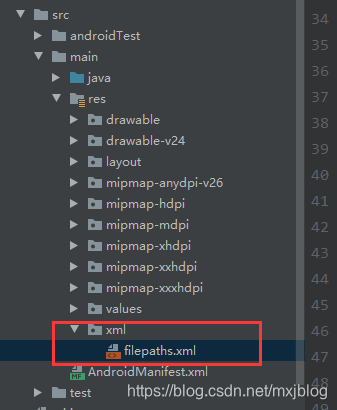
filepaths 中的内容为
<paths xmlns:android="http://schemas.android.com/apk/res/android">
    <external-path name="external" path="."/>
</paths>
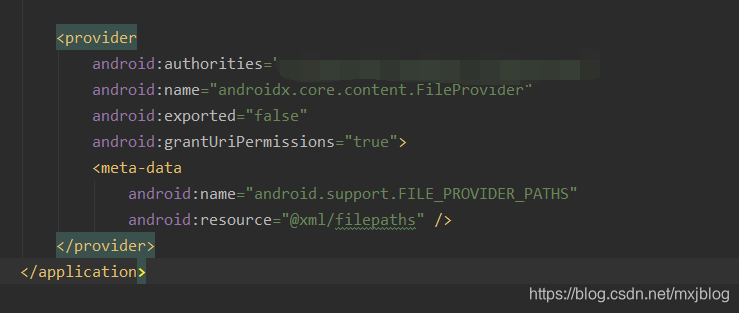
在AndroidManifest.xml 文件中增加
<provider
            android:authorities="你的包名.fileprovider"
            android:name="androidx.core.content.FileProvider"
            android:exported="false"
            android:grantUriPermissions="true">
            <meta-data
                android:name="android.support.FILE_PROVIDER_PATHS"
                android:resource="@xml/filepaths" />
        </provider>
当然最后还需要添加权限,高版本需要动态申请权限了
AndroidManifest.xml 中进行添加权限
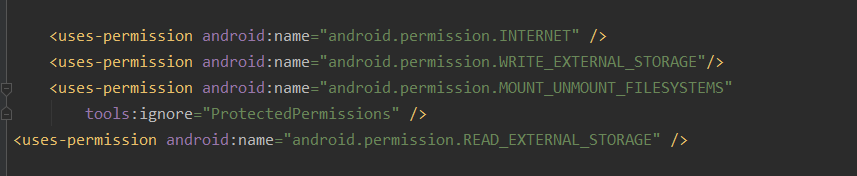
    <uses-permission android:name="android.permission.INTERNET" />
    <uses-permission android:name="android.permission.WRITE_EXTERNAL_STORAGE"/>
    <uses-permission android:name="android.permission.MOUNT_UNMOUNT_FILESYSTEMS"
        tools:ignore="ProtectedPermissions" />
<uses-permission android:name="android.permission.READ_EXTERNAL_STORAGE" />
在MainActivity 中动态申请权限方式
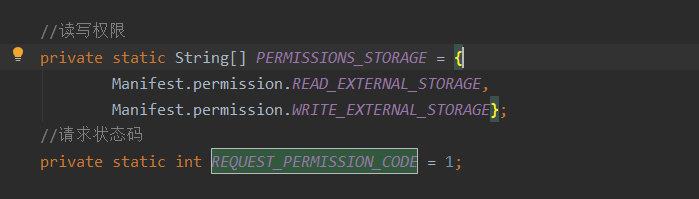
在onCreate 中添加

   //读写权限
    private static String[] PERMISSIONS_STORAGE = {
            Manifest.permission.READ_EXTERNAL_STORAGE,
            Manifest.permission.WRITE_EXTERNAL_STORAGE};
    //请求状态码
    private static int REQUEST_PERMISSION_CODE = 1;
   if (Build.VERSION.SDK_INT > Build.VERSION_CODES.LOLLIPOP) {
            if (ActivityCompat.checkSelfPermission(this, Manifest.permission.WRITE_EXTERNAL_STORAGE) != PackageManager.PERMISSION_GRANTED) {
                ActivityCompat.requestPermissions(this, PERMISSIONS_STORAGE, REQUEST_PERMISSION_CODE);
            }
        }
然后就OK了





 扫一扫
扫一扫


 1041
1041


 到【灌水乐园】发言



