


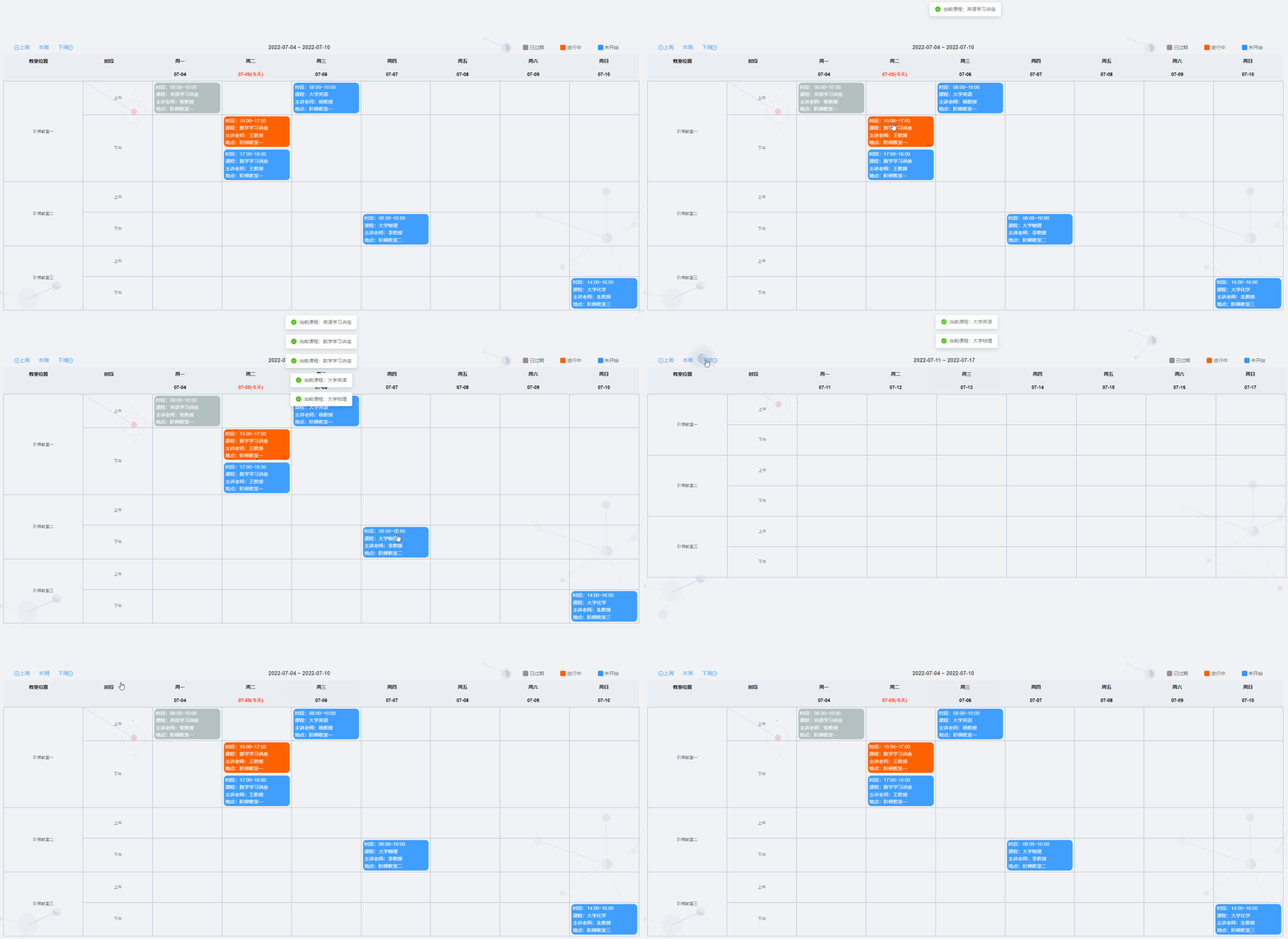
以上是该日历展示的效果。
由于最近比较忙,之前说放出来源码的,一直没有时间去发出来,今天抽时间把代码给发出来,大家可以作为参考,没有封装成组件,带demo数据,大家可以自行封装使用
HTML标签方面
首先要把页面的表头通过div给画出来
1、周导航栏标题
主要为周菜单导航,上周、本周、下周的导航,中间为周的起止时间,右边为状态信息展示,具体代码如下所示:
<div class="week-top">
            <div class="btn_wrap">
                <a-tooltip class="item" effect="dark" content="上周" placement="top">
                    <span @click="getLastWeek"><a-icon type="left-circle" />上周</span>
                </a-tooltip>
                <span @click="getCurWeek">本周</span>
                <a-tooltip class="item" effect="dark" content="下周" placement="top">
                    <span @click="getNextWeek">下周<a-icon type="right-circle" /></span>
                </a-tooltip>
            </div>
            <span class="todayDate"> {{ todayDate }}</span>
            <div class="chooseMonth">
                <div>
                    <span class="is_expired square"></span>
                    <span class="title">已过期</span>
                </div>
                <div>
                    <span class="in_progress square"></span>
                    <span class="title">进行中</span>
                </div>
                <div>
                    <span class="has_not_started square"></span>
                    <span class="title">未开始</span>
                </div>
            </div>
        </div>
2、日历header
显示周一,周二... 以及对应的时间,根据获取到当前的周的日期for循环展示
<div class="table_header">
                <div class="table_week">
                    <template v-for="(item,index) of weeks">
            <span class="first" v-if="index===0" :key="index">{{ item }}<i
                    class="el-icon-edit"></i></span>
                        <span class="first" v-else-if="index===1" :key="index">{{ item }}<i
                                class="el-icon-edit"></i></span>
                        <span v-else :key="index">{{ item }}</span>
                    </template>
                </div>
                <div class="table_date">
                    <template v-for="(item,index) of months">
            <span class="first" v-if="index===0" :key="index">
            </span>
                        <span class="first" v-else-if="index===1" :key="index">
            </span>
                        <span v-else :key="index">
              <span class="day_item" :class="{'isCurDate':item&&item.isCurDate}">
                {{ `${item && item.isCurDate ? item && item.showDate + '(今天)' || '' : item && item.showDate || ''}` }}
              </span>
            </span>
                    </template>
                </div>
            </div>
3、展示每天对应的课程
表格的横坐标显示时间,纵坐标显示是对应的教室,根据教室和时间安排生成对应的列表数据
 <div class="timePeriodList">
                <ul class="timePeriod_row">
                    <li class="timePeriod_col" v-for="(item,p_index) in locations"
                        :key="`period${p_index}`">
                        <div class="timePeriod"> {{ item.name }}</div>
                        <div class="row_day">
                            <div class="row_split" v-for="ts_item in timeSplits">
                                <div class="things"><span>{{ ts_item }}</span></div>
                                <template v-for="(month,m_index) of months">
                                    <!-- v-if="month" 去除数据处理的时候移除数组第一个为empty的问题-->
                                    <div v-if="month" :key="`month${m_index}`" class="things">
                                        <!-- 循环每个时间段的计划-->
                                        <template v-for="(thing,t_index) of records">
                                            <!-- 根据日期和计划的日期匹配 显示 然后根据状态显示进行中 已过期 未开始-->
                                            <div v-if="thing.locationId==item.id&&thing.date===month.date&&thing.time==ts_item"
                                                 :key="`thing${t_index}`"
                                                 class="thing_item"
                                                 @click="handleDetail(thing)"
                                                 :class="{'outdated':compareTime(thing)===1,'waiting':compareTime(thing)===3}">
                                                <span>时段:{{ thing.timeStart+'~'+thing.timeEnd }}</span>
                                                <span>课程:{{ thing.course }}</span>
                                                <span>主讲老师:{{ thing.teacher }}</span>
                                                <span>地点:{{ thing.place }}</span>
                                            </div>
                                        </template>

                                    </div>

                                </template>
                            </div>
                        </div>
                    </li>
                </ul>
            </div>
整体可成的列表html的代码如下所示:
<div class="week_table">
            <div class="table_header">
                <div class="table_week">
                    <template v-for="(item,index) of weeks">
            <span class="first" v-if="index===0" :key="index">{{ item }}<i
                    class="el-icon-edit"></i></span>
                        <span class="first" v-else-if="index===1" :key="index">{{ item }}<i
                                class="el-icon-edit"></i></span>
                        <span v-else :key="index">{{ item }}</span>
                    </template>
                </div>
                <div class="table_date">
                    <template v-for="(item,index) of months">
            <span class="first" v-if="index===0" :key="index">
            </span>
                        <span class="first" v-else-if="index===1" :key="index">
            </span>
                        <span v-else :key="index">
              <span class="day_item" :class="{'isCurDate':item&&item.isCurDate}">
                {{ `${item && item.isCurDate ? item && item.showDate + '(今天)' || '' : item && item.showDate || ''}` }}
              </span>
            </span>
                    </template>
                </div>
            </div>
            <div class="timePeriodList">
                <ul class="timePeriod_row">
                    <li class="timePeriod_col" v-for="(item,p_index) in locations"
                        :key="`period${p_index}`">
                        <div class="timePeriod"> {{ item.name }}</div>
                        <div class="row_day">
                            <div class="row_split" v-for="ts_item in timeSplits">
                                <div class="things"><span>{{ ts_item }}</span></div>
                                <template v-for="(month,m_index) of months">
                                    <!-- v-if="month" 去除数据处理的时候移除数组第一个为empty的问题-->
                                    <div v-if="month" :key="`month${m_index}`" class="things">
                                        <!-- 循环每个时间段的计划-->
                                        <template v-for="(thing,t_index) of records">
                                            <!-- 根据日期和计划的日期匹配 显示 然后根据状态显示进行中 已过期 未开始-->
                                            <div v-if="thing.locationId==item.id&&thing.date===month.date&&thing.time==ts_item"
                                                 :key="`thing${t_index}`"
                                                 class="thing_item"
                                                 @click="handleDetail(thing)"
                                                 :class="{'outdated':compareTime(thing)===1,'waiting':compareTime(thing)===3}">
                                                <span>时段:{{ thing.timeStart+'~'+thing.timeEnd }}</span>
                                                <span>课程:{{ thing.course }}</span>
                                                <span>主讲老师:{{ thing.teacher }}</span>
                                                <span>地点:{{ thing.place }}</span>
                                            </div>
                                        </template>

                                    </div>

                                </template>
                            </div>
                        </div>
                    </li>
                </ul>
            </div>
        </div>
示例数据
由于是一个演示demo,需要准备一下基本数据,用来展示当前功能,以下为当前demo使用的演示数据:
 weeks: [
                    '教室位置','时段', '周一', '周二', '周三', '周四', '周五', '周六', '周日',
                ],
                timeSplits:[
                    "上午",
                    "下午"
                ],
                locations:[
                    {
                        id:"001",
                        name:"阶梯教室一",
                    },
                    {
                        id:"002",
                        name:"阶梯教室二",
                    },
                    {
                        id:"003",
                        name:"阶梯教室三",
                    },
                ],
                records:[
                    {
                        locationId:"001",
                        time:"下午",
                        timeStart:'15:00',
                        timeEnd: '17:00',
                        date: this.getDate(),
                        course: '数学学习讲座',
                        teacher: '王教授',
                        place: '阶梯教室一',
                        status: 2,
                    },
                    {
                        locationId:"001",
                        time:"上午",
                        timeStart:'08:00',
                        timeEnd: '10:00',
                        date: this.getDate(-1),
                        course: '英语学习讲座',
                        teacher: '张教授',
                        place: '阶梯教室一',
                        status: 1,
                    },
                    {
                        locationId:"001",
                        time:"上午",
                        timeStart:'08:00',
                        timeEnd: '10:00',
                        date: this.getDate(1),
                        course: '大学英语',
                        teacher: '杨教授',
                        place: '阶梯教室一',
                        status: 1,
                    },
                    {
                        locationId:"002",
                        time:"下午",
                        timeStart:'08:00',
                        timeEnd: '10:00',
                        date: this.getDate(2),
                        course: '大学物理',
                        teacher: '李教授',
                        place: '阶梯教室二',
                        status: 2,
                    },
                    {
                        locationId:"003",
                        time:"下午",
                        timeStart:'14:00',
                        timeEnd: '16:00',
                        date: this.getDate(5),
                        course: '大学化学',
                        teacher: '朱教授',
                        place: '阶梯教室三',
                        status: 1,
                    },
                ],
JS代码方面
1、生成周时间
根据当前时间生成当前的周得开始时间和结束时间,代码如下:
/**
             * 获取 时间
             * @param time
             */
            getWeek(time) {
                const week = time.getDay() - 1;
                time = this.addDate(time, week * -1);
                this.curDate = new Date(time);
                for (let i = 0; i < 7; i++) {
                    const {year, month, day} = this.formatDate(i === 0 ? time : this.addDate(time, 1))
                    this.months.push({
                        date: `${year}-${month}-${day}`,
                        showDate: `${month}-${day}`
                    })
                }
                delete this.months[0];
                delete this.months[1];
                this.todayDate = `${this.months[2].date} ~ ${this.months[this.months.length - 1].date}`
            },
2、 比较时间
根据当前生成的时间和课表安排的数据进行时间对比,分析当前课程的状态,已过期,进行中,已完成的三个状态
compareTime(obj){
                let momentA = this.$moment(obj.date+" "+obj.timeStart,"YYYY-MM-DD HH:mm");
                let momentB = this.$moment(obj.date+" "+obj.timeEnd,"YYYY-MM-DD HH:mm");
                let momentC=this.$moment();
                if (momentC < momentA) return 3;
                else if (momentC > momentB) return 1;
                else return 2;
            },
3、其他附助方法
其他方法包含格式化时间格式,按钮的点击时间,列表的点击事件,使得该程序可以正常的交互操作,形成一个完成的demo展示
            /**
             * 处理日期
             * @param date
             * @param n
             * @returns {*}
             */
            addDate(date, n) {
                date.setDate(date.getDate() + n);
                return date;
            },
            // 日期格式处理
            formatDate(date) {
                var year = date.getFullYear();
                var months = date.getMonth() + 1;
                var month = (months < 10 ? '0' + months : months).toString();
                var day = (date.getDate() < 10 ? '0' + date.getDate() : date.getDate()).toString();
                return {
                    year,
                    month,
                    day
                }
            },
            /**
             * 上周
             */
            getLastWeek() {
                this.dealDate(this.addDate(this.curDate, -7));
            },
            /**
             * 本周
             */
            getCurWeek() {
                this.dealDate(new Date())
            },
            /**
             * 下周
             */
            getNextWeek() {
                this.dealDate(this.addDate(this.curDate, 7));
            },
            /**
             * 显示当天日期状态
             * @param date
             */
            dealDate(date) {
                this.months = ['','']
                this.getWeek(date);
                const curDate = this.getDate()
                this.months.forEach(item => {
                    item.isCurDate = item.date === curDate
                })
            },
            /**
             * 点击查看详情
             * @param row
             */
            handleDetail(row) {
                this.$message.success("当前课程:"+row.course);
            }
整体的代码结构就这样,没有什么特殊的东西,大部分就是页面UI展示,div+css的组合。
所有代码如下:
<template>
  <div class="course-week">
    <div class="week-top">
      <div class="btn_wrap">
        <a-tooltip class="item" effect="dark" content="上周" placement="top">
          <span @click="getLastWeek"><a-icon type="left-circle" />上周</span>
        </a-tooltip>
        <span @click="getCurWeek">本周</span>
        <a-tooltip class="item" effect="dark" content="下周" placement="top">
          <span @click="getNextWeek">下周<a-icon type="right-circle" /></span>
        </a-tooltip>
      </div>
      <span class="todayDate"> {{ todayDate }}</span>
      <div class="chooseMonth">
        <div>
          <span class="is_expired square"></span>
          <span class="title">已过期</span>
        </div>
        <div>
          <span class="in_progress square"></span>
          <span class="title">进行中</span>
        </div>
        <div>
          <span class="has_not_started square"></span>
          <span class="title">未开始</span>
        </div>
      </div>
    </div>
    <div class="week_table">
      <div class="table_header">
        <div class="table_week">
          <template v-for="(item,index) of weeks">
            <span class="first" v-if="index===0" :key="index">{{ item }}<i
                class="el-icon-edit"></i></span>
            <span class="first" v-else-if="index===1" :key="index">{{ item }}<i
                class="el-icon-edit"></i></span>
            <span v-else :key="index">{{ item }}</span>
          </template>
        </div>
        <div class="table_date">
          <template v-for="(item,index) of months">
            <span class="first" v-if="index===0" :key="index">
            </span>
            <span class="first" v-else-if="index===1" :key="index">
            </span>
            <span v-else :key="index">
              <span class="day_item" :class="{'isCurDate':item&&item.isCurDate}">
                {{ `${item && item.isCurDate ? item && item.showDate + '(今天)' || '' : item && item.showDate || ''}` }}
              </span>
            </span>
          </template>
        </div>
      </div>
      <div class="timePeriodList">
        <ul class="timePeriod_row">
            <li class="timePeriod_col" v-for="(item,p_index) in locations"
                :key="`period${p_index}`">
              <div class="timePeriod"> {{ item.name }}</div>
              <div class="row_day">
                <div class="row_split" v-for="ts_item in timeSplits">
                  <div class="things"><span>{{ ts_item }}</span></div>
                  <template v-for="(month,m_index) of months">
                    <!-- v-if="month" 去除数据处理的时候移除数组第一个为empty的问题-->
                    <div v-if="month" :key="`month${m_index}`" class="things">
                      <!-- 循环每个时间段的计划-->
                      <template v-for="(thing,t_index) of records">
                        <!-- 根据日期和计划的日期匹配 显示 然后根据状态显示进行中 已过期 未开始-->
                        <div v-if="thing.locationId==item.id&&thing.date===month.date&&thing.time==ts_item"
                             :key="`thing${t_index}`"
                             class="thing_item"
                             @click="handleDetail(thing)"
                             :class="{'outdated':compareTime(thing)===1,'waiting':compareTime(thing)===3}">
                          <span>时段:{{ thing.timeStart+'~'+thing.timeEnd }}</span>
                          <span>课程:{{ thing.course }}</span>
                          <span>主讲老师:{{ thing.teacher }}</span>
                          <span>地点:{{ thing.place }}</span>
                        </div>
                      </template>

                    </div>

                  </template>
                </div>
              </div>
            </li>
        </ul>
      </div>
    </div>
  </div>
</template>

<script>
export default {
  name: "courseWeek",
  data() {
    return {
      weeks: [
        '教室位置','时段', '周一', '周二', '周三', '周四', '周五', '周六', '周日',
      ],
      timeSplits:[
          "上午",
          "下午"
      ],
      locations:[
        {
          id:"001",
          name:"阶梯教室一",
        },
        {
          id:"002",
          name:"阶梯教室二",
        },
        {
          id:"003",
          name:"阶梯教室三",
        },
      ],
      records:[
        {
          locationId:"001",
          time:"下午",
          timeStart:'15:00',
          timeEnd: '17:00',
          date: this.getDate(),
          course: '数学学习讲座',
          teacher: '王教授',
          place: '阶梯教室一',
          status: 2,
        },
        {
          locationId:"001",
          time:"上午",
          timeStart:'08:00',
          timeEnd: '10:00',
          date: this.getDate(-1),
          course: '英语学习讲座',
          teacher: '张教授',
          place: '阶梯教室一',
          status: 1,
        },
        {
          locationId:"001",
          time:"上午",
          timeStart:'08:00',
          timeEnd: '10:00',
          date: this.getDate(1),
          course: '大学英语',
          teacher: '杨教授',
          place: '阶梯教室一',
          status: 1,
        },
        {
          locationId:"002",
          time:"下午",
          timeStart:'08:00',
          timeEnd: '10:00',
          date: this.getDate(2),
          course: '大学物理',
          teacher: '李教授',
          place: '阶梯教室二',
          status: 2,
        },
        {
          locationId:"003",
          time:"下午",
          timeStart:'14:00',
          timeEnd: '16:00',
          date: this.getDate(5),
          course: '大学化学',
          teacher: '朱教授',
          place: '阶梯教室三',
          status: 1,
        },
      ],
      todayDate: '',
      months: [],
    }
  },
  mounted() {
    this.getCurWeek()
  },
  methods: {
    compareTime(obj){
      let momentA = this.$moment(obj.date+" "+obj.timeStart,"YYYY-MM-DD HH:mm");
      let momentB = this.$moment(obj.date+" "+obj.timeEnd,"YYYY-MM-DD HH:mm");
      let momentC=this.$moment();
      if (momentC < momentA) return 3;
      else if (momentC > momentB) return 1;
      else return 2;
    },
    getDate(t=0){
      return this.$moment().add(t,'d').format("YYYY-MM-DD");
    },
    /**
     * 获取 时间
     * @param time
     */
    getWeek(time) {
      const week = time.getDay() - 1;
      time = this.addDate(time, week * -1);
      this.curDate = new Date(time);
      for (let i = 0; i < 7; i++) {
        const {year, month, day} = this.formatDate(i === 0 ? time : this.addDate(time, 1))
        this.months.push({
          date: `${year}-${month}-${day}`,
          showDate: `${month}-${day}`
        })
      }
      delete this.months[0];
      delete this.months[1];
      this.todayDate = `${this.months[2].date} ~ ${this.months[this.months.length - 1].date}`
    },
    /**
     * 处理日期
     * @param date
     * @param n
     * @returns {*}
     */
    addDate(date, n) {
      date.setDate(date.getDate() + n);
      return date;
    },
    // 日期格式处理
    formatDate(date) {
      var year = date.getFullYear();
      var months = date.getMonth() + 1;
      var month = (months < 10 ? '0' + months : months).toString();
      var day = (date.getDate() < 10 ? '0' + date.getDate() : date.getDate()).toString();
      return {
        year,
        month,
        day
      }
    },
    /**
     * 上周
     */
    getLastWeek() {
      this.dealDate(this.addDate(this.curDate, -7));
    },
    /**
     * 本周
     */
    getCurWeek() {
      this.dealDate(new Date())
    },
    /**
     * 下周
     */
    getNextWeek() {
      this.dealDate(this.addDate(this.curDate, 7));
    },
    /**
     * 显示当天日期状态
     * @param date
     */
    dealDate(date) {
      this.months = ['','']
      this.getWeek(date);
      const curDate = this.getDate()
      this.months.forEach(item => {
        item.isCurDate = item.date === curDate
      })
    },
    /**
     * 点击查看详情
     * @param row
     */
    handleDetail(row) {
      this.$message.success("当前课程:"+row.course);
    }
  }
}
</script>

<style scoped lang="scss">
$borderCoder: #a4b0c2;
.course-week {
  width: 100%;
  padding: 1%;
  box-sizing: border-box;

  .week-top {
    display: flex;
    justify-content: space-between;
    align-items: center;
    width: 100%;
    height: 40px;
    padding: 0 1%;

    .btn_wrap {
      width: 200px;
      display: flex;
      justify-content: space-around;
      color: #409EFF;

      span {
        cursor: pointer;
        display: flex;
        justify-content: center;
        align-items: center;
        font-size: 15px;
      }

    }

    .todayDate {
      font-weight: bold;
      font-size: 16px;
    }

    .chooseMonth {
      display: flex;
      justify-content: flex-end;
      width: 18%;

      div {
        flex: 1;
        display: flex;
        padding: 0 2%;
        white-space: nowrap;
        line-height: 20px;
        box-sizing: border-box;

        .square {
          display: flex;
          width: 16px;
          height: 16px;
          border-radius: 4px;
          box-sizing: border-box;
        }

        .title {
          display: flex;
          align-items: center;
          line-height: 16px;
          margin-left: 4px;
          font-size: 14px;
        }

        .in_progress {
          background: #FF6200;
        }

        .has_not_started {
          background: #3291F8;
        }

        .is_expired {
          background: #8E8E93;
        }
      }
    }
  }

  .week_table {
    display: flex;
    flex-direction: column;

    .table_header {
      width: 100%;
      height: 80px;
      background: #EAEDF2;
      display: flex;
      flex-direction: column;
      align-items: center;
      border-bottom: 1px solid $borderCoder;
      box-sizing: border-box;

      .table_date, .table_week {
        width: 100%;
        height: 40px;
        text-align: left;
        display: flex;
        justify-content: center;
        align-items: center;

        span {
          flex: 1;
          color: #000;
          height: 100%;
          font-size: 14px;
          display: flex;
          justify-content: center;
          align-items: center;
          font-weight: bold;

          .day_item {
            color: #000;
            font-size: 14px;
            display: flex;
            justify-content: center;
            align-items: center;
          }
        }

        .first {
          cursor: pointer;

          i {
            margin-left: 1%;
            font-size: 16px;
            font-weight: bold;

          }

          &:hover {
            color: #0d9bf2;
          }

          //border-right: 1px solid $borderCoder;
        }
      }
    }

    .timePeriodList {
      width: 100%;

      .timePeriod_row {
        width: 100%;
        min-height: 60px;

        .timePeriod_col {
          width: 100%;
          min-height: 60px;
          display: flex;

          .timePeriod {
            width: 12.5%;
            display: flex;
            justify-content: center;
            align-items: center;
            border-left: 1px solid $borderCoder;
            border-bottom: 1px solid $borderCoder;
            box-sizing: border-box;
            flex-direction: column;
            justify-content:center;
            .timeItem{
              //height: 50%;
              width: 100%;
              display: table;
              &:first-child{
                border-bottom: 1px solid $borderCoder;
              }
              span{
                display: table-cell;
                text-align: center;
                vertical-align: middle;
              }
            }
          }

          .row_day {
            width: 87.5%;
            display: flex;
            justify-content: center;
            flex-direction: column;
            .row_split{
              //height: 50%;
              display: flex;
              flex-direction: row;
              justify-items: center;
            }

            .things {
              flex: 1;
              display: flex;
              flex-direction: column;
              border-left: 1px solid $borderCoder;
              border-bottom: 1px solid $borderCoder;
              box-sizing: border-box;
              align-items: center;
              justify-content: center;
              min-height: 90px;

              &:last-child {
                border-right: 1px solid $borderCoder;
              }

              .thing_item {
                display: flex;
                font-size: 14px;
                flex-direction: column;
                justify-content: space-around;
                color: #fff;
                background: #FF6200;
                min-height: 90px;
                border-radius: 10px;
                margin: 2% 1%;
                padding: 1% 2%;
                cursor: pointer;
                box-sizing: border-box;
                width: 95%;
              }

              .waiting {
                background: #409EFF;
              }

              .outdated {
                color: #fff;
                background: #9CADADB7;
              }
            }
          }
        }
      }
    }
  }
}

.isCurDate {
  color: #FF2525 !important;
}

ul, li {
  margin: 0;
  padding: 0;
}

.noMore {
  min-height: 200px;
  padding: 2%;
  display: flex;
  justify-content: center;
  align-items: center;
  border: 1px solid rgba(156, 173, 173, 0.3);
  color: #9CADADB7;
  box-sizing: border-box;
}
</style>
当然这仅仅是根据自己的需求展示的一个demo,也可以变换显示方式,做更多类似的课程表之类的,下次有时间可以给出其他的demo供大家参考,希望对你有帮助
如果其他前端问题或者合作,可以发邮件探讨:mxgsa@qq.com






 扫一扫
扫一扫


 816
816


 到【灌水乐园】发言



