



主要思想就是用多个table拼凑成一个table造成固定的假象,话不多说直接上代码
以下代码主要是控制表格样式
<style>
    table {
        width: 100%;
        border: 1px solid black;
        border-collapse: collapse;
    }
    tbody tr:nth-child(even) {
        background-color: #ccc;
    }
    tr {
        height: 30px;
    }
</style>
以下代码是重点啦,一个表格只有thead,另一个表格只有tbody
<body>
    <!-- 容器 -->
    <div>
        <!-- 放置表头 -->
        <div>
            <table>
                <thead>
                    <tr>
                        <th>1</th>
                        <th>2</th>
                        <th>3</th>
                        <th>4</th>
                        <th>5</th>
                        <th>6</th>
                    </tr>
                </thead>
            </table>
        </div>
        <!-- 放置表体 -->
        <div style="height: 200px; overflow-y: scroll;">
            <table>
                <tbody id="tbody">
                </tbody>
            </table>
        </div>
    </div>
</body>
下面是创建tbody的tr和td,可忽略不看
<script>
     function createEle(){
         var tbody = document.getElementById("tbody");
         for(var i=0; i<50; i++){
             var tr = document.createElement("tr");
             for(var j=0; j<6; j++){
                 var td = document.createElement("td");
                 tr.appendChild(td);
             }
             tbody.appendChild(tr);
         }
     }
     createEle();
 </script>
实现效果图如下

如果你想简单实现固定表头,以上代码已经可以做到啦,但是以上的表格宽度是100%,我们在项目中嵌入表格时一般不能做到宽度100%,而且可能涉及到首列也固定的问题,下面的代码实现
- 表格宽度自定(非100%)
- 浏览器滚动条滚动时表格整体滚动
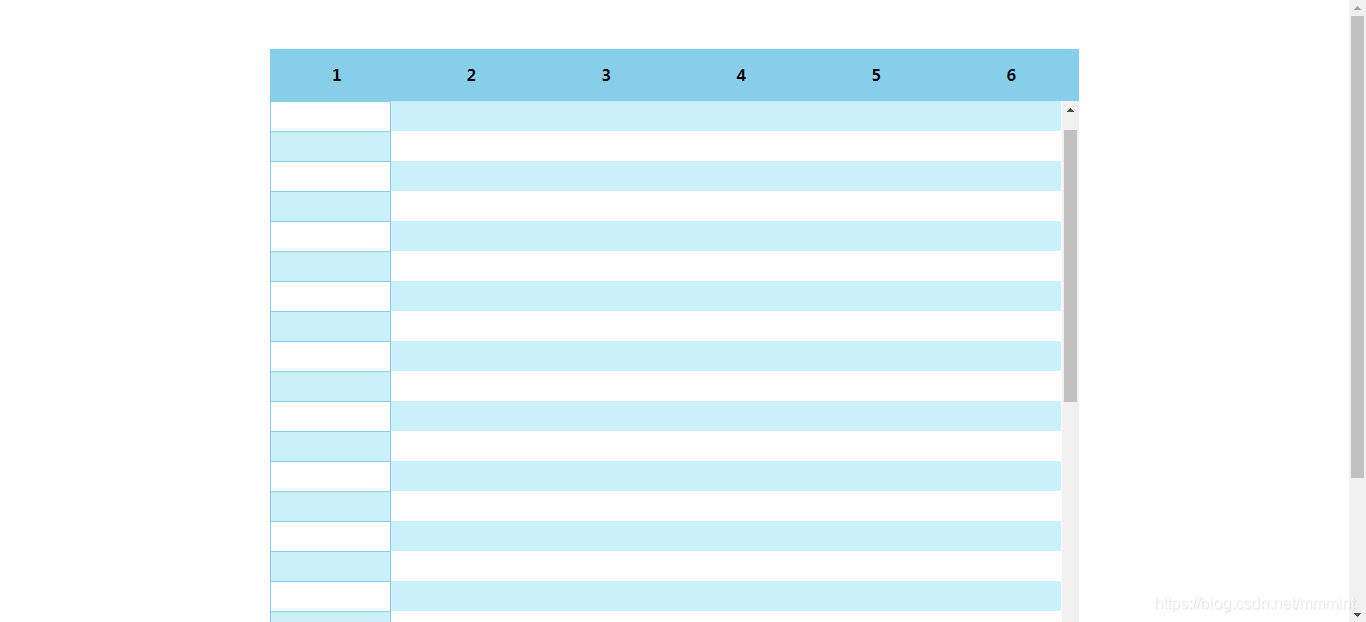
- 表格滚动条滚动时表头固定,首列固定,其他行滚动
依旧直接上代码
样式代码
<style>
	 body {
	     margin: 0;
	     padding: 0;
	 }
	 .container {
	     width: 60%;
	     height: 700px;
	     margin: 50px auto;
	     overflow: hidden;
	 }
	 thead {
	     width: 100%;
	     line-height: 50px;
	     background-color: skyblue;
	 }
	 table {
	     width: 100%;
	     border-collapse: collapse;
	 }
	 tbody tr:nth-child(even) {
	     background-color: rgb(202, 240, 252);
	 }
	 tr {
	     height: 30px;
	 }
	 .tbody1 {
	     width: 15%;
	     float: left;
	 }
	 .tbody2 {
	     width: 85%;
	     float: left;
	 }
</style>
重点又来啦,主要是tbody部分(两个tbody拼在一起)
<body>
    <!-- 容器 -->
    <div class="container">
        <!-- 放置表头 -->
        <table>
            <thead>
                <tr>
                    <th>1</th>
                    <th>2</th>
                    <th>3</th>
                    <th>4</th>
                    <th>5</th>
                    <th>6</th>
                </tr>
            </thead>
        </table>
        <!-- 放置表体 -->
        <div class="tbody1">
            <table>
                <tbody id="tbody1">
                </tbody>
            </table>
        </div>
        <div style="height: 650px; overflow-y: auto;" class="tbody2">
            <table>
                <tbody id="tbody2">
                </tbody>
            </table>
        </div>
    </div>
</body>
接下来是循环创建元素,可忽略不看
<script>
     function createEle(){
         var tbody1 = document.getElementById("tbody1");
         var tbody2 = document.getElementById("tbody2");
         for(var k=1; k<25; k++) {
             var tr1 = document.createElement("tr");
             var td1 = document.createElement("td");
             td1.style.border = "1px solid skyblue";
             tr1.appendChild(td1);
             tbody1.appendChild(tr1);
         }
         for(var i=1; i<50; i++){
             var tr2 = document.createElement("tr");
             for(var j=0; j<5; j++){
                 var td2 = document.createElement("td");
                 tr2.appendChild(td2);
             }
             tbody2.appendChild(tr2);
         }
     }
     createEle();
 </script>
实现效果图如下





 扫一扫
扫一扫


 1348
1348

 被折叠的 条评论
为什么被折叠?
被折叠的 条评论
为什么被折叠?
 到【灌水乐园】发言





