






 本文详细介绍了在PyCharm中使用TensorFlow遇到的模块加载错误,包括numpy版本冲突和CUDA动态库加载失败的问题,并提供了修改pip源、重新安装numpy及配置环境变量的解决方案。
从anaconda安装tensorflow2.0后,经notebook测试,工作正常。于是安装了pycharm,但是报错不能加载模块,原来是numpy版本的问题,于是安装网上的介绍修改
1.先改pip的源
使用win+R调出运行,输入”%appdata%”,回车,然后新建pip文件夹,再新建pip.ini文件,输入内容
[global]
index-url=https://pypi.tuna.tsinghua.edu.cn/simple
[install]
trusted-host=pypi.tuna.tsinghua.edu.cn
disable-pip-version-check = true
timeout = 6000
2.然后重新安装numpy
pip uninstall numpy
然后再
pip install numpy
3.再次运行依然报错 Could not load dynamic library 'cudart64_100.dll',这个是环境变量没配置好
配置环境变量
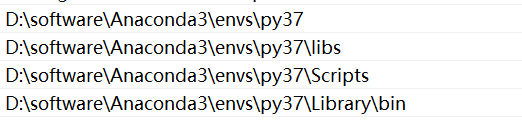
4.重启pycharm,再次运行,成功。






 扫一扫
扫一扫


 3007
3007

 被折叠的 条评论
为什么被折叠?
被折叠的 条评论
为什么被折叠?
 到【灌水乐园】发言





