
<center>JavaScript淘宝登录界面</center>

博客主要介绍了使用JavaScript实现淘宝界面。JavaScript作为前端开发的重要语言,在界面交互等方面发挥着关键作用,通过它能构建出具有一定功能和交互性的淘宝界面。
<!DOCTYPE html>
	<html>
		<head>
			<meta charset="utf-8" />
			<meta http-equiv="X-UA-Compatible" content="IE=edge">
			<title>淘宝用户注册</title>
			<meta name="viewport" content="width=device-width, initial-scale=1">
		<style type="text/css">
			form{
				width: 600px;margin: 100px auto;
			}
			input{
				width: 160px;height: 28px;line-height: 28px;
			}
			.title{
				display: inline-block;width: 80px;text-align: right;
			}
			p{
				font-size: 12px;color: gray;
				width: 300px;float: right;
				line-height: 28px;vertical-align: top;
				margin: 2px 30px 0 0;
			}
			#count{
				   padding-left: 90px;
				   font-size: 12px;
				   color: gray;line-height: 28px;
			}
			em{
				display: inline-block;
				width: 54px;height: 20px;
				background-color: rgb(255, 204, 157);
				margin-right: 2px;
				font-size: 12px;
				font-style: normal;
				text-align: center;
				height: 14px;
				line-height: 14px;
				color: white;
			}
			.active{
				background-color: rgb(255, 95, 2);
			}
			#tips{
				padding-left: 82px;
			}
			img{
				height: 30px;
				vertical-align: middle;
			}
			.checkimg{
				width: 100px;
			}
			#submitBtn{
				border: 1px solid rgb(255, 95, 2);
				width: 166px;
				height: 30px;
				background-color: rgb(255, 95, 2);
				color: white;
				margin-left: 80px;
			}
			.margin{
				margin-top: 20px;
			}
		</style>
			<script type="text/javascript">
				 function getLength(str){  
				 	// \x00-xff代表单字节字符。  
				 	return str.replace(/[^\x00-\xff]/g, "xx").length;
				 } 
				 function findStr(str, n){  
				 	var tmp = 0;  
				 	for (var i = 0; i < str.length; i++){    
				 		if(str.charAt(i)==n){      
				 			tmp++;    
				 		}  
				 	}  
				 	return tmp;
				 }
				 window.onload=function(){  
				 	var aInput = document.getElementsByTagName('input');  
				 	var oName = aInput[0];  
				 	var pwd = aInput[1];  
				 	var pwd2 = aInput[2];  
				 	var aP = document.getElementsByTagName('p');  
				 	var name_msg = aP[0];  
				 	var pwd_msg = aP[1];  
				 	var pwd2_msg = aP[2];  
				 	var count = document.getElementById('count');  
				 	var aEm = document.getElementsByTagName('em');  
				 	var name_length = 0; //会员名   
				 	oName.onfocus = function(){    
				 		name_msg.style.display = "inline";    
				 		name_msg.innerHTML = "<i class=‘ati’></i>5-25个字符,一个汉字为两个字符,推荐使用中文会员名。";  
				 	}   
				 	oName.onkeyup = function(){    
				 		count.style.visibility = "visible";    
				 		name_length = getLength(this.value);    
				 		count.innerHTML = name_length + "个字符";  
				 		
				 		if(name_length==0){      
				 			count.style.visibility = "hidden";    
				 		}  
				 	}   
				 	oName.onblur = function(){    
				 		//含有非法字符                
				 		var reg = /[^\w\u4e00-\u9fa5]/g;    
				 		// \w代表“数字、字母(不分大小写)、下划线”,\u4e00-\u9fa5代表汉字。      
				 		if(reg.test(this.value)){      
				 			name_msg.innerHTML = '<i class="err"></i>含有非法字符!';    
				 	}     
				 	//不能为空    
				 	else if (this.value==""){      
				 		name_msg.innerHTML = "<i class='err'></i>不能为空!";    
				 	}     
				 	//长度超过25个字符    
				 	else if (name_length > 25){      
				 		name_msg.innerHTML = "<i class='err'></i>长度超过25个字符!";    
				 	}     
				 	//长度少于6个字符    
				 	else if (name_length < 6){      
				 		name_msg.innerHTML = "<i class='err'></i>长度少于6个字符!";    
				 	}     
				 	//OK    
				 	else {      
				 		name_msg.innerHTML = "<i class='err'></i>OK!";      
				 		count.style.visibility = "hidden";    
				 	}  
				 	} 
				 	//密码   
				 	pwd.onfocus = function(){    
				 		pwd_msg.style.display = "inline";    
				 		pwd_msg.innerHTML = '<i class="ati"></i>6-16个字符,请使用字母加数字或符号的组合密码,不能单独使用字母、数字或符号。' 
				 	}   
				 	pwd.onkeyup = function(){    
				 		//大于5字符为“中”    
				 		if(this.value.length>5){      
				 			aEm[1].className = "active";      
				 			pwd2.removeAttribute("disabled");      
				 			pwd2_msg.style.display = "inline";    
				 		}else{      
				 			aEm[1].className = "";      
				 			pwd2.setAttribute("disabled");      
				 			pwd2_msg.style.display = "none";          
				 		}     
				 		//大于10字符为“强”    
				 		if(this.value.length>10){      
				 			aEm[2].className = "active";    
				 		}else{      
				 			aEm[2].className = "";    
				 		} 
				 	}   
				 	pwd.onblur = function(){    
				 		var m = findStr(pwd.value, pwd.value[0]);     
				 		var reg_n = /[^\d]/g;    
				 		var reg_c = /[^a-zA-Z]/g;     
				 		//不能为空    
				 		if(this.value==""){      
				 			pwd_msg.innerHTML = '<i class="err"></i>不能为空!';    
				 		} 
				 		//不能用相同字符    
				 		else if(m == this.value.length){      
				 			pwd_msg.innerHTML = '<i class="err"></i>不能用相同字符!';    
				 		}    
				 		//长度应为6-16个字符    
				 		else if(this.value.length < 6 || this.value.length > 16){ 
				 			pwd_msg.innerHTML = '<i class="err"></i>长度应为6-16个字符!';   
				 		}  
				 		//不能全为数字    
				 		else if(!reg_n.test(this.value)){
				 			pwd_msg.innerHTML = '<i class="err"></i>不能全为数字!';   
				 		}  
				 		//不能全为字母   
				 		else if(!reg_c.test(this.value)){
				 			pwd_msg.innerHTML = '<i class="err"></i>不能全为字母!';   
				 		}  
				 		//OK    
				 		else{      
				 			pwd_msg.innerHTML = '<i class="ok"></i>OK!';
				 		}  
				 	} 
				 	//确认密码   
				 	pwd2.onblur = function(){    
				 		if(this.value != pwd.value){ 
				 			pwd2_msg.innerHTML = '<i class="err"></i>两次输入的密码不一致!';   
				 		}else{      
				 			pwd2_msg.innerHTML = '<i class="ok"></i>OK!';    
				 		} 
				 	}
				 	}
			</script>

		</head>
		<body>
			<form action="">
				<div>
					<label for=""><span class="title">会员名:</span>
					<input type="text" class="text"></label>
					<p class="msg"><i class="ati"></i>5-25个字符,1个汉字为两个字符,推荐使用中文会员名</p>
				</div>
				<div>
					<label for=""><span></span><b id="count">0个字符</b></label>
				</div>
				<div>
					<label for=""><span class="title">登录密码:</span>
						<input type="password" class="text"></label>
						<p class="msg"><i class="err"></i></p>
				</div>
				<div id="tips">
					<label for=""><span></span>
						<em class="active">弱</em><em>中</em><em>强</em></label>
				</div>
				<div class="margin">
					<label for=""><span class="title">确认密码:</span>
						<input type="password" class="text" disabled="">
					</label>
					<p class="msg"><i class="ati"></i>请再输入一次</p>
				</div>
				<div class="margin">
					<label for=""><span class="title">验证码:</span>
						<input type="text" class="text checkimg"></label>
						<img src="../表单验证/images/1.png">
						<a href="javascript:;"class="changeImg" title="重新获取验证码"></a>
				</div>
				<div class="margin">
					<input type="submit" id="submitBtn" class="submitBtn btn" value="同意协议并注册">
				</div>
			</form>
		</body>
	</html>
	````
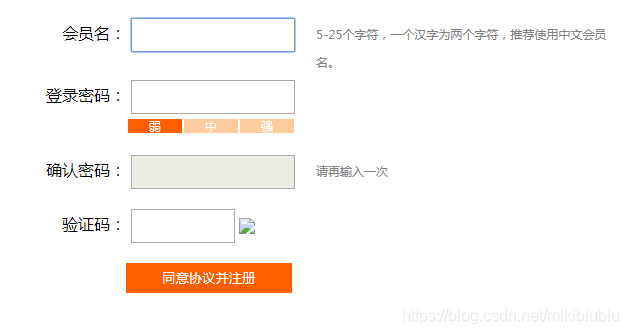
![在这里插入图片描述](https://img-blog.csdnimg.cn/20190715191256891.png?x-oss-process=image/watermark,type_ZmFuZ3poZW5naGVpdGk,shadow_10,text_aHR0cHM6Ly9ibG9nLmNzZG4ubmV0L21pa2liaXViaXU=,size_16,color_FFFFFF,t_70)
<!DOCTYPE html> <html lang="zh"> <head> <meta charset="UTF-8" /> <meta name="viewport" content="width=device-width, initial-scale=1.0"/> <title>会计信息管理系统</title> <style> body { font-family: "Microsoft YaHei", sans-serif; background-color: #f4f6f9; margin: 0; padding: 0; color: #333; } header { background-color: #2c3e50; color: white; padding: 20px; text-align: center; } nav { background-color: #34495e; overflow: hidden; } nav a { float: left; display: block; color: white; text-align: center; padding: 14px 20px; text-decoration: none; } nav a:hover { background-color: #ddd; color: black; } .container { max-width: 1200px; margin: 20px auto; padding: 20px; background-color: white; border-radius: 8px; box-shadow: 0 0 10px rgba(0,0,0,0.1); } /* 卡片样式 */ .card-container { display: flex; flex-wrap: wrap; gap: 20px; margin-bottom: 30px; } .card { flex: 1; min-width: 250px; border: 1px solid #ddd; border-radius: 8px; padding: 20px; background-color: #f8f9fa; box-shadow: 0 2px 5px rgba(0,0,0,0.05); transition: transform 0.3s ease; } .card:hover { transform: translateY(-5px); box-shadow: 0 5px 15px rgba(0,0,0,0.1); } .card h3 { color: #2c3e50; margin-top: 0; } .card p { color: #666; line-height: 1.6; } table { width: 100%; border-collapse: collapse; margin-top: 20px; } table, th, td { border: 1px solid #ccc; } th, td { padding: 12px; text-align: center; } th { background-color: #ecf0f1; } .form-group { margin-bottom: 15px; } .form-group label { display: block; margin-bottom: 5px; font-weight: bold; } .form-group input, .form-group select { width: 100%; padding: 8px; border: 1px solid #ccc; border-radius: 4px; } button { background-color: #27ae60; color: white; padding: 10px 15px; border: none; border-radius: 4px; cursor: pointer; } button:hover { background-color: #219a52; } .btn-group { margin: 20px 0; } .btn { display: inline-block; padding: 10px 18px; background-color: #3498db; color: white; text-decoration: none; border-radius: 4px; margin-right: 10px; font-size: 14px; } .btn:hover { background-color: #2980b9; } .chart-container { margin-top: 30px; text-align: center; } footer { text-align: center; padding: 20px; background-color: #2c3e50; color: white; margin-top: 40px; } /* 隐藏非当前页面 */ .container > section { display: none; } </style> </head> <body> <header> <h1>会计信息网络化管理系统</h1> <p>实时财务数据 · 安全高效 · 多端同步</p> </header> <nav> <a href="#home">首页</a> <a href="#balance-sheet">资产负债表</a> <a href="#income-statement">利润表</a> <a href="#entry">凭证录入</a> <a href="#charts">数据可视化</a> </nav> <div class="container"> <!-- ============ 首页内容 ============ --> <section id="home"> <h2>欢迎使用会计信息管理系统</h2> <p>本系统提供企业财务数据的在线录入、查询、分析与可视化功能,支持多用户权限管理和数据加密传输。</p> <!-- 功能卡片 --> <div class="card-container"> <div class="card"> <h3>📊 财务报表</h3> <p>一键生成资产负债表、利润表、现金流量表,支持导出为 Excel 或 PDF 格式。</p> </div> <div class="card"> <h3>📝 凭证管理</h3> <p>支持会计凭证的增删改查,自动校验借贷平衡,确保账务准确无误。</p> </div> <div class="card"> <h3>📈 数据可视化</h3> <p>通过图表直观展示收入、支出、利润趋势,辅助管理层决策。</p> </div> <div class="card"> <h3>🔐 权限控制</h3> <p>支持多角色登录(管理员、会计、出纳),不同角色拥有不同操作权限。</p> </div> </div> <!-- 快捷操作 --> <div class="btn-group"> <!-- 使用 JavaScript 强制跳转并显示 entry 表单 --> <a href="javascript:void(0)" onclick="goToSection('entry')" class="btn">➕ 录入新凭证</a> <a href="javascript:void(0)" onclick="goToSection('balance-sheet')" class="btn">📄 查看资产负债表</a> <a href="javascript:void(0)" onclick="goToSection('income-statement')" class="btn">📉 查看利润表</a> <a href="javascript:void(0)" onclick="goToSection('charts')" class="btn">📊 查看图表分析</a> </div> <!-- 最近凭证记录 --> <h3>近期凭证记录</h3> <table id="recentVouchers"> <thead> <tr> <th>编号</th> <th>日期</th> <th>摘要</th> <th>科目</th> <th>借方金额</th> <th>贷方金额</th> </tr> </thead> <tbody> <tr><td>PZ001</td><td>2025-04-01</td><td>销售商品收款</td><td>银行存款</td><td>50,000.00</td><td>-</td></tr> <tr><td>PZ002</td><td>2025-04-02</td><td>采购原材料</td><td>应付账款</td><td>-</td><td>30,000.00</td></tr> <tr><td>PZ003</td><td>2025-04-03</td><td>支付工资</td><td>银行存款</td><td>20,000.00</td><td>-</td></tr> <tr><td>PZ004</td><td>2025-04-04</td><td>收到投资款</td><td>实收资本</td><td>-</td><td>100,000.00</td></tr> </tbody> </table> </section> <!-- ============ 凭证录入 ============ --> <section id="entry"> <h3>会计凭证录入</h3> <form id="accountingForm"> <div class="form-group"> <label>凭证编号</label> <input type="text" id="voucherNo" required placeholder="如:PZ005" /> </div> <div class="form-group"> <label>日期</label> <input type="date" id="date" required /> </div> <div class="form-group"> <label>摘要</label> <input type="text" id="summary" placeholder="如:销售商品收入" required /> </div> <div class="form-group"> <label>科目</label> <select id="account" required> <option value="">--选择会计科目--</option> <option value="cash">库存现金</option> <option value="bank">银行存款</option> <option value="revenue">主营业务收入</option> <option value="payable">应付账款</option> <option value="receivable">应收账款</option> <option value="expense">管理费用</option> </select> </div> <div class="form-group"> <label>借方金额</label> <input type="number" id="debit" step="0.01" placeholder="请输入借方金额" /> </div> <div class="form-group"> <label>贷方金额</label> <input type="number" id="credit" step="0.01" placeholder="请输入贷方金额" /> </div> <button type="submit">保存凭证</button> </form> </section> <!-- ============ 资产负债表 ============ --> <section id="balance-sheet"> <h3>资产负债表(示例)</h3> <table> <thead> <tr> <th>项目</th> <th>期末余额(元)</th> <th>期初余额(元)</th> </tr> </thead> <tbody> <tr><td>货币资金</td><td>150,000.00</td><td>130,000.00</td></tr> <tr><td>应收账款</td><td>80,000.00</td><td>75,000.00</td></tr> <tr><td>存货</td><td>200,000.00</td><td>190,000.00</td></tr> <tr><td><strong>资产合计</strong></td><td><strong>430,000.00</strong></td><td><strong>395,000.00</strong></td></tr> <tr><td>应付账款</td><td>60,000.00</td><td>55,000.00</td></tr> <tr><td>应交税费</td><td>20,000.00</td><td>18,000.00</td></tr> <tr><td><strong>负债合计</strong></td><td><strong>80,000.00</strong></td><td><strong>73,000.00</strong></td></tr> <tr><td><strong>所有者权益</strong></td><td><strong>350,000.00</strong></td><td><strong>322,000.00</strong></td></tr> </tbody> </table> </section> <!-- ============ 利润表 ============ --> <section id="income-statement"> <h3>利润表(示例)</h3> <table> <thead> <tr> <th>项目</th> <th>本期金额(元)</th> <th>上期金额(元)</th> </tr> </thead> <tbody> <tr><td>一、营业收入</td><td>500,000.00</td><td>450,000.00</td></tr> <tr><td>减:营业成本</td><td>300,000.00</td><td>270,000.00</td></tr> <tr><td>税金及附加</td><td>20,000.00</td><td>18,000.00</td></tr> <tr><td>销售费用</td><td>30,000.00</td><td>28,000.00</td></tr> <tr><td>管理费用</td><td>40,000.00</td><td>38,000.00</td></tr> <tr><td><strong>二、营业利润</strong></td><td><strong>110,000.00</strong></td><td><strong>96,000.00</strong></td></tr> <tr><td>加:营业外收入</td><td>5,000.00</td><td>4,000.00</td></tr> <tr><td><strong>三、利润总额</strong></td><td><strong>115,000.00</strong></td><td><strong>100,000.00</strong></td></tr> <tr><td>减:所得税费用</td><td>28,750.00</td><td>25,000.00</td></tr> <tr><td><strong>四、净利润</strong></td><td><strong>86,250.00</strong></td><td><strong>75,000.00</strong></td></tr> </tbody> </table> </section> <!-- ============ 数据可视化 ============ --> <section id="charts" class="chart-container"> <h3>财务数据可视化</h3> <p>此处可集成 ECharts 或 Chart.js 实现柱状图、折线图等。</p> <img src="https://via.placeholder.com/600x300?text=收入+支出+趋势图" alt="图表占位图" style="max-width: 100%;" /> <p><small>提示:可添加月度收入对比图、利润变化趋势图等。</small></p> </section> </div> <footer> © 2025 会计信息网络化管理系统 | 技术支持:Web开发团队 </footer> <script> // 统一跳转函数:显示指定 section 并滚动到其位置 function goToSection(id) { // 隐藏所有 section document.querySelectorAll('.container > section').forEach(sec => { sec.style.display = 'none'; }); // 显示目标 section const target = document.getElementById(id); if (target) { target.style.display = 'block'; // 平滑滚动到该元素顶部 target.scrollIntoView({ behavior: 'smooth', block: 'start' }); } } // 通用导航绑定(也可用于顶部导航栏) document.querySelectorAll('nav a').forEach(link => { link.addEventListener('click', function(e) { e.preventDefault(); const targetId = this.getAttribute('href').substring(1); // 去掉 # goToSection(targetId); }); }); // 表单提交处理 document.getElementById('accountingForm').addEventListener('submit', function(e) { e.preventDefault(); const voucherNo = document.getElementById('voucherNo').value; const date = document.getElementById('date').value; const summary = document.getElementById('summary').value; const account = document.getElementById('account').value; const debitVal = parseFloat(document.getElementById('debit').value || 0).toFixed(2); const creditVal = parseFloat(document.getElementById('credit').value || 0).toFixed(2); // 校验借贷是否至少有一项大于0 if (parseFloat(debitVal) === 0 && parseFloat(creditVal) === 0) { alert("请填写借方或贷方金额!"); return; } alert(`凭证已保存!\n编号:${voucherNo}\n摘要:${summary}\n借方:${debitVal}元\n贷方:${creditVal}元`); // ===== 将新凭证添加到首页的“最近凭证记录”表格中 ===== const recentTableBody = document.querySelector('#recentVouchers tbody'); const newRow = document.createElement('tr'); // 获取科目文本 const accountText = document.querySelector(`#account option[value="${account}"]`).text; newRow.innerHTML = ` <td>${voucherNo}</td> <td>${date}</td> <td>${summary}</td> <td>${accountText}</td> <td>${debitVal !== "0.00" ? debitVal : "-"}</td> <td>${creditVal !== "0.00" ? creditVal : "-"}</td> `; recentTableBody.prepend(newRow); // 添加在最前面 // 清空表单 this.reset(); // 可选:返回首页或其他页面 // goToSection('home'); }); // 页面加载时默认显示首页 window.onload = () => { goToSection('home'); }; </script> </body> </html> 添加登录页面登录以后才能进会计信息网络化管理系统
最新发布
10-18
评论
添加红包

请填写红包祝福语或标题

红包个数最小为10个

红包金额最低5元

当前余额3.43前往充值 >
需支付:10.00
成就一亿技术人!
领取后你会自动成为博主和红包主的粉丝 规则
hope_wisdom
发出的红包
实付
使用余额支付
点击重新获取
扫码支付
钱包余额 0

抵扣说明:

1.余额是钱包充值的虚拟货币,按照1:1的比例进行支付金额的抵扣。
2.余额无法直接购买下载,可以购买VIP、付费专栏及课程。

余额充值



