

使用node-inspect调试NodeJS代码.md

本文详细介绍如何使用Node.js的内置调试工具进行代码调试。通过全局安装node-inspect并使用--inspect参数启动应用,可在Chrome浏览器中远程调试Node.js应用程序。文章指导如何在Chrome的开发者工具中查看和控制Node.js应用的状态。

执行安装

npm install --global node-inspect

运行

node --inspect bin/www

在chrome中的地址栏输入

chrome://inspect/#devices

出现以下界面,点击inspect
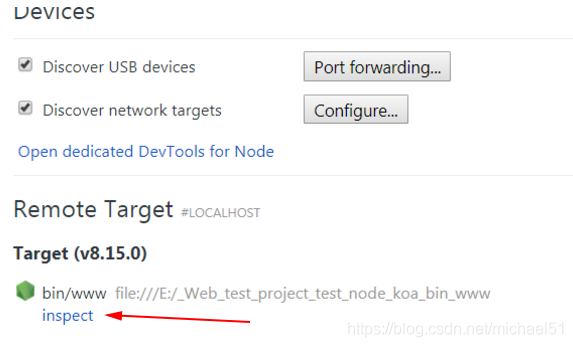
在这里插入图片描述

C:\Users\qusg>appium-doctor WARN AppiumDoctor [Deprecated] Please use appium-doctor installed with "npm install @appium/doctor --location=global" info AppiumDoctor Appium Doctor v.1.16.2 info AppiumDoctor ### Diagnostic for necessary dependencies starting ### info AppiumDoctor ✔ The Node.js binary was found at: C:\own\app\Node\node.EXE info AppiumDoctor ✔ Node version is 22.18.0 WARN AppiumDoctor ✖ ANDROID_HOME environment variable is NOT set! info AppiumDoctor ✔ JAVA_HOME is set to: C:\own\app\JDK WARN AppiumDoctor ✖ adb, android, emulator, apkanalyzer.bat could not be found because ANDROID_HOME or ANDROID_SDK_ROOT is NOT set! info AppiumDoctor ✔ 'bin' subfolder exists under 'C:\own\app\JDK' info AppiumDoctor ### Diagnostic for necessary dependencies completed, 2 fixes needed. ### info AppiumDoctor info AppiumDoctor ### Diagnostic for optional dependencies starting ### WARN AppiumDoctor ✖ opencv4nodejs cannot be found. WARN AppiumDoctor ✖ ffmpeg cannot be found WARN AppiumDoctor ✖ mjpeg-consumer cannot be found. WARN AppiumDoctor ✖ bundletool.jar cannot be found WARN AppiumDoctor ✖ gst-launch-1.0.exe and/or gst-inspect-1.0.exe cannot be found info AppiumDoctor ### Diagnostic for optional dependencies completed, 5 fixes possible. ### info AppiumDoctor info AppiumDoctor ### Manual Fixes Needed ### info AppiumDoctor The configuration cannot be automatically fixed, please do the following first: WARN AppiumDoctor ➜ Make sure the environment variable ANDROID_HOME is properly configured for the Appium process. Refer https://github.com/appium/java-client/blob/master/docs/environment.md for more details. WARN AppiumDoctor ➜ Manually configure ANDROID_HOME and run appium-doctor again. info AppiumDoctor info AppiumDoctor ### Optional Manual Fixes ### info AppiumDoctor The configuration can install optionally. Please do the following manually: WARN AppiumDoctor ➜ Why opencv4nodejs is needed and how to install it: http://appium.io/docs/en/writing-running-appium/image-comparison/ WARN AppiumDoctor ➜ ffmpeg is needed to record screen features. Please read https://www.ffmpeg.org/ to install it WARN AppiumDoctor ➜ mjpeg-consumer module is required to use MJPEG-over-HTTP features. Please install it with 'npm i -g mjpeg-consumer'. WARN AppiumDoctor ➜ bundletool.jar is used to handle Android App Bundle. Please read http://appium.io/docs/en/writing-running-appium/android/android-appbundle/ to install it. Also consider adding the ".jar" extension into your PATHEXT environment variable in order to fix the problem for Windows WARN AppiumDoctor ➜ gst-launch-1.0.exe and gst-inspect-1.0.exe are used to stream the screen of the device under test. Please read https://appium.io/docs/en/writing-running-appium/android/android-screen-streaming/ to install them and for more details info AppiumDoctor info AppiumDoctor ### info AppiumDoctor info AppiumDoctor Bye! Run appium-doctor again when all manual fixes have been applied! info AppiumDoctor 表明appium运行依赖环境是否全部安装成功
最新发布
10-14
评论
成就一亿技术人!
拼手气红包6.0元
还能输入1000个字符
 
红包 添加红包
表情包 插入表情
 条评论被折叠 查看
添加红包

请填写红包祝福语或标题

红包个数最小为10个

红包金额最低5元

当前余额3.43前往充值 >
需支付:10.00
成就一亿技术人!
领取后你会自动成为博主和红包主的粉丝 规则
hope_wisdom
发出的红包
实付
使用余额支付
点击重新获取
扫码支付
钱包余额 0

抵扣说明:

1.余额是钱包充值的虚拟货币,按照1:1的比例进行支付金额的抵扣。
2.余额无法直接购买下载,可以购买VIP、付费专栏及课程。

余额充值



