



目录
- 基础模块
- Pytest框架
- pytest安装
- pytest编写规则
- pytest运行方式
- 断言
- pytest丰富的插件系统
- pytest分组执行
- pytest跳过执行
- 参数化
- 前后置处理
- 钩子函数
- pytest_configure(config)
- pytest_collection_modifyitems(config, items)
- pytest_runtest_protocol(item, nextitem)
- pytest_fixture_setup(fixturedef, request)
- pytest_fixture_post_finalizer(fixturedef, request)
- pytest_runtest_makereport(item, call, report)
- pytest_terminal_summary(terminalreporter, exitstatus, config)
- Allure
基础模块
requests模块
requests 是Python一个常用的 HTTP 请求库,可以方便地向网站发送 HTTP 请求,并获取响应结果。
***导入模块***
import requests


***发送请求***
'''
发送GET请求:requests.get(url, params=None, **kwargs)
发送POST请求:requests.post(url, data=None, json=None, **kwargs)
发送PUT请求:requests.put(url, data=None, **kwargs)
发送DELETE请求:requests.delete(url, **kwargs)
发送任意请求(常用):requests.request(method, url, **kwargs)

注意:
1.发送get请求时,请注意传入的params会自动解析拼接在url后面。所以其实也可以不传params,传url时直接带上这部分参数也行
2.发送post请求时,请注意该接口的请求头里约定的是“application/x-www-formurlencoded”还是“application/json”,前者的话传data,后者的话传json
3.通过上面的方法返回的是一个Response对象,该对象有一些常用的属性和方法:
cookies:返回一个 CookieJar 对象,包含了从服务器发回的 cookie
status_code:状态码
text:返回字符串方式的响应体,会自动根据响应头部的字符编码进行解码
json():返回内容进行json转换
'''

# 发送get请求(通过params传参)
url_get1 = 'http://127.0.0.1:8787/coupApply/cms/goodsList'
header_get1 = {'Content-Type': 'application/x-www-formurlencoded;charset=UTF-8'}
params_get1 = {
    "msgType": "getHandsetListOfCust",
    "page": 1,
    "size": 20
}

res_get1 = requests.get(url=url_get1, params=params_get1, headers=header_get1)


# 发送get请求(通过url传参)
url_get2 = 'http://127.0.0.1:8787/coupApply/cms/goodsList?msgType=getHandsetListOfCust&page=1&size=20'
header_get2 = {'Content-Type': 'application/x-www-formurlencoded;charset=UTF-8'}

res_get2 = requests.get(url=url_get2, headers=header_get2)


# 发送post请求(x-www-formurlencoded)
url_post1 = 'http://127.0.0.1:8787/dar/user/login'
header_post1 = {'Content-Type': 'application/x-www-formurlencoded;charset=UTF-8'}
data_post1 = {
    "user_name": "test01",
    "passwd": "admin123"
}

res_post1 = requests.post(url=url_post1, data=data_post1)
# 获取登录接口响应的cookie
print(res_post1.cookies) # <RequestsCookieJar[<Cookie access_token_cookie=eyJhbGciOiJIUzI1NiIsInR5cCI6IkpXVCJ9.eyJmcmVzaCI6ZmFsc2UsImlhdCI6MTc0MTQyOTQ4MSwianRpIjoiYWVhM2FkN2QtYjFkNy00N2I2LTk0MGUtMzUzMmUzMGRiZTcyIiwidHlwZSI6ImFjY2VzcyIsInN1YiI6ImV4YW1wbGVfdXNlciIsIm5iZiI6MTc0MTQyOTQ4MSwiZXhwIjoxNzQxNDMwMzgxfQ.qejKoJE_4HejFLYMM7O_PRDUU3mecmo8s3IA07P9HSc for 127.0.0.1/>]>
cookie = requests.utils.dict_from_cookiejar(res_post1.cookies)
print(cookie) # {'access_token_cookie': 'eyJhbGciOiJIUzI1NiIsInR5cCI6IkpXVCJ9.eyJmcmVzaCI6ZmFsc2UsImlhdCI6MTc0MTQyOTQ4MSwianRpIjoiYWVhM2FkN2QtYjFkNy00N2I2LTk0MGUtMzUzMmUzMGRiZTcyIiwidHlwZSI6ImFjY2VzcyIsInN1YiI6ImV4YW1wbGVfdXNlciIsIm5iZiI6MTc0MTQyOTQ4MSwiZXhwIjoxNzQxNDMwMzgxfQ.qejKoJE_4HejFLYMM7O_PRDUU3mecmo8s3IA07P9HSc'}


# 发送post请求(json)
url_post2 = 'http://127.0.0.1:8787/coupApply/cms/productDetail'
header_post2 = {'Content-Type': 'application/json;charset=UTF-8'}
json_post2 = {
    "pro_id": "33809635011",
    "page": 1,
    "size": 20
}

res_post2 = requests.post(url=url_post2, json=json_post2, headers=header_post2)


# 使用request方法发送上一个post请求
method_request = 'post'

res_request = requests.request(method = method_request, url=url_post2, json=json_post2, headers=header_post2)
# 获取接口响应的状态码
print(res_request.status_code) # 200
# 获取接口响应内容(文本)
print(res_request.text) # {"api_info":"today:21 max:10000 all[90=21+33+36];expires:2030-12-31","api_type":"pinduoduo","cache":0,"call_args":{"num_iid":"1620002566"},"client_ip":"106.6.39.223","error":"","error_code":"0000","execution_time":"0.437","goodsId":"56996760797","item":{"AmountOnSale":3188,"CategoryId":8484,"Coupon":null,"Delivery":{"From":null,"Info":null,"MarkInfo":null,"Postage":"快递 免运费","To":null,"extras":null},"DescUrl":null,"Detail":"<img src=\"https://img.pddpic.com/mms-material-img/2022-09-18/3f89d470-1af8-4dee-b529-6d62aa2ea3b7.png\" style=\"width:100%;\"/><img src=\"https://t00img.yangkeduo.com/goods/images/2019-02-15/ddf6fe7b-b536-4183-932d-69a1189a3f59.png\" style=\"width:100%;\"/><img src=\"https://t00img.yangkeduo.com/goods/images/2018-09-02/20f659b04d3e7e5851c27ff9931c96fc.jpeg\" style=\"width:100%;\"/><img src=\"https://t00img.yangkeduo.com/goods/images/2019-11-14/4420a8c3-49ed-46d8-ab55-15e7a638ca31.jpg\" style=\"width:100%;\"/><img src=\"https://t00img.yangkeduo.com/goods/images/2018-09-02/26c3e9d5cfbaf4e8f13b2bdd38f48d71.jpeg\" style=\"width:100%;\"/><img src=\"https://t00img.yangkeduo.com/goods/images/2018-09-02/0aa872fa74599dad7b6aefe6b6c035c0.jpeg\" style=\"width:100%;\"/><img src=\"https://t00img.yangkeduo.com/goods/images/2018-09-02/6bc959e32a30424c7a5284a37676999c.jpeg\" style=\"width:100%;\"/><img src=\"https://t00img.yangkeduo.com/goods/images/2018-09-02/1fa9861a8c99c5e9e8119fd2239fef5a.jpeg\" style=\"width:100%;\"/><img src=\"https://t00img.yangkeduo.com/goods/images/2018-09-02/b62cabf1d2320c5761e3f4c15203fb20.jpeg\" style=\"width:100%;\"/><img src=\"https://t00img.yangkeduo.com/goods/images/2018-09-02/6f6e54376a66cbc78e16700d4c424fe1.jpeg\" style=\"width:100%;\"/><img src=\"https://t00img.yangkeduo.com/goods/images/2018-09-02/2f60753dfc875a6876adc35833a69d31.jpeg\" style=\"width:100%;\"/><img src=\"https://t00img.yangkeduo.com/goods/images/2018-09-02/ae0116e589d8de712f8dafd0c356cefe.jpeg\" style=\"width:100%;\"/><img src=\"https://t00img.yangkeduo.com/goods/images/2018-09-02/da910c98fcc8de1b4d2d1498cd7899fd.jpeg\" style=\"width:100%;\"/><img src=\"https://t00img.yangkeduo.com/goods/images/2018-09-02/140349649d8b7d08c8e88bfbbaa2f900.jpeg\" style=\"width:100%;\"/><img src=\"https://t00img.yangkeduo.com/goods/images/2018-09-02/a953bae2eeb7364ef3ef2976a97d07eb.jpeg\" style=\"width:100%;\"/><img src=\"https://t00img.yangkeduo.com/goods/images/2018-09-02/4da59828136c3b1308aad0aa990778a7.jpeg\" style=\"width:100%;\"/><img src=\"https://t00img.yangkeduo.com/goods/images/2018-09-02/4a365b61a80e47288c8609ccd5982396.jpeg\" style=\"width:100%;\"/><img src=\"https://t00img.yangkeduo.com/goods/images/2018-11-17/cd0a8a96b783a51236812ce24c59a329.jpeg\" style=\"width:100%;\"/><img src=\"https://t00img.yangkeduo.com/goods/images/2018-11-17/16008ac19768d05e7dee16406ff958a1.jpeg\" style=\"width:100%;\"/><img src=\"https://t00img.yangkeduo.com/goods/images/2018-11-17/ef1d17b69ebf9449a8bb52459b168c26.jpeg\" style=\"width:100%;\"/>","FansCount":null,"ImageUrls":["https://omsproductionimg.yangkeduo.com/images/2017-12-12/bcf848aa71c6389607ae7a84b70f1543.jpeg","https://omsproductionimg.yangkeduo.com/images/2017-12-12/176019babfdecffa1d9f98f40b7e99b4.jpeg","https://omsproductionimg.yangkeduo.com/images/2017-12-12/efb5db42397550bffd3211ca6f197498.jpeg","https://omsproductionimg.yangkeduo.com/images/2017-12-12/d209ef7bcc9183c3bb8ca1dfdb108d49.jpeg","https://omsproductionimg.yangkeduo.com/images/2017-12-12/74257ab65f3f00da7a90fde9042fe640.jpeg","https://t00img.yangkeduo.com/goods/images/2019-08-17/e8fbd9cb-cc74-4caa-9380-84c46d27b008.jpg","https://t00img.yangkeduo.com/goods/images/2019-08-17/d76f515b-e375-4060-b94e-cf64f6b0964e.jpg","https://t00img.yangkeduo.com/goods/images/2019-08-17/f2f279b5-6000-4fbe-b99b-7c1cbd7884ea.jpg"],"MainImageVideo":null,"OfferId":1620002566,"OriginalPriceRangeInfos":[{"ConvertPrice":0,"Price":115,"Range":"3"}],"PriceRangeInfos":[{"ConvertPrice":0,"Price":95.4,"Range":"3"}],"ProductFeatureTuples":[{"Item1":"面料材质","Item2":"仿皮草"},{"Item1":"成分含量","Item2":"71%(含)—80%(含)"},{"Item1":"版型","Item2":"修身"},{"Item1":"领型","Item2":"圆领"},{"Item1":"衣长","Item2":"短款"},{"Item1":"是否带毛领","Item2":"不带毛领"},{"Item1":"主风格","Item2":"气质名媛"}],"ProductFeatures":{"主风格":"气质名媛","成分含量":"71%(含)—80%(含)","是否带毛领":"不带毛领","版型":"修身","衣长":"短款","面料材质":"仿皮草","领型":"圆领"},"RateCount":null,"RetryCount":0,"SellCount":"已拼4.2万件","SellerId":null,"SellerNick":null,"ShopId":"461742","ShopInfo":null,"ShopName":"果果家气质女装","ShopUrl":"http://yangkeduo.com/mall_page.html?mall_id=461742","SkuMaps":[{"AmountOnSale":73,"ImageUrl":"http://t00img.yangkeduo.com/goods/images/2018-08-28/062d42b525a7c786920cbb83ac772af7.jpeg","Key":"1215:1115500378;1226:119128","OriginalPrice":115,"Price":95.4,"SkuId":"57114357891","SpecAttributes":{"尺码":"S(90斤以下)","颜色":"粉色两件套(外套+裙子)"}},{"AmountOnSale":65,"ImageUrl":"http://t00img.yangkeduo.com/goods/images/2018-08-28/062d42b525a7c786920cbb83ac772af7.jpeg","Key":"1215:1115500378;1226:96784","OriginalPrice":115,"Price":95.4,"SkuId":"57114357892","SpecAttributes":{"尺码":"M(90-100斤)","颜色":"粉色两件套(外套+裙子)"}},{"AmountOnSale":82,"ImageUrl":"http://t00img.yangkeduo.com/goods/images/2018-08-28/062d42b525a7c786920cbb83ac772af7.jpeg","Key":"1215:1115500378;1226:33651","OriginalPrice":115,"Price":95.4,"SkuId":"57114357893","SpecAttributes":{"尺码":"L(100-110斤)","颜色":"粉色两件套(外套+裙子)"}},{"AmountOnSale":89,"ImageUrl":"http://t00img.yangkeduo.com/goods/images/2018-08-28/062d42b525a7c786920cbb83ac772af7.jpeg","Key":"1215:1115500378;1226:33652","OriginalPrice":115,"Price":95.4,"SkuId":"57114357894","SpecAttributes":{"尺码":"XL(110-120斤)","颜色":"粉色两件套(外套+裙子)"}},{"AmountOnSale":94,"ImageUrl":"http://t00img.yangkeduo.com/goods/images/2018-08-28/062d42b525a7c786920cbb83ac772af7.jpeg","Key":"1215:1115500378;1226:33653","OriginalPrice":115,"Price":95.4,"SkuId":"57114357895","SpecAttributes":{"尺码":"2XL(120-130斤)","颜色":"粉色两件套(外套+裙子)"}},{"AmountOnSale":105,"ImageUrl":"http://t00img.yangkeduo.com/goods/images/2018-08-28/062d42b525a7c786920cbb83ac772af7.jpeg","Key":"1215:1115500378;1226:33656","OriginalPrice":115,"Price":95.4,"SkuId":"57114357896","SpecAttributes":{"尺码":"3XL(130-140斤)","颜色":"粉色两件套(外套+裙子)"}},{"AmountOnSale":1051,"ImageUrl":"http://t00img.yangkeduo.com/goods/images/2018-08-28/415bed99d5a925123d7b7c39547205de.jpeg","Key":"1215:1115501666;1226:119128","OriginalPrice":115,"Price":95.4,"SkuId":"57114357897","SpecAttributes":{"尺码":"S(90斤以下)","颜色":"米色两件套(外套+裙子)"}},{"AmountOnSale":88,"ImageUrl":"http://t00img.yangkeduo.com/goods/images/2018-08-28/415bed99d5a925123d7b7c39547205de.jpeg","Key":"1215:1115501666;1226:96784","OriginalPrice":115,"Price":95.4,"SkuId":"57114357898","SpecAttributes":{"尺码":"M(90-100斤)","颜色":"米色两件套(外套+裙子)"}},{"AmountOnSale":80,"ImageUrl":"http://t00img.yangkeduo.com/goods/images/2018-08-28/415bed99d5a925123d7b7c39547205de.jpeg","Key":"1215:1115501666;1226:33651","OriginalPrice":115,"Price":95.4,"SkuId":"57114357899","SpecAttributes":{"尺码":"L(100-110斤)","颜色":"米色两件套(外套+裙子)"}},{"AmountOnSale":660,"ImageUrl":"http://t00img.yangkeduo.com/goods/images/2018-08-28/415bed99d5a925123d7b7c39547205de.jpeg","Key":"1215:1115501666;1226:33652","OriginalPrice":115,"Price":95.4,"SkuId":"57114357900","SpecAttributes":{"尺码":"XL(110-120斤)","颜色":"米色两件套(外套+裙子)"}},{"AmountOnSale":126,"ImageUrl":"http://t00img.yangkeduo.com/goods/images/2018-08-28/415bed99d5a925123d7b7c39547205de.jpeg","Key":"1215:1115501666;1226:33653","OriginalPrice":115,"Price":95.4,"SkuId":"57114357901","SpecAttributes":{"尺码":"2XL(120-130斤)","颜色":"米色两件套(外套+裙子)"}},{"AmountOnSale":89,"ImageUrl":"http://t00img.yangkeduo.com/goods/images/2018-08-28/415bed99d5a925123d7b7c39547205de.jpeg","Key":"1215:1115501666;1226:33656","OriginalPrice":115,"Price":95.4,"SkuId":"57114357902","SpecAttributes":{"尺码":"3XL(130-140斤)","颜色":"米色两件套(外套+裙子)"}},{"AmountOnSale":98,"ImageUrl":"http://t00img.yangkeduo.com/goods/images/2018-11-17/48b30664f0f7e526ab1b956e813f25cf.jpeg","Key":"1215:105309781;1226:119128","OriginalPrice":115,"Price":95.4,"SkuId":"103851107855","SpecAttributes":{"尺码":"S(90斤以下)","颜色":"蓝色两件套(外套+裙子)"}},{"AmountOnSale":95,"ImageUrl":"http://t00img.yangkeduo.com/goods/images/2018-11-17/3660b7893ca5cda1ffcea745d10b2506.jpeg","Key":"1215:105309781;1226:96784","OriginalPrice":115,"Price":95.4,"SkuId":"103851107856","SpecAttributes":{"尺码":"M(90-100斤)","颜色":"蓝色两件套(外套+裙子)"}},{"AmountOnSale":97,"ImageUrl":"http://t00img.yangkeduo.com/goods/images/2018-11-17/a4a5a671afbb2d8e1f4c21c0ced3bea8.jpeg","Key":"1215:105309781;1226:33651","OriginalPrice":115,"Price":95.4,"SkuId":"103851107857","SpecAttributes":{"尺码":"L(100-110斤)","颜色":"蓝色两件套(外套+裙子)"}},{"AmountOnSale":97,"ImageUrl":"http://t00img.yangkeduo.com/goods/images/2018-11-17/f0551176629bf81f25757c160198dba1.jpeg","Key":"1215:105309781;1226:33652","OriginalPrice":115,"Price":95.4,"SkuId":"103851107858","SpecAttributes":{"尺码":"XL(110-120斤)","颜色":"蓝色两件套(外套+裙子)"}},{"AmountOnSale":99,"ImageUrl":"http://t00img.yangkeduo.com/goods/images/2018-11-17/801a2e23140bfe76229f02aab0a8a5fe.jpeg","Key":"1215:105309781;1226:33653","OriginalPrice":115,"Price":95.4,"SkuId":"103851107853","SpecAttributes":{"尺码":"2XL(120-130斤)","颜色":"蓝色两件套(外套+裙子)"}},{"AmountOnSale":100,"ImageUrl":"http://t00img.yangkeduo.com/goods/images/2018-11-17/2f202934f16f0eee41257b77bf489262.jpeg","Key":"1215:105309781;1226:33656","OriginalPrice":115,"Price":95.4,"SkuId":"103851107854","SpecAttributes":{"尺码":"3XL(130-140斤)","颜色":"蓝色两件套(外套+裙子)"}}],"SkuProps":[{"IsImg":true,"Prop":"颜色","Value":[{"imageUrl":"http://t00img.yangkeduo.com/goods/images/2018-08-28/062d42b525a7c786920cbb83ac772af7.jpeg","name":"粉色两件套(外套+裙子)","value":"1215:1115500378"},{"imageUrl":"http://t00img.yangkeduo.com/goods/images/2018-08-28/415bed99d5a925123d7b7c39547205de.jpeg","name":"米色两件套(外套+裙子)","value":"1215:1115501666"},{"imageUrl":"http://t00img.yangkeduo.com/goods/images/2018-11-17/48b30664f0f7e526ab1b956e813f25cf.jpeg","name":"蓝色两件套(外套+裙子)","value":"1215:105309781"}]},{"IsImg":false,"Prop":"尺码","Value":[{"name":"S(90斤以下)","value":"1226:119128"},{"name":"M(90-100斤)","value":"1226:96784"},{"name":"L(100-110斤)","value":"1226:33651"},{"name":"XL(110-120斤)","value":"1226:33652"},{"name":"2XL(120-130斤)","value":"1226:33653"},{"name":"3XL(130-140斤)","value":"1226:33656"}]}],"SourceType":6,"Subject":"【2件套】套装秋冬新款仿獭兔毛钉珠皮草毛毛短外套加厚大衣女装","Tag":null,"Unit":null,"UserId":"461742","_ddf":"app","format_check":"ok"},"reason":"","request_id":"gw-4.63510267214bd","secache":"c98b29872e8a4b28859db207944ba817","secache_date":"2025-03-01 23:01:59","secache_time":1666253415,"server_memory":"0.84MB","server_time":"Beijing/2023-10-20 16:10:15","translate_engine":"baidu","translate_language":"zh-CN"}
# 获取接口响应内容(json格式)
print(res_request.json()) # {'api_info': 'today:21 max:10000 all[90=21+33+36];expires:2030-12-31', 'api_type': 'pinduoduo', 'cache': 0, 'call_args': {'num_iid': '1620002566'}, 'client_ip': '106.6.39.223', 'error': '', 'error_code': '0000', 'execution_time': '0.437', 'goodsId': '56996760797', 'item': {'AmountOnSale': 3188, 'CategoryId': 8484, 'Coupon': None, 'Delivery': {'From': None, 'Info': None, 'MarkInfo': None, 'Postage': '快递 免运费', 'To': None, 'extras': None}, 'DescUrl': None, 'Detail': '<img src="https://img.pddpic.com/mms-material-img/2022-09-18/3f89d470-1af8-4dee-b529-6d62aa2ea3b7.png" style="width:100%;"/><img src="https://t00img.yangkeduo.com/goods/images/2019-02-15/ddf6fe7b-b536-4183-932d-69a1189a3f59.png" style="width:100%;"/><img src="https://t00img.yangkeduo.com/goods/images/2018-09-02/20f659b04d3e7e5851c27ff9931c96fc.jpeg" style="width:100%;"/><img src="https://t00img.yangkeduo.com/goods/images/2019-11-14/4420a8c3-49ed-46d8-ab55-15e7a638ca31.jpg" style="width:100%;"/><img src="https://t00img.yangkeduo.com/goods/images/2018-09-02/26c3e9d5cfbaf4e8f13b2bdd38f48d71.jpeg" style="width:100%;"/><img src="https://t00img.yangkeduo.com/goods/images/2018-09-02/0aa872fa74599dad7b6aefe6b6c035c0.jpeg" style="width:100%;"/><img src="https://t00img.yangkeduo.com/goods/images/2018-09-02/6bc959e32a30424c7a5284a37676999c.jpeg" style="width:100%;"/><img src="https://t00img.yangkeduo.com/goods/images/2018-09-02/1fa9861a8c99c5e9e8119fd2239fef5a.jpeg" style="width:100%;"/><img src="https://t00img.yangkeduo.com/goods/images/2018-09-02/b62cabf1d2320c5761e3f4c15203fb20.jpeg" style="width:100%;"/><img src="https://t00img.yangkeduo.com/goods/images/2018-09-02/6f6e54376a66cbc78e16700d4c424fe1.jpeg" style="width:100%;"/><img src="https://t00img.yangkeduo.com/goods/images/2018-09-02/2f60753dfc875a6876adc35833a69d31.jpeg" style="width:100%;"/><img src="https://t00img.yangkeduo.com/goods/images/2018-09-02/ae0116e589d8de712f8dafd0c356cefe.jpeg" style="width:100%;"/><img src="https://t00img.yangkeduo.com/goods/images/2018-09-02/da910c98fcc8de1b4d2d1498cd7899fd.jpeg" style="width:100%;"/><img src="https://t00img.yangkeduo.com/goods/images/2018-09-02/140349649d8b7d08c8e88bfbbaa2f900.jpeg" style="width:100%;"/><img src="https://t00img.yangkeduo.com/goods/images/2018-09-02/a953bae2eeb7364ef3ef2976a97d07eb.jpeg" style="width:100%;"/><img src="https://t00img.yangkeduo.com/goods/images/2018-09-02/4da59828136c3b1308aad0aa990778a7.jpeg" style="width:100%;"/><img src="https://t00img.yangkeduo.com/goods/images/2018-09-02/4a365b61a80e47288c8609ccd5982396.jpeg" style="width:100%;"/><img src="https://t00img.yangkeduo.com/goods/images/2018-11-17/cd0a8a96b783a51236812ce24c59a329.jpeg" style="width:100%;"/><img src="https://t00img.yangkeduo.com/goods/images/2018-11-17/16008ac19768d05e7dee16406ff958a1.jpeg" style="width:100%;"/><img src="https://t00img.yangkeduo.com/goods/images/2018-11-17/ef1d17b69ebf9449a8bb52459b168c26.jpeg" style="width:100%;"/>', 'FansCount': None, 'ImageUrls': ['https://omsproductionimg.yangkeduo.com/images/2017-12-12/bcf848aa71c6389607ae7a84b70f1543.jpeg', 'https://omsproductionimg.yangkeduo.com/images/2017-12-12/176019babfdecffa1d9f98f40b7e99b4.jpeg', 'https://omsproductionimg.yangkeduo.com/images/2017-12-12/efb5db42397550bffd3211ca6f197498.jpeg', 'https://omsproductionimg.yangkeduo.com/images/2017-12-12/d209ef7bcc9183c3bb8ca1dfdb108d49.jpeg', 'https://omsproductionimg.yangkeduo.com/images/2017-12-12/74257ab65f3f00da7a90fde9042fe640.jpeg', 'https://t00img.yangkeduo.com/goods/images/2019-08-17/e8fbd9cb-cc74-4caa-9380-84c46d27b008.jpg', 'https://t00img.yangkeduo.com/goods/images/2019-08-17/d76f515b-e375-4060-b94e-cf64f6b0964e.jpg', 'https://t00img.yangkeduo.com/goods/images/2019-08-17/f2f279b5-6000-4fbe-b99b-7c1cbd7884ea.jpg'], 'MainImageVideo': None, 'OfferId': 1620002566, 'OriginalPriceRangeInfos': [{'ConvertPrice': 0, 'Price': 115, 'Range': '3'}], 'PriceRangeInfos': [{'ConvertPrice': 0, 'Price': 95.4, 'Range': '3'}], 'ProductFeatureTuples': [{'Item1': '面料材质', 'Item2': '仿皮草'}, {'Item1': '成分含量', 'Item2': '71%(含)—80%(含)'}, {'Item1': '版型', 'Item2': '修身'}, {'Item1': '领型', 'Item2': '圆领'}, {'Item1': '衣长', 'Item2': '短款'}, {'Item1': '是否带毛领', 'Item2': '不带毛领'}, {'Item1': '主风格', 'Item2': '气质名媛'}], 'ProductFeatures': {'主风格': '气质名媛', '成分含量': '71%(含)—80%(含)', '是否带毛领': '不带毛领', '版型': '修身', '衣长': '短款', '面料材质': '仿皮草', '领型': '圆领'}, 'RateCount': None, 'RetryCount': 0, 'SellCount': '已拼4.2万件', 'SellerId': None, 'SellerNick': None, 'ShopId': '461742', 'ShopInfo': None, 'ShopName': '果果家气质女装', 'ShopUrl': 'http://yangkeduo.com/mall_page.html?mall_id=461742', 'SkuMaps': [{'AmountOnSale': 73, 'ImageUrl': 'http://t00img.yangkeduo.com/goods/images/2018-08-28/062d42b525a7c786920cbb83ac772af7.jpeg', 'Key': '1215:1115500378;1226:119128', 'OriginalPrice': 115, 'Price': 95.4, 'SkuId': '57114357891', 'SpecAttributes': {'尺码': 'S(90斤以下)', '颜色': '粉色两件套(外套+裙子)'}}, {'AmountOnSale': 65, 'ImageUrl': 'http://t00img.yangkeduo.com/goods/images/2018-08-28/062d42b525a7c786920cbb83ac772af7.jpeg', 'Key': '1215:1115500378;1226:96784', 'OriginalPrice': 115, 'Price': 95.4, 'SkuId': '57114357892', 'SpecAttributes': {'尺码': 'M(90-100斤)', '颜色': '粉色两件套(外套+裙子)'}}, {'AmountOnSale': 82, 'ImageUrl': 'http://t00img.yangkeduo.com/goods/images/2018-08-28/062d42b525a7c786920cbb83ac772af7.jpeg', 'Key': '1215:1115500378;1226:33651', 'OriginalPrice': 115, 'Price': 95.4, 'SkuId': '57114357893', 'SpecAttributes': {'尺码': 'L(100-110斤)', '颜色': '粉色两件套(外套+裙子)'}}, {'AmountOnSale': 89, 'ImageUrl': 'http://t00img.yangkeduo.com/goods/images/2018-08-28/062d42b525a7c786920cbb83ac772af7.jpeg', 'Key': '1215:1115500378;1226:33652', 'OriginalPrice': 115, 'Price': 95.4, 'SkuId': '57114357894', 'SpecAttributes': {'尺码': 'XL(110-120斤)', '颜色': '粉色两件套(外套+裙子)'}}, {'AmountOnSale': 94, 'ImageUrl': 'http://t00img.yangkeduo.com/goods/images/2018-08-28/062d42b525a7c786920cbb83ac772af7.jpeg', 'Key': '1215:1115500378;1226:33653', 'OriginalPrice': 115, 'Price': 95.4, 'SkuId': '57114357895', 'SpecAttributes': {'尺码': '2XL(120-130斤)', '颜色': '粉色两件套(外套+裙子)'}}, {'AmountOnSale': 105, 'ImageUrl': 'http://t00img.yangkeduo.com/goods/images/2018-08-28/062d42b525a7c786920cbb83ac772af7.jpeg', 'Key': '1215:1115500378;1226:33656', 'OriginalPrice': 115, 'Price': 95.4, 'SkuId': '57114357896', 'SpecAttributes': {'尺码': '3XL(130-140斤)', '颜色': '粉色两件套(外套+裙子)'}}, {'AmountOnSale': 1051, 'ImageUrl': 'http://t00img.yangkeduo.com/goods/images/2018-08-28/415bed99d5a925123d7b7c39547205de.jpeg', 'Key': '1215:1115501666;1226:119128', 'OriginalPrice': 115, 'Price': 95.4, 'SkuId': '57114357897', 'SpecAttributes': {'尺码': 'S(90斤以下)', '颜色': '米色两件套(外套+裙子)'}}, {'AmountOnSale': 88, 'ImageUrl': 'http://t00img.yangkeduo.com/goods/images/2018-08-28/415bed99d5a925123d7b7c39547205de.jpeg', 'Key': '1215:1115501666;1226:96784', 'OriginalPrice': 115, 'Price': 95.4, 'SkuId': '57114357898', 'SpecAttributes': {'尺码': 'M(90-100斤)', '颜色': '米色两件套(外套+裙子)'}}, {'AmountOnSale': 80, 'ImageUrl': 'http://t00img.yangkeduo.com/goods/images/2018-08-28/415bed99d5a925123d7b7c39547205de.jpeg', 'Key': '1215:1115501666;1226:33651', 'OriginalPrice': 115, 'Price': 95.4, 'SkuId': '57114357899', 'SpecAttributes': {'尺码': 'L(100-110斤)', '颜色': '米色两件套(外套+裙子)'}}, {'AmountOnSale': 660, 'ImageUrl': 'http://t00img.yangkeduo.com/goods/images/2018-08-28/415bed99d5a925123d7b7c39547205de.jpeg', 'Key': '1215:1115501666;1226:33652', 'OriginalPrice': 115, 'Price': 95.4, 'SkuId': '57114357900', 'SpecAttributes': {'尺码': 'XL(110-120斤)', '颜色': '米色两件套(外套+裙子)'}}, {'AmountOnSale': 126, 'ImageUrl': 'http://t00img.yangkeduo.com/goods/images/2018-08-28/415bed99d5a925123d7b7c39547205de.jpeg', 'Key': '1215:1115501666;1226:33653', 'OriginalPrice': 115, 'Price': 95.4, 'SkuId': '57114357901', 'SpecAttributes': {'尺码': '2XL(120-130斤)', '颜色': '米色两件套(外套+裙子)'}}, {'AmountOnSale': 89, 'ImageUrl': 'http://t00img.yangkeduo.com/goods/images/2018-08-28/415bed99d5a925123d7b7c39547205de.jpeg', 'Key': '1215:1115501666;1226:33656', 'OriginalPrice': 115, 'Price': 95.4, 'SkuId': '57114357902', 'SpecAttributes': {'尺码': '3XL(130-140斤)', '颜色': '米色两件套(外套+裙子)'}}, {'AmountOnSale': 98, 'ImageUrl': 'http://t00img.yangkeduo.com/goods/images/2018-11-17/48b30664f0f7e526ab1b956e813f25cf.jpeg', 'Key': '1215:105309781;1226:119128', 'OriginalPrice': 115, 'Price': 95.4, 'SkuId': '103851107855', 'SpecAttributes': {'尺码': 'S(90斤以下)', '颜色': '蓝色两件套(外套+裙子)'}}, {'AmountOnSale': 95, 'ImageUrl': 'http://t00img.yangkeduo.com/goods/images/2018-11-17/3660b7893ca5cda1ffcea745d10b2506.jpeg', 'Key': '1215:105309781;1226:96784', 'OriginalPrice': 115, 'Price': 95.4, 'SkuId': '103851107856', 'SpecAttributes': {'尺码': 'M(90-100斤)', '颜色': '蓝色两件套(外套+裙子)'}}, {'AmountOnSale': 97, 'ImageUrl': 'http://t00img.yangkeduo.com/goods/images/2018-11-17/a4a5a671afbb2d8e1f4c21c0ced3bea8.jpeg', 'Key': '1215:105309781;1226:33651', 'OriginalPrice': 115, 'Price': 95.4, 'SkuId': '103851107857', 'SpecAttributes': {'尺码': 'L(100-110斤)', '颜色': '蓝色两件套(外套+裙子)'}}, {'AmountOnSale': 97, 'ImageUrl': 'http://t00img.yangkeduo.com/goods/images/2018-11-17/f0551176629bf81f25757c160198dba1.jpeg', 'Key': '1215:105309781;1226:33652', 'OriginalPrice': 115, 'Price': 95.4, 'SkuId': '103851107858', 'SpecAttributes': {'尺码': 'XL(110-120斤)', '颜色': '蓝色两件套(外套+裙子)'}}, {'AmountOnSale': 99, 'ImageUrl': 'http://t00img.yangkeduo.com/goods/images/2018-11-17/801a2e23140bfe76229f02aab0a8a5fe.jpeg', 'Key': '1215:105309781;1226:33653', 'OriginalPrice': 115, 'Price': 95.4, 'SkuId': '103851107853', 'SpecAttributes': {'尺码': '2XL(120-130斤)', '颜色': '蓝色两件套(外套+裙子)'}}, {'AmountOnSale': 100, 'ImageUrl': 'http://t00img.yangkeduo.com/goods/images/2018-11-17/2f202934f16f0eee41257b77bf489262.jpeg', 'Key': '1215:105309781;1226:33656', 'OriginalPrice': 115, 'Price': 95.4, 'SkuId': '103851107854', 'SpecAttributes': {'尺码': '3XL(130-140斤)', '颜色': '蓝色两件套(外套+裙子)'}}], 'SkuProps': [{'IsImg': True, 'Prop': '颜色', 'Value': [{'imageUrl': 'http://t00img.yangkeduo.com/goods/images/2018-08-28/062d42b525a7c786920cbb83ac772af7.jpeg', 'name': '粉色两件套(外套+裙子)', 'value': '1215:1115500378'}, {'imageUrl': 'http://t00img.yangkeduo.com/goods/images/2018-08-28/415bed99d5a925123d7b7c39547205de.jpeg', 'name': '米色两件套(外套+裙子)', 'value': '1215:1115501666'}, {'imageUrl': 'http://t00img.yangkeduo.com/goods/images/2018-11-17/48b30664f0f7e526ab1b956e813f25cf.jpeg', 'name': '蓝色两件套(外套+裙子)', 'value': '1215:105309781'}]}, {'IsImg': False, 'Prop': '尺码', 'Value': [{'name': 'S(90斤以下)', 'value': '1226:119128'}, {'name': 'M(90-100斤)', 'value': '1226:96784'}, {'name': 'L(100-110斤)', 'value': '1226:33651'}, {'name': 'XL(110-120斤)', 'value': '1226:33652'}, {'name': '2XL(120-130斤)', 'value': '1226:33653'}, {'name': '3XL(130-140斤)', 'value': '1226:33656'}]}], 'SourceType': 6, 'Subject': '【2件套】套装秋冬新款仿獭兔毛钉珠皮草毛毛短外套加厚大衣女装', 'Tag': None, 'Unit': None, 'UserId': '461742', '_ddf': 'app', 'format_check': 'ok'}, 'reason': '', 'request_id': 'gw-4.63510267214bd', 'secache': 'c98b29872e8a4b28859db207944ba817', 'secache_date': '2025-03-01 23:01:59', 'secache_time': 1666253415, 'server_memory': '0.84MB', 'server_time': 'Beijing/2023-10-20 16:10:15', 'translate_engine': 'baidu', 'translate_language': 'zh-CN'}
yaml模块
yaml模块是python中用来操作yaml文件的第三方库。
yaml介绍:
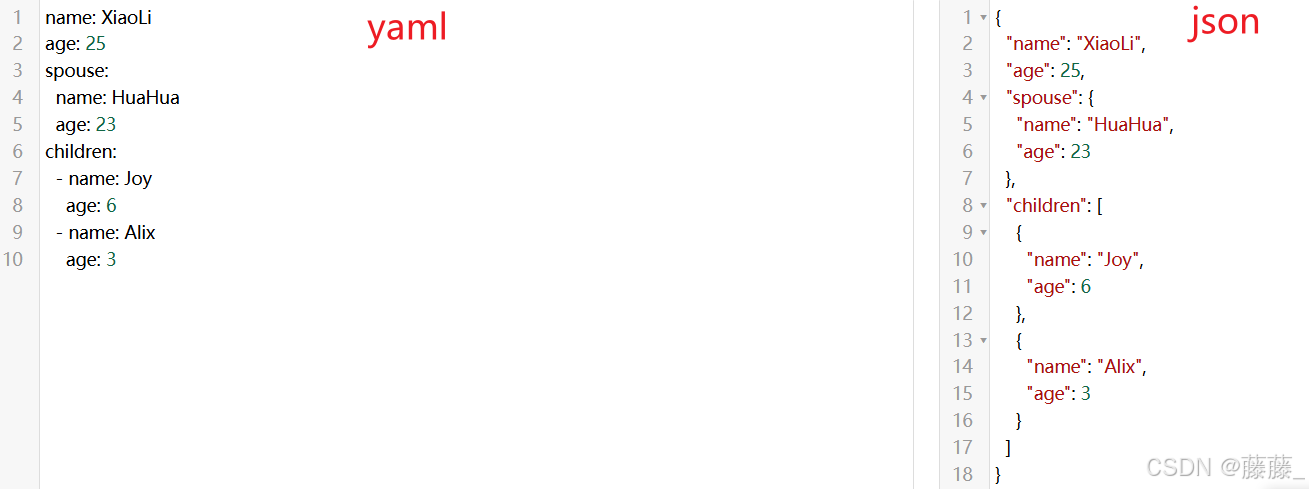
yaml是一种简洁的非标记语言,通常用来写配置文件。yaml文件的后缀为.yaml或.yml语法特点:
1、大小写敏感
2、使用缩进表示层级关系
3、缩进时不允许使用Tab键,只允许使用空格(缩进的空格数目不重要,只要相同层级的元素左侧对其即可,通常是两格)
4、key值前面带-表示这组数据是一个列表类型,如果两组数据的-属于同级关系的话,数据存在在一个列表里面
5、: 号后面要加空格
6、# 表示注释
举例:(可在https://www.bejson.com/validators/yaml_editor/该网站验证yaml格式是否正确)
***导入模块***
import yaml


***解析yaml文件***
'''
yaml.safe_load(stream)

注意:
1.该此函数能将 YAML 文档解析成 Python 字典对象以便进一步操作
'''

with open('data.yaml','r',encoding='utf-8') as f:
    data = yaml.safe_load(f)
    print(data) # {'name': 'XiaoLi', 'age': 25, 'spouse': {'name': 'HuaHua', 'age': 23}, 'children': [{'name': 'Joy', 'age': 6}, {'name': 'Alix', 'age': 3}]}


***生成yaml文件***
'''
yaml.safe_dump(data, stream=None, **kwds)
'''

data = {'name': 'XiaoLi', 'age': 25, 'spouse': {'name': 'HuaHua', 'age': 23}, 'children': [{'name': 'Joy', 'age': 6}, {'name': 'Alix', 'age': 3}]}
with open('data.yaml','w',encoding='utf-8') as f:
    yaml.safe_dump(data, f)
os模块
os模块主要用于与操作系统进行交互,包括文件和目录的操作、路径处理、进程管理等。
***导入模块***
import os


***路径处理***
'''
获取当前文件所在目录:os.getcwd()
获取指定目录下的所有文件和文件夹,返回一个列表:os.listdir(path=None)
路径拼接:os.path.join(path, *paths)
判断指定的路径是否存在,返回布尔值:os.path.exists(path)
获取指定路径的目录部分:os.path.dirname(file_path)

注意:
Python有一个特殊变量“__file__”,它的值是一个字符串,包含了脚本的完整路径(包括文件名)。例如os.path.dirname(__file__)即代表获取当前脚本路径的目录部分
'''

# 获取当前文件所在目录
path1 = os.getcwd()
print(path1) # E:\ltt_PythonProject1


# 获取指定目录下的所有文件和文件夹
path2 = os.listdir(path='E:\ltt_PythonProject1')
print(path2) # ['.idea', '.venv', 'data.yaml', 'test1.py', 'test2.py', 'tmp.py']


# 路径拼接
path_middle = 'data'
path_end = 'report.pdf'

path_full = os.path.join(path1, path_middle, path_end)
print(path_full) # E:\ltt_PythonProject1\data\report.pdf


# 判断指定路径'E:\ltt_PythonProject1'是否存在
is_exist = os.path.exists('E:\ltt_PythonProject1')
print(is_exist,type(is_exist)) # True <class 'bool'>


# 获取当前脚本路径的目录部分
path3 = os.path.dirname(__file__)
print(path3) # E:\ltt_PythonProject1


***在终端执行命令***
'''
os.system(command)
'''

# 执行命令查看python版本
os.system("python --version") # Python 3.7.0
configparser模块
configparser模块主要用于操作配置文件(ini文件)
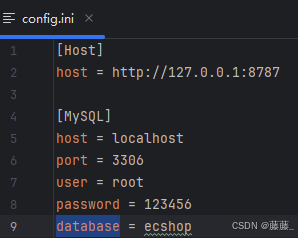
ini文件介绍:
ini 文件是一种常用配置文件,后缀通常为.ini语法特点:
1.由节(section)、键(key)、值(value)组成
2.节用方括号 [] 表示,键和值之间用等号 = 或冒号 : 分隔
3.一个ini文件中可以有多个 section,每个 section 名字不能相同;每个 section 下可以有多个键值对,每个 section 下的键不能相同
4.#代表注释
举例:
***导入模块***
import configparser


***操作ini文件***
'''
创建ConfigParser对象:config = configparser.ConfigParser()
读取配置文件:config.read(filenames)
获取指定section下指定key的值:config.get(section, option)
'''

# 创建ConfigParser对象
config = configparser.ConfigParser()

# 读取配置文件
config.read('config.ini')

# 获取指定section(MySQL)下指定key(database)的值
database = config.get('MySQL', 'database')
print(database) # ecshop
time模块
time模块主要用于处理时间
***导入模块***
import time


***获取时间***
'''
获取当前时间戳:time.time()
'''

now_time = time.time()
print(now_time) # 1750059436.261765
datetime模块
datetime模块主要用于处理日期和时间。有以下几个常用类
date
time
datetime
timedelta
***导入datetime模块的date类***
from datetime import date


***获取当前日期***
'''
date.today()
'''

d = date.today()
print(d) # 2025-06-16
***导入datetime模块的time类***
from datetime import time


***创建特定时间***
'''
创建特定时间:time(hour, minute, second)
'''

t = time(14, 30, 0)
print(t)  # 14:30:00
***导入datetime模块的datetime类***
from datetime import datetime


***获取当前日期时间***
'''
datetime.now()
'''

dt = datetime.now()
print(dt)  # 2025-06-16 16:16:40.386623
***导入datetime模块的timedelta类***
from datetime import timedelta


***创建时间差对象***
'''
timedelta(days, seconds, minutes, hours)
'''

now = datetime.now()
future1 = now + timedelta(days=10)
future2 = now + timedelta(seconds=10)
future3 = now + timedelta(minutes=10)
future4 = now + timedelta(hours=10)
print(now)  # 2025-06-16 16:28:03.451147
print(future1)  # 2025-06-26 16:28:03.451147
print(future2)  # 2025-06-16 16:28:13.451147
print(future3)  # 2025-06-16 16:38:03.451147
print(future4)  # 2025-06-17 02:28:03.451147
re模块
re模块主要用于处理正则表达式。正则表达式是一种强大的文本匹配工具。
核心语法:
1、普通字符
直接匹配自身。
2、元字符
.:匹配除换行符外的任意单个字符。
^:匹配字符串的起始位置。
$:匹配字符串的结束位置。
*:匹配前一个字符的零个或多个重复。
+:匹配前一个字符的一个或多个重复。
?:匹配前一个字符的零个或一个重复。
[]:匹配括号内的任意一个字符。
|:匹配两个模式中的任意一个。
():创建一个捕获组,用于提取匹配的部分。
\:转义字符,用于匹配特殊字符本身。
3、重复限定符
{n}:匹配前一个字符恰好 n 次。
{n,}:匹配前一个字符至少 n 次。
{n,m}:匹配前一个字符 n 到 m 次。
4、字符类
[abc]:匹配a、b或c中的任意一个字符。
[a-z]:匹配任意一个小写字母。
[A-Z]:匹配任意一个大写字母。
[0-9]:匹配任意一个数字字符。
5、预定义字符类
\d:匹配任意一个数字字符。
\D:匹配任意一个非数字字符。
\w:匹配任意一个字母、数字或下划线字符。
\W:匹配任意一个非字母、数字或下划线字符。
\s:匹配任意一个空白字符,包括空格、制表符、换行符等。
\S:匹配任意一个非空白字符。
6、非贪婪匹配
在量词后加 ?。如 *?、+?、??、{n,m}?,表示尽可能少地匹配。
***导入模块***
import re


***编译正则表达式***
'''
将正则表达式模式编译为正则表达式对象,提高重复使用的效率:re.compile(pattern, flags=0)

注:
1、flags表示标志,用于修改正则表达式的匹配方式。可以不填。常用re.S,表示匹配包括换行符在内的所有字符
'''

pattern = re.compile(r'\d+') # 表示匹配一个或多个数字


***匹配字符串***
'''
从字符串开头开始匹配:re.match(pattern, string, flags=0)
整个字符串完全匹配:re.fullmatch(pattern, string, flags=0)

注:
1、如果不匹配则返回 None;匹配则返回 Match 对象。group() 是 Match 对象的一个方法,用于返回匹配的子串
'''

result1 = re.match(r'\d+', '123abc')
print(result1.group())  # 123

result2 = re.fullmatch(r'\d+', '123')
print(result2.group())  # 123


***搜索字符串***
'''
扫描整个字符串,返回第一个匹配的子串:re.search(pattern, string, flags=0)
'''

result = re.search(r'\d+', 'abc123def')
print(result.group())  # 123


***查找所有匹配***
'''
返回字符串中所有匹配子串的列表:re.findall(pattern, string, flags=0)
'''

result = re.findall(r'\d+', 'abc123def456')
print(result)  # ['123', '456']


***替换字符串***
'''
用 repl 替换字符串中所有匹配的子串:re.sub(pattern, repl, string, count=0, flags=0)
'''

result = re.sub(r'\d+', 'X', 'abc123def456')  # 输出: 'abcXdefX'
print(result) # abcXdefX


***分割字符串***
'''
re.split(pattern, string, maxsplit=0, flags=0)
'''

result = re.split(r'\d+', 'abc123def456')
# 第一次匹配 '123',将字符串分割为 'abc' 和 'def456'。
# 第二次匹配 '456',将 'def456' 分割为 'def' 和 ''(因为 '456' 是字符串的末尾)
print(result) # ['abc', 'def', '']


***转义字符串中的特殊字符***
'''
re.escape(string)
'''

text = "hello.world?123*[]{}"
escaped_text = re.escape(text)
print(escaped_text) # hello\.world\?123\*\[\]\{\}
random模块
random 模块主要用于生成随机数
***导入模块***
import random


***choice()***
'''
从非空序列 seq 返回一个随机元素:choice(seq)
'''

list = [1, 2, 3, 4, 5]
random_num = random.choice(list)
print(random_num)
operator模块
该模块提供了一系列与 Python 内置运算符对应的高效函数,这些函数可以替代一些基本的运算符操作
***导入模块***
import operator


***比较运算符***
'''
等于:operator.eq(a,b)
不等于:operator.ne(a,b)
'''

is_eq = operator.eq(2,2) # True
is_ne = operator.ne(2,2) # False
print(is_eq, is_ne)
jsonpath模块
jsonpath 模块主要用于从 JSON 中提取特定信息
JSONPath教程见:(非官方,挂了就关键字搜索其他的)https://blog.youkuaiyun.com/zhouruifu2015/article/details/130056895
https://blog.youkuaiyun.com/fanfangyu/article/details/133988514
查看JSONPath提取值的网站:https://jsonpath.com/
***导入模块***
import jsonpath


***从json中提取指定信息***
import jsonpath
'''
jsonpath.jsonpath(json_data, jsonpath_expression)

注:
1、json_data 是要查询的 JSON 数据
2、jsonpath_expression 是 JSONPath 表达式,用于指定要提取的数据
'''

json_data = {
    "store": {
        "book": [
            {"category": "reference", "author": "Nigel Rees", "title": "Sayings of the Century", "price": 8.95},
            {"category": "fiction", "author": "Evelyn Waugh", "title": "Sword of Honour", "price": 12.99},
            {"category": "fiction", "author": "Herman Melville", "title": "Moby Dick", "isbn": "0-553-21311-3", "price": 8.99},
            {"category": "fiction", "author": "J. R. R. Tolkien", "title": "The Lord of the Rings", "isbn": "0-395-19395-8", "price": 22.99}
        ],
        "bicycle": {
            "color": "red",
            "price": 19.95
        }
    },
    "expensive": 10
}

# 查所有书籍的价格
prices = jsonpath.jsonpath(json_data, "$.store.book[*].price")
print(prices)  # [8.95, 12.99, 8.99, 22.99]
pymysql模块
pymysql 模块主要用于连接MySQL数据库进行增删改查
***导入模块***
import pymysql


***增删改查***
# 建立数据库连接
connection = pymysql.connect(
    host='192***33',      # 数据库主机地址
    port =3**6,   # 端口
    user='r**t',  # 数据库用户名
    password='S***%^&*',  # 数据库密码
    database='so***ev',  # 数据库名称
    charset='utf8mb4',     # 字符编码
    cursorclass=pymysql.cursors.DictCursor  # 返回字典形式的结果
)


# 使用连接对象创建操作游标
cursor = connection.cursor()


# 查询
# 查询多条数据
select_sql1 = "SELECT * FROM sys_position"
cursor.execute(select_sql1)
results = cursor.fetchall()
for row in results:
    print(row)
# 查询单条数据
select_sql2 = "SELECT * FROM sys_position WHERE remark = '测试'"
cursor.execute(select_sql2)
result = cursor.fetchone()
print(result)


# 删除
delete_sql = "DELETE FROM sys_position WHERE remark = 'test'"
cursor.execute(delete_sql)
connection.commit()


# 更新
update_sql = "UPDATE sys_position SET remark = '更新' WHERE name = '销售经理'"
cursor.execute(update_sql)
connection.commit()


# 插入
insert_sql = "INSERT INTO `sone_v324_240903_dev`.`sys_position` (`id`, `name`, `remark`, `create_time`, `update_time`, `create_by`, `update_by`, `org_id`, `reference_cnt`, `element_id`, `type`, `state`, `unique_code`, `is_enabled`, `audit_state`, `audit_by`, `audit_time`, `tenant_id`, `staff_size`, `qualification`, `responsibility`, `position_level_count`, `emp_count`) VALUES ('1962423700152467456', 'test0901', 'test', '2025-09-01 15:54:04', '2025-09-01 15:54:05', '1924282009449488384', '1924282009449488384', '1111ok5499d5403f924249dbf035b188', 0, NULL, 'a414069be2980d16f16970f18a9a569a', '1939896487765331968', '000089', 1, 0, NULL, NULL, NULL, 1, '', '', 0, 0)"
cursor.execute(insert_sql)
connection.commit()


# 关闭数据库连接
connection.close()
logging模块
logging是python中用于记录日志的模块。
日志有以下级别(从低到高。默认级别是WARNING,默认只会输出 WARNING 及以上的日志) :
DEBUG:详细信息,一般只在调试问题时使用。
INFO:证明事情按预期工作。
WARNING:某些没有预料到的事件的提示,或者在将来可能会出现的问题提示。例如:磁盘空间不足。但是软件还是会照常运行。
ERROR:由于更严重的问题,软件已不能执行一些功能了。
CRITICAL:严重错误,表明软件已不能继续运行了。
***导入模块***
import logging


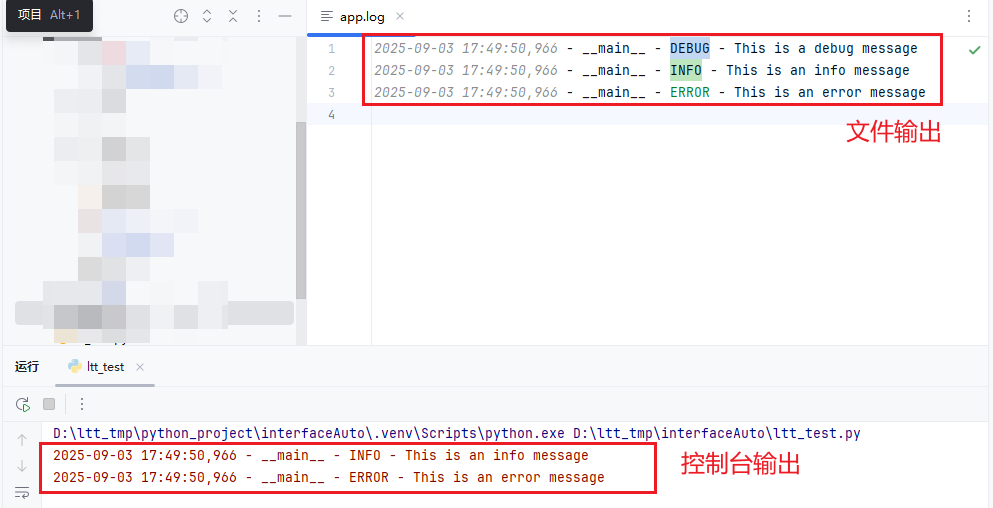
***在控制台和文件中同时输出日志***

# 创建Logger( Logger是程序员直接交互的对象。通常使用模块的名字(如__name__)作为logger的名字,这样可以方便地追踪日志来自哪个模块。也可以自定义名字)
logger = logging.getLogger(__name__)

# 设置logger的捕获级别(这里设置为DEBUG,意味着logger会捕获DEBUG及以上级别的日志)
logger.setLevel(logging.DEBUG)


# 创建Handler(Handler决定日志的输出目的地是哪里,StreamHandler是控制台,FileHandler是文件)
console_handler = logging.StreamHandler()   # 日志输出到控制台
console_handler.setLevel(logging.INFO)  # 控制台只输出INFO及以上级别的日志

file_handler = logging.FileHandler('app.log', encoding='utf-8') # 日志输出到文件
file_handler.setLevel(logging.DEBUG) # 文件记录DEBUG及以上级别的日志

# 创建Formatter并绑定到Handler(Formatter决定日志的输出格式)
formatter = logging.Formatter('%(asctime)s - %(name)s - %(levelname)s - %(message)s')
console_handler.setFormatter(formatter)
file_handler.setFormatter(formatter)


# 将Handler添加到Logger
logger.addHandler(console_handler)
logger.addHandler(file_handler)


# 记录日志
logger.debug("This is a debug message")
logger.info("This is an info message")
logger.error("This is an error message")
效果:
Pytest框架
pytest安装
pip install pytest
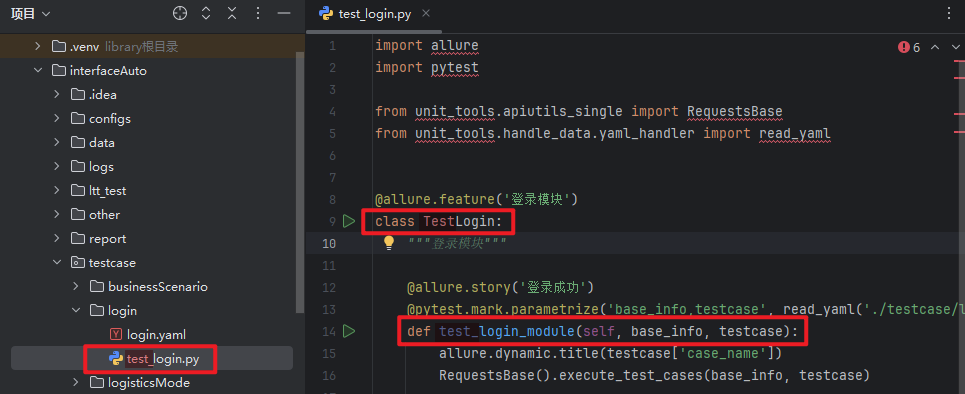
pytest编写规则
1、测试文件以test_开头(或者以_test结尾也行)
2、测试类以Test开头(注意类里面不能带有__init__初始化构造函数)
3、测试函数以test_开头
pytest运行方式
注!pytest中有很多的参数可用于控制测试的运行方式、输出格式等。如:
-s :输出调试信息,包括print信息
-v :显示更加详细的信息
-vs :把上面这两个参数一起使用
-k :指定运行的测试用例文件、目录等
-n :设置多线程并发执行测试用例文件
–reruns :设置测试用例失败重跑次数
-m :运行被特定标记的测试用例
一、命令行运行(一般用于调试)
1、查找并运行当前目录及其子目录中的所有以test_开头的文件
pytest
2、查找并运行指定目录及其子目录中的所有以test_开头的文件
pytest testcase/login # testcase/login为指定目录
3、运行指定文件
pytest testcase/login/test_login.py # testcase/login/test_login.py为指定文件
4、使用-k参数,匹配指定名称的目录、文件、函数并运行
1)匹配目录
pytest -k login # login为目录名
2)匹配文件
pytest -k test_login # test_login为文件名
3)匹配函数
pytest -k test_login_module # test_login_module为函数名
二、主函数运行(常用)
不指定参数和匹配项:
if __name__ == '__main__':
    pytest.main()
指定参数和匹配项:
if __name__ == '__main__':
    pytest.main(['-vs', '-k', 'test_add_user_01']) # -vs、-k是参数;test_add_user_01是想要匹配的名称
注!pytest运行时会自动读取配置文件:pytest.ini
pytest.ini是Pytest测试框架的配置文件,会在pytest运行时读取文件并应用其中的配置。一般放在项目的根目录下,文件名是固定写法,不可更改。
配置文件参数说明:
addopts:用于在运行测试时传递额外的命令行选项(比如之前提的-v、-s等)
testpaths:用于指定pytest在哪些目录中查找测试文件
python_files:用于指定测试文件的命名匹配模式
python_classes:用于指定测试类的命名匹配模式
python_functions:用于指定测试函数的命名匹配模式
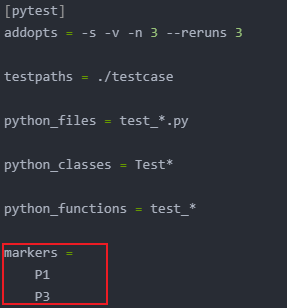
markers:用于注册自定义标记
例子:
[pytest]
addopts = -s -v -n 3 --reruns 3

testpaths = ./testcase

python_files = test_*.py

python_classes = Test*

python_functions = test_*

markers =
    P1
    P3
断言
相等断言:assert a == b
不等断言:assert a != b
真假断言:assert bool_value
成员断言:assert item in container
非成员断言:assert item not in container
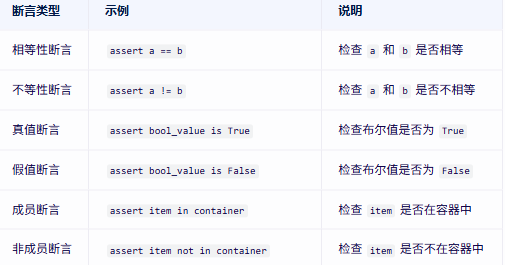
import pytest

class TestAssertResult:

    # 相等断言,判断两个值是否相等
    def test_assert_eq(self):
        exp = {"msg": "登录成功"}
        response = {"msg": "登录成功"}
        assert exp == response, '断言失败,它们不相等' #PASSED

    # 不相等断言,判断两个值是否不等
    def test_assert_nq(self):
        exp = {"msg": "登录成功"}
        response = {"msg": "登录成功"}
        assert exp != response, '断言失败,它们相等' #FAILED

    # 真值断言
    def test_assert_bool1(self):
        assert True is True, '真值断言失败' #PASSED

    # 假值断言
    def test_assert_bool2(self):
        assert True is False, '假值断言失败' #FAILED

    # 成员断言,检查 item 是否在容器中
    def test_assert_contains1(self):
        contains = "pytest"
        contains_lst = ['pytest', 'unittest', 'python']
        assert contains in contains_lst, '断言失败,contains没在contains_lst里' #PASSED

    # 非成员断言,检查 item 是否不在容器中
    def test_assert_contains2(self):
        contains = "pytest"
        contains_lst = ['pytest', 'unittest', 'python']
        assert contains not in contains_lst, '断言失败,contains在contains_lst里' #FAILED

if __name__ == '__main__':
    pytest.main()
pytest丰富的插件系统
一、pytest_xdist插件实现并发执行
安装插件:
pip install pytest-xdist
代码实现:
pytest.ini文件增加配置:

测试文件:
import pytest
from time import sleep

class TestLogin:

    def test_login_success(self):
        sleep(1)
        print('登录成功场景')

    def test_login_failed(self):
        sleep(1)
        print('登录失败场景')

    def test_login_error(self):
        sleep(1)
        print('登录错误场景')

if __name__ == '__main__':
    pytest.main()   # 效果:原本的3s的执行时间被缩短到了1s
二、pytest-rerunfailures插件实现失败测试用例重跑
安装插件:
pip install pytest-rerunfailures
代码实现:
pytest.ini文件增加配置:

测试文件:
import pytest

class TestLogin:

    def test_login_success(self):
        import random
        assert random.choice([True, False]), '测试失败'

if __name__ == '__main__':
    pytest.main() # 效果:若测试失败会重复执行,超过3次还没成功就不再执行了
三、pytest-ordering插件实现自定义测试用例的执行顺序
安装插件:
pip install pytest-ordering
代码实现:
使用@pytest.mark.run(order=N)
import pytest

class TestAddUser:

    @pytest.mark.run(order=3)
    def test_add_user_01(self):
        print("新增用户01")

    @pytest.mark.run(order=2)
    def test_add_user_02(self):
        print("新增用户02")

    @pytest.mark.run(order=1)
    def test_add_user_03(self):
        print("新增用户03")

if __name__ == '__main__':
    pytest.main() # 效果:执行顺序为新增用户03、新增用户02、新增用户01
pytest分组执行
步骤一:在pytest.ini文件中注册自定义标记
步骤二:代码中使用@pytest.mark.标记用例
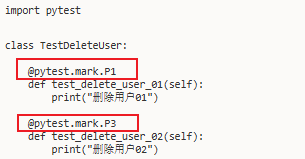
步骤三:在pytest.ini文件使用-m执行标记的那组测试用例
执行单组测试用例(下图表示只执行标记为P1的)

执行多组测试用例(下图表示只执行标记为P1或P3的)

pytest跳过执行

import pytest

class TestLogin:

    @pytest.mark.skip
    def test_login_failed(self):
        print('登录失败场景') # SKIPPED

    num = 5
    @pytest.mark.skipif(num == 5, reason="符合表达式条件,所以此用例跳过")
    def test_login_error(self):
        print('登录错误场景') # SKIPPED

    @pytest.mark.xfail
    def test_login_except(self):
        assert 1 == 2 # XFAIL

if __name__ == '__main__':
    pytest.main()
参数化
pytest使用@pytest.mark.parametrize装饰器实现参数化
语法:
@pytest.mark.parametrize("params1,params2.....", iterable)
参数:
"params1,params2....."用于指定测试函数的参数名称
iterable是可迭代的对象,如:列表、元组、字典等
测试函数接收的参数名必须要与"params1,params2....."保持一致,参数个数也要保持一致
import pytest

class TestParameter:

    # 可迭代对象为列表(传递多个参数)
    @pytest.mark.parametrize('username,password',
                             [('test01', 'password01'), ('test02', 'password02'), ('test03', 'password03')])
    def test_login01(self, username, password):
        print(username, password) # 函数执行了3次,传参分别为:test01 password01、test02 password02、test03 password03

    # 可迭代对象为列表(传递一个参数)
    @pytest.mark.parametrize('username', ['test01', 'test02', 'test03'])
    def test_login02(self, username):
        print(username) # 函数执行了3次,传参分别为:test01、test02、test03


    # 可迭代对象为元组
    @pytest.mark.parametrize('username', ('test01', 'test02', 'test03'))
    def test_login_03(self, username):
        print(username) # 函数执行了3次,传参分别为:test01、test02、test03


    # 可迭代对象为字典
    @pytest.mark.parametrize("test_data", [
        {"username": "test01", "password": "pwd01"},
        {"username": "test02", "password": "pwd02"},
    ])
    def test_login(self,test_data):
        print(test_data["username"],test_data["password"]) # 函数执行了2次,传参分别为:{"username": "test01", "password": "pwd01"}、{"username": "test02", "password": "pwd02"}


if __name__ == '__main__':
    pytest.main()
前后置处理
一、setup_method、teardown_method、setup_class、teardown_class
setup_method、teardown_method用于函数级别的前后置处理:
import pytest

class TestSetup:

    def setup_method(self):
        print('所有测试函数执行前先执行这个操作')

    def test_case_01(self):
        print('这个是第一个测试函数')

    def test_case_02(self):
        print('这个是第二个测试函数')

    def test_case_03(self):
        print('这个是第三个测试函数')

    def teardown_method(self):
        print('所有测试函数执行结束后先执行这个操作')

if __name__ == '__main__':
    pytest.main() # 效果是每个测试函数开始和结束时都会执行一次前后置。共执行了3次。
setup_class、teardown_class用于类级别的前后置处理:
import pytest

class TestSetup:

    def setup_class(self):
        print('在测试类执行前先执行此方法')

    def test_case_01(self):
        print('这个是第一个测试函数')

    def test_case_02(self):
        print('这个是第二个测试函数')

    def test_case_03(self):
        print('这个是第三个测试函数')

    def teardown_class(self):
        print('在测试类执行结束后先执行此方法')

if __name__ == '__main__':
    pytest.main()  # 效果是每个测试类开始和结束时都会执行一次前后置。共执行了1次。
二、@pytest.fixture(常用)
可用@pytest.fixture装饰器定义fixture函数,以便在测试函数执行前后进行一些初始化和清理操作,以及共享状态和资源等
语法:
@pytest.fixture(scope="", autouse="", params="", ids="", name="")
def 函数名():
    前置操作
    yield
    后置操作
注意:
scope、autouse、params、ids、name为fixture函数可以携带的参数,可以没有。
scope:控制fixture的作用范围。可选值有:function、class、session、module,默认function
function:每个测试函数运行前后各执行一次
class:每个测试类运行前后各执行一次
module:每个 .py文件运行前后各执行一次
session:整个测试会话(所有文件)运行前后各执行一次
autouse:用于指定是否自动应用fixture而无需在测试函数中显示调用。默认为False
params:允许为fixture定义多个参数值,以便在测试函数中使用不同的参数组合进行测试
ids:为参数化的fixture提供自定义的标识,用于在测试报告中更加清晰显示参数,需要跟params参数结合起来使用
name:自定义fixture的名称
示例:
import pytest

# 定义不带参数的fixture
@pytest.fixture()
def set_and_teardown01():
    print('前置操作')
    yield
    print('后置操作')

# 定义带参数的fixture
@pytest.fixture(scope="function", autouse=False, params=['北京', '成都', '重庆'], ids=['BJ', 'CD', 'CQ'], name='setValue')
def set_and_teardown02(request):
    return request.param


class TestFixture:


    def test_case_01(self, set_and_teardown01):
        print('这个是第一个测试函数')


    def test_case_02(self, setValue):
        print('这个是第二个测试函数')
        print(f'获取到的值为:{setValue}')


    def test_case_03(self):
        print('这个是第三个测试函数')


if __name__ == '__main__':
    pytest.main()
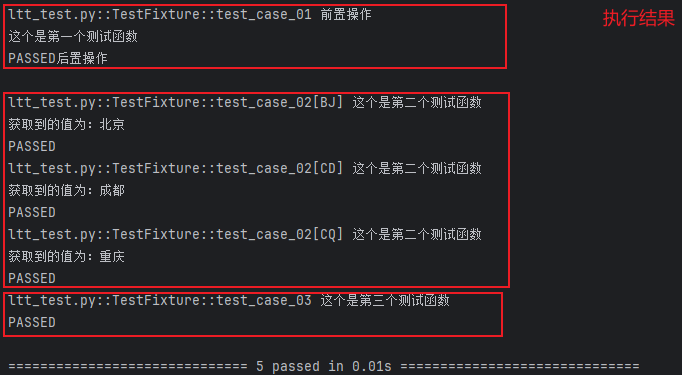
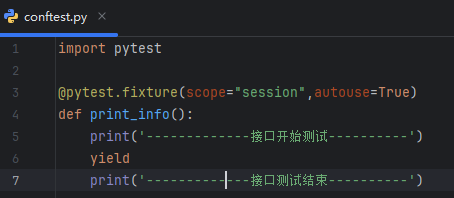
三、@pytest.fixture、conftest.py结合(常用)
可将@pytest.fixture和conftest.py结合来实现全局的前后置应用
1、conftest.py是一个单独存放的夹具配置文件,名称是固定写法不能更改
2、可以在项目中的不同目录创建多个conftest.py,每个conftest.py文件都会对其所在的目录及其子目录下的.py文件生效
示例:
钩子函数
钩子函数是 Pytest 框架中的回调机制,允许用户在测试执行的特定时刻插入自定义代码。这些函数通常在 conftest.py 文件中定义,Pytest 会在特定时刻自动调用它们。
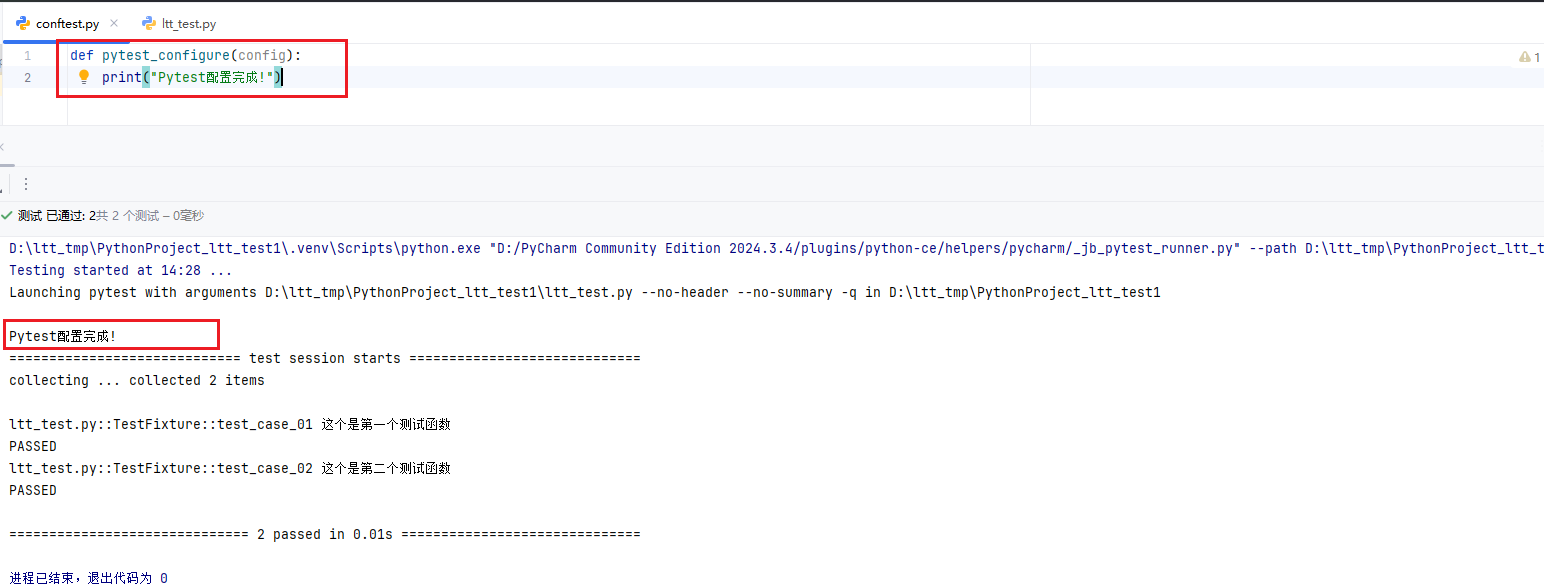
pytest_configure(config)
在测试配置初始化后、收集测试项之前被调用。这个钩子函数提供了在测试运行前进行全局配置和初始化的机会。
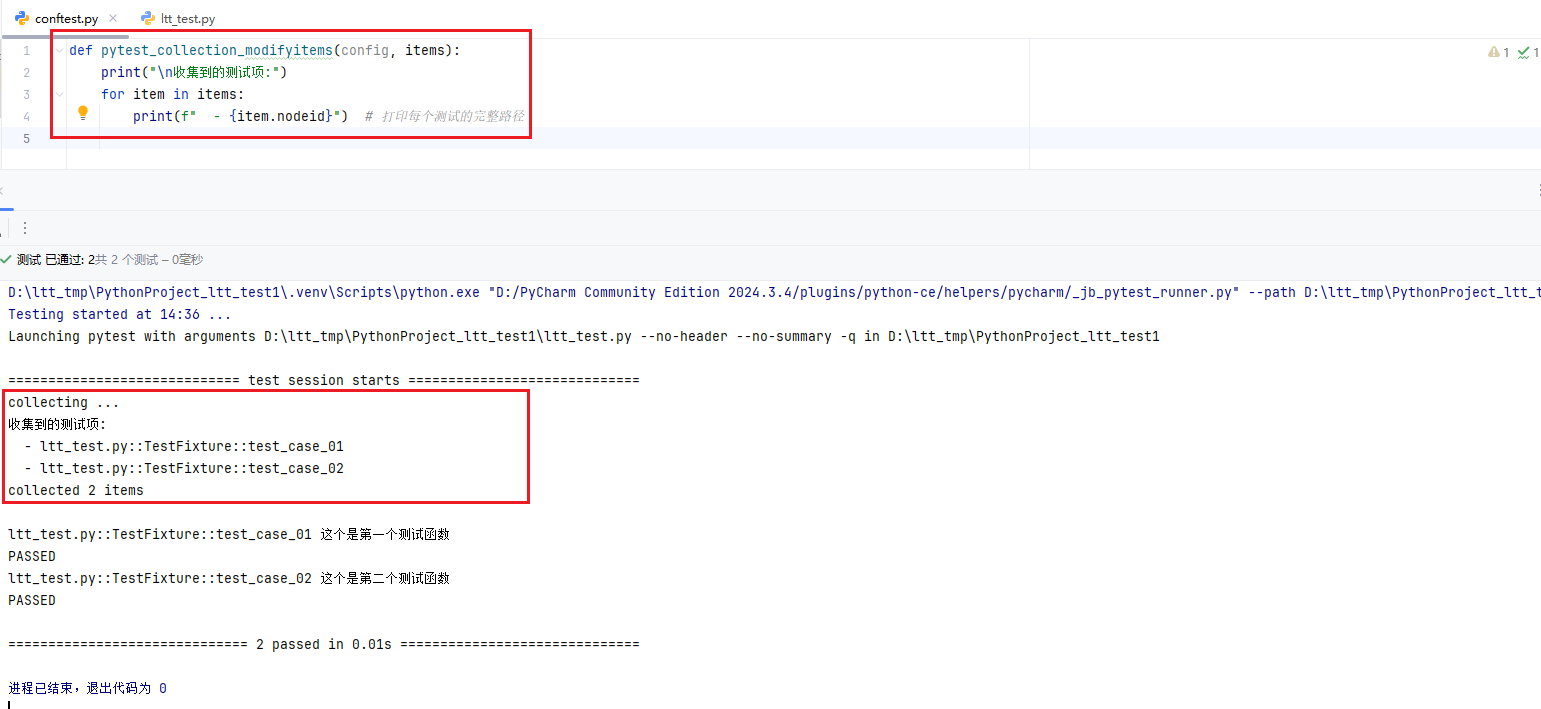
pytest_collection_modifyitems(config, items)
在收集测试项之后、测试执行前被调用。可用于修改、排序收集到的测试用例。
pytest_runtest_protocol(item, nextitem)
在每个测试项执行前后调用。
pytest_fixture_setup(fixturedef, request)
在每个fixture之前调用。
pytest_fixture_post_finalizer(fixturedef, request)
在每个fixture的最终清理阶段调用
pytest_runtest_makereport(item, call, report)
在每个测试用例运行结束后调用。常用来自定义测试报告,比如在用例失败时截图或者打印日志。
pytest_terminal_summary(terminalreporter, exitstatus, config)
在所有测试执行完毕后调用。用于自定义终端输出的摘要信息。
Allure
Allure是一个轻量级、灵活、支持多语言的测试报告生成工具
使用Allure生成测试报告
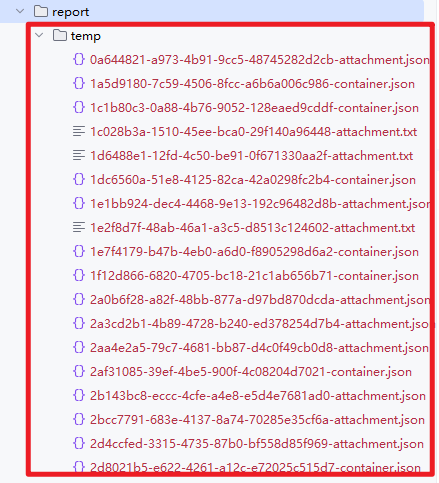
步骤一:生成测试报告原始数据
在Pytest的配置文件pytest.ini中加参数选项: --alluredir=原始数据存放路径 、 --clean-alluredir
这样运行pytest的时候就会自动生成原始数据↓
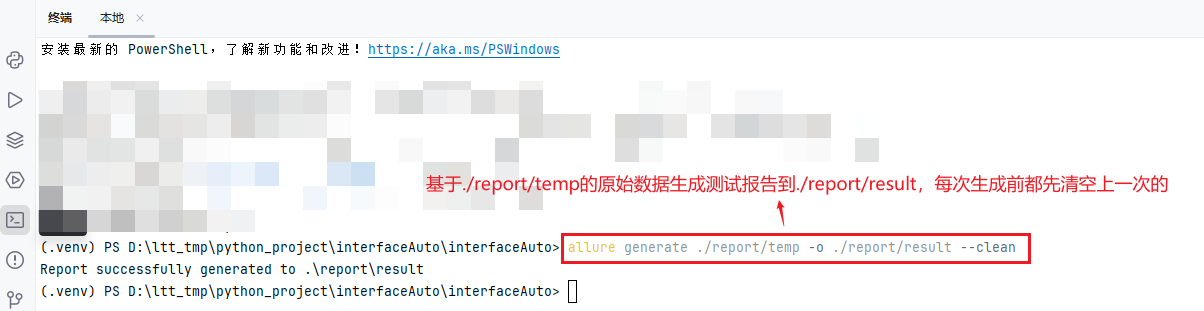
步骤二:基于原始数据生成测试报告
命令行运行:allure generate 原始数据存放路径 -o 测试报告存放路径 --clean
步骤三:查看报告
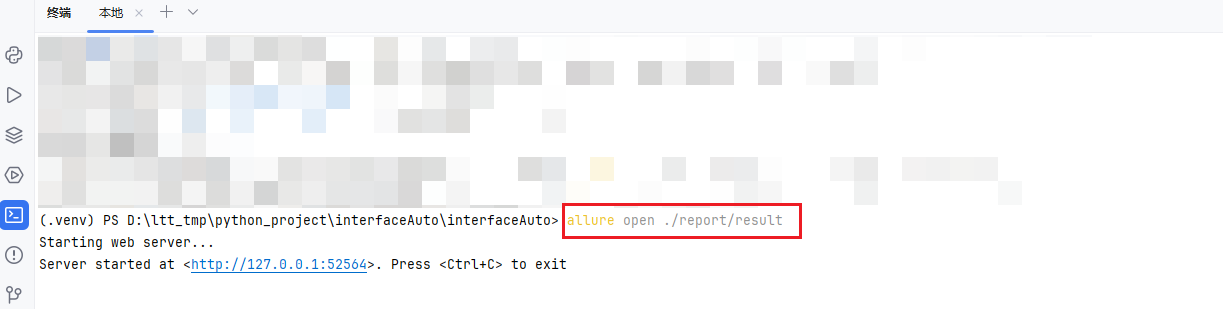
方式一:命令行运行allure open 测试报告存放路径
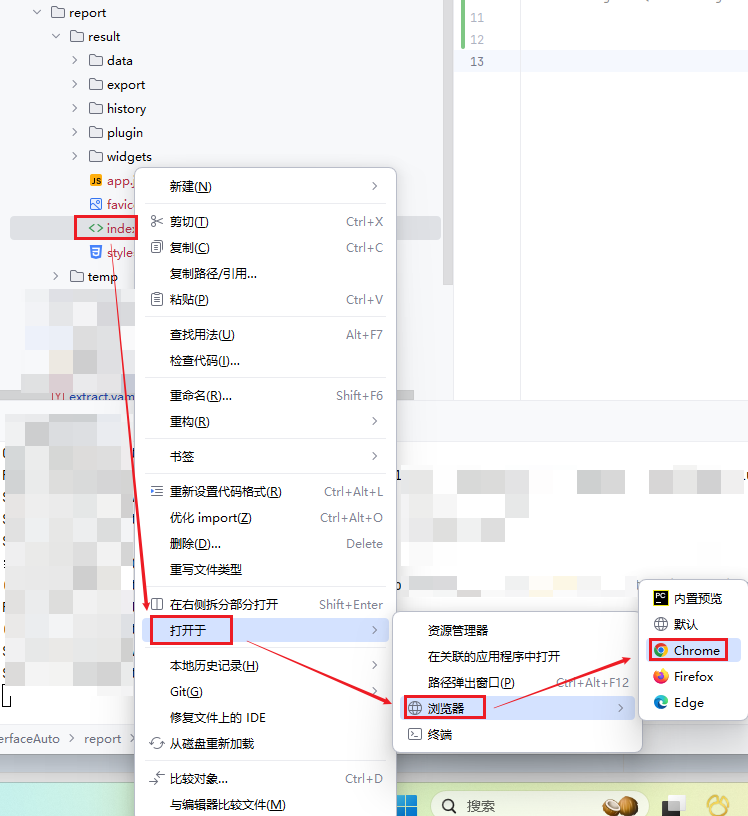
方式二:找到测试报告存放位置,手工打开
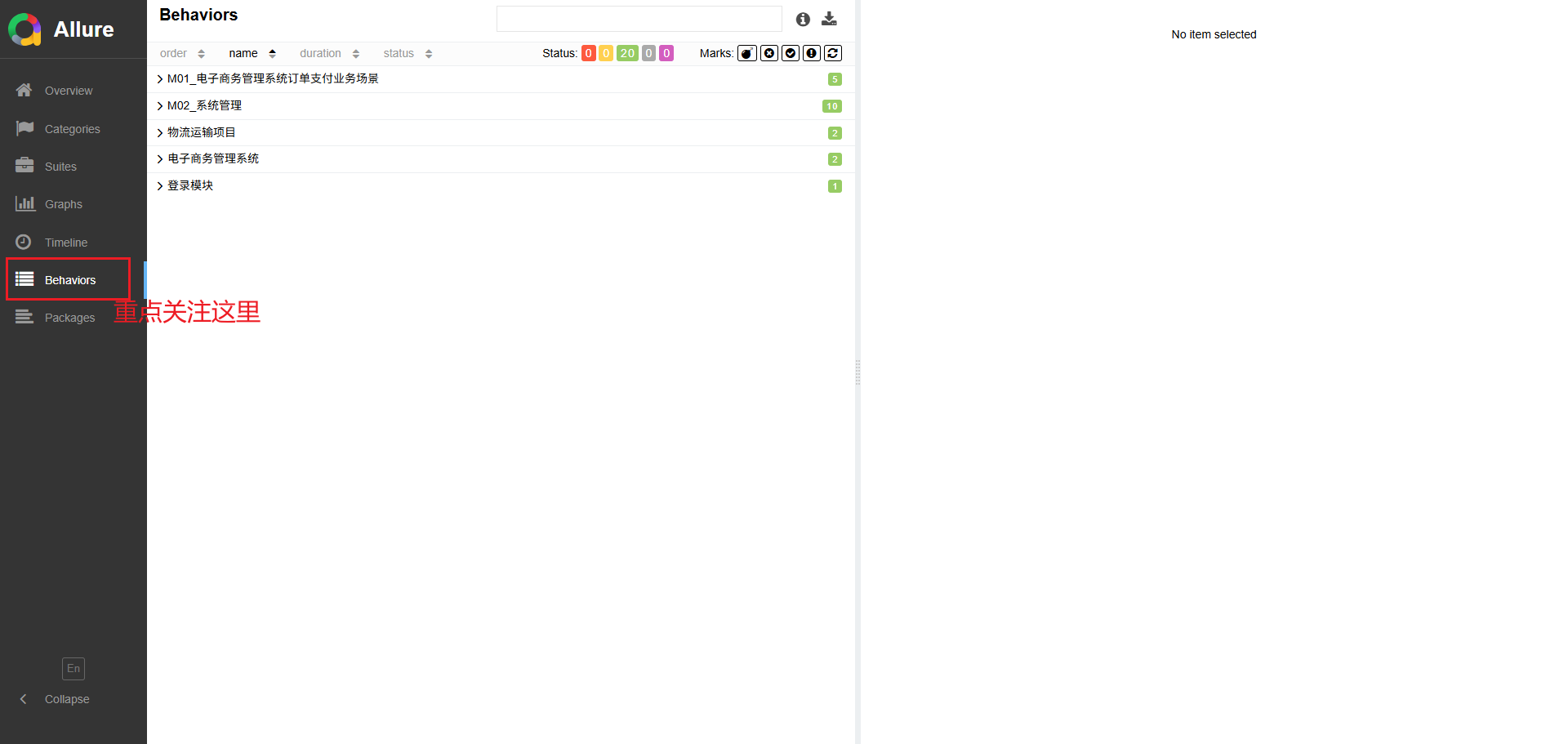
效果:
使用Allure常用功能使报告内容更丰富
一、使用注解
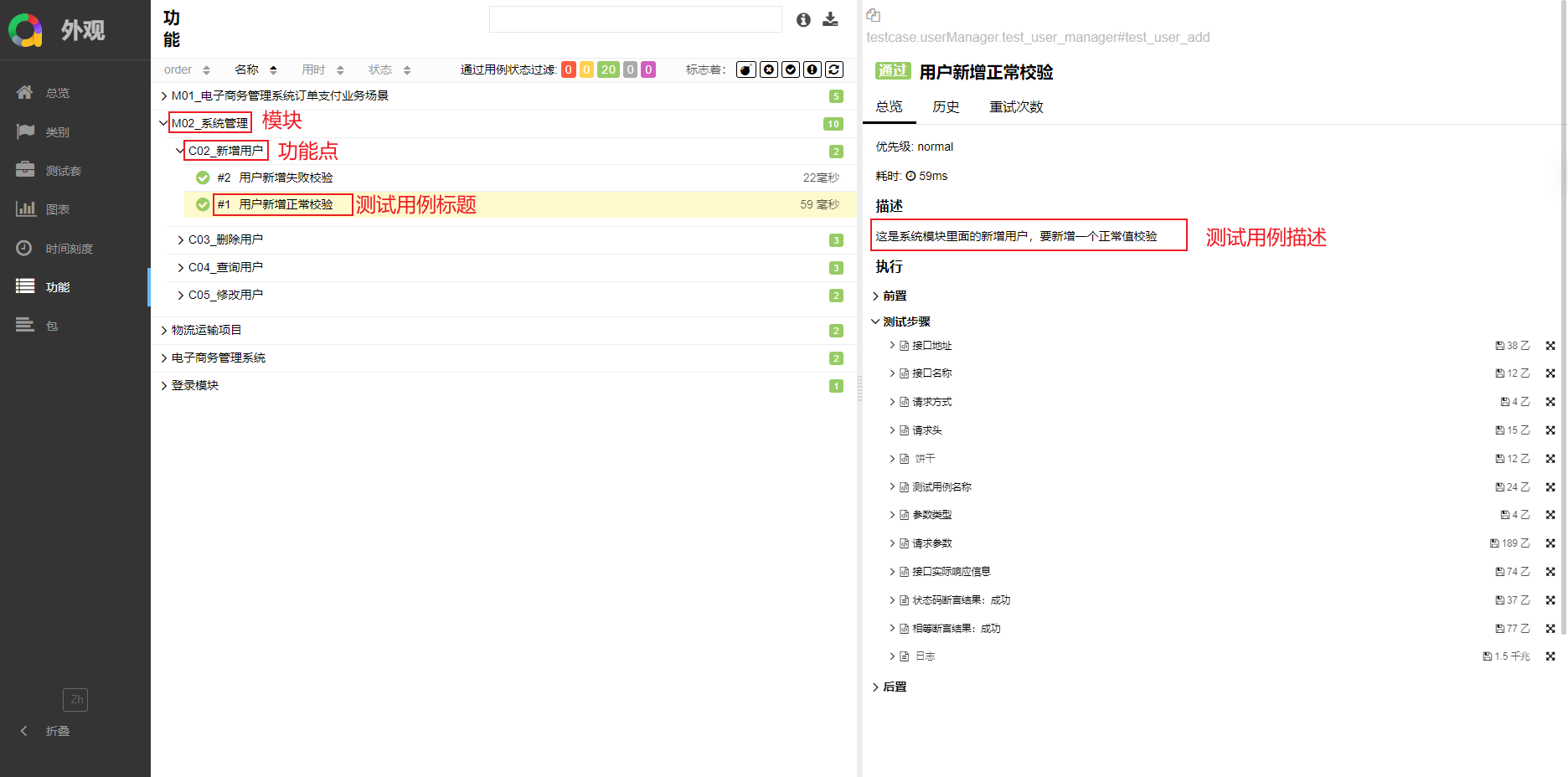
@allure.feature
用来定义测试用例所属的功能特性,可以在类方法上面使用,指明模块
如@allure.feature('系统管理')
@allure.story
用来定义测试用例所属的用户故事,可以在测试函数方法上使用,指明功能点
如@allure.story('新增用户')
@allure.title
用来定义测试用例标题
如@allure.title('新增用户(用户名和密码输入正确)')
@allure.description
用来定义测试用例的描述
如@allure.description('这是系统管理模块里面的新增用户功能,输入正确的用户和密码,验证能否成功新建')
在测试报告中的对应位置如下:
二、使用API函数(常用)
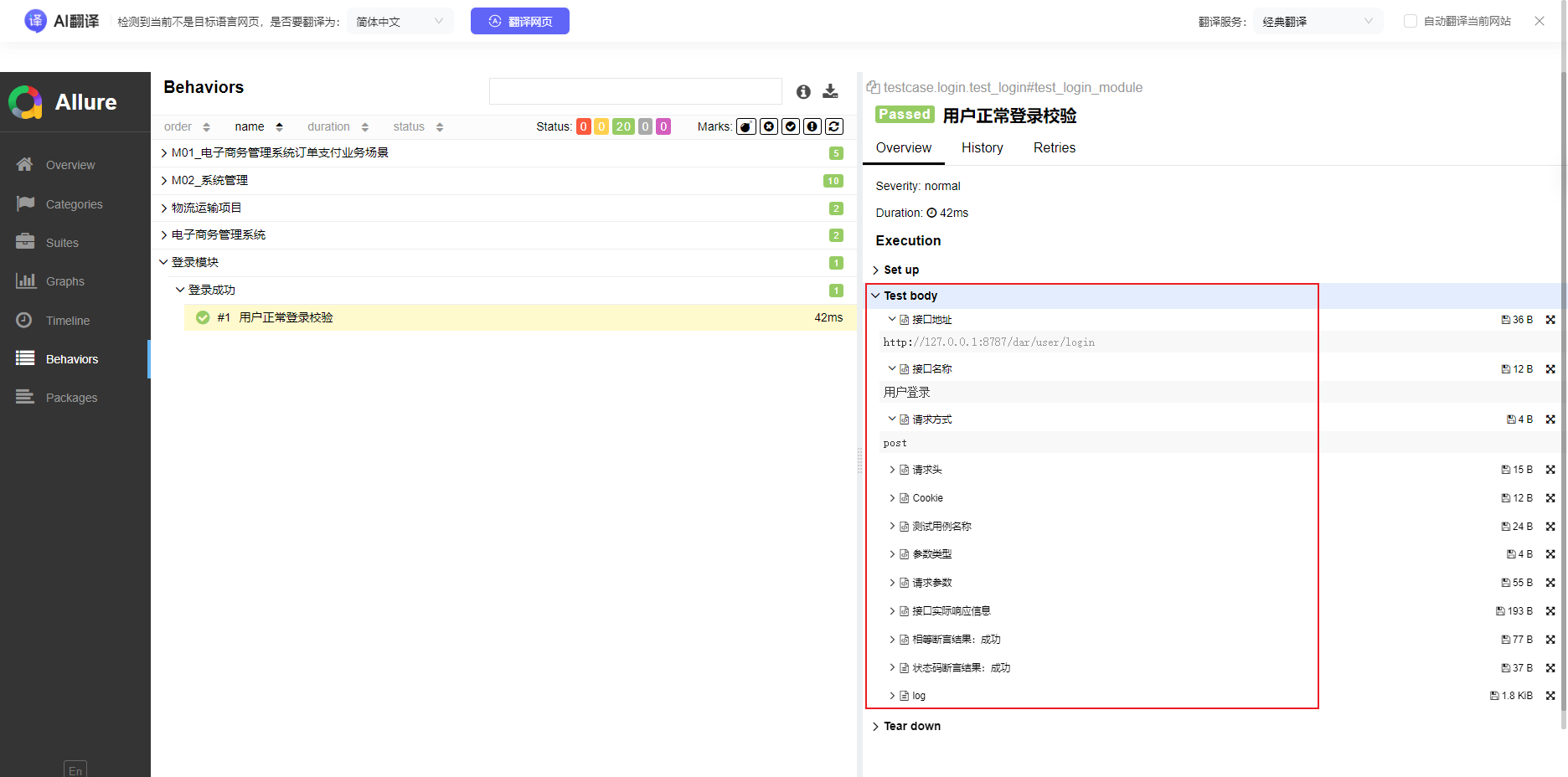
allure.attach(body,name,attachment_type)
用来在报告中附加额外的信息,如文本、图片或文件
body:附件内容 。
name:附件标题。
attachment_type:附件类型。常用TEXT、JSON、PNG等例:
allure.attach("url、传参、token等信息", name="请求信息", attachment_type=allure.attachment_type.TEXT
在测试报告中的对应位置如下:
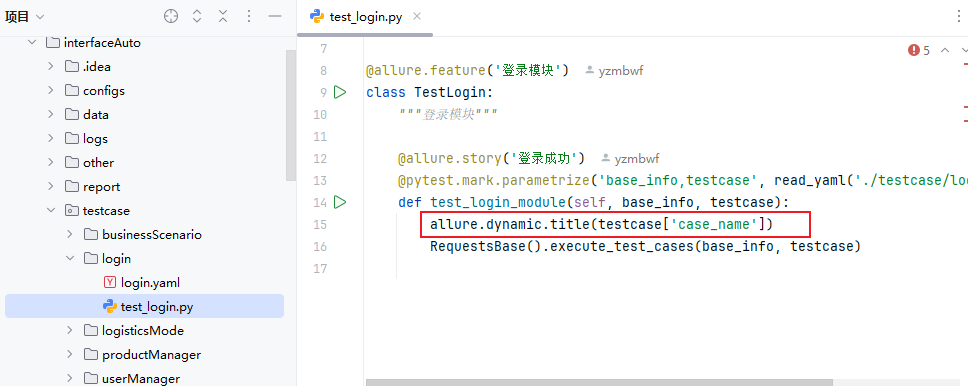
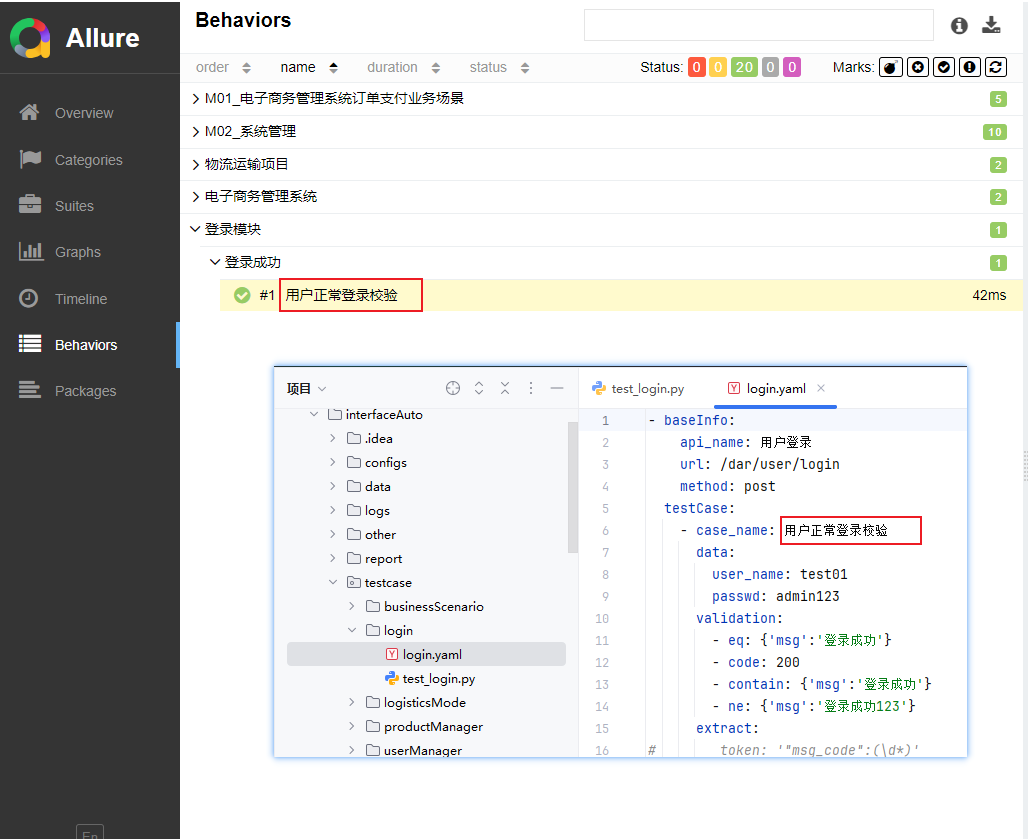
allure.dynamic.title
用来动态生成测试用例标题,通过从yaml文件获取接口名称而不需要通过@allure.title方式写死标题
配置Allure测试报告总览的环境信息
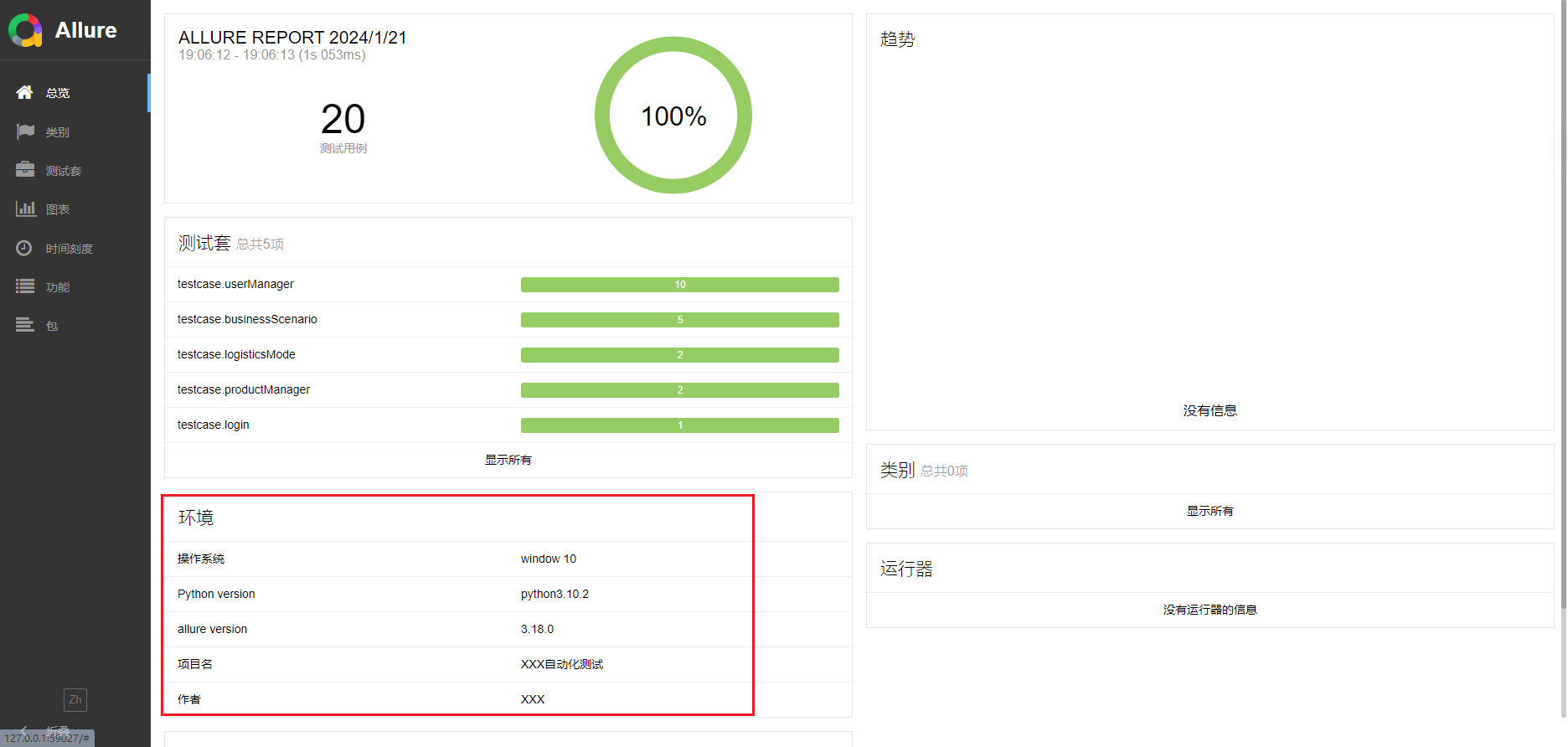
Allure主要通过读取测试报告原始数据文件夹下的名为environment.xml 的配置文件来展示环境信息。
但由于每次执行前都会清空原始数据,所以建议先在根目录下创建该文件,然后在生成测试报告原始数据后,通过代码,复制该文件到原始数据存放目录下。
environment.xml文件常见内容:
<environment>
    <parameter>
        <key>操作系统</key>
        <value>window 10</value>
    </parameter>
    <parameter>
        <key>Python version</key>
        <value>python3.10.2</value>
    </parameter>
    <parameter>
        <key>allure version</key>
        <value>3.18.0</value>
    </parameter>
    <parameter>
        <key>项目名</key>
        <value>XXX自动化测试</value>
    </parameter>
    <parameter>
        <key>作者</key>
        <value>XXX</value>
    </parameter>
</environment>
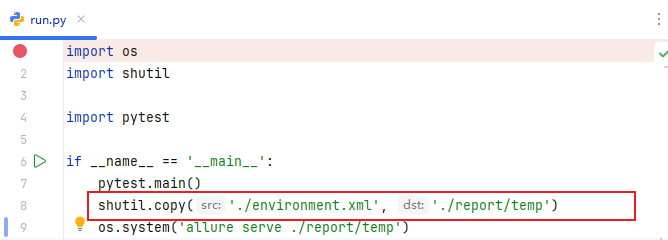
在生成原始数据后,生成测试报告前,加代码逻辑:
shutil.copy('./environment.xml', '原始数据存放路径')
效果:






 扫一扫
扫一扫


 811
811

 被折叠的 条评论
为什么被折叠?
被折叠的 条评论
为什么被折叠?
 到【灌水乐园】发言





