


 本文介绍了如何在华为路由器上配置端口映射和NAT,包括设置接口IP地址、发布默认路由、用户接口认证、进行端口映射测试,以及通过telnet验证连接。详细步骤包括了在路由器ar1和ar2上的配置,确保外部网络可以通过特定端口访问内部网络的设备。
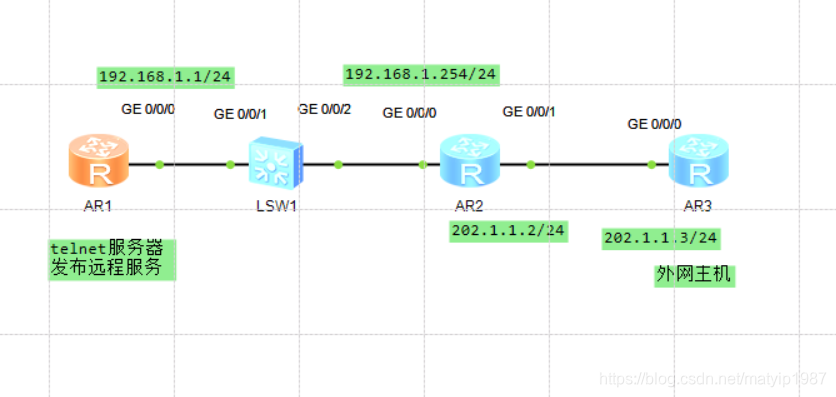
华为路由器端口映射
[ar1]interface GigabitEthernet 0/0/0
[ar1-GigabitEthernet0/0/0]ip address 192.168.1.1 24
[ar1]ip route-static 0.0.0.0 0 192.168.1.254
*//发布一条默认路由出去
[ar1]user-interface vty 0 4
[ar1-ui-vty0-4]authentication-mode password
[ar1-ui-vty0-4]authentication-mode password
Please configure the login password (maximum length 16):huawei@123
*//你可以设置ftp也可以设置telnet,密码我设置为huawei@123
[ar2]interface GigabitEthernet 0/0/0
[ar2-GigabitEthernet0/0/0]ip address 192.168.1.254 24
[ar2]ping 192.168.1.1
PING 192.168.1.1: 56 data bytes, press CTRL_C to break
Reply from 192.168.1.1: bytes=56 Sequence=1 ttl=255 time=110 ms
Reply from 192.168.1.1: bytes=56 Sequence=2 ttl=255 time=40 ms
Reply from 192.168.1.1: bytes=56 Sequence=3 ttl=255 time=40 ms
Reply from 192.168.1.1: bytes=56 Sequence=4 ttl=255 time=50 ms
*//习惯配置
 最低0.47元/天 解锁文章






 扫一扫
扫一扫


 4983
4983

 被折叠的 条评论
为什么被折叠?
被折叠的 条评论
为什么被折叠?
 到【灌水乐园】发言





