




目录
1. 概述
fork创建一个新的进程,原进程称为父进程,新的进程称为子进程。fork创建进程后,函数在子进程返回0值,在父进程中返回子进程的PID。两个进程都有自己的数据段、BSS段、栈、堆等资源,父进程间不共享这些存储空间,而代码段为父进程和子进程共享。父进程和子进程各自从fork函数后开始执行代码,在创建子进程后,子进程复制了父进程打开的文件描述符,但是不复制文件锁。子进程未处理的闹钟定时被清除,子进程不继承父进程的未决信号集。
函数表头文件:
#include<unistd.h>函数原型:
/* Clone the calling process, creating an exact copy.
   Return -1 for errors, 0 to the new process,
   and the process ID of the new process to the old process.  */
extern __pid_t fork (void) __THROWNL;
返回值,如果失败,则返回-1,如果成功,则返回进程PID。
查看进程ID的函数:
pid_t getpid(void);
pid_t getppid(void);
2. 查询当前进程ID
我们开始编写一个代码看看,首先创建一个fork_test.c文件用来存放我们后续工程,我们先来查看一下当前进程:
#include<stdio.h>
#include<stdlib.h>
#include<unistd.h>

int main(int argc, char const *argv[])
{
    printf("当前进程的ID为:%d\n",getpid());

    return 0;
}
编写一个Makefile文件:
fork_test :fork_test.c
	-$(CC) -o $@ $^
	-./$@
	-rm ./$@
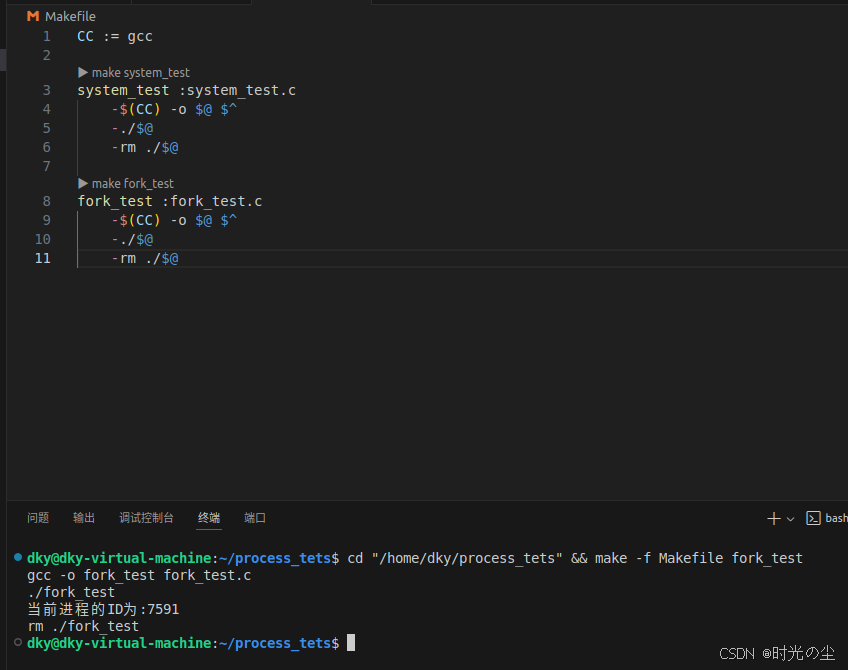
可以看到此时的进程ID:
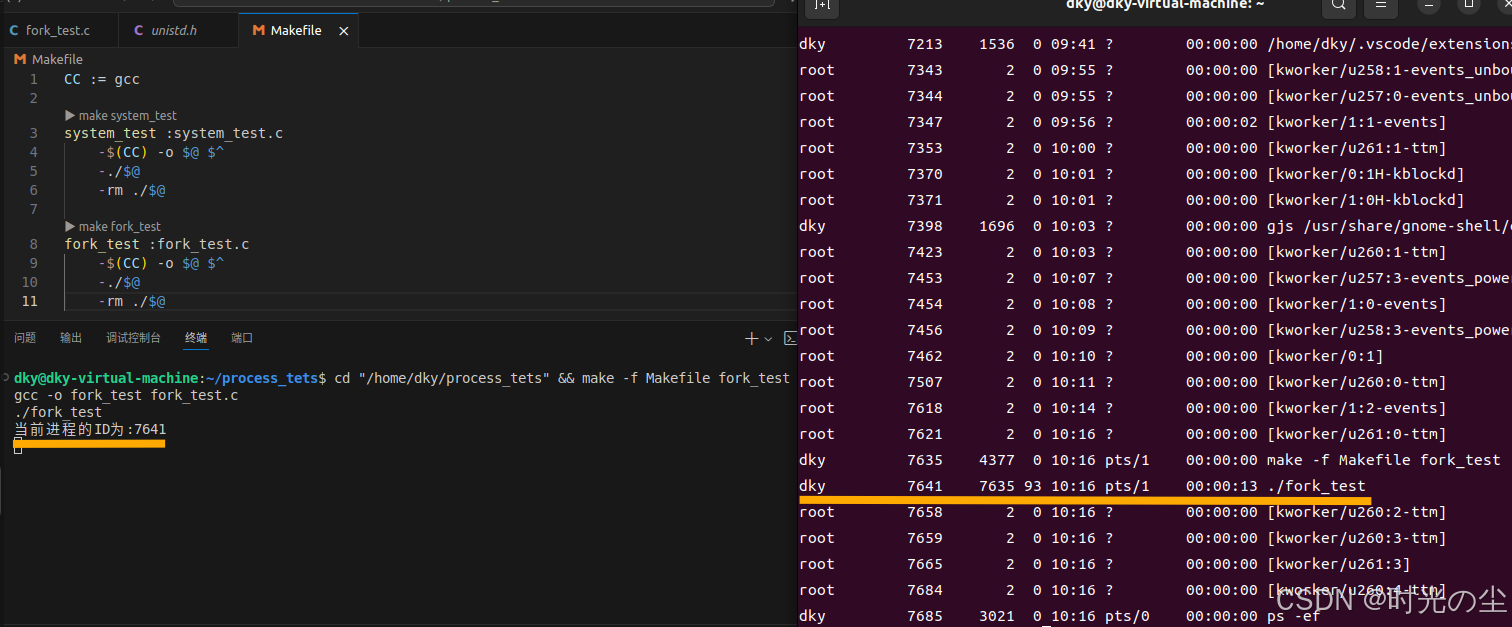
我们如果想要通过终端命令查看当前进程,则需要再主函数添加一个 while() 循环,不要让进程结束过快,否则看不见:
#include<stdio.h>
#include<stdlib.h>
#include<unistd.h>

int main(int argc, char const *argv[])
{
    printf("当前进程的ID为:%d\n",getpid());

    while(1)
    {

    }

    return 0;
}
3. fork函数的运用
我们上面知道,fork创建一个新的进程,原进程称为父进程,新的进程称为子进程。fork创建进程后,函数在子进程返回0值,在父进程中返回子进程的PID:
#include<stdio.h>    // 标准输入输出
#include<stdlib.h>   // 标准库函数
#include<unistd.h>   // Unix 标准函数(包含 fork(), getpid(), getppid())
#include <sys/types.h> // 系统类型定义(包含 pid_t)

int main(int argc, char const *argv[])
{
    printf("当前进程的ID为:%d\n",getpid());

    pid_t pid = fork();

    if(pid == -1)
    {
        printf("子进程创建失败!\n");
        return 1;
    }
    else if(pid == 0)//这里的代码都是新的子进程的
    {
        sleep(1); // 让父进程先执行
        printf("子进程创建创建成功%d,它的父进程为%d\n",getpid(),getppid());
    }
    else//这里的代码都是父进程的
    {
        sleep(2); // 等待子进程执行
        printf("我是父进程%d,我创建的子进程为%d\n",getpid(),pid);
    }

    return 0;
}
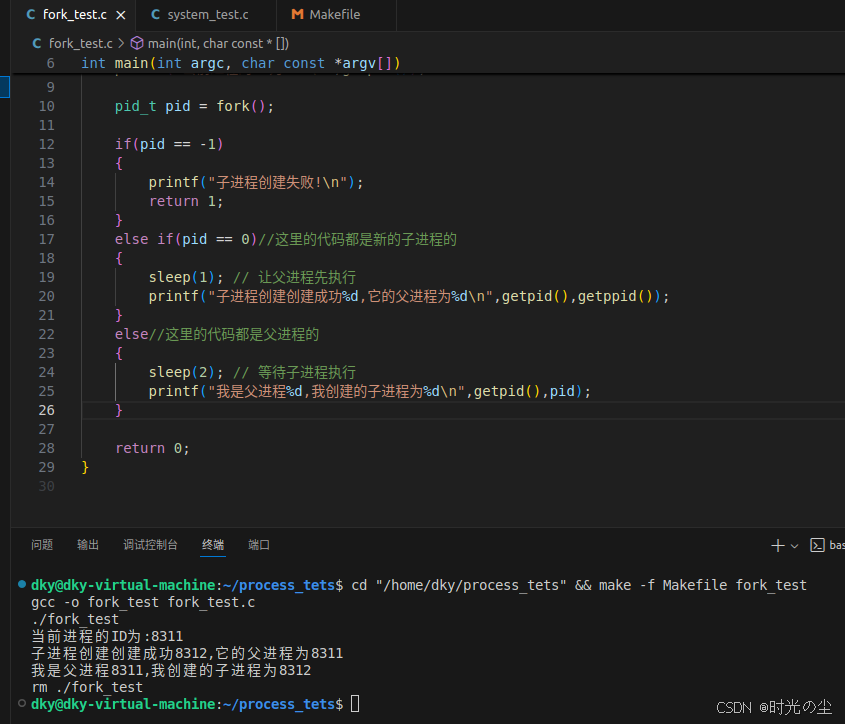
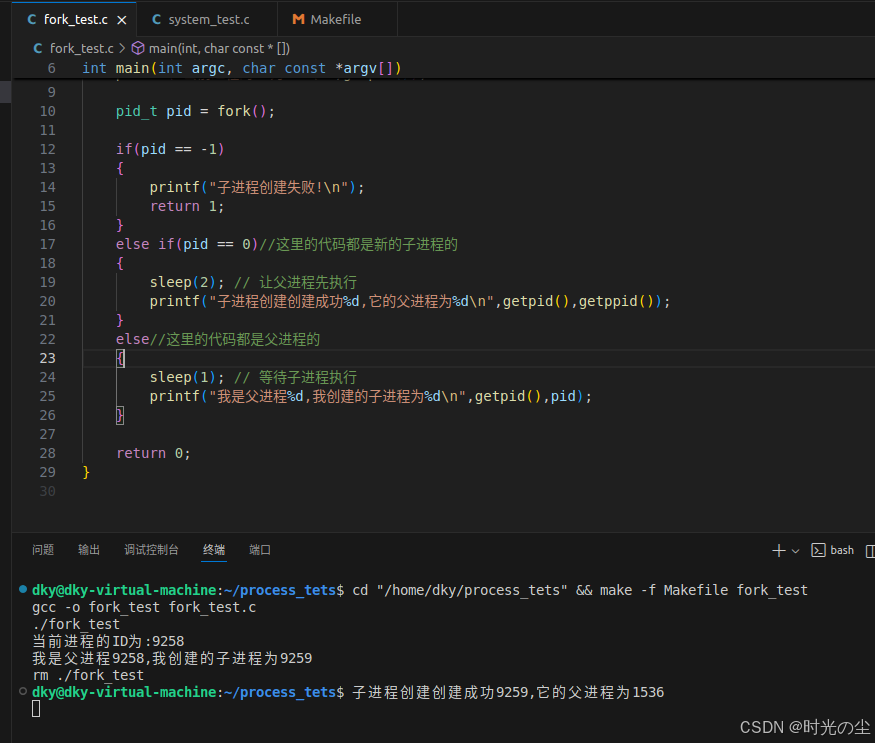
这里需要注意,代码中需要加入sleep进行一个延时,如上述,子进程在休眠1秒期间,父进程有足够时间执行并退出,子进程醒来时父进程还在,所以能正确显示父进程ID。
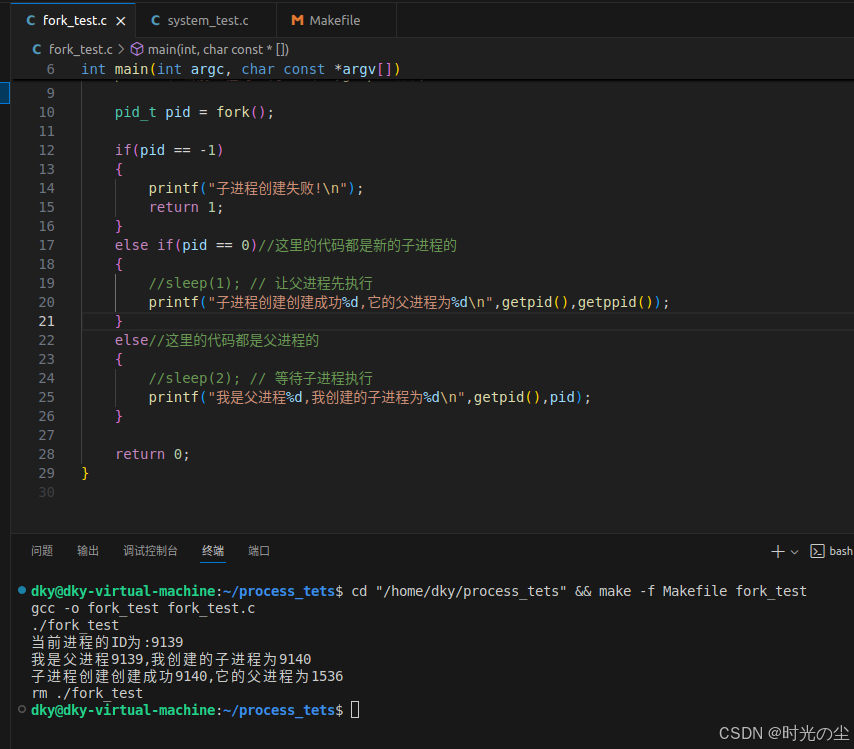
如果不加延时,或者父进程比子进程执行过快,就会出现,父进程执行太快,在子进程输出之前就退出了,子进程变成了"孤儿进程",被 init/systemd 进程收养:
我们也可以通过更改延时看一下:
我们可以创建一个for循环用来打印数据,去观察父进程和子进程的并发执行:
#include<stdio.h>    // 标准输入输出
#include<stdlib.h>   // 标准库函数
#include<unistd.h>   // Unix 标准函数(包含 fork(), getpid(), getppid())
#include <sys/types.h> // 系统类型定义(包含 pid_t)

int main(int argc, char const *argv[])
{
    printf("当前进程的ID为:%d\n",getpid());

    pid_t pid = fork();

    if(pid == -1)
    {
        printf("子进程创建失败!\n");
        return 1;
    }
    else if(pid == 0)//这里的代码都是新的子进程的
    {
        int i,a=5;
        for(i = 0;i < 5;i++)
        {
            printf("son: %d\n",i);
            sleep(1); // 让父进程先执行
        }

        printf("子进程创建创建成功%d,它的父进程为%d\n",getpid(),getppid());
    }
    else//这里的代码都是父进程的
    {
        int i,a=10;
        for(i = 5;i<a;i++)
        {
            printf("father: %d\n",i);
            sleep(2); // 等待子进程执行
        }
        printf("我是父进程%d,我创建的子进程为%d\n",getpid(),pid);
    }

    return 0;
}
运行结果:
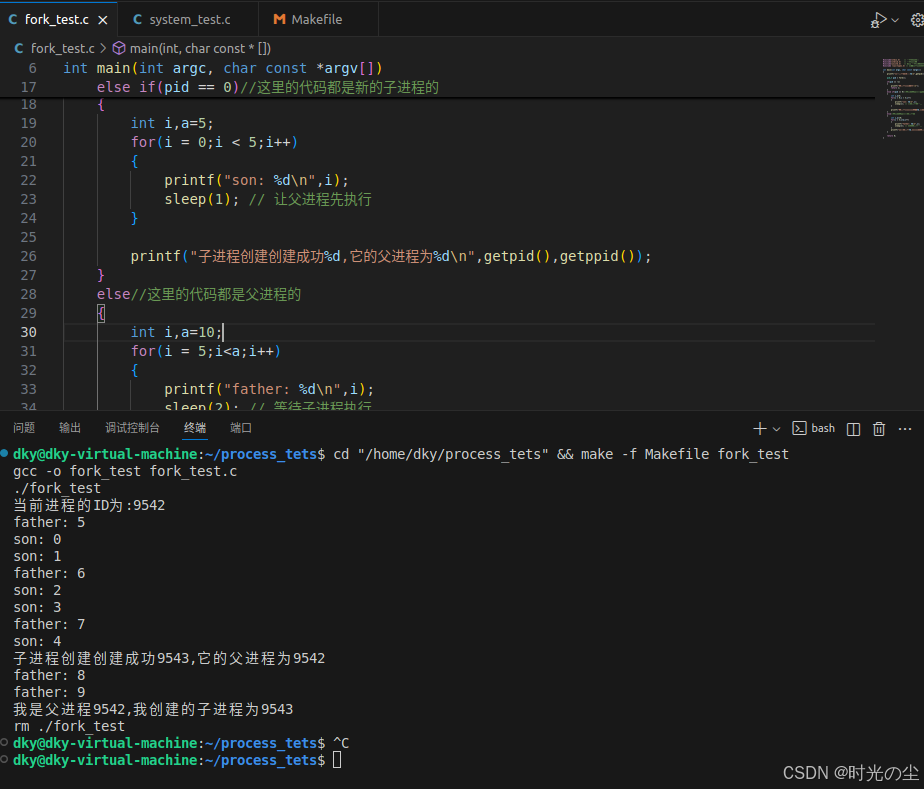
我们可以将上述结果拆分如下分析:
时间(秒)  父进程(PID:9542)       子进程(PID:9543)
--------------------------------------------------
t=0       father: 5             son: 0
t=1       (休眠中)               son: 1
t=2       father: 6             son: 2
t=3       (休眠中)               son: 3
t=4       father: 7             son: 4
t=5       (休眠中)               子进程创建成功...
t=6       father: 8             (子进程结束)
t=7       (休眠中)
t=8       father: 9
t=9       我是父进程...
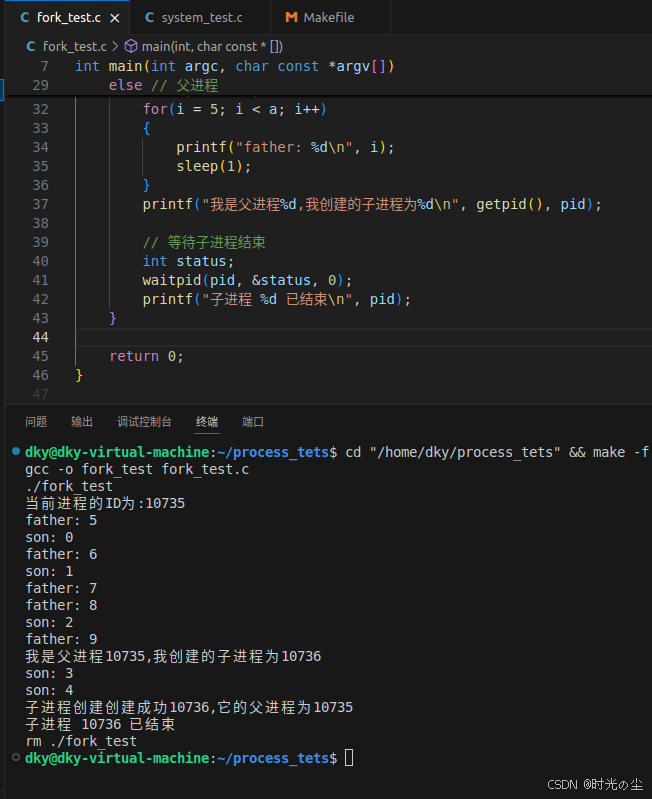
更加正确的做法应当调用waitpid函数进行等待子进程的结束,而不是一味的通过时间进行判断,如:
#include<stdio.h>    // 标准输入输出
#include<stdlib.h>   // 标准库函数
#include<unistd.h>   // Unix 标准函数(包含 fork(), getpid(), getppid())
#include <sys/types.h> // 系统类型定义(包含 pid_t)
#include <sys/wait.h>  // 添加 waitpid 所需的头文件

int main(int argc, char const *argv[])
{
    printf("当前进程的ID为:%d\n",getpid());

    pid_t pid = fork();

    if(pid == -1)
    {
        printf("子进程创建失败!\n");
        return 1;
    }
    else if(pid == 0)//这里的代码都是新的子进程的
    {
        int i,a=5;
        for(i = 0;i < 5;i++)
        {
            printf("son: %d\n",i);
            sleep(1); // 让父进程先执行
        }

        printf("子进程创建创建成功%d,它的父进程为%d\n",getpid(),getppid());
    }
    else // 父进程
    {
        int i, a = 10;
        for(i = 5; i < a; i++)
        {
            printf("father: %d\n", i);
            sleep(2);
        }
        printf("我是父进程%d,我创建的子进程为%d\n", getpid(), pid);

        // 等待子进程结束
        int status;
        waitpid(pid, &status, 0);
        printf("子进程 %d 已结束\n", pid);
    }

    return 0;
}
这样做的好处就是可以防止孤儿进程的产生,假如我们将子进程的时间延长,父进程的时间缩短,如果不通过waitpid等待子进程结束,那么自己成就会变成孤儿进程:
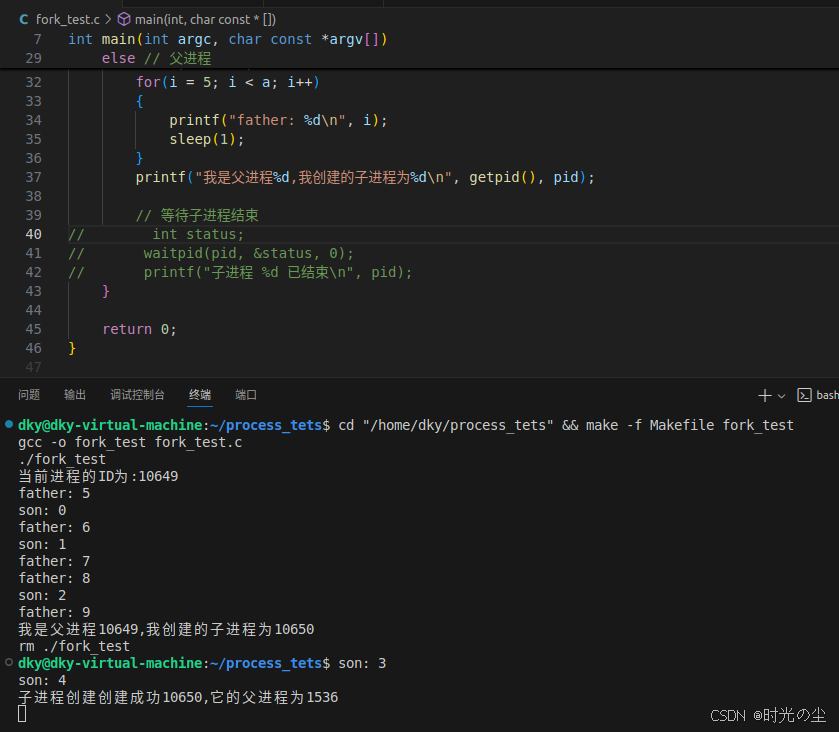
而如果我们加上,父进程需要等待子进程结束而结束:
4. 延伸--验证存储空间
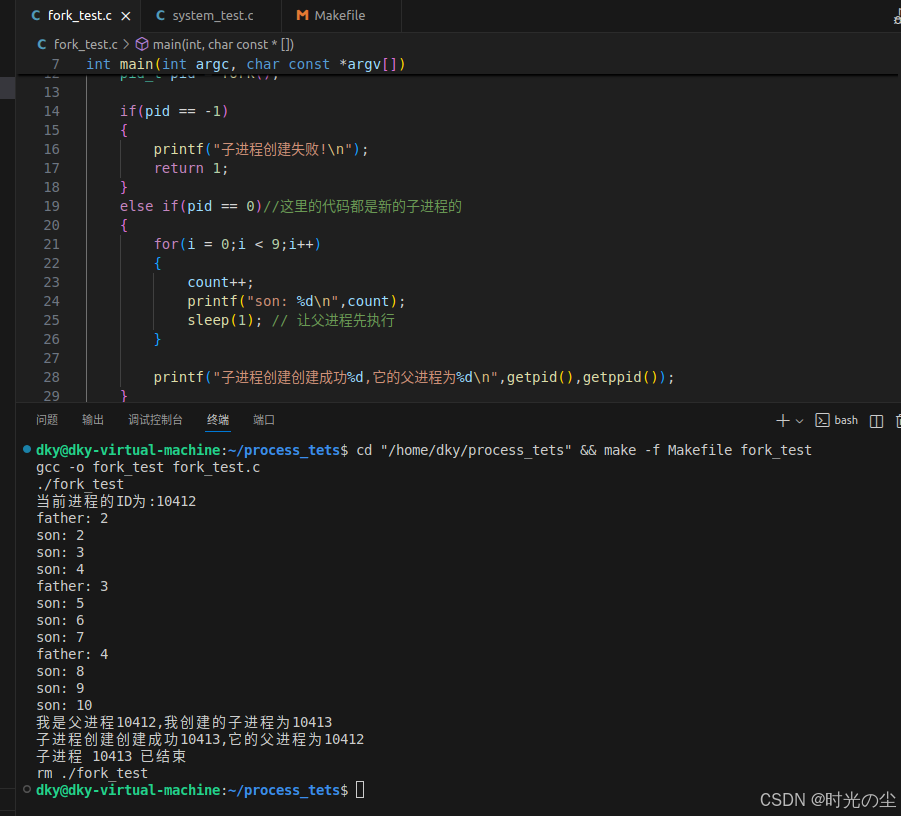
对于waitpid函数文章后续会详细解释,这里只是为了了解fork的调用,我们上面通过打印 i 和 a 大致可以看出进程间是并发执行的,我们下面再来看一下另一个点,两个进程都有自己的数据段、BSS段、栈、堆等资源,父进程间不共享这些存储空间,而代码段为父进程和子进程共享,这一点我们要怎么理解呢?我们在对上面的代码进行一个简单的修改,声明一个全局变量 count,为了方便观察现象,将父进程的延时在延长一点,通过for循环在父子进程中各自累加看看会是什么结果:
#include<stdio.h>    // 标准输入输出
#include<stdlib.h>   // 标准库函数
#include<unistd.h>   // Unix 标准函数(包含 fork(), getpid(), getppid())
#include <sys/types.h> // 系统类型定义(包含 pid_t)
#include <sys/wait.h>  // 添加 waitpid 所需的头文件

int main(int argc, char const *argv[])
{
    printf("当前进程的ID为:%d\n",getpid());
    int i,count = 1;

    pid_t pid = fork();

    if(pid == -1)
    {
        printf("子进程创建失败!\n");
        return 1;
    }
    else if(pid == 0)//这里的代码都是新的子进程的
    {
        for(i = 0;i < 9;i++)
        {
            count++;
            printf("son: %d\n",count);
            sleep(1); // 让父进程先执行
        }

        printf("子进程创建创建成功%d,它的父进程为%d\n",getpid(),getppid());
    }
    else // 父进程
    {
        for(i = 0; i < 3; i++)
        {
            count++;
            printf("father: %d\n", count);
            sleep(3);
        }
        printf("我是父进程%d,我创建的子进程为%d\n", getpid(), pid);

        // 等待子进程结束
        int status;
        waitpid(pid, &status, 0);
        printf("子进程 %d 已结束\n", pid);
    }

    return 0;
}
可以看出,当 fork() 创建子进程后,此时父子进程各有独立的 count 变量副本,初始值都是 1,父进程和子进程各自累计自己的count的值,没有共享存储空间:
5. vfork函数
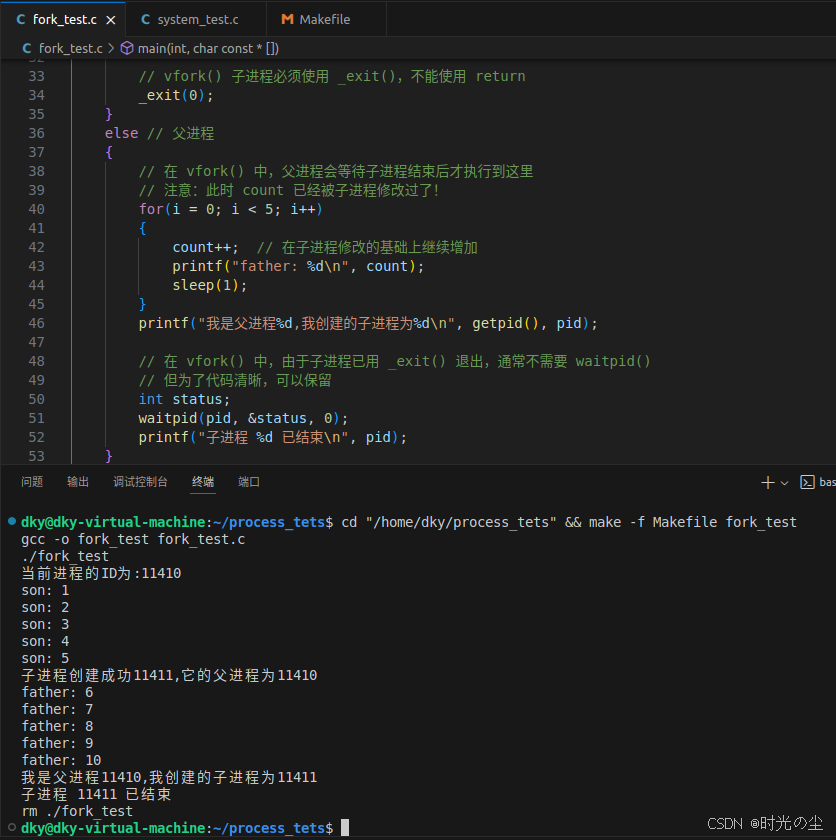
vfork相较于fork的主要区别是fork要复制父进程的数据段;而vfork则不需要完全复制父进程的数据段,子进程与父进程共享数据段。
fork不对父进程的执行次序进行限制,但是vfork需要子进程先运行、父进程挂起。
我们对上面代码更改一下,将fork改为vfork:
#include<stdio.h>    // 标准输入输出
#include<stdlib.h>   // 标准库函数
#include<unistd.h>   // Unix 标准函数
#include<sys/types.h> // 系统类型定义
#include<sys/wait.h>  // waitpid 头文件

int main(int argc, char const *argv[])
{
    printf("当前进程的ID为:%d\n",getpid());
    int i, count = 0;

    // 使用 vfork() 替代 fork()
    pid_t pid = vfork();

    if(pid == -1)
    {
        printf("子进程创建失败!\n");
        return 1;
    }
    else if(pid == 0) // 子进程
    {
        // 警告:vfork() 子进程与父进程共享内存空间!
        // 修改 count 会影响父进程的 count 值
        for(i = 0; i < 5; i++)
        {
            count++;  // 这会修改父进程的 count 变量!
            printf("son: %d\n", count);
            sleep(1);
        }

        printf("子进程创建成功%d,它的父进程为%d\n", getpid(), getppid());

        // vfork() 子进程必须使用 _exit(),不能使用 return
        _exit(0);
    }
    else // 父进程
    {
        // 在 vfork() 中,父进程会等待子进程结束后才执行到这里
        // 注意:此时 count 已经被子进程修改过了!
        for(i = 0; i < 5; i++)
        {
            count++;  // 在子进程修改的基础上继续增加
            printf("father: %d\n", count);
            sleep(1);
        }
        printf("我是父进程%d,我创建的子进程为%d\n", getpid(), pid);

        // 在 vfork() 中,由于子进程已用 _exit() 退出,通常不需要 waitpid()
        // 但为了代码清晰,可以保留
        int status;
        waitpid(pid, &status, 0);
        printf("子进程 %d 已结束\n", pid);
    }

    return 0;
}
此时运行发现子进程先进行累加,然后父进程才进行运行,并且父子进程的数据是共享的:
| 特性 | fork() | vfork() |
|---|---|---|
| 内存复制 | 写时复制(Copy-on-Write) | 不复制,共享父进程内存空间 |
| 执行顺序 | 父子进程并发执行 | 子进程先执行,父进程阻塞等待 |
| 性能 | 相对较慢(需要设置页表) | 很快(几乎不消耗资源) |
| 安全性 | 安全,进程隔离 | 危险,可能破坏父进程状态 |
| 使用场景 | 通用进程创建 | 后接 exec() 族函数 |
| 现代系统 | 推荐使用 | 已过时,不推荐使用 |
6. 使用fork复制文件描述符
我们重新创建一个.c文件,先将我们需要使用的头文件全部引入,然后调用open函数创建一个.txt文件,open返回的文件描述符为 fd:
#include<stdio.h>     // 标准输入输出
#include<stdlib.h>    // 标准库函数
#include<unistd.h>    // Unix 标准函数(包含 fork(), getpid(), getppid())
#include<sys/types.h> // 系统类型定义(包含 pid_t)
#include<fcntl.h>     // 文件控制选项
#include <sys/stat.h> // 文件状态信息

int main(int argc, char const *argv[])
{
    int fd = open("io.txt",O_CREAT | O_WRONLY | O_APPEND ,0644);

    if(fd == -1)
    {
        printf("打开文件失败\n");
        perror("open");
        exit(EXIT_FAILURE);
    }

    return 0;
}
对于open函数的调用,不熟悉可以了解:
然后在Makefile中编写代码:
fork_fd_test :fork_fd_test.c
	-$(CC) -o $@ $^
	-./$@
	-rm ./$@
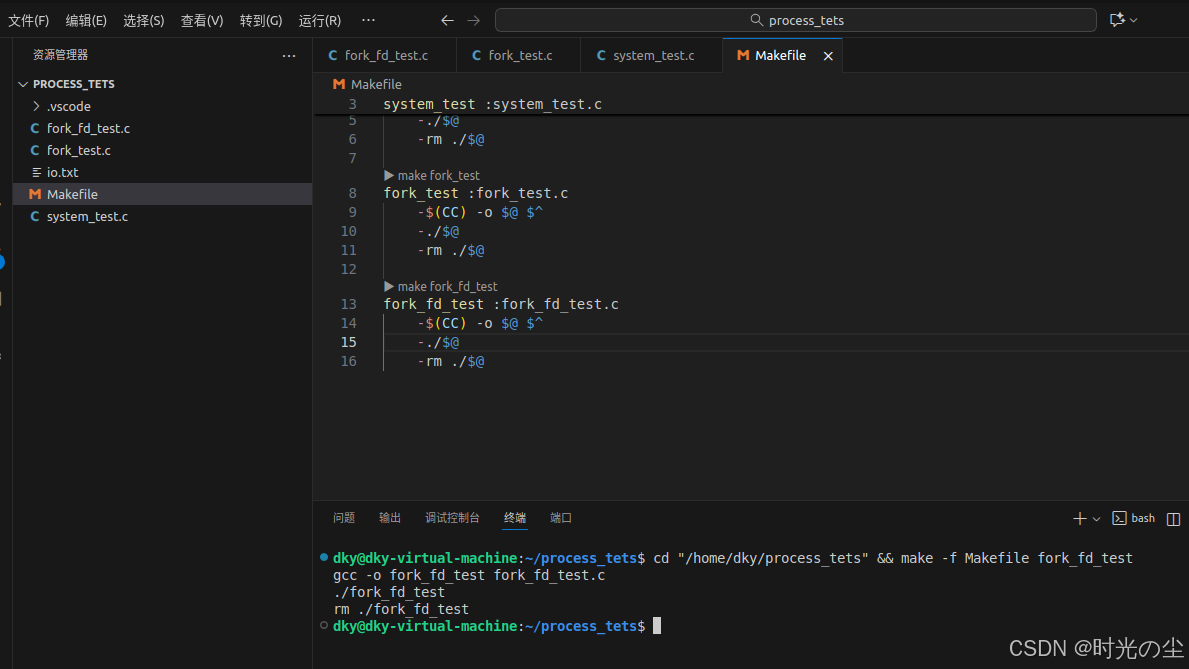
运行后发现创建一个 io.txt 文件:
调用fork函数创建子进程:
    pid_t pid = fork();

    if(pid == -1)
    {
        printf("子进程创建失败!\n");
        perror("fork");
        exit(EXIT_FAILURE);
    }
    else if(pid == 0)
    {
        printf("子进程开始写入数据······\n");
        /*子进程需要写入的数据*/

    }
    else
    {
        printf("父进程开始写入数据······\n");
        /*父进程需要写入的数据*/

    }
我们可以通过strcpy函数进行数据复制,我们可以将想要写入的数据写入到缓冲区去,然后通过writer进行写入到io.txt文件当中:
#include<stdio.h>     // 标准输入输出
#include<stdlib.h>    // 标准库函数
#include<unistd.h>    // Unix 标准函数
#include<sys/types.h> // 系统类型定义
#include<fcntl.h>     // 文件控制选项
#include <sys/stat.h> // 文件状态信息
#include <string.h>   // 字符串操作
#include <sys/wait.h> // 进程等待

int main(int argc, char const *argv[])
{
    int fd = open("io.txt", O_CREAT | O_WRONLY | O_APPEND, 0644);

    if(fd == -1)
    {
        printf("打开文件失败\n");
        perror("open");
        exit(EXIT_FAILURE);
    }

    char buffer[1024];
    pid_t pid = fork();

    if(pid == -1)
    {
        printf("子进程创建失败!\n");
        perror("fork");
        close(fd);
        exit(EXIT_FAILURE);
    }
    else if(pid == 0)
    {
        // 子进程
        printf("子进程开始写入数据······\n");
        strcpy(buffer, "这是子进程写入的数据!\n");

        ssize_t bytes_write = write(fd, buffer, strlen(buffer));
        if (bytes_write == -1)
        {
            perror("子进程write失败");
        } else {
            printf("子进程写入数据成功,写入 %zd 字节\n", bytes_write);
        }

        close(fd);
        printf("子进程写入完毕,并释放文件描述符\n");
        exit(EXIT_SUCCESS);  // 子进程明确退出
    }
    else
    {
        // 父进程
        printf("父进程开始写入数据······\n");
        strcpy(buffer, "这是父进程写入的数据!\n");

        ssize_t bytes_write = write(fd, buffer, strlen(buffer));
        if (bytes_write == -1)
        {
            perror("父进程write失败");
        } else {
            printf("父进程写入数据成功,写入 %zd 字节\n", bytes_write);
        }

        // 等待子进程结束
        int status;
        waitpid(pid, &status, 0);
        printf("子进程已结束,状态: %d\n", status);

        close(fd);
        printf("父进程写入完毕,并释放文件描述符\n");
    }

    return 0;
}
我们运行看一下:
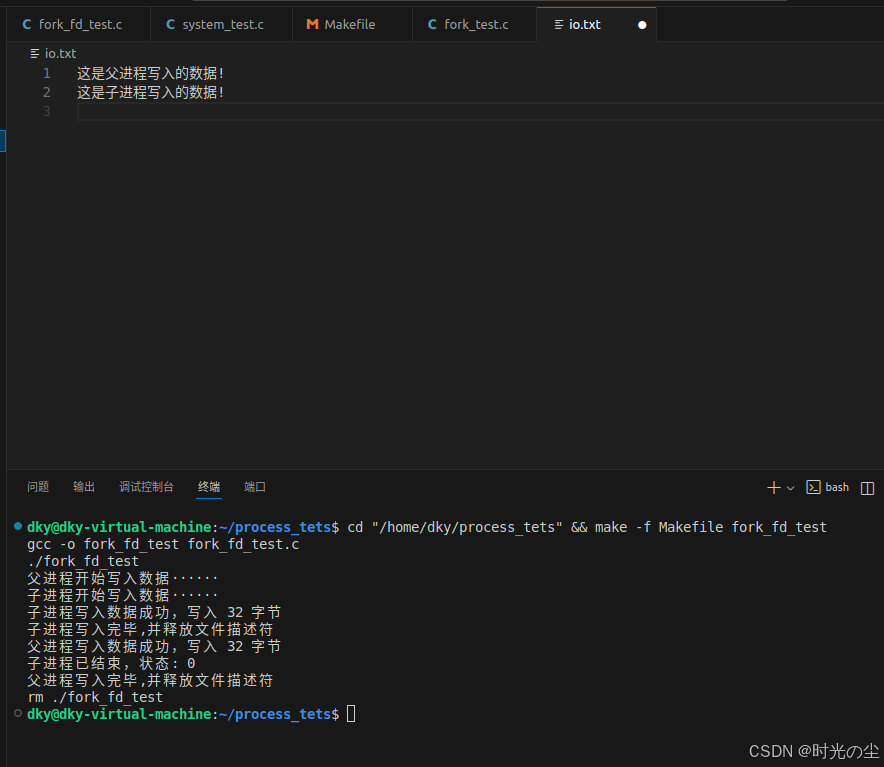
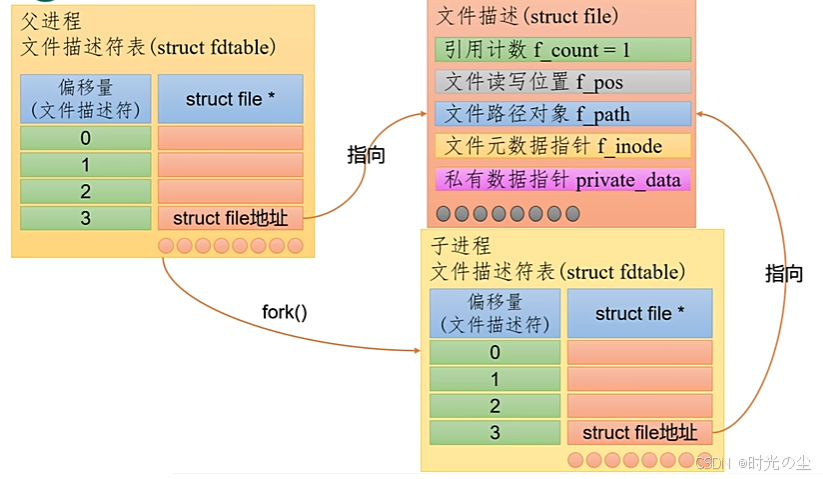
根据上述结果我们可以看出,子进程复制了父进程的文件描述符fd,二者指向的应是同一个底层文件描述(struct file结构体)。我们思考一个问题,子进程通过close()释放文件描述符之后,父进程对于相同的文件描述符执行write()操作仍然成功了。这是为什么?
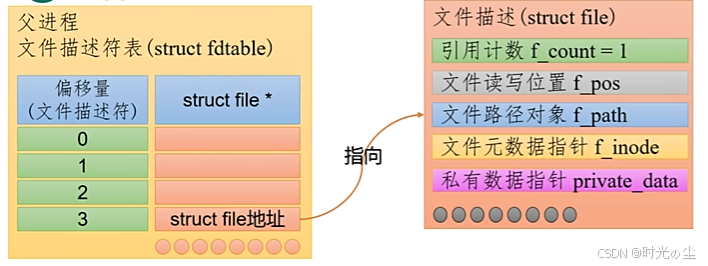
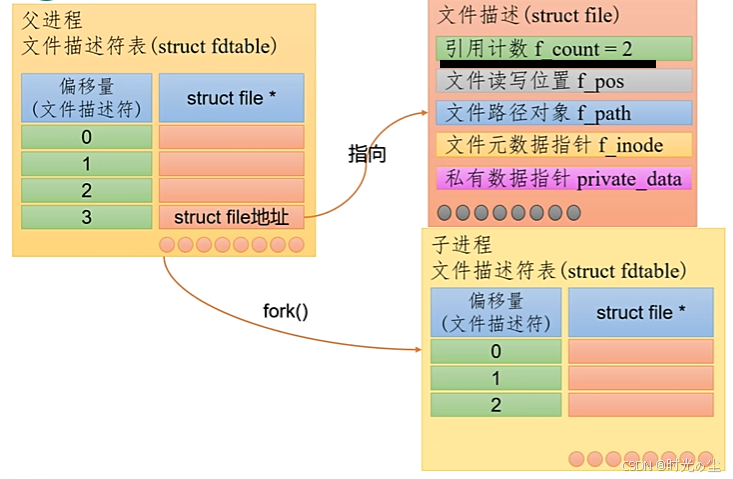
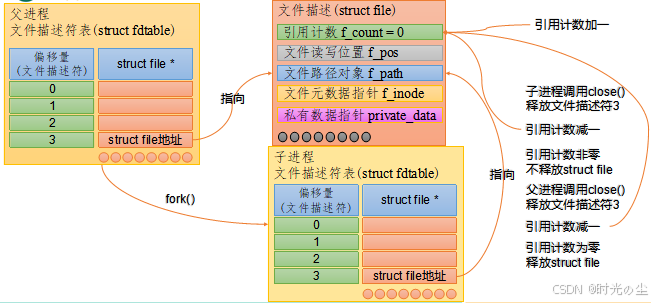
struct file结构体中有一个属性为引用计数,记录的是与当前struct file绑定的文件描述符数量。close()系统调用的作用是将当前进程中的文件描述符和对应的struct file结构体解绑,使得引用计数减一。如果close()执行之后,引用计数变为0,则会释放struct file相关的所有资源。
我们通过图示来解释一下,最开始的时候,父进程open创建一个文件,其地址指向如下,此时引用计数为1:
当我们使用fork后会创建一个子进程,其地址也是执行图示:
此时的文件描述,引用计数就会变为2:
因此虽然我们子进程调用close使引用计数减1,并不会马上关闭文件,灯父进程也调用close后才会正式清零关闭:







 扫一扫
扫一扫


 5万+
5万+

 被折叠的 条评论
为什么被折叠?
被折叠的 条评论
为什么被折叠?
 到【灌水乐园】发言





