


<div class="overflow-x-auto">
        <table class="w-full">
          <thead>
            <tr class="bg-gray-50 border-b border-gray-200">
              <th class="px-6 py-4 text-left text-xs font-medium text-gray-500 uppercase tracking-wider">订单编号</th>
              <th class="px-6 py-4 text-left text-xs font-medium text-gray-500 uppercase tracking-wider">商品信息</th>
              <th class="px-6 py-4 text-left text-xs font-medium text-gray-500 uppercase tracking-wider">状态</th>
              <th class="px-6 py-4 text-left text-xs font-medium text-gray-500 uppercase tracking-wider">交易时间</th>
              <th class="px-6 py-4 text-left text-xs font-medium text-gray-500 uppercase tracking-wider">价格</th>
            </tr>
          </thead>
          <tbody class="divide-y divide-gray-200">
          <%
            List<Order> orders = c.getPurchaseHistory();
            if (orders == null || orders.isEmpty()) {
          %>
            <tr>
              <td colspan="5" class="px-6 py-4 text-gray-500">暂无购买记录。</td>
            </tr>
          <%
            } else {
              for (Order o : orders) {
          %>
            <tr class="hover:bg-gray-50 transition-custom">
              <td class="px-6 py-4 whitespace-nowrap">
                <div class="text-sm font-medium text-gray-900"><%= o.getOrderNumber() %></div>
              </td>
              <td class="px-6 py-4 whitespace-nowrap">
                <div class="flex items-center">
                  <div class="h-10 w-10 flex-shrink-0">
                    <img class="h-10 w-10 rounded-md object-cover" src="<%= o.getProduct() != null ? o.getProduct().getImageUrl() : "" %>" alt="<%= o.getProduct() != null ? o.getProduct().getName() : "" %>">
                  </div>
                  <div class="ml-4">
                    <div class="text-sm font-medium text-gray-900"><%= o.getProduct() != null ? o.getProduct().getName() : "" %></div>
                    <div class="text-xs text-gray-500 line-clamp-2 max-w-xs"><%= o.getProduct() != null ? o.getProduct().getDescription() : "" %></div>
                  </div>
                </div>
              </td>
              <td class="px-6 py-4 whitespace-nowrap">
                <span class="px-2 inline-flex text-xs leading-5 font-semibold rounded-full <%= o.getProduct() != null ? o.getProduct().getStatusClass() : "bg-gray-100 text-gray-800" %>">
                  <%= o.getStatus() %>
                </span>
              </td>
              <td class="px-6 py-4 whitespace-nowrap text-sm text-gray-500">
                <div><%= o.getFormattedTransactionTime() %></div>
              </td>
              <td class="px-6 py-4 whitespace-nowrap">
                <div class="text-sm font-medium text-gray-900"><%= o.getProduct() != null ? o.getProduct().getFormattedPrice() : "" %></div>
              </td>
            </tr>
          <%
              }
            }
          %>
          </tbody>
        </table>
      </div>
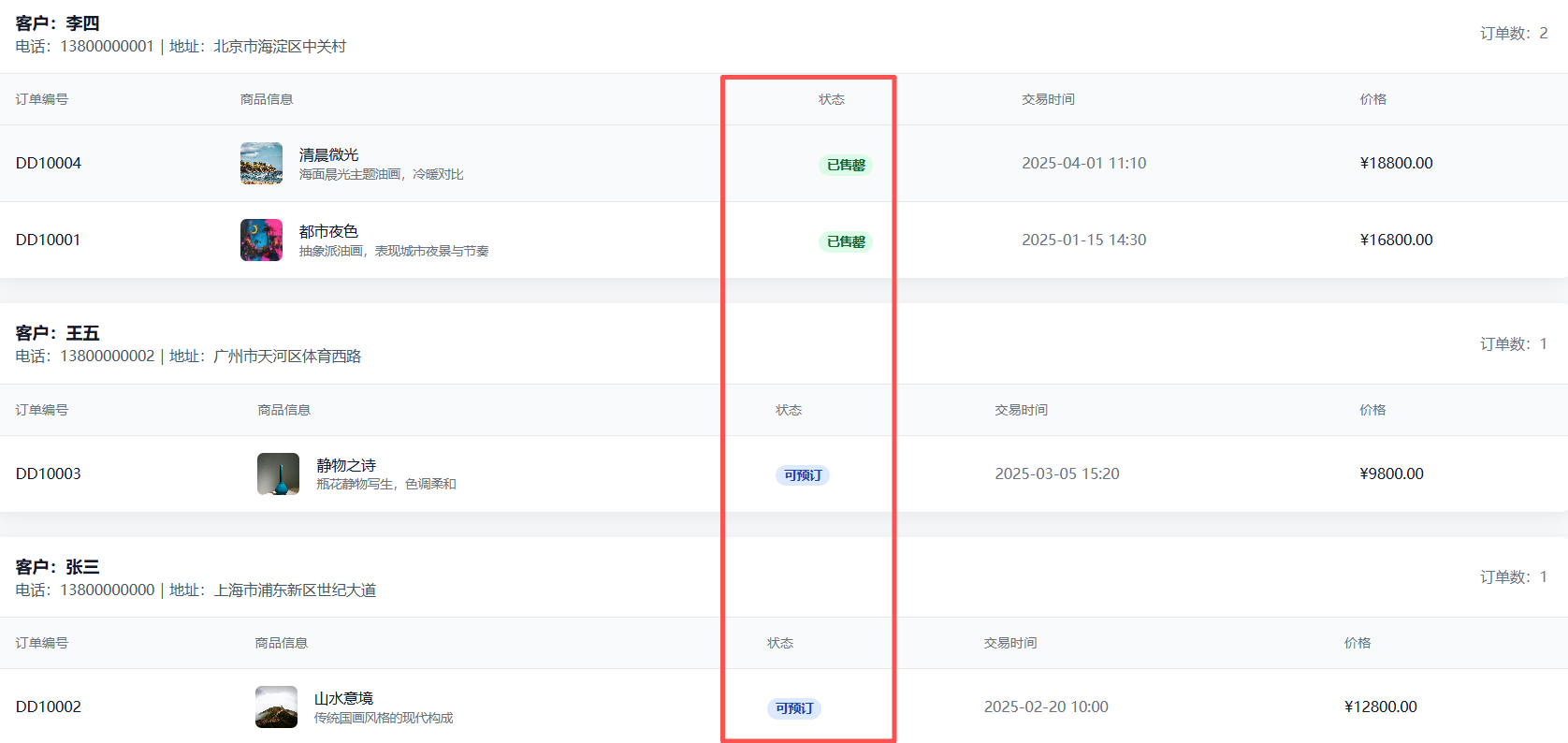
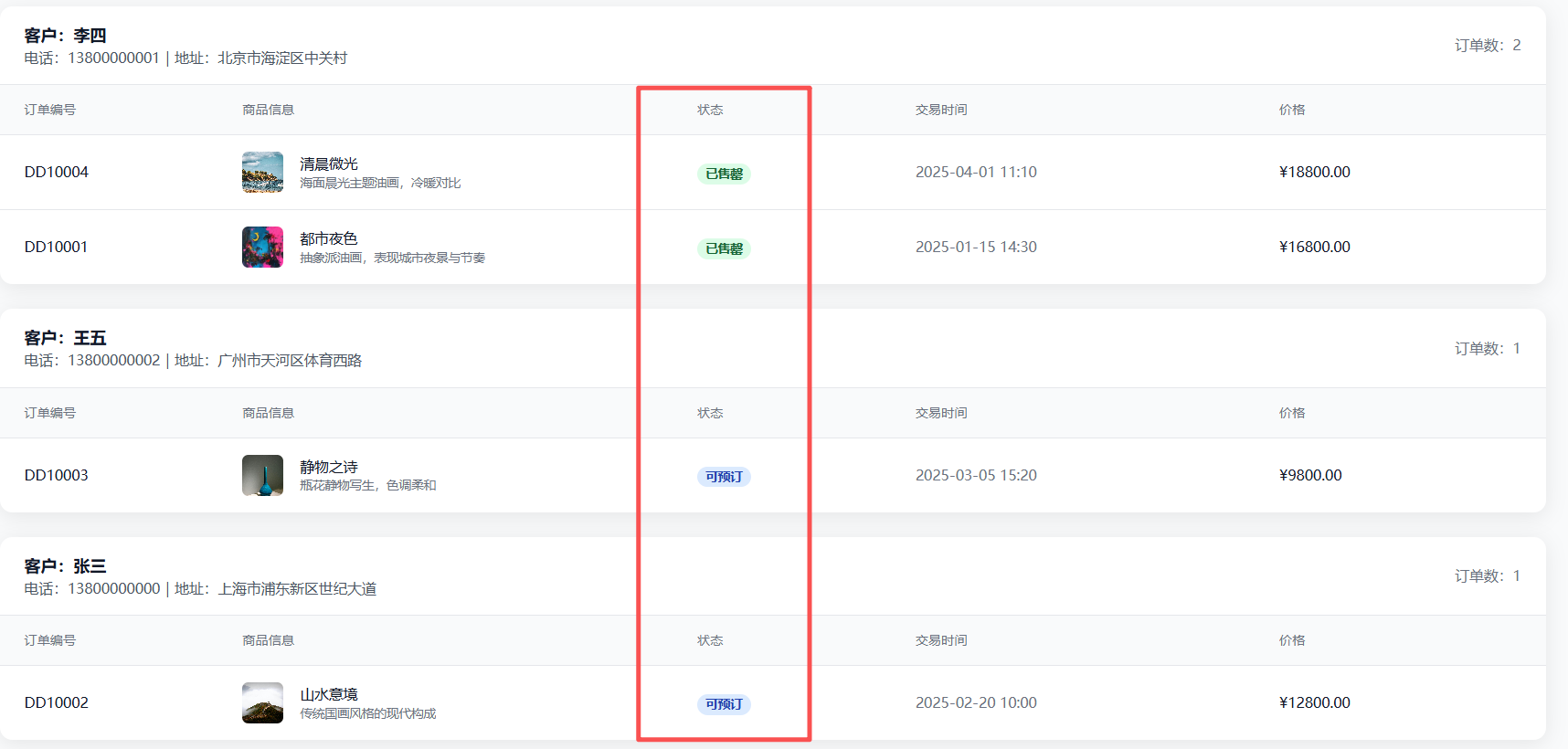
状态栏无法对齐的核心原因是表格采用了默认的auto布局(列宽随内容自动调整),导致表头与内容行的列宽不一致。结合代码和显示效果,可通过以下调整解决:
具体修改方案
- 设置表格固定布局:强制列宽由表头定义,避免内容撑开列宽导致错位。
- 为各列指定固定宽度:根据内容需求分配宽度,确保表头与内容行对齐。
修改后的代码(表格相关部分)
<div class="overflow-x-auto">
  <table class="w-full table-fixed"> <!-- 新增 table-fixed 启用固定布局 -->
    <thead>
      <tr class="bg-gray-50 border-b border-gray-200">
        <!-- 为每列指定宽度,总和建议 ≤ 100% -->
        <th class="w-[12%] px-6 py-4 text-left text-xs font-medium text-gray-500 uppercase tracking-wider">订单编号</th>
        <th class="w-[40%] px-6 py-4 text-left text-xs font-medium text-gray-500 uppercase tracking-wider">商品信息</th>
        <th class="w-[12%] px-6 py-4 text-left text-xs font-medium text-gray-500 uppercase tracking-wider">状态</th>
        <th class="w-[20%] px-6 py-4 text-left text-xs font-medium text-gray-500 uppercase tracking-wider">交易时间</th>
        <th class="w-[16%] px-6 py-4 text-left text-xs font-medium text-gray-500 uppercase tracking-wider">价格</th>
      </tr>
    </thead>
    <tbody class="divide-y divide-gray-200">
      <%
        List<Order> orders = c.getPurchaseHistory();
        if (orders == null || orders.isEmpty()) {
      %>
        <tr>
          <td colspan="5" class="px-6 py-4 text-gray-500">暂无购买记录。</td>
        </tr>
      <%
        } else {
          for (Order o : orders) {
      %>
        <tr class="hover:bg-gray-50 transition-custom">
          <td class="px-6 py-4 whitespace-nowrap">
            <div class="text-sm font-medium text-gray-900"><%= o.getOrderNumber() %></div>
          </td>
          <td class="px-6 py-4"> <!-- 移除 whitespace-nowrap,允许内容换行避免撑开宽度 -->
            <div class="flex items-center">
              <div class="h-10 w-10 flex-shrink-0">
                <img class="h-10 w-10 rounded-md object-cover" src="<%= o.getProduct() != null ? o.getProduct().getImageUrl() : "" %>" alt="<%= o.getProduct() != null ? o.getProduct().getName() : "" %>">
              </div>
              <div class="ml-4 max-w-[280px]"> <!-- 限制商品信息最大宽度,避免挤压其他列 -->
                <div class="text-sm font-medium text-gray-900"><%= o.getProduct() != null ? o.getProduct().getName() : "" %></div>
                <div class="text-xs text-gray-500 line-clamp-2"><%= o.getProduct() != null ? o.getProduct().getDescription() : "" %></div>
              </div>
            </div>
          </td>
          <td class="px-6 py-4 whitespace-nowrap">
            <span class="px-2 inline-flex text-xs leading-5 font-semibold rounded-full <%= o.getProduct() != null ? o.getProduct().getStatusClass() : "bg-gray-100 text-gray-800" %>">
              <%= o.getStatus() %>
            </span>
          </td>
          <td class="px-6 py-4 whitespace-nowrap text-sm text-gray-500">
            <div><%= o.getFormattedTransactionTime() %></div>
          </td>
          <td class="px-6 py-4 whitespace-nowrap">
            <div class="text-sm font-medium text-gray-900"><%= o.getProduct() != null ? o.getProduct().getFormattedPrice() : "" %></div>
          </td>
        </tr>
      <%
          }
        }
      %>
    </tbody>
  </table>
</div>
关键调整说明
- 表格布局:通过
table-fixed类将表格设置为固定布局,列宽由表头的w-[xx%]定义,确保表头与内容行列宽一致。 - 列宽分配:根据内容长度分配宽度(例如商品信息占比最大),总和控制在 100% 以内避免横向溢出。
- 商品信息限制:通过
max-w-[280px]限制商品信息区域宽度,并允许文本换行(移除whitespace-nowrap),防止内容过长挤压其他列。






 扫一扫
扫一扫


 5224
5224

 被折叠的 条评论
为什么被折叠?
被折叠的 条评论
为什么被折叠?
 到【灌水乐园】发言





