


File只能操作文件,不能访问内容本身
File类的常用方法
| 方法名称 | 说明 |
|---|---|
| boolean exists() | 判断目录或者文件是否存在 |
| boolean isFile() | 判断是否是文件 |
| boolean isDirectory() | 判断是否是目录 |
| String getPath() | 返回此对象表示的相对路径 |
| String getAbsolutePath() | 返回此对象表示的绝对路径 |
| String getName() | 返回此对象表示的文件或目录名称 |
| boolean delete() | 删除此对象指定的文件或目录 |
| boolean createNewFile() | 创建名称的空文件,不创建文件夹 |
| long length() | 返回文件的长度,单位为字节,若文件不存在,返回OL |
| mkdir() | 创建目录 |
File
1.创建File对象
语法:File file = new File ("相对路径/绝对路径");
例:File file = new File("C:\Users\jijia\Desktop\Text\txt.txt");
2.创建目录
语法: file.exists()
if(!file.exists){       //先判断文件或目录是否存在,不存在就创建
    file.mkdir();        //创建目录
}else{
    System.out.println("目录已存在")
}
3.创建新文件
语法:file.createNewFile()
if(!file.exists){       //先判断文件或目录是否存在,不存在就创建
    file.createNewFile(); //创建文件
}else{
    System.out.println("文件已存在")
}
4.删除文件或目录
语法:file.delete()
if(file.exists){    //先判断文件或目录是否存在,不存在就创建
    file.delete();  //删除文件或目录
}else{
    System.out.println("文件不存在")
}
5.判断是文件还是目录,查询信息
if(file.exists){    //判断文件或目录是否存在
    if(file.isFile()){          //存在判断是文件?
        System.out.println("绝对路径:"+file.getAbsolutePath());
        System.out.println("相对路径:"+file.getPath());
        System.out.println("文件名:"+file.getName);
        System.out.println("文件大小(字节):"+file.length());
    }
    if(file.isDirectory()){
        System.out.println("此文件是目录!");
    }
}else{
    System.out.println("文件或目录不存在")
}
Java的流
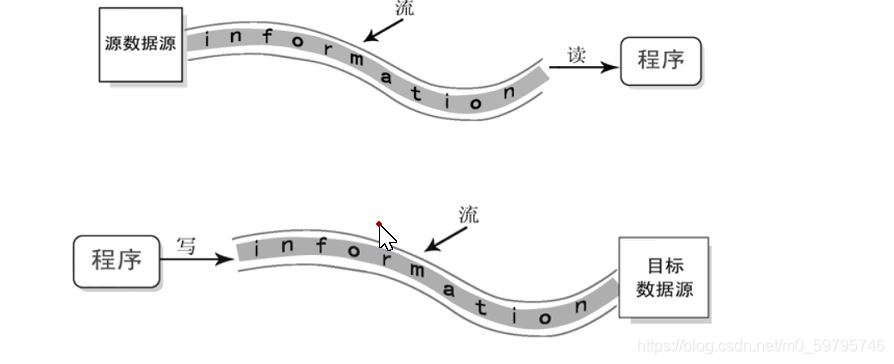
流,是指一连串流动的字符,以先进先出的方式发送和接受数据(有序)
-
按流向分为:输入流:只能从中读取数据(InputStream和Reader)
输出流:只能向其中写入数据(OutpputStream和Writer)
-
按操作数据单元的不同分为:字节流和字符流
读写文件
流使用完后必须关闭,使用时必须处理异常
1.使用字节流(InputStream)读取文件
FileInputStream fr = null;  //创建流对象
        try {
            fr=new FileInputStream("C:\\Users\\jijia\\Desktop\\Text\\txt.txt");
            byte []aaa=new byte[1024];//定义每次读取的长度
            int length=0; //长度
            try {
                while ((length=fr.read(aaa))!=-1) { //读取文件内容是否为空
                    System.out.println(new String(aaa, 0, length)); //以aaa字节的速度,从0的位置开始读取,读完结束
                }
            } catch (IOException e) {
                e.printStackTrace();
            }finally {
                try {
                    fr.close(); //关闭字节流
                } catch (IOException e) {
                    e.printStackTrace();
                }
            }
2.使用字符流(FileReader)读取文件
FileReader reader = null;  //创建FileReader对象
        try {
            reader = new FileReader("C:\\Users\\jijia\\Desktop\\Text\\txt.txt");
            char a[] = new char[10]; //读取的长度
            int length = 0;
            while ((length = reader.read(a)) != -1) {   //读取文件内容是否为空
                System.out.println(new String(a, 0, length)); //以aaa字节的速度,从0的位置开始读取,读完结束
            }
        } catch (IOException e) {
            e.printStackTrace();
        } finally {
            try {
                reader.close(); //关闭字符流
            } catch (IOException e) {
                e.printStackTrace();
            }
        }
3.使用字节流(OutputStream)写入文本文件
FileOutputStream fo=null;   //创建对象
        try {
        fo=new FileOutputStream("C:\\Users\\jijia\\Desktop\\Text\\txt.txt",true);//true的作用不会覆盖原本内容
            String aString="一样一样";//定义字符串内容
            fo.write(aString.getBytes());//将字符串转化为byte字节,写入
        } catch (IOException e) {
            e.printStackTrace();
        }
        finally {
            try {
                fo.close();//关闭流
            } catch (IOException e) {
                e.printStackTrace();
            }
        }
4.使用字符流(FileWrite)写入文件
FileWriter fw=null;//创建对象
        try {
            fw=new FileWriter("C:\\Users\\jijia\\Desktop\\Text\\txt.txt",true);
            String aString="fsdegegw111";//定义内容
            fw.write(aString);//直接写入
            fw.flush();//刷新缓冲区
        } catch (IOException e) {
            e.printStackTrace();
        }finally {
            try {
                fw.close();//关闭流
            } catch (IOException e) {
                e.printStackTrace();
            }
        }
复制文件
try {
        FileInputStream fis=new FileInputStream("C:\\Users\\jijia\\Desktop\\Text\\txt.txt");
        FileOutputStream fos=new FileOutputStream("C:\\Users\\jijia\\Desktop\\Text\\txt1.txt",true);
                byte[] words=new byte[1024];
                while (fis.read(words)!=-1) {//判断文件是否为空
                    fis.read(words);//读取文件
                    fos.write(words);//写入文件
                }
    } catch (IOException e) {
                e.printStackTrace();
    }
二进制的读写
1.使用字节流(DataInputStream)读取
FileInputStream fis=new FileInputStream("C:\Users\jijia\Desktop\Text\txt.txt");
DataInputStream dis=new DataInputStream(fis);
2.使用字节流(DataOutputStream)写入
FileOutputStream fos=new FileOutputStream("C:\Users\jijia\Desktop\Text\txt1.txt");
DataOutputStream out=new DataOutputStream(fos);





 扫一扫
扫一扫


 被折叠的 条评论
为什么被折叠?
被折叠的 条评论
为什么被折叠?
 到【灌水乐园】发言





